1. Introduction
Thank you for choosing the Ayybboo Kids Digital Watch MR8207BK. This watch is designed for children aged 5-12, featuring a digital display, colorful LED lights, 30M water resistance, an alarm clock, and a stopwatch. This manual provides detailed instructions for setting up and operating your new watch.

Image 1: Ayybboo Kids Digital Watch MR8207BK.
2. Important Safety Information
- Water Resistance: This watch is 30M water-resistant, suitable for daily use such as hand washing, sweating, and splashes. It is not recommended for prolonged immersion in water or for operating buttons underwater, as this may compromise the water seal.
- Battery: The watch uses 1 nonstandard battery. Battery replacement should be performed by an adult or qualified technician.
- Choking Hazard: Keep small parts away from young children.

Image 2: The watch is suitable for splashes and hand washing.
3. Watch Components
Familiarize yourself with the buttons and display areas of your Ayybboo Kids Digital Watch:

Image 3: Labeled diagram of the watch buttons and display.
- LIGHT Button: Activates the backlight and changes light color.
- MODE Button: Cycles through different modes (Time, Alarm, Stopwatch).
- START Button (S): Used for setting values and starting/stopping the stopwatch.
- RESET Button (R): Used for resetting values and clearing the stopwatch.
4. Setup Instructions
4.1 Setting Time and Date
To set the current time and date on your watch, follow the steps outlined in the video below:
Video 1: Instructions on how to set the date and time on the Ayybboo Kids Digital Watch MR8207BK.
4.2 Setting the Alarm
To set an alarm, refer to the following video for a step-by-step guide:
Video 2: Instructions on how to set the alarm on the Ayybboo Kids Digital Watch MR8207BK.
4.3 Switching 12/24 Hour Time Format
The watch supports both 12-hour and 24-hour time formats. Learn how to switch between them:
Video 3: Instructions on how to switch between 12-hour and 24-hour time formats.
4.4 Turning Off the Hourly Chime
If you wish to disable the hourly chime, the following short video demonstrates the process:
Video 4: Instructions on how to turn off the hourly chime.
4.5 Setting the Light Color
The watch features colorful LED lights. Learn how to change the light color:
Video 5: Instructions on how to set the light color.
5. Operating Instructions
5.1 Basic Time Display
In the default time mode, the watch displays the current time, including hours, minutes, and seconds, along with the day of the week.
5.2 Using the Stopwatch
The stopwatch function is useful for timing activities. Here's how to use it:
Video 6: Instructions on how to use the stopwatch function.
5.3 Colorful LED Lights
Press the LIGHT button to illuminate the display. Long-press the LIGHT button to cycle through the available 7 colors. This feature enhances visibility in low-light conditions and adds a fun element for children.
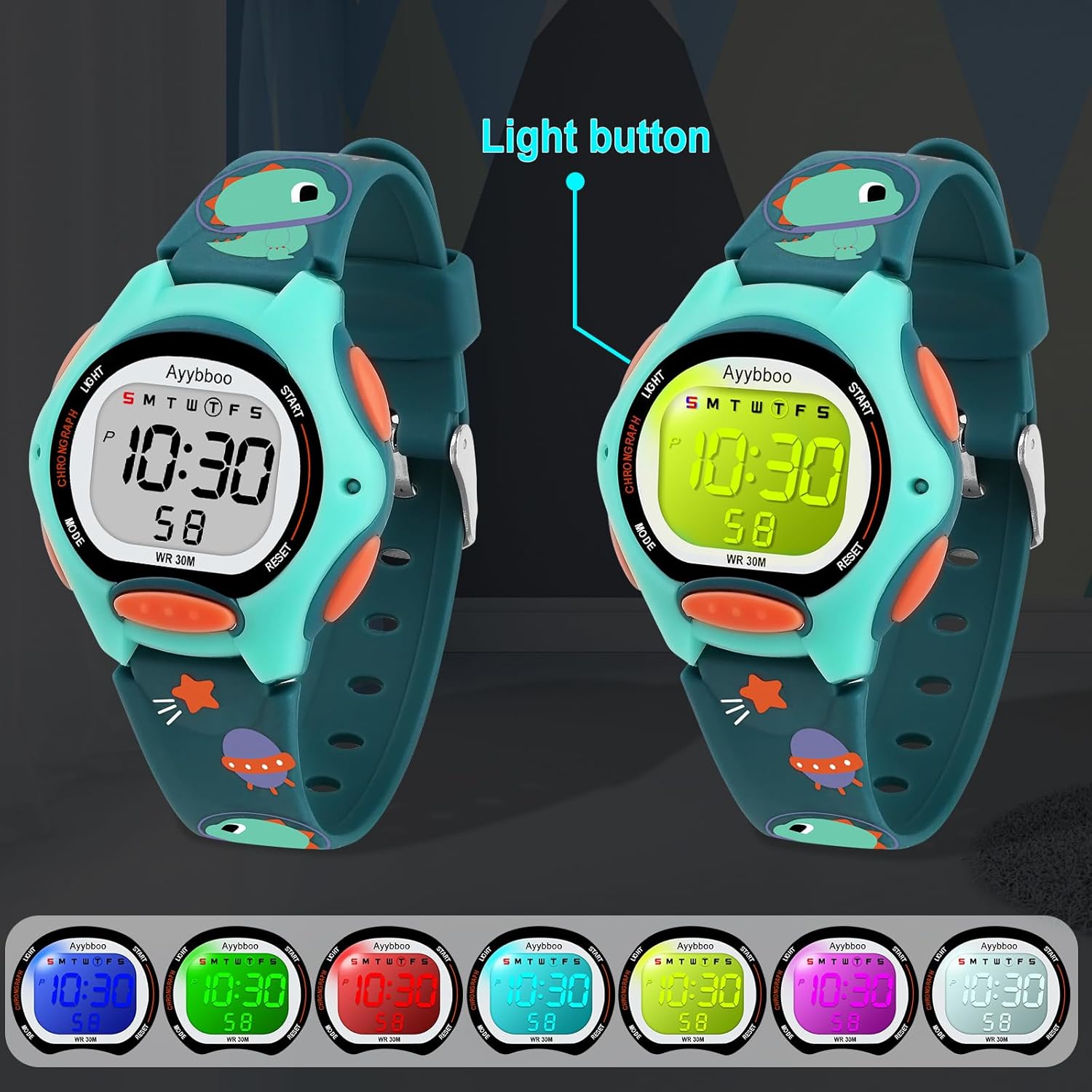
Image 4: The watch display with different colorful LED lights activated.
6. Maintenance
6.1 Water Resistance Guidelines
While the watch is 30M water-resistant, it is important to adhere to the following guidelines to maintain its integrity:
- Avoid pressing buttons when the watch is wet or submerged in water.
- Do not expose the watch to hot water or steam (e.g., hot showers, saunas).
- After exposure to saltwater, rinse the watch with fresh water and dry it thoroughly.
6.2 Cleaning
To clean the watch, wipe it with a soft, damp cloth. Avoid using harsh chemicals or abrasive materials that could damage the watch's finish or components.
7. Troubleshooting
| Problem | Solution |
|---|---|
| Display is blank or dim. | The battery may be low or depleted. Replace the battery. |
| Buttons are unresponsive. | Ensure the watch is not in a locked mode (if applicable) or try resetting the watch by removing and reinserting the battery. |
| Time is incorrect. | Follow the "Setting Time and Date" instructions to adjust the time. |
8. Specifications
- Model Number: MR8207BK
- Water Resistance: 30M
- Display Type: Digital
- Features: Alarm, Stopwatch, Colorful LED Lights, Calendar, 12/24H Time Format
- Clasp Type: Buckle
- Power Source: 1 Nonstandard Battery (required)
- Max Circumference: 19.5 cm (7.67 inches)
- Min Circumference: 14.3 cm (5.6 inches)
- Product Weight: 1.12 ounces
- Dial Case Thickness: 1.7 cm / 0.67 inches

Image 5: Watch dimensions for reference.
9. Warranty and Support
Ayybboo offers comprehensive after-sales service for your product:
- 30-Day Returns: Eligible for returns within 30 days of purchase.
- 90-Day Free Replacement: Free replacement service for 90 days.
- Lifetime Repair Service: Enjoy lifetime repair service for your watch.
For any inquiries or support, please contact Ayybboo customer service at: ayybbooservice@outlook.com

