
Alesis SR-18 Studio Drum Machine and ASP-1 MKII Sustain Pedal User Manual
Model: SR-18, ASP-1 MKII | Brand: Alesis
1. Introduction
Welcome to the user manual for your Alesis SR-18 Studio Drum Machine and Alesis ASP-1 MKII Sustain Pedal. This comprehensive guide provides essential information for setting up, operating, and maintaining your new equipment. Please read this manual thoroughly to ensure proper use and to maximize the performance of your Alesis products.
The Alesis SR-18 is a powerful and versatile drum machine designed for musicians, producers, and performers, offering a wide range of sounds and programmable patterns. The Alesis ASP-1 MKII is a robust and reliable sustain pedal, providing expressive control for keyboards, synthesizers, and other electronic instruments.
2. Product Overview
2.1 Alesis SR-18 Studio Drum Machine
The Alesis SR-18 is a studio-grade drum machine featuring 500 professional drum and percussion sounds, along with built-in effects. It includes 100 preset patterns created by professional drummers and allows for the storage of 200 custom user patterns. The SR-18 incorporates Dynamic Articulation technology, which enables sounds to change tone based on playing dynamics, providing realistic performances. It offers comprehensive MIDI connectivity and various pattern playback modes.
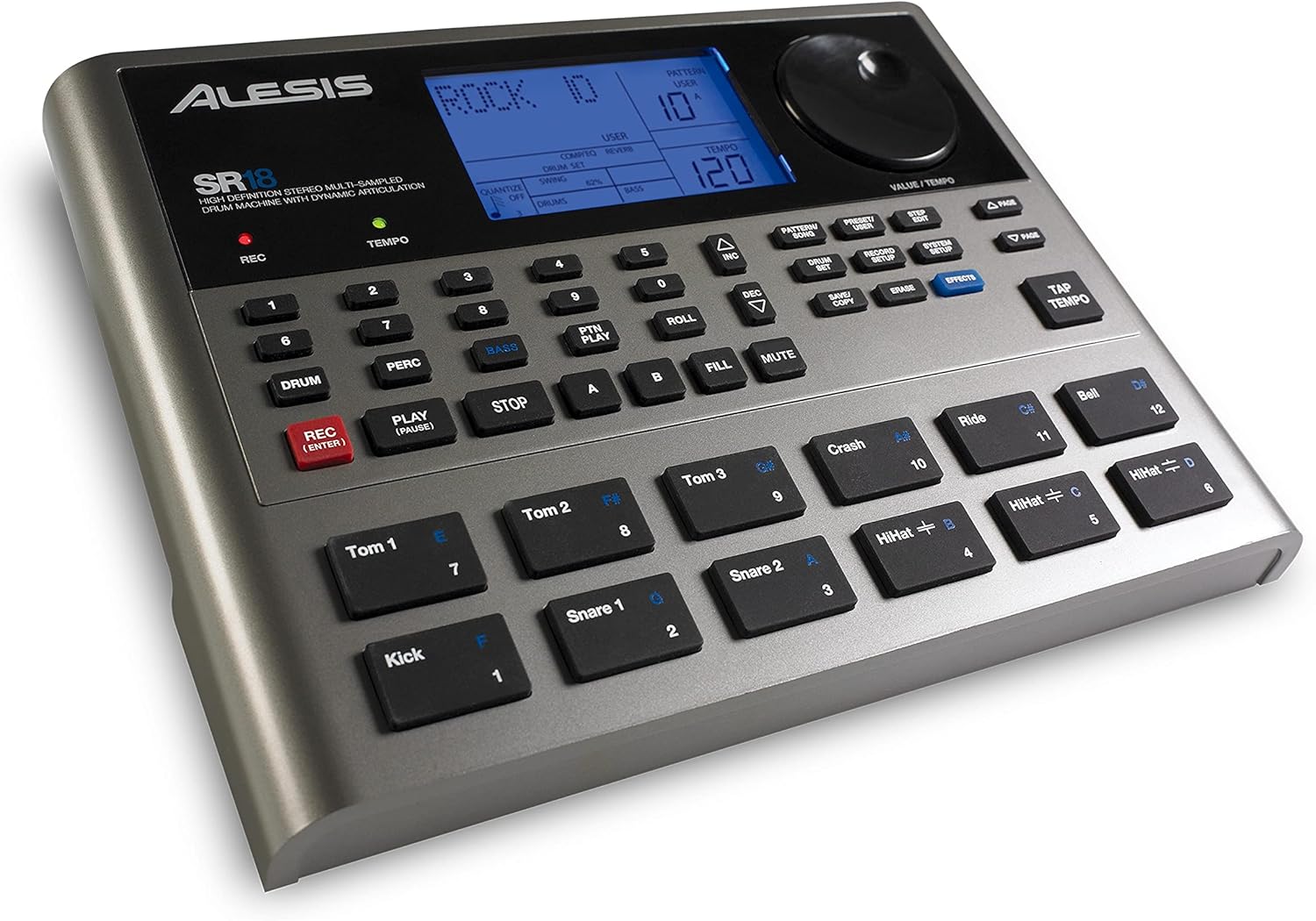
Figure 2.1: Top view of the Alesis SR-18 Studio Drum Machine, highlighting its control layout and display.
Key features of the SR-18 include:
- 500 professional drum and percussion sounds.
- Built-in effects for studio-quality sound.
- 100 preset patterns and 200 user-programmable patterns.
- Dynamic Articulation technology for realistic sound variation.
- MIDI connectivity for integration with other equipment.
- Pattern Play Mode and programmable Drum Roll function.
2.2 Alesis ASP-1 MKII Sustain Pedal
The Alesis ASP-1 MKII is a sturdy and portable sustain pedal designed to provide expressive control for various electronic instruments. It features a polarity switch for universal compatibility and a non-slip bottom to ensure stability during use. The pedal offers fast response times, enhancing the expressive capabilities of your electronic instruments.

Figure 2.2: The Alesis ASP-1 MKII Sustain Pedal, illustrating its robust design and connectivity.
Key features of the ASP-1 MKII include:
- Universal compatibility with keyboards, synthesizers, and other instruments via a polarity switch.
- Sturdy, non-slip design for stable performance.
- Fast response time for precise control.
- Hard-wired 1.5m cable with a 1/4-inch (6.35mm) plug.
3. Setup
3.1 Alesis SR-18 Setup
- Power Connection: Connect the included power adapter to the DC input on the rear panel of the SR-18. Plug the adapter into a standard AC power outlet.
- Audio Output: Connect the main audio outputs (L/MONO, R) of the SR-18 to your mixer, amplifier, or audio interface using standard 1/4-inch TS cables.
- Headphones: For private monitoring, plug your headphones into the 1/4-inch stereo headphone jack.
- MIDI Connection (Optional): If integrating with other MIDI devices, connect a MIDI cable from the MIDI OUT of your controller/interface to the MIDI IN of the SR-18, and from the MIDI OUT of the SR-18 to the MIDI IN of your other device.
3.2 Alesis ASP-1 MKII Sustain Pedal Setup
- Connect to Instrument: Plug the 1/4-inch (6.35mm) cable from the ASP-1 MKII into the sustain pedal input jack on your electronic keyboard, synthesizer, or digital piano.
- Set Polarity: Locate the polarity switch on the side or bottom of the ASP-1 MKII pedal. If the sustain function operates in reverse (e.g., sustains when released, stops when pressed), flip this switch to the opposite position. This ensures compatibility with various instrument brands.
- Positioning: Place the pedal on a flat, stable surface. The non-slip bottom will help keep it in place during use.

Figure 3.1: The ASP-1 MKII's polarity switch and universal compatibility.
4. Operation
4.1 Alesis SR-18 Operation
- Power On/Off: Press the POWER button to turn the unit on or off.
- Playing Sounds: Press the individual pads (Kick, Snare, Toms, HiHat, etc.) to trigger the assigned drum and percussion sounds. The sound will vary based on the velocity of your press due to Dynamic Articulation.
- Tempo Control: Use the TEMPO knob or the TAP TEMPO button to adjust the playback speed of patterns and songs.
- Pattern Play Mode: Press the PATTERN/SONG button to switch between pattern and song modes. In Pattern Play Mode, different patterns can be triggered directly from the pads.
- Drum Roll Function: The SR-18 features a programmable Drum Roll function. Refer to the detailed SR-18 manual for specific instructions on configuring and using this feature.
- Effects: Press the EFFECTS button to access and adjust the built-in digital effects, such as reverb and compression, to enhance your sounds.
- Saving Work: Regularly save your custom patterns and songs using the SAVE/COPY button to prevent loss of data.
4.2 Alesis ASP-1 MKII Sustain Pedal Operation
Once connected and the polarity is correctly set, the ASP-1 MKII functions as a standard sustain pedal. Press and hold the pedal down to sustain notes played on your instrument. Release the pedal to stop the sustain effect. Its fast response ensures accurate and expressive control over your sound.
5. Maintenance
To ensure the longevity and optimal performance of your Alesis SR-18 and ASP-1 MKII, follow these maintenance guidelines:
- Cleaning: Use a soft, dry cloth to wipe down the surfaces of both devices. For stubborn dirt, a slightly damp cloth can be used, but ensure no moisture enters the unit. Avoid abrasive cleaners or solvents.
- Storage: When not in use, store the SR-18 and ASP-1 MKII in a cool, dry place away from direct sunlight, extreme temperatures, and excessive dust.
- Handling: Handle both units with care. Avoid dropping them or subjecting them to strong impacts. Do not place heavy objects on top of the SR-18.
- Cables: Regularly check cables for any signs of wear or damage. Replace damaged cables immediately to prevent performance issues or safety hazards.
6. Troubleshooting
If you encounter issues with your Alesis SR-18 or ASP-1 MKII, refer to the following common troubleshooting steps:
- No Power (SR-18):
- Ensure the power adapter is securely connected to both the SR-18 and a working power outlet.
- Verify the power outlet is active by plugging in another device.
- No Sound (SR-18):
- Check that the main volume knob on the SR-18 is turned up.
- Ensure audio cables are correctly connected from the SR-18 outputs to your mixer/amplifier inputs.
- Verify that your mixer/amplifier is powered on and its volume is adjusted appropriately.
- Check headphone connection and volume if using headphones.
- Sustain Pedal Not Working / Working in Reverse (ASP-1 MKII):
- Ensure the 1/4-inch cable is fully inserted into the sustain input jack of your instrument.
- Flip the polarity switch on the ASP-1 MKII. Different instruments may require different polarity settings.
- Test the pedal with another compatible instrument if possible to rule out an issue with the instrument's input.
- Pads Not Responding (SR-18):
- Ensure the unit is powered on and not in a menu or mode that disables pad input.
- If specific pads are unresponsive, contact Alesis support.
If these steps do not resolve your issue, please refer to the Alesis support website or contact customer service for further assistance.
7. Specifications
7.1 Alesis SR-18 Studio Drum Machine
| Feature | Specification |
|---|---|
| Model Name | SR-18 |
| Sound Library | 500 professional drum and percussion sounds |
| Patterns | 100 preset, 200 user-programmable |
| Articulation Technology | Dynamic Articulation |
| Connectivity | MIDI IN/OUT (DIN 5-pin), 1/4-inch audio outputs, headphone output |
| Material | Metal, Aluminum, Alloy Steel |
| Color | Pro Color |
7.2 Alesis ASP-1 MKII Sustain Pedal
| Feature | Specification |
|---|---|
| Connector Type | 1/4-inch (6.35mm) TS plug |
| Cable Length | 1.5 meters (approx. 5 feet) |
| Key Features | Built-in polarity switch, non-slip bottom |
| Construction | Durable construction |
8. Warranty and Support
Alesis products are designed for reliability and performance. For information regarding warranty coverage, product registration, technical support, and service, please visit the official Alesis website or contact their customer support directly.
Online Resources:
- Alesis Official Website: www.alesis.com
- Alesis Support Page: Refer to the support section on the official website for FAQs, drivers, and software updates.
Please retain your proof of purchase for warranty claims.