1. Introduction
This manual provides instructions for the XCQQ Remote Control, designed for use with compatible bidet toilet seats. Please read this manual thoroughly before use to ensure proper setup and operation.
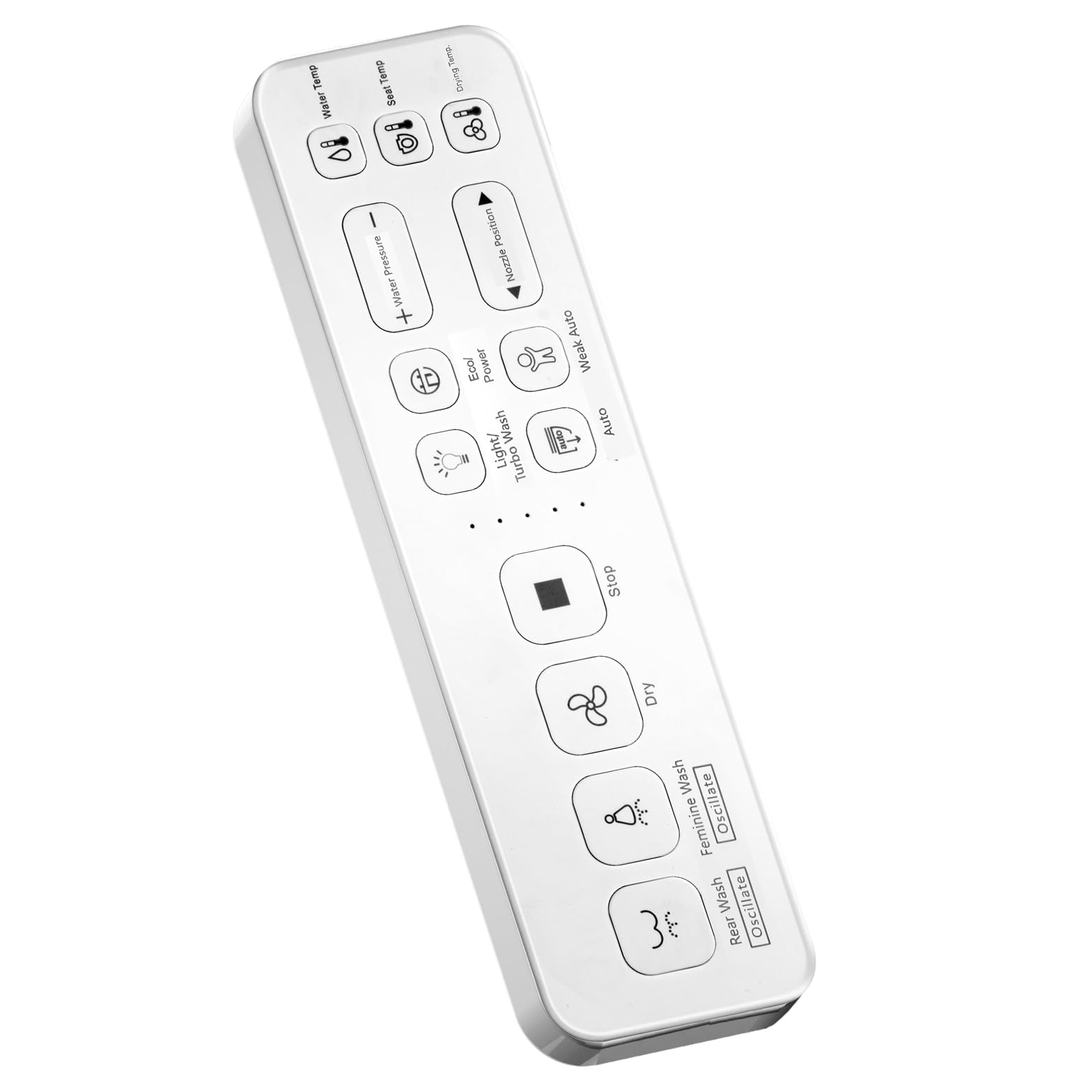
Image 1: XCQQ Remote Control for Bidet Toilet Seat. This image displays the remote control, typically white or light-colored, with various function buttons clearly visible.
2. Compatibility
The XCQQ Remote Control is designed for universal compatibility with specific XCQQ Bidet Toilet Seat series and select third-party bidet seats. Ensure your bidet model is listed below for proper function.
- Compatible Series: XCQQ Bidet Toilet Seat series S80, V90, U90, F16, S90.
- Important Note: This remote control is not compatible with bidet toilet seats that utilize a FIXING SIDE PANEL control system. Verify your bidet's control type before attempting to pair or use this remote.
3. Setup and Pairing
Follow these instructions to pair your XCQQ Remote Control with your compatible bidet toilet seat.
3.1. Interference Prevention
Before initiating the pairing process, ensure that the power source of any old or previously paired remote controls is disconnected. This prevents potential interference and ensures a smooth pairing process for the new remote.
3.2. Pairing Method 1 (Using Side Knob)
- Locate the side knob on your bidet toilet seat.
- Press and hold the side knob for approximately 5 seconds.
- You will hear an audible beep, and the bidet's screen (if applicable) will begin flashing. This indicates the bidet is in pairing mode.
- While the bidet is in pairing mode, press any button on the XCQQ Remote Control.
- A second beeping sound will confirm successful pairing.
3.3. Pairing Method 2 (Using Stop and Feminine Wash Buttons)
- Ensure the bidet toilet seat is currently unplugged from its power source.
- On the XCQQ Remote Control, simultaneously press and hold the 'Stop' button and the 'Feminine Wash' button.
- While continuing to hold these two buttons, plug the bidet toilet seat back into its power source.
- Upon plugging in, you will hear a beeping sound, indicating successful pairing.
4. Operation
Once successfully paired, the XCQQ Remote Control provides intuitive control over your bidet toilet seat's functions. The buttons on the remote correspond directly to the features available on your specific bidet model.
Typical functions may include:
- Stop/Dry
- Rear Wash
- Feminine Wash
- Water Pressure Adjustment
- Water Temperature Adjustment
- Seat Temperature Adjustment
- Nozzle Position Adjustment
Refer to your bidet toilet seat's primary instruction manual for detailed descriptions of each function and their specific operation.
5. Maintenance
To ensure the longevity and proper functioning of your XCQQ Remote Control, follow these maintenance guidelines:
- Cleaning: Wipe the remote control with a soft, damp cloth. Avoid using harsh chemicals, abrasive cleaners, or excessive moisture, as these can damage the electronic components and surface finish.
- Storage: Store the remote control in a dry place, away from direct sunlight and extreme temperatures.
- Batteries: This remote control is designed not to require user-replaceable batteries. If the remote is unresponsive after successful pairing, refer to the troubleshooting section.
6. Troubleshooting
If you encounter issues with your XCQQ Remote Control, refer to the following common problems and solutions:
| Problem | Possible Cause | Solution |
|---|---|---|
| Remote does not control bidet. | Not paired correctly or pairing lost. | Re-attempt the pairing process using Method 1 or Method 2. Ensure no other remote controls are powered on during pairing. |
| Bidet does not enter pairing mode. | Incorrect button press duration or bidet issue. | Ensure you hold the side knob for the full 5 seconds. Check the bidet's power connection. Consult your bidet's manual. |
| Remote buttons are unresponsive. | Remote damage or bidet issue. | Inspect the remote for physical damage. If the bidet responds to its own controls, the remote may be faulty. Contact customer support. |
| Remote is not compatible. | Bidet uses a FIXING SIDE PANEL control system. | This remote is not designed for such systems. Verify your bidet's control type before purchase. |
7. Specifications
| Feature | Detail |
|---|---|
| Model Number | XCQQ-Remote Controller |
| Brand | XCQQ |
| Material | Plastic |
| Item Weight | 7.8 ounces |
| Package Dimensions | 9.06 x 3.78 x 2.44 inches |
| Batteries Required | No |
| ASIN | B0D6QNZP66 |
| Date First Available | June 11, 2024 |
8. Warranty and Support
For technical assistance, warranty information, or further inquiries regarding your XCQQ Remote Control, please contact XCQQ customer support.
Manufacturer: XCQQ
Refer to the product packaging or the official XCQQ website for the most current contact information and warranty details.


