
Colorlight A100
Contents
LED Display Cloud Media Player (A100) User Manual
Model: A100 | Brand: Colorlight
1. Product Overview
The Colorlight A100 is a new-generation cloud networking player designed for LED displays, supporting both synchronous display and asynchronous playback. It features robust processing capabilities, including 4K H.265/H.264 hard decoding and 4K VP9 decoding playback. With a maximum loading capacity of 1.3 million pixels and support for resolutions up to 1920×1200@60Hz, the A100 is ideal for various digital signage applications.
This device integrates seamlessly with the Colorlight Cloud platform, enabling comprehensive functions such as player monitoring, program creation, scheduling, centralized publishing, and multi-level privilege management. Its versatile networking options, including WiFi, LAN, and optional 4G, facilitate rapid deployment and unified management across multiple screens and regions. The A100 also offers convenient program management via USB flash drive, smartphones, tablets, and PC, along with intelligent control features like automatic brightness adjustment.
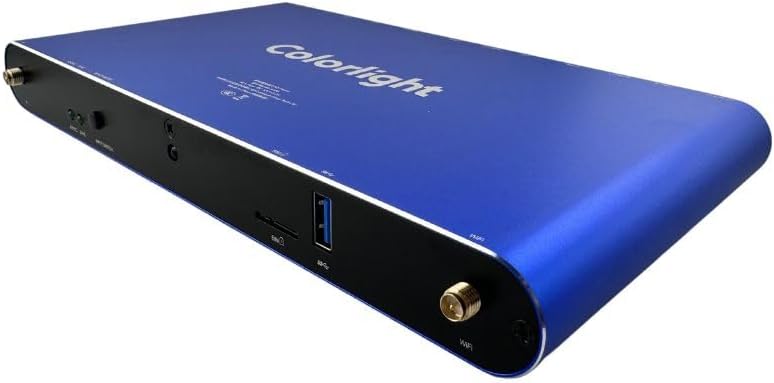
Figure 1: Front-side view of the Colorlight A100 LED Display Cloud Media Player, showcasing its sleek blue casing and connectivity ports.
2. What's in the Box
Upon unboxing your Colorlight A100, please verify that all the following components are included:
- Colorlight A100 LED Display Cloud Media Player
- HDMI Cable
- Power Adapter
- User Manual (this document)
- WiFi Antenna (if applicable)
- GPS Antenna (if 4G/GPS optional module is included)
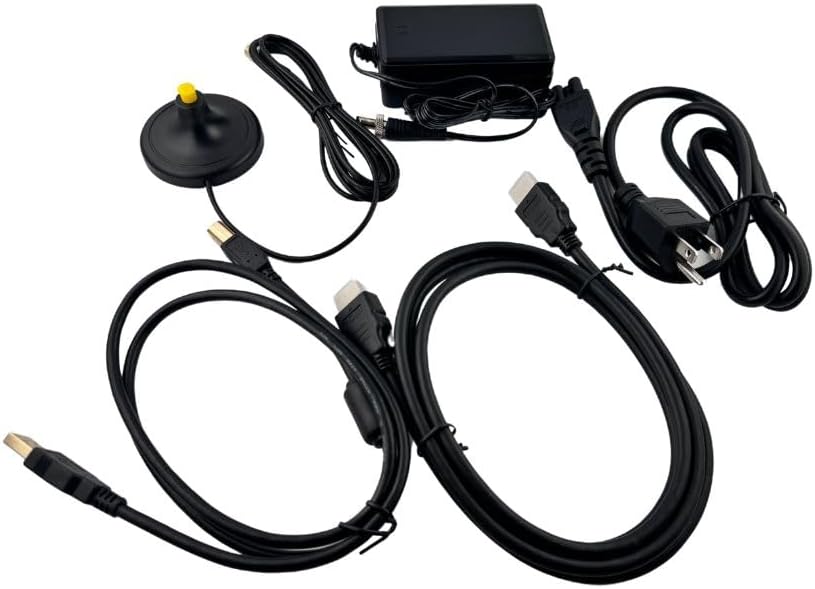
Figure 2: All components included in the Colorlight A100 package. This typically includes the A100 unit, power adapter, HDMI cable, and user manual.
3. Setup
Follow these steps to set up your Colorlight A100 LED Display Cloud Media Player:
- Connect to Display: Use an HDMI cable to connect the A100's HDMI OUT port to your LED display or video processor's HDMI IN port.
- Connect Power: Connect the provided power adapter to the A100's 12V DC input port and then plug it into a power outlet. The device will power on automatically.
- Network Connection (Optional):
- LAN: Connect an Ethernet cable from the A100's LAN port to your network router or switch.
- WiFi: The A100 has a permanent WiFi hotspot. You can connect to this hotspot from a PC, smartphone, or tablet to configure network settings or connect the A100 to an existing WiFi network (client mode).
- 4G (Optional): If your model includes the 4G module, ensure the 4G antenna is securely connected.
- USB Devices (Optional): You can connect a USB flash drive to the USB port for content playback or program updates.
- Sensor Connections (Optional): If using external sensors for ambient temperature, humidity, or brightness, connect them to the designated sensor ports.

Figure 3: Rear view of the Colorlight A100, illustrating the arrangement of ports including power input, sensor ports, LAN, audio out, HDMI in/out, and output ports.
4. Operating Instructions
4.1. Program Management
The A100 supports various methods for program editing and publishing:
- PlayerMaster Software: Use the dedicated PlayerMaster software on a PC to create, edit, and publish programs. This software allows for multi-window arbitrary arrangement and supports various media materials like video, picture, text, table, clock, streaming media, webpages, and weather.
- USB Flash Drive: For quick updates, content can be played directly from a USB flash drive. Simply plug the drive into the USB port; the A100 will automatically detect and play compatible content or update the program list.
- Mobile Devices: Program management and parameter settings can also be achieved via smartphones and tablets by connecting to the A100's WiFi hotspot.
4.2. Network Communication
The A100 offers flexible network connectivity for remote management and content delivery:
- WiFi: Supports 2.4G frequency band. Can operate in WiFi hotspot mode (for direct connection from devices) or WiFi client mode (to connect to an existing network).
- LAN: Supports both DHCP mode (automatic IP assignment) and static mode (manual IP configuration).
- 4G (Optional): For remote locations without wired or WiFi access, the optional 4G module provides cellular network connectivity.
- GPS Positioning (Optional): If equipped, allows for location-based services and management.
4.3. Intelligent Control and Scheduling
- Automatic Brightness Adjustment: The A100 can monitor ambient temperature, humidity, and brightness (with connected sensors) and automatically adjust the display brightness to suit various environmental conditions.
- Scheduled Commands: Supports command scheduling via LAN and Internet, allowing for automated tasks and content changes.
- Multi-Screen Synchronization: Achieves synchronized playback across multiple screens using NTP synchronization.
5. Features
The Colorlight A100 is equipped with a comprehensive set of features designed for advanced LED display management:
- High Loading Capacity: Supports up to 1.3 million pixels, with a maximum of 4096 pixels in width or 2560 pixels in height.
- HDMI Output: Supports resolutions up to 1920×1200@60Hz via HDMI.
- Dual Playback Modes: Offers synchronous display or asynchronous playback, with configurable priority settings.
- Powerful Processing: Features 4K H.265/H.264 hard decoding and 4K VP9 decoding playback for smooth content delivery.
- Internal Storage: Includes 8GB of storage, with 4GB available for user content.
- Compatibility: Fully compatible with conventional synchronous control system program management and display configuration.
- Flexible Content Management: Supports rich media materials including pictures, videos, texts, tables, clocks, stream media, webpages, and weather.
- Multi-Window Support: Allows overlaying of multiple windows with freely adjustable size and location.
- Multi-Page Playback: Supports up to 32 program pages.
- Cross-Platform Control: Manage players via PC, smartphone, and tablet using various application software.

Figure 4: Top view of the Colorlight A100, showing the brand logo and model information.
6. Specifications
| Attribute | Detail |
|---|---|
| Brand | Colorlight |
| Model Number | A100 |
| Loading Capacity | Up to 1.3 million pixels (Max 4096px width, 2560px height) |
| HDMI Resolution | Up to 1920×1200@60Hz |
| Decoding Performance | 4K H.265/H.264 hard decoding, 4K VP9 decoding |
| Internal Storage | 8GB (4GB available) |
| Connectivity Technology | WiFi 2.4G (hotspot/client), LAN (DHCP/static), Optional 4G, Optional GPS |
| Product Dimensions | 5.43"L x 2"W x 9.25"H (approx. 13.79 x 5.08 x 23.5 cm) |
| Item Weight | 3.76 pounds (approx. 1.71 kg) |
| Operating Modes | Synchronous display, Asynchronous playback |
| Special Features | Multi-screen synchronization, Scheduled commands, Automatic brightness adjustment, Multi-window overlay, Multi-page playback |
7. Maintenance
To ensure the longevity and optimal performance of your Colorlight A100, follow these maintenance guidelines:
- Cleaning: Gently wipe the exterior of the device with a soft, dry cloth. Avoid using liquid cleaners or abrasive materials, as they may damage the surface or internal components.
- Ventilation: Ensure that the ventilation openings on the device are not blocked. Proper airflow is crucial to prevent overheating.
- Storage: When not in use for extended periods, store the A100 in a cool, dry place away from direct sunlight and extreme temperatures.
- Firmware Updates: Periodically check the Colorlight official website or PlayerMaster software for firmware updates. Keeping the firmware updated can improve performance, add new features, and resolve potential issues.
8. Troubleshooting
If you encounter issues with your Colorlight A100, refer to the following common troubleshooting steps:
| Problem | Possible Cause / Solution |
|---|---|
| No Display Output |
|
| Network Connection Issues |
|
| Content Not Playing / Updating |
|
| Device Overheating |
|
9. Warranty and Support
The Colorlight A100 LED Display Cloud Media Player comes with a standard manufacturer's warranty. For specific warranty terms and conditions, please refer to the documentation provided at the time of purchase or contact your authorized Colorlight dealer.
For technical support, troubleshooting assistance beyond this manual, or service inquiries, please contact Colorlight customer support through their official website or the contact information provided by your reseller. When contacting support, please have your product model (A100) and any relevant purchase details ready.
Note: Protection plans may be available for extended coverage. Please check with your retailer for details on available protection plans.
Documents and downloads
Ask a question about this manual
Ask about setup, troubleshooting, compatibility, parts, safety, or missing instructions. Manuals+ will review the question and use this page’s manual context to help answer it.