
Pininfarina Sintesi Smartwatch
Pininfarina Sintesi Smartwatch User Manual
Model: Sintesi Smartwatch
1. Introduction
Welcome to the Pininfarina Sintesi Smartwatch user manual. This document provides essential information for setting up, operating, maintaining, and troubleshooting your new hybrid smartwatch. The Sintesi Smartwatch combines classic watchmaking aesthetics with advanced digital functionalities, offering comprehensive health and activity tracking alongside traditional timekeeping.
Please read this manual thoroughly before using your device to ensure proper operation and to maximize its features.
2. Product Overview
Key Features:
- Hybrid Design: Blends traditional analog watch aesthetics with modern smartwatch capabilities.
- Premium Materials: Features a 316L stainless steel case and bezel, crystal watch glass, and a replaceable 22mm FKM strap.
- Durable Display: Sapphire glass with anti-fingerprint coating, offering five times more resistance than standard watch glass.
- Water and Dust Resistance: Rated up to 5 ATM water resistance and dust-resistant.
- Advanced Sensors: Monitors vital signs including detailed sleep metrics, pulse, and heart rate.
- Fitness Tracking: Tracks steps, calories burned, and provides insights into your activity levels.
- GPS Tracking: Integrated GPS for accurate location and activity mapping.
- Digital Compass: Provides directional guidance.
- Optimized Battery: Powered by an optimized lithium battery for extended use.
- Companion App: Syncs with a dedicated mobile application (Android and iOS compatible) to store and analyze health data and statistics.
Components:
The Pininfarina Sintesi Smartwatch includes the watch unit, an FKM strap, and a charging cable. Familiarize yourself with the watch face, digital display, physical buttons, and charging port.

Figure 2.1: The Pininfarina Sintesi Smartwatch, showcasing its elegant design with a black FKM strap and a clear digital display integrated into the analog watch face. The display shows the time and date.
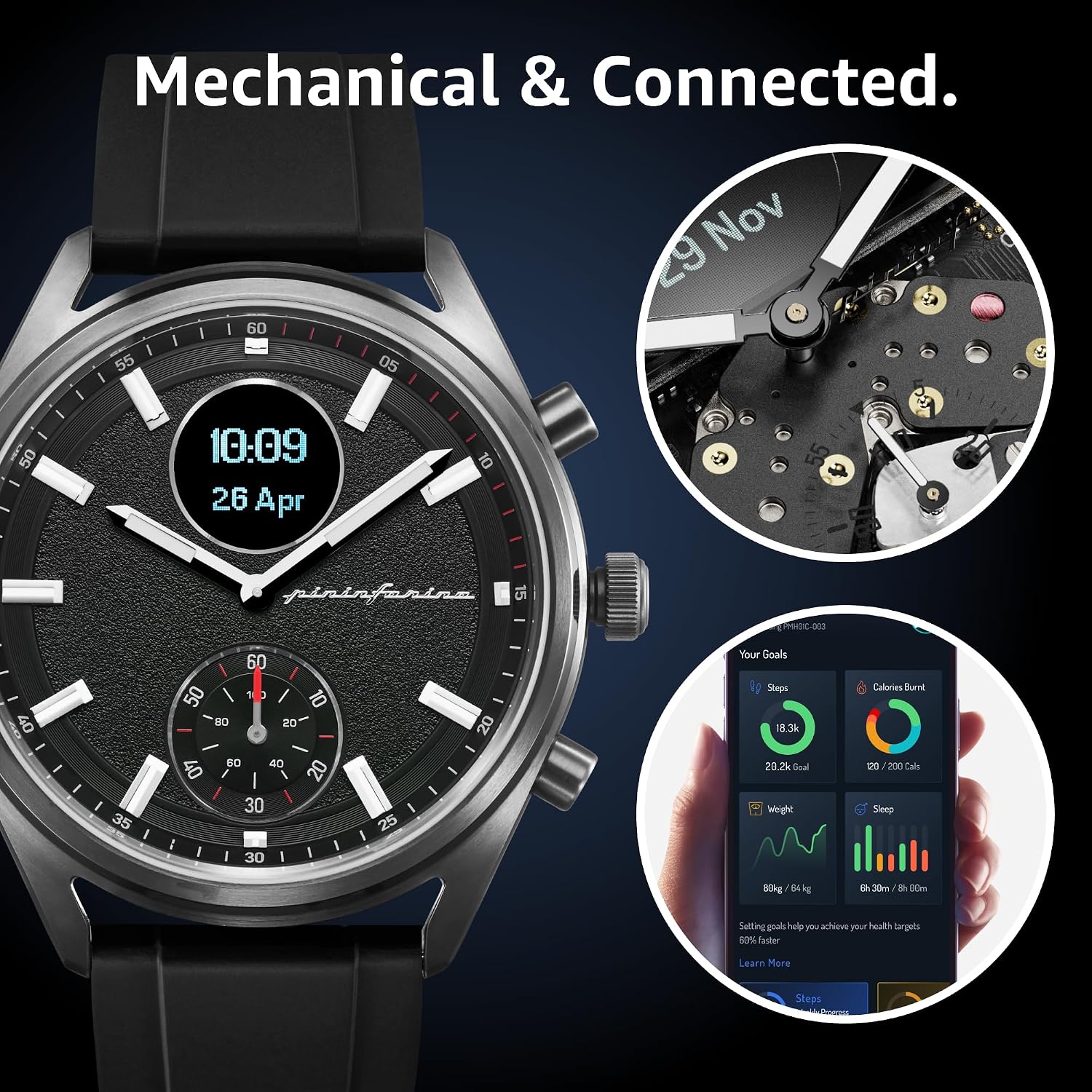
Figure 2.2: A detailed view of the Pininfarina Sintesi Smartwatch face, highlighting the blend of mechanical and connected features. Insets illustrate the intricate internal mechanism and a glimpse of the companion app's health goal tracking interface.
3. Setup
3.1 Initial Charging
Before first use, fully charge your Sintesi Smartwatch. Connect the provided charging cable to the watch's charging port and a USB power source. The digital display will indicate charging status. A full charge typically takes approximately 2 hours.
3.2 App Installation
- Download the official Pininfarina Sintesi companion app from the Apple App Store (for iOS devices) or Google Play Store (for Android devices).
- Install the app on your smartphone.
3.3 Pairing with Your Smartphone
- Ensure Bluetooth is enabled on your smartphone.
- Open the Pininfarina Sintesi app and follow the on-screen instructions to create an account or log in.
- The app will guide you through the pairing process. Select your Sintesi Smartwatch from the list of available devices.
- Confirm the pairing code on both your watch and smartphone if prompted.
3.4 Initial Calibration (Hand Adjustment)
During the initial setup via the app, you may be prompted to calibrate the analog hands to ensure they align correctly with the digital time. Follow the app's instructions to adjust the hands precisely.
4. Operating the Smartwatch
4.1 Digital Display Navigation
The digital display provides access to various functions and information. Use the physical buttons on the side of the watch to navigate through menus, view notifications, and access different modes (e.g., fitness tracking, compass, stopwatch).
4.2 Fitness Tracking
Your Sintesi Smartwatch continuously monitors your activity and health metrics:
- Heart Rate: The watch automatically tracks your heart rate throughout the day. View real-time data on the digital display or detailed trends in the companion app.
- Steps & Calories: Your daily steps and estimated calories burned are displayed on the watch and synced to the app.
- Sleep Tracking: Wear your watch to bed for automatic sleep analysis, including sleep stages and duration. Detailed reports are available in the app.
- GPS Tracking: For outdoor activities, the integrated GPS tracks your route, distance, and pace. Activate GPS tracking through the watch's menu or the app before starting an activity.
- Compass: Access the digital compass feature from the watch's menu for directional guidance.

Figure 4.1: The Pininfarina Sintesi companion app interface on a smartphone, displaying various health monitoring features such as steps, calories burned, weight, sleep patterns, heart rate, and SpO2 respiratory system data. The app helps users monitor their health and improve their lifestyle.
4.3 Notifications
Once paired, your watch can receive notifications from your smartphone (e.g., calls, messages, app alerts). Customize which notifications you receive through the companion app settings.
5. Maintenance
5.1 Cleaning
Regularly clean your watch and strap with a soft, damp cloth. Avoid using harsh chemicals or abrasive materials, as these can damage the watch's finish or sensors. Ensure the charging contacts are clean and dry before charging.
5.2 Water Resistance
The Pininfarina Sintesi Smartwatch is water-resistant up to 5 ATM. This means it can withstand splashes, rain, and brief immersion in shallow water, such as during showering or swimming. It is not suitable for diving, high-speed water sports, or prolonged submersion. Do not operate the buttons underwater.

Figure 5.1: The Pininfarina Sintesi Smartwatch shown with water splashing, illustrating its 5 ATM water resistance and durable stainless steel case, designed for timeless aesthetics and resilience.
5.3 Battery Life and Charging
The watch features an optimized lithium battery designed for extended use. Battery life can vary based on usage patterns and feature activation (e.g., continuous GPS tracking will consume more power). Charge the watch when the battery indicator is low. For optimal battery health, avoid fully depleting the battery frequently.

Figure 5.2: The Pininfarina Sintesi Smartwatch worn on a wrist, positioned next to a coffee cup, visually representing its impressive battery life of up to 14 days, providing a full picture of your health without frequent charging.
5.4 Strap Replacement
The 22mm FKM strap is replaceable. Refer to the Pininfarina website or authorized retailers for compatible replacement straps and instructions on how to change them.
6. Troubleshooting
If you encounter issues with your Pininfarina Sintesi Smartwatch, try the following steps:
- Watch Not Turning On: Ensure the watch is fully charged. Connect it to the charger and wait a few minutes.
- Cannot Pair with Phone:
- Ensure Bluetooth is enabled on your phone and the watch is within range.
- Restart both your watch and smartphone.
- Try unpairing and re-pairing the device through the app's settings.
- Inaccurate Tracking Data (HR, Steps, Sleep):
- Ensure the watch is worn snugly on your wrist, not too loose or too tight.
- Clean the sensor on the back of the watch.
- Ensure the app is up to date.
- Digital Display Not Responding: Try restarting the watch. If the issue persists, ensure the battery is not critically low.
- Notifications Not Appearing: Check the notification settings within the Pininfarina Sintesi app and your phone's system settings to ensure permissions are granted.
For persistent issues, consult the FAQ section within the companion app or contact Pininfarina customer support.
7. Specifications
| Feature | Detail |
|---|---|
| Model Name | Sintesi Smartwatch |
| Brand | Pininfarina |
| Case Material | 316L Stainless Steel |
| Glass Material | Sapphire Glass with Anti-fingerprint Coating |
| Strap Material | FKM (Fluoroelastomer) |
| Strap Width | 22mm (Replaceable) |
| Water Resistance | 5 ATM |
| Battery Type | Optimized Lithium Battery |
| Connectivity | Bluetooth |
| Compatibility | Android, iOS |
| Sensors | Heart Rate, GPS, Compass, Activity Tracker |
| Country of Origin | Hongkong |
8. Warranty and Support
For warranty information and customer support, please refer to the official Pininfarina website or contact the retailer from whom you purchased the product. Keep your proof of purchase for any warranty claims.
For technical assistance or further inquiries, please reach out to Pininfarina customer service through the contact information provided on their official website or within the companion application.
Related documentsSintesi Smartwatch

Ask a question about this manual
Ask about setup, troubleshooting, compatibility, parts, safety, or missing instructions. Manuals+ will review the question and use this page’s manual context to help answer it.