
1. Important Safety Instructions
Please read this manual carefully before operating the appliance and retain it for future reference. Failure to follow these instructions may result in electric shock, fire, or serious injury.
- Always connect the dehumidifier to a grounded power outlet.
- Do not operate the unit with a damaged power cord or plug.
- Keep the appliance away from water and other liquids. Do not immerse it.
- Ensure proper ventilation around the unit. Do not block air inlets or outlets.
- Unplug the dehumidifier before cleaning or performing any maintenance.
- This appliance is not intended for use by persons (including children) with reduced physical, sensory or mental capabilities, or lack of experience and knowledge, unless they have been given supervision or instruction concerning use of the appliance by a person responsible for their safety.
- Do not use the appliance in areas where flammable gases or vapors are present.
- Operate the unit within the specified temperature range of 5-32 °C.
2. Product Overview
The SENCOR SDH 3028WH is a portable smart dehumidifier designed to efficiently remove excess moisture from your indoor environment. It features Wi-Fi connectivity for app control, multiple operating modes, and a large water tank capacity.
Key Features:
- Dehumidification Capacity: 30 liters per day (at 30 °C, 80% Relative Humidity).
- Water Tank Capacity: 6 liters.
- Control: Wi-Fi enabled with Sencor HOME app (iOS and Android).
- Dehumidification Settings: Adjustable from 35% to 85% Relative Humidity, or Continuous operation.
- Operating Modes: Dehumidification, Fan, Laundry Drying.
- Fan Speeds: High and Low.
- Display: Precise humidity indication.
- Timer: 0-24 hours.
- Safety Features: Full tank indicator, Child safety lock, Automatic defrost function, Automatic restart function.
- Convenience: Removable and washable filter, Integrated handles and wheels for easy portability, 1-meter drain hose for continuous drainage.
- Quiet Operation: Noise level 43/41 dB.
- Suitable Room Size: 30 to 89 m².
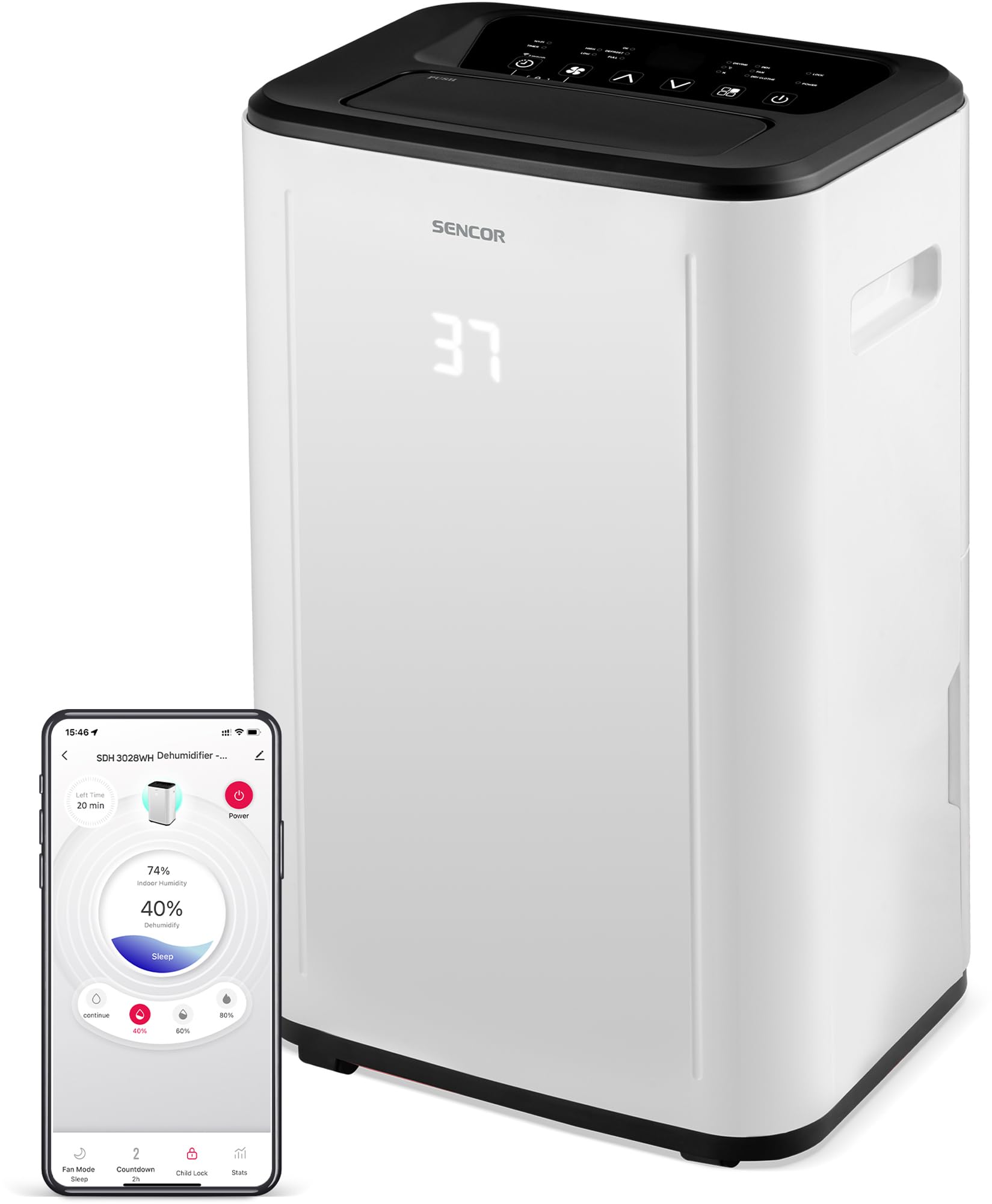
Figure 1: Front view of the SENCOR SDH 3028WH Portable Dehumidifier.
3. Package Contents
Upon unpacking, please ensure all items are present and in good condition:
- SENCOR SDH 3028WH Portable Dehumidifier
- Instruction Manual
- Drain Hose (1 meter)

Figure 2: Packaging of the SENCOR SDH 3028WH, illustrating key features.
4. Setup
4.1 Placement
Place the dehumidifier on a firm, level surface in the area where dehumidification is desired. Ensure there is at least 20 cm (8 inches) of clear space around the air inlets and outlets for optimal airflow.
4.2 Power Connection
Plug the power cord into a suitable grounded electrical outlet (220-240V, 50Hz). The unit will enter standby mode.
4.3 Wi-Fi Setup (Sencor HOME App)
- Download the Sencor HOME app from the App Store (iOS) or Google Play Store (Android).
- Create an account or log in.
- Follow the in-app instructions to add your SDH 3028WH dehumidifier. This typically involves putting the dehumidifier into pairing mode (refer to the app or device display for specific instructions) and connecting it to your home Wi-Fi network.
- Once connected, you can control the dehumidifier remotely and monitor its status via the app.
5. Operating Instructions
5.1 Control Panel
The control panel on top of the unit allows you to manage all functions. The digital display shows the current humidity level or timer settings.
5.2 Power On/Off
Press the Power button to turn the unit on or off.
5.3 Setting Desired Humidity
- Press the Humidity button.
- Use the Up/Down arrows to adjust the desired humidity level between 35% and 85% RH in 5% increments.
- The unit will operate until the set humidity level is reached, then cycle on and off to maintain it.
- To enable continuous dehumidification, select the 'Continuous' setting (usually indicated by 'CO' or similar on the display).
5.4 Operating Modes
Press the Mode button to cycle through the available modes:
- Dehumidification Mode: Standard operation to remove moisture.
- Fan Mode: Circulates air without dehumidifying.
- Laundry Drying Mode: Optimized for drying clothes faster by continuously running the fan and dehumidifier.
5.5 Fan Speed
Press the Fan Speed button to switch between High and Low fan speeds.
5.6 Timer Function
- Press the Timer button.
- Use the Up/Down arrows to set the desired operating duration from 0 to 24 hours.
- The unit will automatically turn off or on after the set time.
5.7 Child Lock
To activate the child lock, press and hold the Child Lock button (or a combination of buttons as indicated on the control panel) for a few seconds. This prevents accidental changes to settings. Repeat the action to deactivate.
6. Maintenance
Regular maintenance ensures optimal performance and extends the lifespan of your dehumidifier.
6.1 Emptying the Water Tank
- When the water tank is full, the unit will stop operating, and the 'Full Tank' indicator will illuminate.
- Carefully pull out the water tank from the back or side of the unit.
- Empty the collected water.
- Reinsert the empty tank firmly into its position. The unit will resume operation.
6.2 Continuous Drainage
For continuous operation without needing to empty the tank, you can use the included drain hose.
- Locate the continuous drain outlet on the back of the dehumidifier.
- Remove the rubber stopper (if present).
- Connect one end of the 1-meter drain hose to the outlet.
- Direct the other end of the hose to a suitable drain or larger container, ensuring it is lower than the dehumidifier's drain outlet for gravity flow.
6.3 Cleaning the Air Filter
- It is recommended to clean the air filter every two weeks or more frequently depending on usage.
- Turn off and unplug the dehumidifier.
- Locate and remove the air filter (usually at the back or side).
- Wash the filter with lukewarm water and a mild detergent. Rinse thoroughly.
- Allow the filter to air dry completely before reinserting it into the unit. Do not use a dryer or direct heat.
6.4 Cleaning the Exterior
Wipe the exterior of the unit with a soft, damp cloth. Do not use harsh chemicals, abrasive cleaners, or solvents.
7. Troubleshooting
Before contacting customer support, please refer to the following common issues and solutions:
| Problem | Possible Cause | Solution |
|---|---|---|
| Unit does not turn on. | No power supply. Power cord not properly connected. | Check if the unit is plugged into a working outlet. Ensure the power cord is securely connected. |
| Dehumidifier not collecting water. | Air filter is clogged. Room temperature is too low (below 5°C). Humidity setting is too high. Water tank is not properly inserted. | Clean the air filter. Ensure room temperature is within 5-32°C. Lower the desired humidity setting. Reinsert the water tank correctly. |
| Unit is noisy or vibrating excessively. | Unit is on an uneven surface. Air filter is clogged. | Place the unit on a flat, stable surface. Clean the air filter. |
| "Full Tank" indicator is on, but tank is not full. | Water tank is not properly seated. Float switch is stuck. | Remove and reinsert the water tank firmly. Check the float switch inside the tank for obstructions. |
| Wi-Fi connection issues. | Incorrect Wi-Fi password. Dehumidifier too far from router. Router issues. | Verify Wi-Fi password. Move dehumidifier closer to the router. Restart your Wi-Fi router. Re-attempt pairing process. |
8. Specifications
| Feature | Detail |
|---|---|
| Brand | SENCOR |
| Model Number | SDH 3028WH |
| Dehumidification Capacity | 30 Liters/day (at 30 °C, 80% RH) |
| Water Tank Capacity | 6 Liters |
| Power Consumption | 420 Watts |
| Operating Temperature Range | 5-32 °C |
| Recommended Room Size | 30-89 m² |
| Noise Level | 43/41 dB |
| Dimensions (L x W x H) | 26 x 33.5 x 53 cm |
| Weight | 15.3 kg |
| Material | Plastic |
| Special Features | Digital display, Automatic defrost, Timer, Portable, Wi-Fi control, Child lock, Auto restart |
| Drain Hose Length | 1 meter |
9. Warranty and Support
SENCOR products are manufactured to the highest quality standards. For warranty information, please refer to the warranty card included with your product or visit the official SENCOR website. For technical support or service inquiries, please contact SENCOR customer service through their official channels.
Spare parts availability: 5 Years.


