
1. Introduction
The TKMARS TK918 4G GPS Tracker is a magnetic, waterproof tracking device designed for vehicles, fleets, and other valuable assets. It provides real-time location tracking, historical route playback, and various alert functions to enhance security and monitoring capabilities. This manual provides detailed instructions for the proper setup, operation, and maintenance of your TK918 GPS tracker.
2. Product Overview
The TKMARS TK918 is equipped with advanced 4G LTE technology for fast and reliable tracking. Key features include a long-lasting 20,000mAh battery, strong built-in magnets for easy installation, and IP67 waterproofing. It supports GPS+LBS dual positioning for accurate location data.

Figure 2.1: TKMARS TK918 4G GPS Tracker highlighting its basic and auxiliary functions, including real-time tracking, history route playback, safe geo-fence, speed alarm, low battery alarm, vibration alarm, LBS+GPS positioning, 20000mAh battery, 150 days standby, strong magnetic installation, IP65 waterproof rating, and included data SIM card.

Figure 2.2: The TKMARS TK918 GPS Tracker held in a hand, illustrating its portable and compact design.
3. Setup
3.1 SIM Card Installation
The TK918 tracker requires a 4G SIM card for communication. You can use the SIM card provided with the device, which may require a subscription, or use your own local 4G SIM card that supports SMS, calls, and internet access. Ensure the SIM card is active and has sufficient balance/data plan.
- Locate the SIM card slot on the device.
- Insert the 4G SIM card into the slot with the correct orientation.
- Ensure the SIM card is securely seated.
3.2 Charging the Device
Before first use, fully charge the TK918 tracker. The device has a built-in 20,000mAh battery. Connect the tracker to a power source using the provided charging cable. The charging indicator light will show the charging status.
3.3 Device Activation
Once the SIM card is installed and the device is charged, power on the tracker. The device will automatically connect to the network. You can then access the tracking features via the dedicated mobile application or web platform.
4. Operating Instructions
The TKMARS TK918 offers a user-friendly interface compatible with both Android and iOS systems, as well as a web platform.
4.1 Real-time Tracking
Track the device's location in real-time on Google Maps through the mobile application, SMS commands, or the computer web platform. The minimum data upload interval is 10 seconds. The device uses GPS+LBS dual positioning, providing 5-10 meters accuracy in GPS mode and 100-2000 meters in LBS mode.

Figure 4.1: Mobile application interface showing real-time tracking of a vehicle on Google Maps and a historical route playback feature.
Video 4.1: An official product video from Wei Heng Electronic (Seller) demonstrating the TKMARS GPS Tracker's ability to track anything, anywhere, anytime, and showcasing its real-time tracking, safe geo-fence, and history route playback features.
4.2 Historical Route Playback
The tracker records and stores historical route data for up to 6 months, allowing you to review past movements of the tracked asset.
4.3 Geofence Alerts
Set up customizable geofence boundaries on the map. You will receive an alert notification if the tracker enters or exits these predefined areas.

Figure 4.2: Mobile application displaying a geofence feature, where users can define a safe area and receive alerts when the tracker moves beyond it. Also shows icons for various alarms like shock, car accident, forced open, and drop down.
4.4 Alarm Functions
The TK918 provides multiple alarm functions for enhanced security:
- Shock Sensor Alarm: Notifies you if unauthorized movement or tampering is detected.
- Motion Alarm: Alerts you if the device starts moving.
- Speed Alarm: Sends an alert if the tracked vehicle exceeds a preset speed limit.
- Fall Off Alarm: Notifies you if the device is accidentally removed or dropped.
- Low Battery Alarm: Alerts you when the battery level is low, prompting a recharge.

Figure 4.3: Visual representation of the 'Loosing Alarm' feature, which triggers an immediate notification if the tracker is accidentally removed or dropped from its installed position.
4.5 Voice Monitoring
You can listen to the sounds around the device by calling the SIM card number within the tracker from your mobile phone. This feature provides an additional layer of security and monitoring.
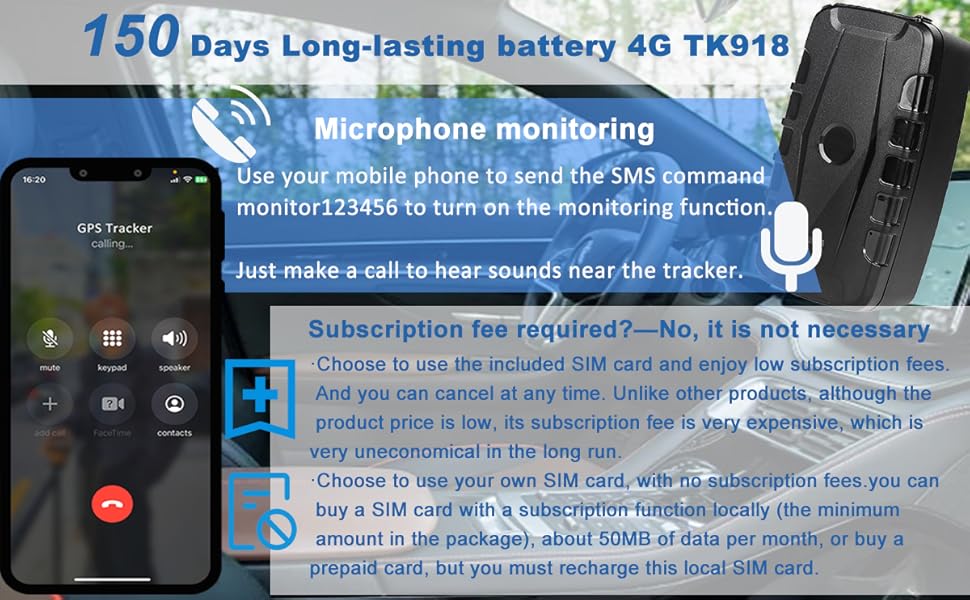
Figure 4.4: An image demonstrating the microphone monitoring function, where a user can call the tracker's SIM card to listen to ambient sounds.
4.6 Sleep Modes
The TK918 features intelligent sleep modes to conserve battery life:
- Sleep by Time Mode: After this setting, the tracker will only work for 5 minutes after being woken up, then return to sleep mode. GPS will shut off, and GSM will operate in low consumption mode. SMS or calls can wake up the tracker.
- Sleep by Shock Sensor Mode: If no shock is detected for 5 minutes, the tracker will enter "sleep by shock" mode. GPS will shut off, and GSM will operate in low consumption. Vibration, SMS, or calls can wake up the tracker.

Figure 4.5: Explanations of the two sleep modes: 'Sleep by time mode' for scheduled operation and 'Sleep by shock sensor mode' for activation upon movement, both designed to optimize battery life.
5. Installation
The TK918 GPS tracker is designed for easy, free installation thanks to its strong built-in magnets.
- Identify a suitable metal surface on your vehicle or asset, such as under a seat, in the luggage compartment, or on the chassis.
- Ensure the surface is clean and dry for optimal magnetic adhesion.
- Simply place the tracker onto the metal surface. The strong magnets will securely attach the device.
For best GPS signal reception, avoid placing the device in enclosed metal containers or areas with heavy metal shielding.

Figure 5.1: Demonstration of the tracker's strong magnetic attachment for easy installation on vehicles, alongside icons indicating its large battery capacity and IP67 waterproof rating.
6. Maintenance
- Charging: Recharge the device when a low battery alert is received. Regular charging ensures continuous operation.
- Water Resistance: The TK918 is rated IP67 waterproof, meaning it is protected against dust and can withstand immersion in water up to 1 meter for 30 minutes. While durable, avoid prolonged submersion or exposure to high-pressure water jets.
- Cleaning: Clean the device with a soft, dry cloth. Do not use harsh chemicals or abrasive cleaners.
- Storage: Store the device in a cool, dry place when not in use for extended periods.
7. Troubleshooting
If you encounter issues with your TKMARS TK918 GPS Tracker, consider the following:
- No Signal/Offline:
- Check if the SIM card is correctly installed and activated.
- Ensure the SIM card has sufficient balance or data plan.
- Verify that the device is in an area with good 4G network coverage.
- Move the device to an open area to improve GPS signal reception.
- Inaccurate Location:
- GPS accuracy is typically 5-10 meters. LBS mode (when GPS is unavailable) has lower accuracy (100-2000 meters).
- Ensure the device is not obstructed by heavy metal structures or indoors, which can degrade GPS signal.
- Battery Draining Quickly:
- Check the tracking frequency settings in the app; more frequent updates consume more power.
- Ensure the device is fully charged.
- Utilize the sleep modes (Sleep by Time or Sleep by Shock Sensor) to extend battery life.
- Device Not Responding:
- Try restarting the device.
- Ensure the battery is charged.
If problems persist, please contact customer support for assistance.
8. Specifications
| Feature | Detail |
|---|---|
| Model Number | TK918-4G |
| Dimensions | 2.56 x 1.93 x 4.72 inches |
| Weight | 1.03 pounds |
| Battery | 20,000mAh Lithium Ion (included) |
| Battery Life (Active) | Approximately 15-60 days (depending on usage) |
| Battery Life (Standby) | Up to 150 days |
| Connectivity | 4G LTE Cellular |
| Positioning | GPS+LBS Dual Positioning |
| GPS Accuracy | 5-10 meters |
| LBS Accuracy | 100-2000 meters |
| Waterproof Rating | IP67 |
| Material | Metal, Plastic |
| Manufacturer | TKMARS |
9. Warranty and Support
TKMARS is committed to providing excellent after-sales service. If you encounter any problems with product setup, usage, or require technical assistance, please do not hesitate to contact our support team.
For more information or to contact support, please visit the official TKMARS store on Amazon: TKMARS Store


