
groov e GVEB16
Digital Buds - Wired in-Ear Earphones User Manual
Model: GVEB16
Brand: groov e
Introduction
Thank you for choosing the groov e Digital Buds. These USB-C earphones are designed to provide a high-quality audio experience for music playback and hands-free calls. This manual will guide you through the setup, operation, and maintenance of your new earphones to ensure optimal performance and longevity.
Package Contents
- Digital Buds USB-C Earphones
- Earbuds (3X Sizes) - Note: The product description mentions "Includes Earbuds (3X Sizes)", but "whats_in_the_box" only lists "Earphones". Assuming the different sizes are pre-attached or included as accessories with the main earphones.
Product Overview
Familiarize yourself with the components of your Digital Buds.
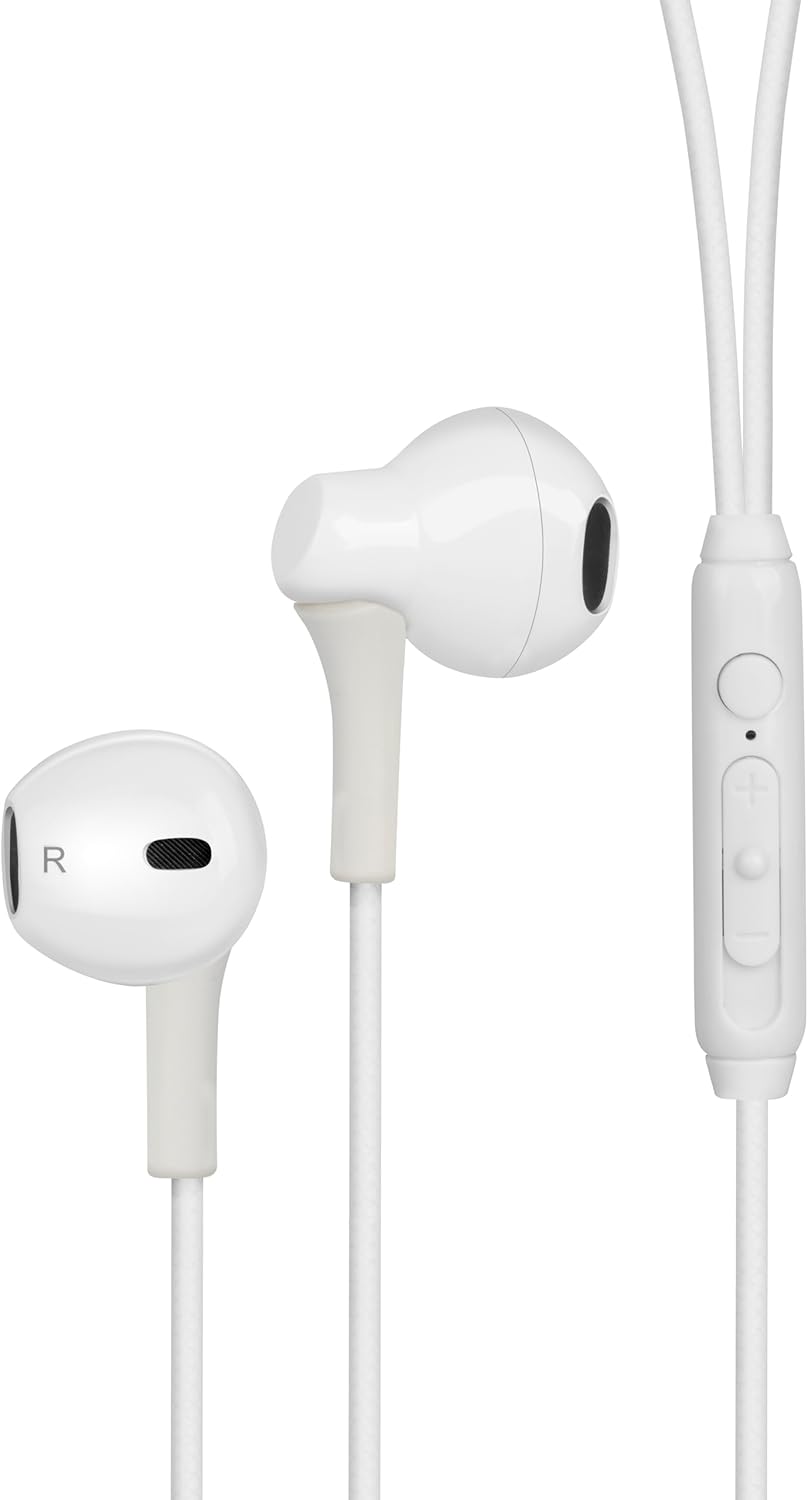
Figure 1: Digital Buds Earphones. This image shows both the left and right earbuds connected by their cable.

Figure 2: In-Line Remote and Microphone. The remote features volume up (+), volume down (-), and a multi-function button for calls and music control. The microphone is integrated into this unit.

Figure 3: USB-C Connector. This connector is used to plug the earphones into compatible devices such as smartphones, tablets, and laptops.
Setup
- Connect to Device: Locate the USB-C port on your smartphone, tablet, or laptop. Insert the USB-C connector of the Digital Buds firmly into the device's USB-C port.
- Earbud Placement: Gently insert the earbuds into your ears. The earbud marked 'L' is for the left ear, and 'R' is for the right ear. Adjust them for a comfortable and secure fit. If necessary, try the different sized ear tips included to find the best fit for optimal sound quality and comfort.
- Initial Recognition: Your device should automatically recognize the earphones. You may need to select them as the audio output device in your device's sound settings.
Operating Instructions
The in-line remote provides convenient control over your audio and calls.
Music Playback
- Play/Pause: Press the multi-function button once.
- Next Track: Press the multi-function button twice quickly.
- Previous Track: Press the multi-function button three times quickly.
- Volume Up: Press the '+' button.
- Volume Down: Press the '-' button.
Call Management
- Answer/End Call: Press the multi-function button once during an incoming call or an active call.
- Reject Call: Press and hold the multi-function button for approximately 2 seconds during an incoming call.
Voice Assistant
- Activate Voice Assistant: Press and hold the multi-function button for approximately 2 seconds when not on a call or playing music. This will activate your device's default voice assistant (e.g., Google Assistant, Siri).
Maintenance
Proper care will extend the life of your Digital Buds.
- Cleaning: Use a soft, dry, lint-free cloth to wipe the earbuds and cable. For stubborn dirt, slightly dampen the cloth with water. Do not use harsh chemicals or abrasive cleaners.
- Storage: When not in use, store the earphones in a clean, dry place, preferably in a small pouch or case to prevent tangling and damage.
- Avoid Moisture: Do not expose the earphones to excessive moisture, rain, or liquids.
- Handle with Care: Avoid pulling on the cable excessively or bending the USB-C connector at sharp angles.
Troubleshooting
If you encounter issues, refer to the following common problems and solutions.
| Problem | Solution |
|---|---|
| No sound from earphones. |
|
| Microphone not working during calls. |
|
| Remote control buttons are unresponsive. |
|
Specifications
| Feature | Detail |
|---|---|
| Brand | groov e |
| Model Name | Groove Digital Buds - White |
| Item Model Number | GVEB16 |
| Connectivity Technology | Wired (USB-C) |
| Ear Placement | In Ear |
| Form Factor | In Ear |
| Control Method | Remote (In-line) |
| Included Components | Earphones |
| Material | Silicone, Plastic |
| Item Weight | 1.06 ounces |
| Package Dimensions | 6.61 x 2.36 x 1.26 inches |
| Compatible Devices | Tablets, Mobile phones, Laptops, Desktops |
| Specific Uses For Product | Entertainment |
Warranty and Support
groov e products are manufactured to high standards and undergo rigorous quality checks. For information regarding warranty coverage, technical support, or customer service, please refer to the warranty card included with your purchase or visit the official groov e website.
Please retain your proof of purchase for any warranty claims.
Related Documents - GVEB16
 |
Groov-e GV-TW04 Jive Buds True Wireless Earphones: User Guide & Specifications Comprehensive guide for Groov-e GV-TW04 Jive Buds True Wireless Earphones, covering setup, pairing, operations, charging, features, specifications, safety information, warranty, and declaration of conformance. |
 |
Groov-e GV-TW02 SoundBuds True Wireless Earphones: Easy Start Guide Learn how to set up and use your Groov-e GV-TW02 SoundBuds True Wireless Earphones with this easy start guide. Covers charging, pairing, basic operations, specifications, and guarantee information. |
 |
Groov-e GV-TW05 VibeBuds User Manual User manual and setup guide for Groov-e GV-TW05 VibeBuds True Wireless Earphones. Includes pairing, charging, and operation instructions. |
 |
Groov-e GV-TW01 PlayBuds True Wireless Earphones: Easy Start Up Guide & Specifications Comprehensive guide for Groov-e GV-TW01 PlayBuds True Wireless Earphones, covering setup, operation, pairing, charging, calls, music playback, specifications, battery disposal, and warranty information. |
 |
groov-e GV-TW10 Ultra Buds: Active Noise Cancelling True Wireless Earbuds Quick Start Guide Get started with your groov-e GV-TW10 Ultra Buds. This guide provides instructions on setup, pairing, charging, features, and specifications for these Active Noise Cancelling True Wireless Earbuds. |
 |
Groov-e GV-BT800 Bluetooth Sports Earphones User Guide User guide for the Groov-e GV-BT800 Bluetooth sports earphones, covering introduction, pack contents, connection diagram, general functions, pairing, charging, earpiece fitting, technical specifications, and service/support. |
Ask a question about this manual
Ask about setup, troubleshooting, compatibility, parts, safety, or missing instructions. Manuals+ will review the question and use this page’s manual context to help answer it.