
1. Introduction
The Philips GoSure 5101 Dash Cam is designed to provide reliable and high-quality video recording for your vehicle. Equipped with a 2K QHD 1600p Sony STARVIS IMX335 sensor and a 135° wide-angle lens, it captures clear footage day and night. This manual provides detailed instructions for installation, operation, and maintenance of your dash cam.
2. What's in the Box
Carefully unpack the box and ensure all items are present:
- Philips GoSure 5101 Dash Camera
- Charging Cable
- Cigar Jack (Car Charger)
- User Manual

Image: Contents of the Philips GoSure 5101 Dash Cam box.
Video: A short preview demonstrating the unboxing and contents of the Philips GoSure 5101 Dash Cam.
3. Product Overview
The Philips GoSure 5101 features a compact design with a 3-inch LCD display for easy viewing and menu navigation. The main camera lens is equipped with an F2.0 aperture for optimal light capture. It includes a built-in microphone for audio recording and a USB port for power and data transfer.

Image: The Philips GoSure 5101 Dash Cam highlighting its 135-degree wide-angle lens and coverage of three lanes.
4. Installation
Follow these steps for proper installation of your dash cam:
- Clean the Windshield: Ensure the area on your windshield where the dash cam will be mounted is clean and dry.
- Attach the Mount: Remove the protective film from the detachable adhesive base of the mount. Firmly press the mount onto the chosen location on your windshield, ideally behind the rearview mirror for optimal view and minimal obstruction.
- Attach the Dash Cam: Slide the dash cam onto the mount until it clicks into place.
- Connect Power: Connect the charging cable to the dash cam and route it along the edge of the windshield and dashboard to the cigar jack (car charger). Plug the cigar jack into your vehicle's 12V power outlet.
- Adjust Angle: Power on your vehicle to activate the dash cam. Adjust the camera angle to ensure it captures the road ahead clearly, covering the desired field of view.

Image: Demonstrating the easy installation process of the dash cam on a car windshield.
5. Initial Setup
Before first use, insert a compatible microSD card (not included) into the designated slot on the dash cam. The device supports up to 256GB microSD cards. Format the card through the dash cam's settings menu for optimal performance. The dash cam will automatically power on and off with your car's ignition.
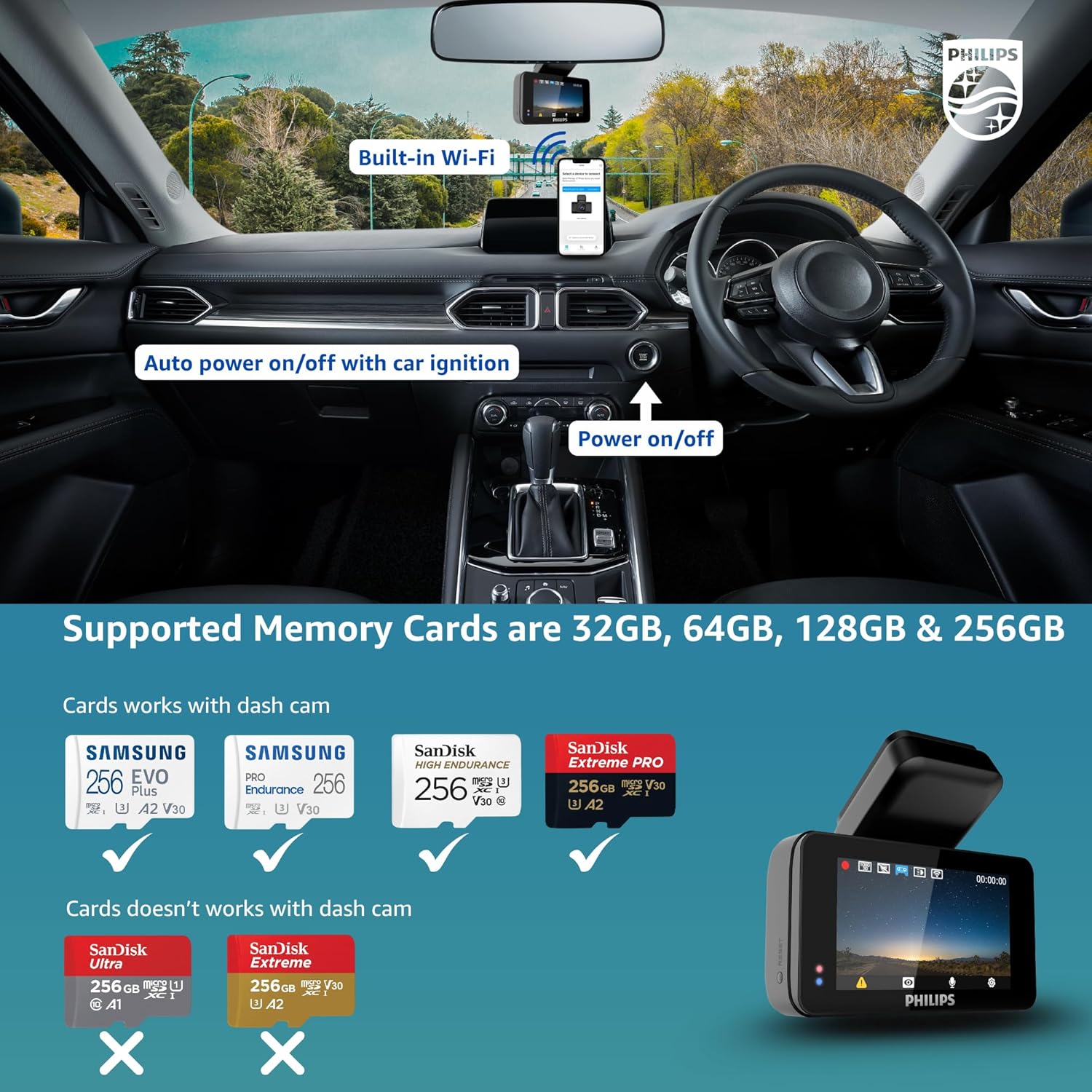
Image: Dash cam installed on a car dashboard, illustrating compatible and incompatible memory card types.
6. Operating Instructions
6.1. Basic Recording (Loop Recording)
The dash cam automatically begins recording when powered on. It uses loop recording, continuously overwriting the oldest files with new footage once the memory card is full. This ensures uninterrupted recording without manual intervention.
6.2. G-Sensor (Emergency Recording)
The built-in 3-axis G-Sensor detects sudden impacts or collisions. When an event is detected, the current footage is automatically locked and saved in a secure folder, preventing it from being overwritten by loop recording. This preserves crucial evidence.

Image: Dash cam in emergency recording mode, showing G-Sensor activation and app connectivity.
6.3. Night Vision
Equipped with a Sony STARVIS IMX335 sensor and Wide Dynamic Range (WDR) technology, the dash cam provides superior night vision. It enhances clarity in low-light conditions, making details like license plates more visible even at night.

Image: Night and day clarity comparison, demonstrating the dash cam's ability to capture clear license plates at night.

Image: Night vision performance with WDR, showing enhanced detail compared to an ordinary shot.
6.4. Voice Control
The GoSure 5101 supports voice commands for hands-free operation. You can instruct the dash cam to take a picture, lock the current video, open the recorder, or close the recorder, allowing you to focus on driving.

Image: Voice control features of the dash cam, enabling hands-free operation for various functions.
6.5. Wi-Fi Connectivity & App Usage
The dash cam features built-in Wi-Fi, allowing you to connect it to your smartphone via the GoSure Safe mobile app. The app provides a user-friendly interface to view live footage, download recorded videos, manage settings, and review emergency clips directly on your phone.

Image: The GoSure Safe app interface on a smartphone, showing various settings and video management options.
7. Advanced Features
7.1. ADAS Alerts
The dash cam includes Advanced Driver-Assistance Systems (ADAS) features such as collision detection, buffered motion detection, and driver fatigue alerts to enhance driving safety.

Image: Driver safety and ADAS alerts, including collision detection and driver fatigue warning.
7.2. Temperature Resistance
The Philips GoSure 5101 is designed to operate reliably in a wide range of temperatures, from -10°C to 60°C, making it suitable for various climates.
8. Maintenance
- Cleaning: Use a soft, dry cloth to clean the camera lens and screen. Avoid abrasive cleaners.
- Memory Card: Regularly format your microSD card (at least once a month) to maintain optimal performance and prevent data corruption.
- Firmware Updates: Check the Philips website or the GoSure Safe app for available firmware updates to ensure your dash cam has the latest features and improvements.
9. Troubleshooting
| Problem | Possible Cause | Solution |
|---|---|---|
| Dash cam does not power on | No power supply; loose connection | Check car charger connection; ensure vehicle ignition is on. |
| Recording stops unexpectedly | Memory card full or corrupted; incompatible memory card | Format the memory card; replace with a compatible, high-speed card. |
| Poor video quality | Dirty lens; incorrect resolution settings | Clean the lens; adjust video resolution in settings. |
| Wi-Fi connection issues | Incorrect password; too far from phone | Ensure correct Wi-Fi password; keep phone close to the dash cam. |
10. Specifications
| Feature | Detail |
|---|---|
| Model | GS5101 |
| Video Capture Resolution | 1600p (2K QHD) |
| Image Sensor | Sony STARVIS IMX335 |
| Viewing Angle | 135 Degrees |
| Display Size | 3 Inches |
| Display Type | LCD |
| Special Features | App Control, Built-In Display, Built-In Microphone, Built-In WiFi, G-Sensor, Loop Recording, Night Vision, Voice Control |
| Connectivity Technology | Wi-Fi |
| Compatible Media Type | MP4 |
| Flash Memory Type | microSD (up to 256GB, not included) |
| Operating Temperature | -10°C to 60°C |
| Item Weight | 350 g |
| Product Dimensions | 7 x 6 x 5 cm |
11. Warranty and Support
For warranty information and customer support, please refer to the official Philips website or contact their customer service. Keep your purchase receipt as proof of purchase for warranty claims.


