
Introduction
This manual provides detailed instructions for the Caline CP-520 Wah-Wah/Volume Guitar Effect Pedal. Please read this manual thoroughly to ensure proper operation and to maximize your experience with this versatile pedal. Understanding its features and functions will help you achieve optimal performance.
Key Features
- Dual Functionality: Operates as both a wah pedal and a volume pedal.
- Mode Indication: Red LED indicates volume mode, Green LED indicates wah mode.
- Adjustable Volume Control: Dedicated dial for fine-tuning the overall output volume.
- Wah Effect Control: Rock the pedal back and forth with your foot to control the wah frequency sweep.
- True Bypass: Ensures signal integrity and preserves your original tone when the pedal is disengaged.
- Power Requirement: Uses a standard 9V DC center-negative power adapter (not included).
Product Overview
Familiarize yourself with the components and layout of your Caline CP-520 pedal.

This image displays the Caline CP-520 pedal from an angled front view, highlighting the main treadle, the 'VOL +/-' knob, and the 'OUT' jack. The 'CALINE WAH VOL' logo is visible on the left side.

This image shows the rear of the Caline CP-520 pedal, featuring the 'IN' jack, the 'OFF/ON' switch, and the 'DC9V' power input.
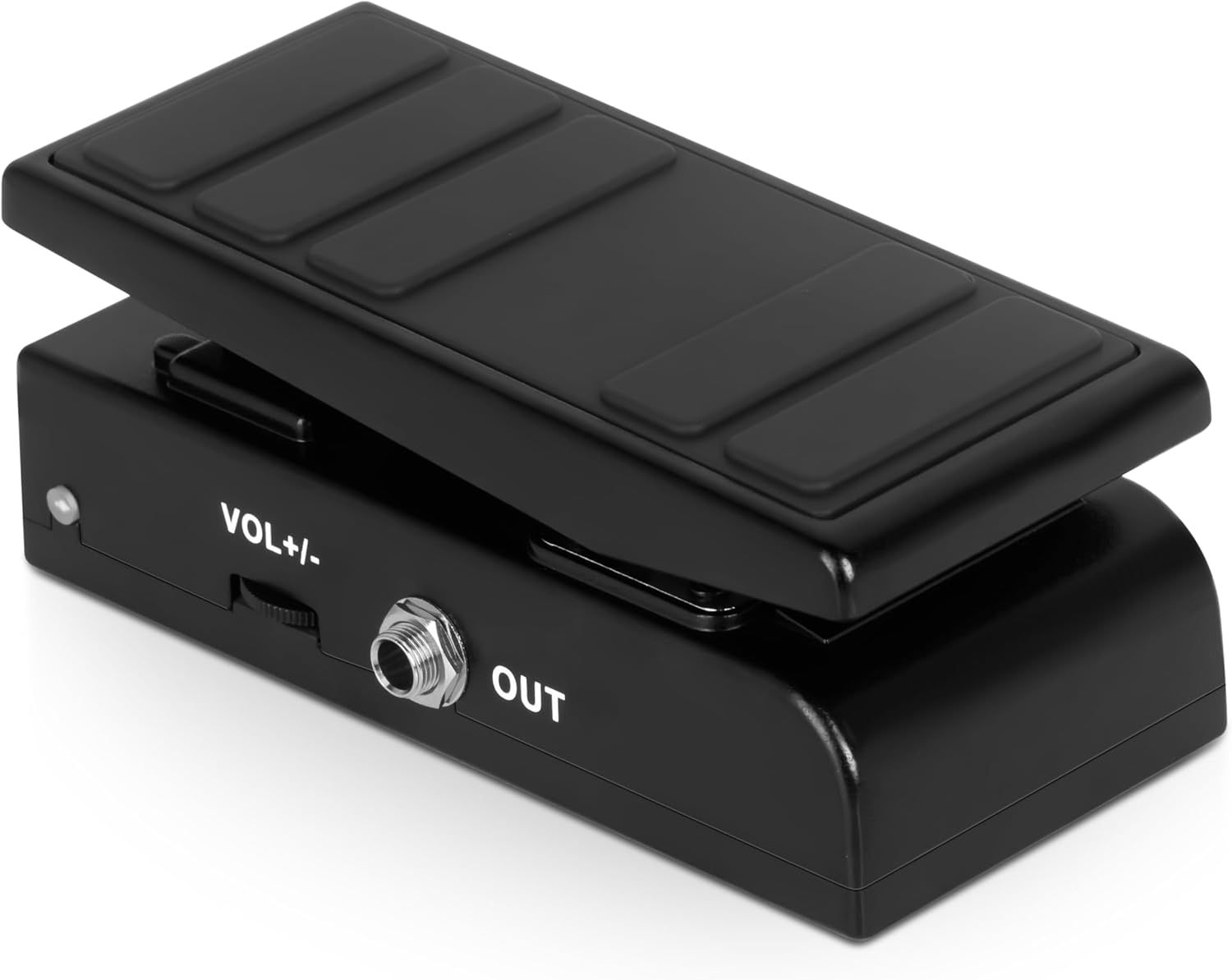
This image presents a side view of the Caline CP-520 pedal, clearly showing the 'OUT' jack and the 'VOL +/-' control knob.
Setup
Follow these steps to properly connect your Caline CP-520 pedal:
- Power Connection: Connect a standard 9V DC center-negative power adapter (not included) to the "DC9V" input jack located on the rear of the pedal.
- Input Connection: Connect your guitar or other instrument to the "IN" jack on the rear of the pedal using a standard 1/4-inch instrument cable.
- Output Connection: Connect the "OUT" jack on the front of the pedal to your amplifier or other effects pedals using a standard 1/4-inch instrument cable.
- Power On: Ensure all connections are secure, then switch the "OFF/ON" toggle on the rear of the pedal to the "ON" position.
Operating Instructions
Switching Between Wah and Volume Modes
The CP-520 pedal features two operational modes: Volume and Wah. An LED indicator shows the current mode.
- Volume Mode: When the red LED light is illuminated, the pedal functions as a volume control. Rocking the pedal forward increases volume, and rocking it back decreases volume.
- Wah Mode: To activate the wah effect, firmly press down on the toe-end of the pedal until the green LED light illuminates. In this mode, rocking the pedal back and forth will produce the classic wah effect.
- Switching Back: To return to volume mode, firmly press down on the toe-end of the pedal again until the red LED light illuminates.
Adjusting Volume
The "VOL +/-" dial located on the side of the pedal allows for fine-tuning of the overall output volume. Adjust this dial to achieve your desired signal level, whether in Volume or Wah mode.
True Bypass
The pedal incorporates true bypass circuitry. When the pedal is switched off (OFF/ON toggle in OFF position), your instrument's signal will pass through the pedal without any coloration or degradation, preserving your original tone.
Maintenance
Proper care will extend the life of your pedal.
- Cleaning: Use a soft, dry cloth to clean the pedal's exterior. Avoid using abrasive cleaners, solvents, or excessive moisture, which can damage the finish or internal components.
- Storage: Store the pedal in a dry environment, away from extreme temperatures, high humidity, and direct sunlight, when not in use.
- Power: Always disconnect the power adapter when the pedal is not in use for extended periods to prevent unnecessary power consumption and potential damage.
Troubleshooting
If you encounter any issues, refer to the table below for common problems and solutions.
| Problem | Possible Cause | Solution |
|---|---|---|
| No Sound | Incorrect power connection, faulty cables, pedal off. | Ensure a 9V DC center-negative adapter is connected and working. Check all instrument cables for damage. Verify the "OFF/ON" switch is in the "ON" position. |
| Wah Effect Not Engaging | Pedal is in Volume mode. | Firmly press down on the toe-end of the pedal until the green LED illuminates, indicating Wah mode. |
| Volume Not Changing | Pedal is in Wah mode, "VOL +/-" dial setting. | Ensure the pedal is in Volume mode (red LED). Adjust the "VOL +/-" dial to your desired level. |
| Unwanted Noise/Hum | Power supply issues, ground loop, faulty cables. | Use a high-quality, regulated 9V DC power supply. Try a different power outlet. Check and replace any suspect cables. |
If issues persist after following these steps, please contact Caline customer support or your authorized dealer for further assistance.
Specifications
Technical details for the Caline CP-520 pedal:
| Feature | Detail |
|---|---|
| Model | CP-520 |
| Item Weight | 1.03 pounds (0.47 Kilograms) |
| Product Dimensions | 5.8"L x 2.59"W x 2.2"H (14.73 x 6.58 x 5.59 cm) |
| Power Requirement | 9V DC Center Negative (Adapter not included) |
| Signal Format | Analog |
| Hardware Interface | HP-HSC |
| Color | Black |
| Style | Multifunctional WAH |
Note: Specifications are subject to change without notice.
Warranty and Support
For warranty information and technical support, please refer to the official Caline website or contact your authorized dealer. Keep your purchase receipt as proof of purchase for any warranty claims.
For more information and product updates, visit the Caline Store.