Introduction
The Symphony Duet-i is a personal kitchen cooling fan designed to provide a comfortable environment in various spaces, including kitchens and offices. This manual outlines the necessary steps for safe and efficient use, from initial setup to routine maintenance and troubleshooting.

Image: The Symphony Duet-i Personal Kitchen Cooling Fan in a kitchen setting, providing focused airflow without disturbing the stove flame.
Product Features
- Compact and Portable Design: Lightweight and easy to carry, allowing flexible placement.
- Efficient Cooling: Utilizes a high-efficiency honeycomb cooling pad for effective air humidification and cooling.
- Touchscreen Control: Intuitive digital touchscreen for easy operation.
- Low Power Consumption: Operates at 60 watts, contributing to energy efficiency.
- 6-Liter Water Tank: Features a transparent water level indicator for convenient monitoring and refilling.
- Optional Ice Water Chamber: Dedicated chamber for adding ice to enhance cooling performance.
- Oscillating Function: Provides 180-degree auto-rotation for wide air distribution.
- Mood Lighting: Integrated mood lighting feature to enhance ambiance.
- Safety Features: Shock-resistant body and bladeless design for safe use in homes with children and pets.
- Low Noise Operation: Designed for quiet performance.

Image: Detailed view of the Symphony Duet-i's swivel action, water level indicator, and touchscreen control panel.
Setup
- Unpacking: Carefully remove the cooling fan from its packaging. Ensure all components are present: the main unit and power cord.
- Placement: Place the unit on a stable, flat surface such as a kitchen countertop or office table. Ensure there is adequate space around the unit for proper airflow.
- Water Filling:
- Locate the water filling port, typically at the back or side of the unit.
- Pull open the "ICE. WATER PULL TO OPEN" tray.
- Fill the 6-liter water tank with clean water. Do not exceed the "MAX" indicator line visible on the front of the unit.
- For enhanced cooling, add ice cubes to the dedicated ice chamber before closing the tray.
- Power Connection: Plug the power cord into a standard electrical outlet (230 Volts).
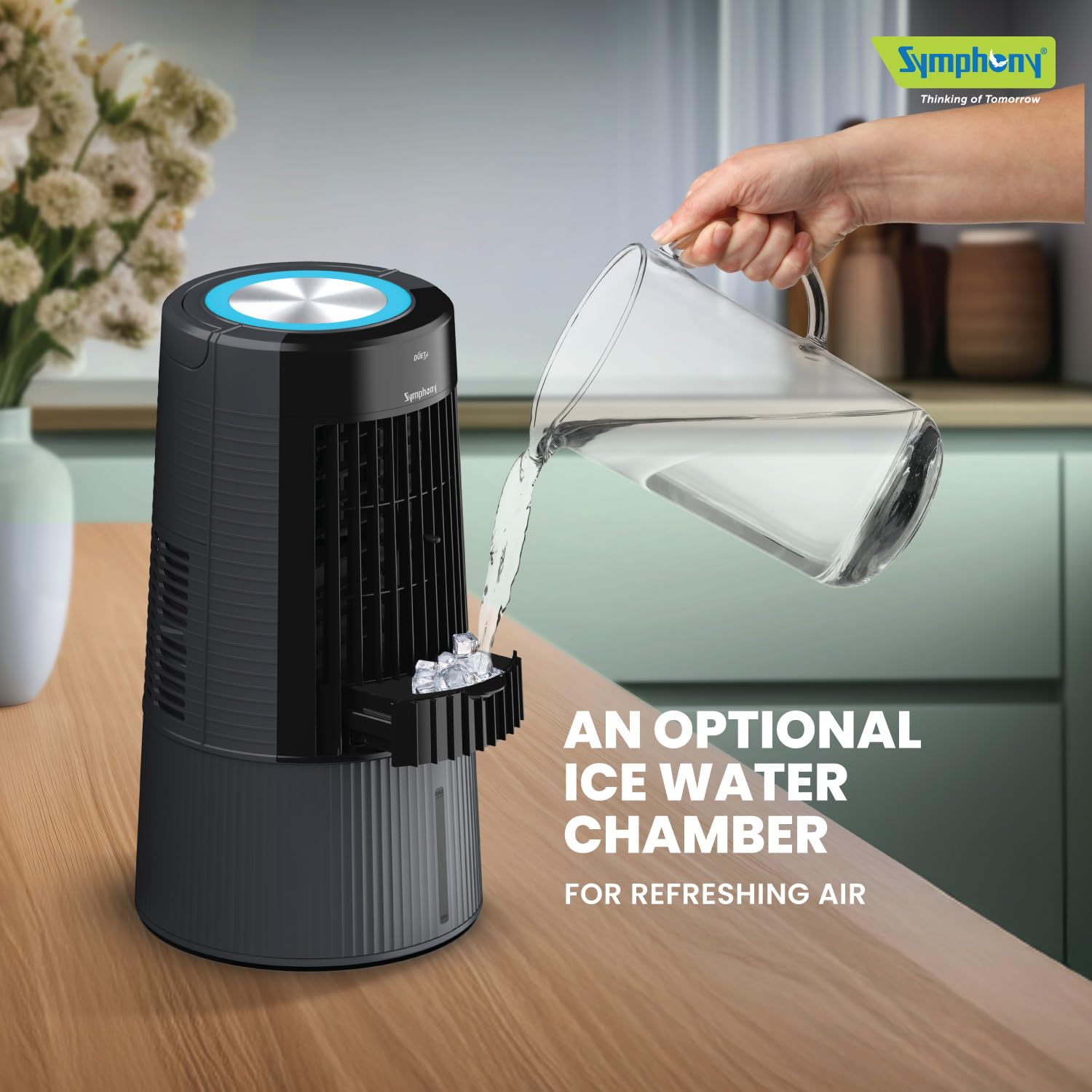
Image: Demonstrating how to fill the ice water chamber of the Symphony Duet-i for refreshing air.
Operation
- Power On/Off: Press the power symbol on the touchscreen control panel to turn the unit on or off.
- Fan Speed Adjustment: The unit offers 3 fan speeds. Press the fan speed icon on the touchscreen to cycle through low, medium, and high settings.
- Oscillation/Swing Function: Press the oscillation icon on the touchscreen to activate or deactivate the 180-degree auto-rotation feature, which distributes air across a wider area.
- Cooling Mode: Ensure the water tank is filled. The unit will automatically engage the cooling function using the honeycomb pads.
- Mood Light Control: Press the mood light icon to turn the ambient lighting on or off.
Video: A short demonstration of the Symphony Duet-i Personal Kitchen Cooling Fan's features, including water filling, touchscreen controls, and its use in various settings.
Maintenance
Regular maintenance ensures optimal performance and longevity of your Symphony Duet-i cooling fan.
- Water Tank Cleaning:
- Unplug the unit before cleaning.
- Drain any remaining water from the tank.
- Clean the water tank with a soft cloth and mild detergent. Rinse thoroughly to remove any residue.
- Allow the tank to air dry completely before refilling.
- Honeycomb Pad Cleaning:
- Refer to the product diagram to locate and carefully remove the honeycomb cooling pad.
- Rinse the pad under running water to remove dust and mineral deposits. Do not use harsh chemicals.
- Allow the pad to dry completely before reinserting it into the unit.
- Replace the honeycomb pad annually or as needed, depending on usage and water quality.
- Exterior Cleaning: Wipe the exterior surfaces of the unit with a soft, damp cloth. Avoid using abrasive cleaners or solvents.
Troubleshooting
| Problem | Possible Cause | Solution |
|---|---|---|
| Unit does not power on. | No power supply; power cord not properly connected. | Check if the unit is plugged into a working outlet. Ensure the power cord is securely connected. |
| No cooling effect. | Water tank is empty; honeycomb pad is dry or clogged. | Fill the water tank. Clean or replace the honeycomb pad. |
| Low airflow. | Air inlet/outlet blocked; fan speed set too low. | Ensure air inlets and outlets are clear of obstructions. Increase the fan speed setting. |
| Unusual noise during operation. | Unit not on a flat surface; foreign object inside. | Place the unit on a stable, flat surface. Unplug and inspect for any foreign objects. |
Specifications
| Feature | Detail |
|---|---|
| Brand | Symphony |
| Model Name | ACOPE487 |
| Material | Plastic |
| Mounting Type | Freestanding |
| Color | Grey |
| Air Flow Capacity | 10 Cubic Feet Per Minute |
| Controls Type | Touch |
| Reservoir Capacity | 6 Liters |
| Floor Area Coverage | 110 Square Feet |
| Item Weight | 5.8 Kilograms |
| Recommended Uses | Cooling |
| Form Factor | Personal |
| Wattage | 60 Watts |
| Number Of Speeds | 3 |
| Voltage | 230 Volts |
| Item Dimensions (D x W x H) | 26D x 26W x 47H Centimeters |
| Included Components | 1 Duet-i Fan |
Warranty and Support
The Symphony Duet-i Personal Kitchen Cooling Fan comes with a limited warranty. The warranty is valid for 12 months from the date of purchase or invoice, provided the product is operated according to the recommendations mentioned in this manual.
For any service requests or support, please contact Symphony Limited customer service. Contact information can typically be found on the product packaging or the official Symphony website.