Introduction
Thank you for choosing the Aiwa Satori AW-SSB240 Soundbar. This 2.1 channel sound system with a 6.5-inch subwoofer delivers 240W of powerful audio output, designed to enhance your home entertainment experience. This manual provides essential information for setting up, operating, and maintaining your soundbar to ensure optimal performance.
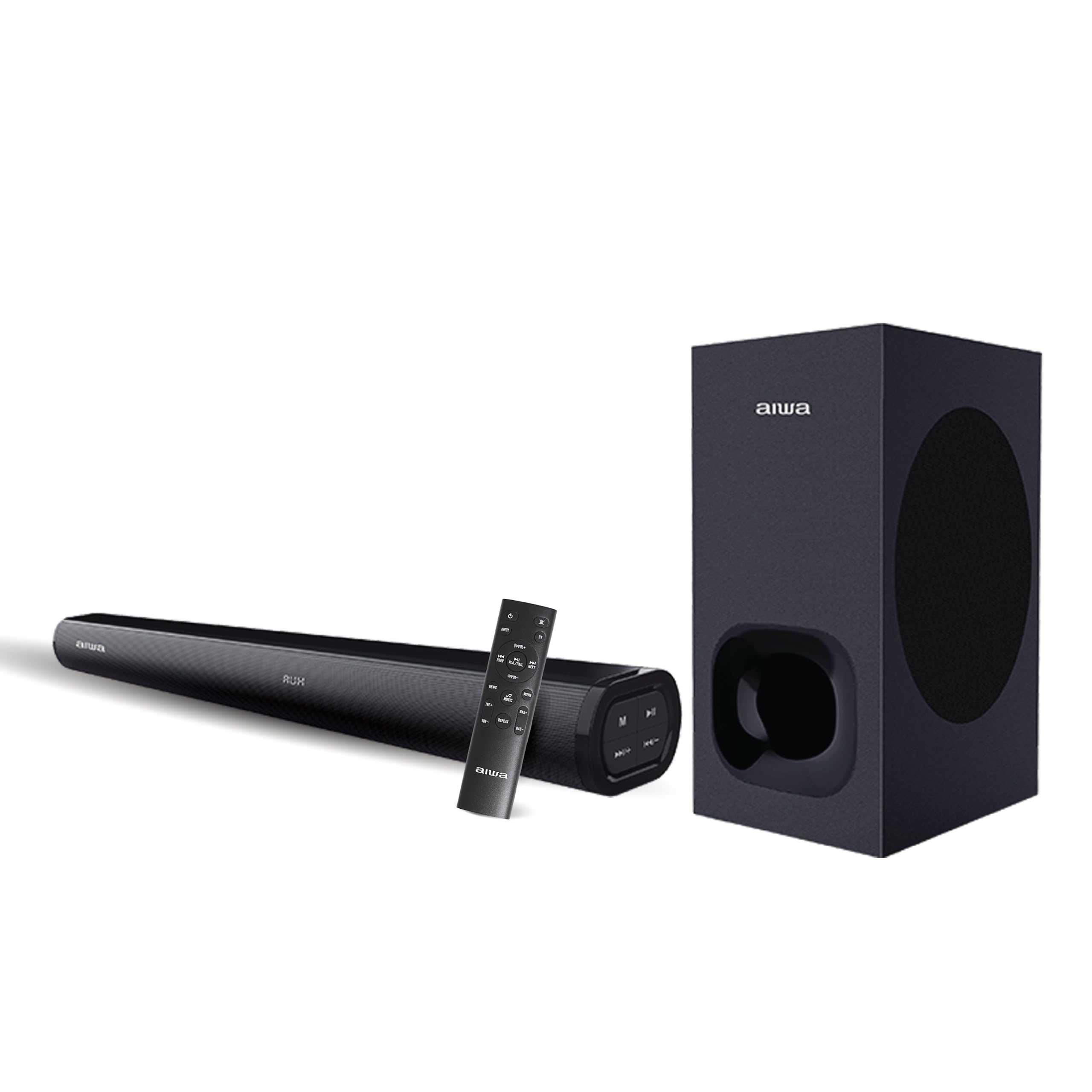
What's in the Box
Carefully unpack your Aiwa Satori AW-SSB240 Soundbar package and ensure all items are present:
- 1N Woofer (Wired)
- 1N Soundbar
- 1N Remote Control
- 1N User Manual
- 1N 3.5mm Audio Cable
- 1N Power Cable

Setup
1. Placement
- Place the soundbar centrally below your television or display for optimal stereo imaging.
- Position the wired subwoofer on the floor, ideally near the soundbar, to enhance bass response. Ensure it has adequate ventilation.
2. Connections
- Subwoofer Connection: Connect the wired subwoofer to the soundbar using the dedicated subwoofer output port.
- Power Connection: Connect the power cable to the soundbar's power input and then to a suitable power outlet.
- Audio Source Connection: Choose one of the following methods to connect your audio source:
- HDMI (ARC): For the best audio quality and control, connect an HDMI cable from the soundbar's HDMI ARC port to your TV's HDMI ARC port.
- Optical: Connect an optical cable from the soundbar's optical input to your TV's optical output.
- AUX: Use the provided 3.5mm audio cable to connect your device to the soundbar's AUX input.
- USB/SD Card: Insert a USB drive or SD card into the respective ports for direct media playback.
Operating Instructions
1. Power On/Off
Press the Power button on the soundbar or the remote control to turn the unit on or off.
2. Input Selection
Press the 'Mode' button on the soundbar or the remote control to cycle through available input sources: Bluetooth, HDMI (ARC), Optical, AUX, USB, and SD Card.
3. Volume Control
Use the Volume Up (+) and Volume Down (-) buttons on the soundbar or remote control to adjust the master volume.
4. Bluetooth Pairing
- Select Bluetooth mode on the soundbar. The LED indicator will flash, indicating it's in pairing mode.
- On your device (smartphone, tablet, etc.), enable Bluetooth and search for available devices.
- Select "AW-SSB240" from the list. Once connected, the LED indicator will stop flashing.
5. Remote Control Functions
The included remote control provides full functionality for your soundbar, including:
- Power On/Off
- Input Mode Selection
- Volume Up/Down
- Play/Pause, Next/Previous Track (for USB/SD Card/Bluetooth modes)
- EQ Modes: Select from 3 preset equalizer modes to optimize audio for different content (e.g., Music, Movie, News).
- Bass & Treble Controls: Adjust bass and treble levels independently to customize your sound preference.

Connectivity Features
The Aiwa Satori AW-SSB240 Soundbar offers a wide range of connectivity options to integrate seamlessly with your devices:
- Bluetooth V5.3: For wireless audio streaming from smartphones, tablets, and other Bluetooth-enabled devices.
- HDMI (ARC): Audio Return Channel for simplified connection and control with compatible televisions.
- Optical Input: High-quality digital audio connection for TVs and other optical-enabled devices.
- AUX Input: Standard 3.5mm audio jack for connecting a wide range of analog audio sources.
- USB Playback: For playing audio files directly from a USB flash drive.
- SD Card Playback: For playing audio files directly from an SD memory card.

Specifications
| Feature | Description |
|---|---|
| Model Name | AW-SSB240-SATORI |
| Speaker Type | Soundbar |
| Mounting Type | Floor Standing |
| Surround Sound Channel Configuration | 2.1 |
| Speaker Maximum Output Power | 240 Watts |
| Subwoofer Diameter | 6.5 Inches |
| Speaker Size | 6.6 Inches |
| Frequency Response | 20 Hz |
| Wireless Communication Technology | Bluetooth V5.3 |
| Connectivity Technology | Auxiliary, Bluetooth, HDMI (ARC), USB, Optical |
| Audio Output Mode | Stereo |
| Control Method | Remote |
| Compatible Devices | Desktop, Home Theater, Smartphone, Tablet, Television |
| Product Dimensions | 88.9D x 22.9W x 48.3H Centimeters |
| Item Weight | 6 Kilograms |
| Power Source | Corded Electric |
| Colour | SATORI - 240 (Black) |
| Special Feature | Japanese Technology |
| Country of Origin | India |

Troubleshooting
If you encounter any issues with your Aiwa Satori AW-SSB240 Soundbar, please refer to the following common solutions:
- No Power: Ensure the power cable is securely connected to both the soundbar and a working power outlet.
- No Sound: Check that the correct input source is selected. Verify all audio cables are properly connected. Adjust the volume on both the soundbar and your connected device.
- Bluetooth Pairing Issues: Make sure the soundbar is in Bluetooth pairing mode. Disable and re-enable Bluetooth on your device, then try pairing again. Ensure no other devices are currently connected to the soundbar.
- Distorted Sound: Reduce the volume. Check audio source quality. Ensure cables are not damaged or loose.
- Remote Control Not Working: Check the battery in the remote control. Ensure there are no obstructions between the remote and the soundbar.
Maintenance
To ensure the longevity and optimal performance of your soundbar, follow these maintenance guidelines:
- Cleaning: Use a soft, dry cloth to clean the surfaces of the soundbar and subwoofer. Do not use liquid cleaners or abrasive materials.
- Ventilation: Ensure adequate airflow around the soundbar and subwoofer to prevent overheating. Do not block ventilation openings.
- Storage: If storing the unit for an extended period, disconnect it from power and store it in a cool, dry place away from direct sunlight and extreme temperatures.
Warranty and Support
Your Aiwa Satori AW-SSB240 Soundbar comes with a 1-year warranty from the date of purchase, covering manufacturing defects. Please retain your purchase receipt for warranty claims.
For technical support, service, or further inquiries, please contact Aiwa India Sales & Services Pvt. Ltd. at:
- Address: 2E/26, Jhandewalan Extn, New Delhi -110055
- Contact: 1800-120-5619
- Email: getintouch@aiwaindia.com


