
ROVE R2-4K DUAL
ROVE R2-4K DUAL Dash Cam User Manual
Model: R2-4K DUAL
1. Introduction
This manual provides detailed instructions for the installation, operation, and maintenance of your ROVE R2-4K DUAL Dash Cam. Please read this manual thoroughly before use to ensure proper functionality and to maximize your device's performance.

Image: ROVE R2-4K DUAL Dash Cam with its components.
2. Package Contents
Verify that all items listed below are included in your package:
- 1x R2-4K DUAL Dash Cam
- 1x Rear Cam
- 1x ROVE PRO 128GB microSD Card
- 1x Dual USB Fast Car Charger
- 1x Windshield Suction Mount
- 1x 3M Sticky Mount
- 1x User Manual
- 1x Quick Start Guide & 1x Warranty Card
- 1x 3.5M USB-C Power Cable
- 1x 1M USB-C Data Cable
- 1x 6.5M Rear Cam Extension Cable
- 5x Cable Clips
- 1x Wire Trim Tool
- 2x Sticky Tapes
- 2x Electrostatic Films
- 2x Wet Cleaning Pads

Image: Detailed view of all included accessories and components.
3. Setup and Installation
Follow these steps for proper installation of your dash cam system:
- Mount Front Camera: Attach the front dash cam to the passenger side of your windshield using the provided suction mount. Ensure a clear view of the road.
- Install Rear Camera: Apply the electrostatic film to the rear windshield and attach the rear camera. Position it for optimal rear view coverage.
- Run Rear Cam Cable: Carefully hide the 6.5M rear cam extension cable along the roof liner or panels using the included wire trim tool for a neat installation.
- Power Up: Plug the dual USB car charger into your vehicle's cigarette lighter socket. Connect the 3.5M USB-C power cable from the charger to the front dash cam.

Image: Step-by-step guide for easy installation.
4. Operating Instructions
4.1 Basic Operation
The ROVE R2-4K DUAL Dash Cam is designed for automatic operation. Once powered, it will automatically begin recording. The 3" IPS display provides a live view of both front and rear cameras.
- Power On/Off: The device powers on automatically when your vehicle starts and powers off when the ignition is turned off.
- Recording: Continuous loop recording starts automatically. Emergency videos are locked and protected from overwriting.
- Menu Navigation: Use the physical buttons below the screen (MENU, UP, DOWN, OK) to navigate settings and playback options.
4.2 ROVE App Connectivity
Utilize the ROVE App for iOS & Android to enhance your dash cam experience. The built-in dual-band 5GHz and 2.4GHz WiFi allows for ultra-fast download speeds of up to 20MB/s.
- Live Preview: View real-time footage from your dash cam on your smartphone.
- Manage Recordings: Easily browse, play back, and download recorded videos directly to your phone.
- Settings Control: Adjust camera settings and update firmware over-the-air (OTA) via the app.

Image: ROVE App integration for seamless control and fast downloads.
5. Key Features
5.1 4K Front + 1080P Rear Recording
The ROVE R2-4K DUAL captures crystal-clear footage simultaneously from both front and rear cameras. The front camera records at 3840x2160P @30fps, and the rear camera at 1920x1080P @30fps. With a 150° ultra-wide angle for the front and 140° for the rear, more of the road is captured.

Image: Dual vision for total protection.
5.2 SONY STARVIS 2 Sensor / Super Night Vision
Equipped with a Sony IMX675 STARVIS 2 Image Sensor and F1.5/F1.8 aperture lenses, the dash cam delivers exceptional image quality with vivid colors and sharp details, even in challenging low-light conditions.

Image: Enhanced night vision with STARVIS 2 sensor.
5.3 Built-in GPS
The integrated GPS module enables real-time display of speed and compass direction on the 3" IPS screen. It records precise driving routes, locations, and speed stamps directly onto the video, providing crucial evidence when needed. ROVE's free GPS Player for PC/Mac allows for detailed review of this data.
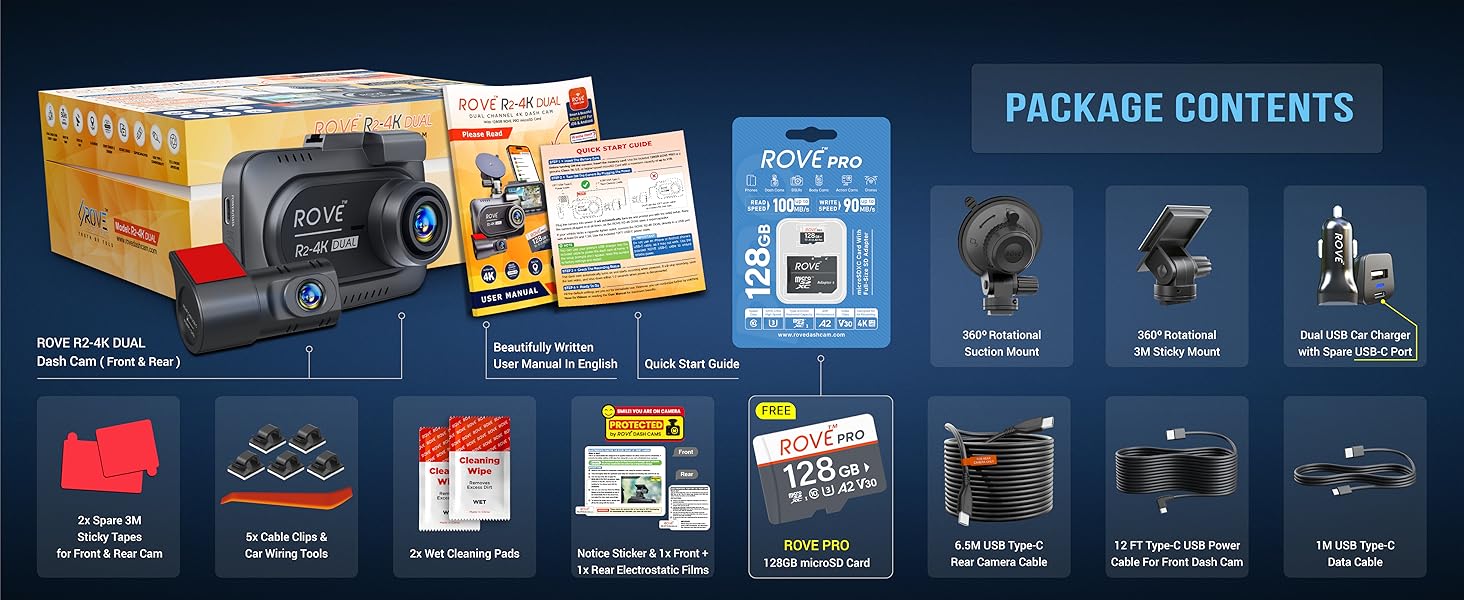
Image: Accurate route and speed tracking with built-in GPS.
5.4 24/7 Custom Designed Parking Mode
The R2-4K DUAL offers three parking mode options: 1fps timelapse video, motion detection, and collision detection. If an event occurs while parked, the camera records a 1-minute video, locks it, and provides a voice alert upon car startup. Note: A hardwire kit (ASIN: B0B7235VLX) is required and sold separately for parking mode functionality.

Image: Comprehensive 24-hour parking mode.
5.5 Built-in G-Sensor (Emergency Accident Lock)
The built-in three-axis impact G-sensor automatically detects collisions and securely locks the video evidence, preventing it from being overwritten. This ensures vital footage is preserved for investigation.

Image: G-Sensor for emergency accident lock.
5.6 Supercapacitor for Extended Product Life
The dash cam features a built-in supercapacitor, offering superior durability and resistance to extreme temperatures (both high heat and cold). This design choice enhances product longevity and provides a safer operation compared to traditional batteries.

Image: Supercapacitor benefits for durability and safety.
5.7 Seamless Loop Recording
The dash cam continuously records in a loop. When the memory card becomes full, it automatically deletes the oldest video files to make space for new recordings, ensuring you never have to manually delete files.

Image: How seamless loop recording works.
5.8 Voice Guidance
The ROVE R2-4K DUAL provides helpful voice alerts. For example, if the camera is not recording, it will remind you every 30 seconds. When parking mode is activated, it will alert you with a voice message like "Parking mode got activated while you were away."

Image: Voice guidance for important alerts.
5.9 Screen Saver
The screen saver feature minimizes distractions, especially in low light or at night. It automatically activates after 1 minute, allowing continuous video recording in the background while displaying only essential driving details like date, time, live speed, compass, and recording status.

Image: Screen saver displaying essential information.
5.10 USB Type-C Compatibility
Experience advanced USB Type-C convenience with the ROVE R2-4K DUAL Dash Cam. This ensures rapid data transmission and quick supercapacitor charging, providing a safer and more efficient user experience. Note: The power cable does NOT transfer data.

Image: USB Type-C compatibility for enhanced connectivity.
6. Maintenance
6.1 General Care and Cleaning
- Keep the dash cam lenses clean using the provided wet cleaning pads or a soft, lint-free cloth. Avoid abrasive materials.
- Ensure the device is kept within its operating temperature range to prevent damage.
- Regularly check the suction mount for secure attachment to the windshield.
6.2 Firmware Updates
Your dash cam continuously improves with FREE firmware updates and the latest features. The ROVE App makes updating the firmware Over The Air (OTA) easy by using a 5G WiFi connection. Regularly check the app for available updates to ensure optimal performance and access to new functionalities.

Image: Over-The-Air (OTA) firmware update process.
7. Troubleshooting
If you encounter issues with your ROVE R2-4K DUAL Dash Cam, refer to the following common problems and solutions:
| Problem | Possible Cause | Solution |
|---|---|---|
| Dash cam does not power on. | No power supply; loose connection. | Check car charger connection; ensure vehicle ignition is on. |
| Recording stops unexpectedly. | Memory card full or corrupted; G-sensor sensitivity too high. | Format the microSD card; reduce G-sensor sensitivity in settings. |
| Wi-Fi connection issues. | Incorrect Wi-Fi password; interference; app issues. | Ensure correct password; restart dash cam and phone; reinstall ROVE App. |
| Poor video quality. | Dirty lens; protective film still on lens; low light conditions. | Clean lenses; remove protective film; ensure sufficient lighting for optimal recording. |
8. Specifications
| Feature | Detail |
|---|---|
| Model Name | R2-4K DUAL |
| Product Dimensions | 1.45 x 3.64 x 2.5 inches |
| Item Weight | 4.5 ounces |
| Video Capture Resolution | Front: 2160p (4K) @30fps, Rear: 1080p @30fps |
| Image Sensor | Sony IMX675 STARVIS 2 (Front) |
| Connectivity Technology | Wi-Fi (5GHz & 2.4GHz), USB |
| Display | 3" IPS Wider Display |
| Storage Support | Up to 1TB microSD cards (128GB included) |
| Special Features | HDR, Built-in GPS, Supercapacitor, G-Sensor, Loop Recording, Parking Mode, Voice Guidance, Screen Saver |
| Mounting Type | Windshield Suction Mount / 3M Sticky Mount |
9. Warranty and Support
For any questions, technical assistance, or warranty inquiries regarding your ROVE R2-4K DUAL Dash Cam, please contact ROVE customer support:
- Email: Refer to your Quick Start Guide or Warranty Card for specific email contact.
- Text Support: Available 7 days a week, 9 AM - 5 PM (PST). Refer to your Quick Start Guide or Warranty Card for the text support number.
- Online Resources: Visit the official ROVE Dash Cam website or scan the QR code in your manual to join the ROVE Dash Cam Community on Facebook for additional support and FAQs.
ROVE is committed to providing innovative products and excellent customer satisfaction. Please retain your proof of purchase for warranty claims.
Related documentsR2-4K DUAL


Ask a question about this manual
Ask about setup, troubleshooting, compatibility, parts, safety, or missing instructions. Manuals+ will review the question and use this page’s manual context to help answer it.