Introduction
Thank you for choosing the Fieety V7 Cordless Stick Vacuum Cleaner. This manual provides essential information for the safe and efficient operation, maintenance, and troubleshooting of your new vacuum cleaner. Please read this manual thoroughly before first use and keep it for future reference.
Important Safety Instructions
Always follow basic safety precautions when using electrical appliances to reduce the risk of fire, electric shock, or injury.
- Read all instructions before using the appliance.
- Do not use outdoors or on wet surfaces.
- Do not allow to be used as a toy. Close attention is necessary when used by or near children.
- Use only as described in this manual. Use only manufacturer's recommended attachments.
- Do not use with damaged cord or plug. If appliance is not working as it should, has been dropped, damaged, left outdoors, or dropped into water, return it to a service center.
- Do not pull or carry by cord, use cord as a handle, close a door on cord, or pull cord around sharp edges or corners. Do not run appliance over cord. Keep cord away from heated surfaces.
- Do not unplug by pulling on cord. To unplug, grasp the plug, not the cord.
- Do not handle plug or appliance with wet hands.
- Do not put any object into openings. Do not use with any opening blocked; keep free of dust, lint, hair, and anything that may reduce air flow.
- Keep hair, loose clothing, fingers, and all parts of body away from openings and moving parts.
- Do not pick up anything that is burning or smoking, such as cigarettes, matches, or hot ashes.
- Do not use to pick up flammable or combustible liquids, such as gasoline, or use in areas where they may be present.
- Do not pick up toxic material (e.g., chlorine bleach, ammonia, drain cleaner).
- Do not use without dust cup and/or filters in place.
- Turn off all controls before unplugging.
- Use extra care when cleaning on stairs.
- Do not use to pick up hard or sharp objects such as glass, nails, screws, coins, etc.
- Prevent unintentional starting. Ensure the switch is in the OFF position before connecting to battery pack, picking up or carrying the appliance.
- Recharge only with the charger specified by the manufacturer.
- Under abusive conditions, liquid may be ejected from the battery; avoid contact. If contact accidentally occurs, flush with water. If liquid contacts eyes, additionally seek medical help.
Package Contents
Carefully unpack all components and check against the list below. If any items are missing or damaged, contact Fieety customer support.

Image: The Fieety V7 Cordless Stick Vacuum Cleaner shown with its main body, extension wand, floor brush, wall mount, charger, and various attachments including a crevice tool and brush tool.
- Main Vacuum Body (with dustbin and motor)
- Extension Wand
- Motorized Floor Brush (with soft and hard bristles)
- Wall Mount with Charging Function
- Power Adapter/Charger
- Crevice Tool
- 2-in-1 Brush Tool
- User Manual
Product Overview
Components

Image: An illustration highlighting the powerful 550W motor and adjustable suction levels (18KPa, 28KPa, 45KPa) of the Fieety V7 vacuum.

Image: A close-up of the vacuum's intelligent HD touch screen display, showing battery percentage and mode indicators.
- Main Body: Contains the 550W motor, 1.5L dustbin, and the intelligent HD touch screen.
- Extension Wand: Connects the main body to the floor brush or other attachments for extended reach.
- Motorized Floor Brush: Equipped with soft and hard bristles for effective cleaning on various floor types, including carpets and hard floors. Features LED lights for improved visibility.
- Battery Pack: Removable 2200mAh battery providing up to 60 minutes of runtime.
- Filtration System: 7-level high-efficiency filtration system, including HEPA filter, to capture fine particles.
Setup & Assembly
Initial Charging
Before first use, fully charge the vacuum cleaner. The battery can be charged while attached to the main unit or separately.
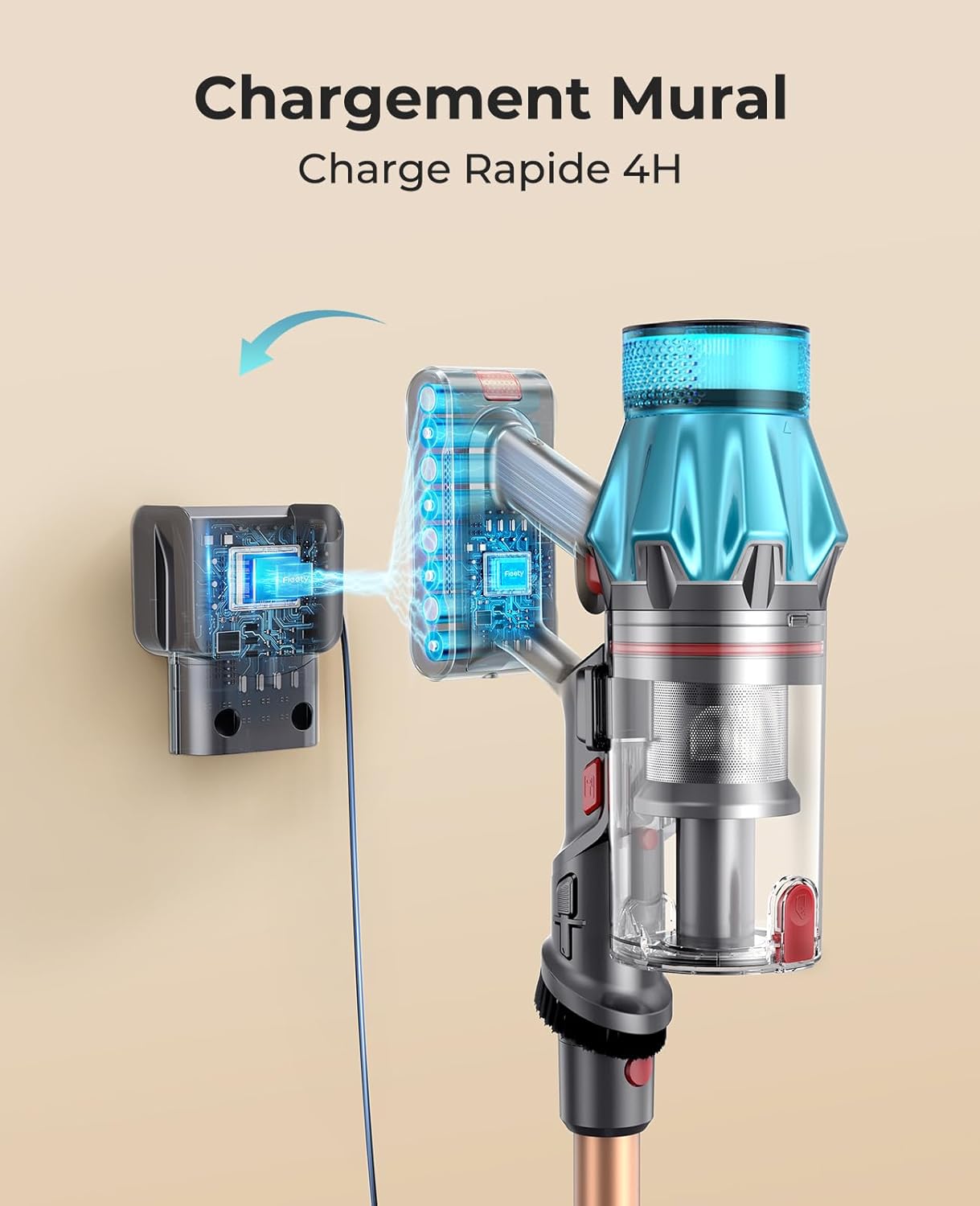
Image: The Fieety V7 vacuum cleaner being charged while docked on its wall-mounted charging station.
- Connect the power adapter to the charging port on the battery or the wall mount.
- Plug the adapter into a power outlet.
- The display screen will indicate charging status. A full charge takes approximately 4-5 hours.
Assembly
- Attach the Extension Wand: Align the main vacuum body with the extension wand and push until it clicks into place.
- Attach the Floor Brush: Connect the motorized floor brush to the other end of the extension wand, ensuring it clicks securely.
- Attach Accessories: For handheld use, attach the crevice tool or 2-in-1 brush tool directly to the main vacuum body.
Operating Instructions
Powering On/Off
- Press the power button on the handle to turn the vacuum on or off.
Selecting Cleaning Modes

Image: An illustration showing the Fieety V7 vacuum's battery runtime for different power modes: 20 minutes for Max, 35 minutes for Standard, and 60 minutes for Eco mode.

Image: The LED touch screen display of the Fieety V7 vacuum, showing icons for Eco, Medium, and Max modes, battery level, roller brush blockage, and obstructed air ducts.
The intelligent HD touch screen allows you to switch between 3 cleaning modes:
- Eco Mode: For light cleaning and maximum runtime (up to 60 minutes).
- Standard Mode: Balanced power for everyday cleaning (up to 35 minutes).
- Max Mode: Powerful suction for stubborn dirt and deep cleaning (up to 20 minutes).
Tap the mode selection button on the screen to cycle through the modes.
Cleaning Different Surfaces

Image: The Fieety V7 vacuum effectively cleaning various debris, including pet food and crumbs, from both hard floors and carpets, with a dog observing in the background.

Image: The Fieety V7 vacuum demonstrating its versatility by showing different configurations: as a handheld vacuum for a laptop keyboard, with the floor brush for carpets, and with a crevice tool for tight spaces.
- Hard Floors & Carpets: Use the motorized floor brush. The combination of soft and hard bristles is designed for optimal performance on both surfaces.
- Tight Spaces & Corners: Attach the crevice tool directly to the main body or extension wand.
- Upholstery & Delicate Surfaces: Use the 2-in-1 brush tool.
- Edge Cleaning: The design of the floor brush allows for effective cleaning along walls and edges.
Maintenance & Cleaning
Regular maintenance ensures optimal performance and extends the lifespan of your vacuum cleaner.
Emptying the Dustbin
The 1.5L dustbin should be emptied regularly, especially when the MAX line is reached.
- Ensure the vacuum is turned off.
- Press the dustbin release button to detach it from the main body.
- Hold the dustbin over a trash can and press the bottom release latch to open the dustbin flap and empty contents.
- Close the flap and reattach the dustbin to the main body until it clicks.
Cleaning Filters

Image: An illustration demonstrating the Fieety V7 vacuum's 7-level filtration system, showing how it captures microscopic particles like pollen and allergens.
The 7-level filtration system, including the HEPA filter, should be cleaned regularly to maintain suction power.
- Remove the dustbin.
- Twist and pull out the filter assembly from the dustbin.
- Separate the HEPA filter and metal mesh filter.
- Tap off loose dirt. Rinse the filters under cold running water until the water runs clear. Do not use detergent.
- Allow filters to air dry completely for at least 24 hours before reassembling. Do not use a dryer or direct heat.
- Reassemble the filters and place them back into the dustbin, then reattach the dustbin to the main body.
Cleaning the Roller Brush

Image: A cutaway view of the Fieety V7 vacuum's motorized floor brush, highlighting its V-shaped anti-tangle roller brush design and integrated LED lights.
The V-shaped anti-tangle roller brush minimizes hair entanglement, but occasional cleaning is recommended.
- Ensure the vacuum is turned off and disconnected from power.
- Locate the release tab on the side of the floor brush head and open it to remove the roller brush.
- Remove any tangled hair or debris from the roller brush using scissors if necessary.
- Wipe the roller brush and the brush housing with a damp cloth. Ensure all parts are completely dry before reinserting.
- Reinsert the roller brush and secure the release tab.
Troubleshooting
If you encounter issues with your Fieety V7 vacuum, refer to the common problems and solutions below. The intelligent display may also show error warnings.
| Problem | Possible Cause | Solution |
|---|---|---|
| Vacuum does not turn on. | Battery is depleted or not properly installed. | Charge the battery fully. Ensure the battery pack is securely clicked into place. |
| Low suction power. | Dustbin is full. Filters are clogged. Blockage in the nozzle, wand, or hose. Roller brush is tangled. | Empty the dustbin. Clean or replace filters. Check for and remove any blockages. Clean the roller brush. |
| Roller brush not spinning. | Hair or debris tangled around the brush. Brush head is blocked. | Clean the roller brush. Check for any obstructions in the brush head mechanism. |
| Short runtime. | Battery not fully charged. Using Max mode continuously. Battery degradation. | Ensure battery is fully charged (4-5 hours). Use Eco or Standard mode for longer runtime. Contact customer support for battery replacement if necessary. |
| Display shows error warning (e.g., obstructed air ducts). | Airflow is restricted. | Check for blockages in the dustbin, filters, wand, and floor brush. Clean as necessary. |
For further assistance, you can visit the product troubleshooting video link: https://www.fieety.com/pages/troubleshooting
Specifications
| Feature | Specification |
|---|---|
| Model Number | V7 |
| Brand | Fieety |
| Power | 550 Watts |
| Suction Power | Up to 45 KPa |
| Dustbin Capacity | 1.5 Liters |
| Battery Capacity | 2200mAh (8 cells) |
| Runtime | Up to 60 minutes (Eco mode) |
| Charging Time | Approx. 4-5 hours |
| Noise Level | 68 dB |
| Filter Type | 7-level filtration, including HEPA filter |
| Product Dimensions (L x W x H) | 44 x 33 x 19 cm |
| Item Weight | 3.2 Kilograms |
Warranty & Support
Fieety is committed to providing quality products and excellent customer service.
- After-Sales Service: All compatible accessories are available in our official Fieety store.
- Customer Support: For any questions or concerns, please contact our support team.
Contact Information: support.fr@fieety.com


