
Introduction
Thank you for choosing the EUQQ Open Ear Bluetooth 5.4 Headphones. These wireless earbuds are designed for comfort and situational awareness, allowing you to enjoy high-quality audio while remaining aware of your surroundings. Featuring an ergonomic open-ear design, Bluetooth 5.4 connectivity, and extended playtime, these headphones are ideal for various activities including music listening, travel, exercise, and calls. Please read this manual carefully to ensure proper use and optimal performance of your new headphones.

Image: The EUQQ Open Ear Bluetooth 5.4 Headphones, showcasing both earbuds within their charging case. The case features an LED display indicating battery levels for the case and individual earbuds.
What's in the Box
Verify that all components are present in your package:
- 2 x EUQQ Open Ear Headphones (Left and Right)
- 1 x Charging Case
- 1 x USB Type-C Charging Cable
- 1 x User Manual (this document)
- 1 x Product Box

Image: A visual representation of the package contents, including the open ear headphones, charging case, USB-C cable, user manual, and product box.
Product Overview
The EUQQ Open Ear Headphones are designed for comfort and high-fidelity audio.
Key Features:
- Open Over-Ear Design: Allows awareness of surroundings while listening.
- Bluetooth 5.4: Ensures stable and fast wireless connection with low latency.
- Extended Playtime: Up to 10 hours on a single charge, 50 hours total with charging case.
- LED Digital Display: Shows battery status of the case and individual earbuds.
- High Fidelity Audio: Equipped with 14.2mm dynamic speakers for powerful sound.
- Clear Calls: Dual built-in microphones for crystal clear hands-free communication.
- Lightweight & Secure Fit: Ergonomic ear hooks and skin-friendly silicone material for comfortable, stable wear.
- Touch Controls: Intuitive touch sensors for managing music and calls.
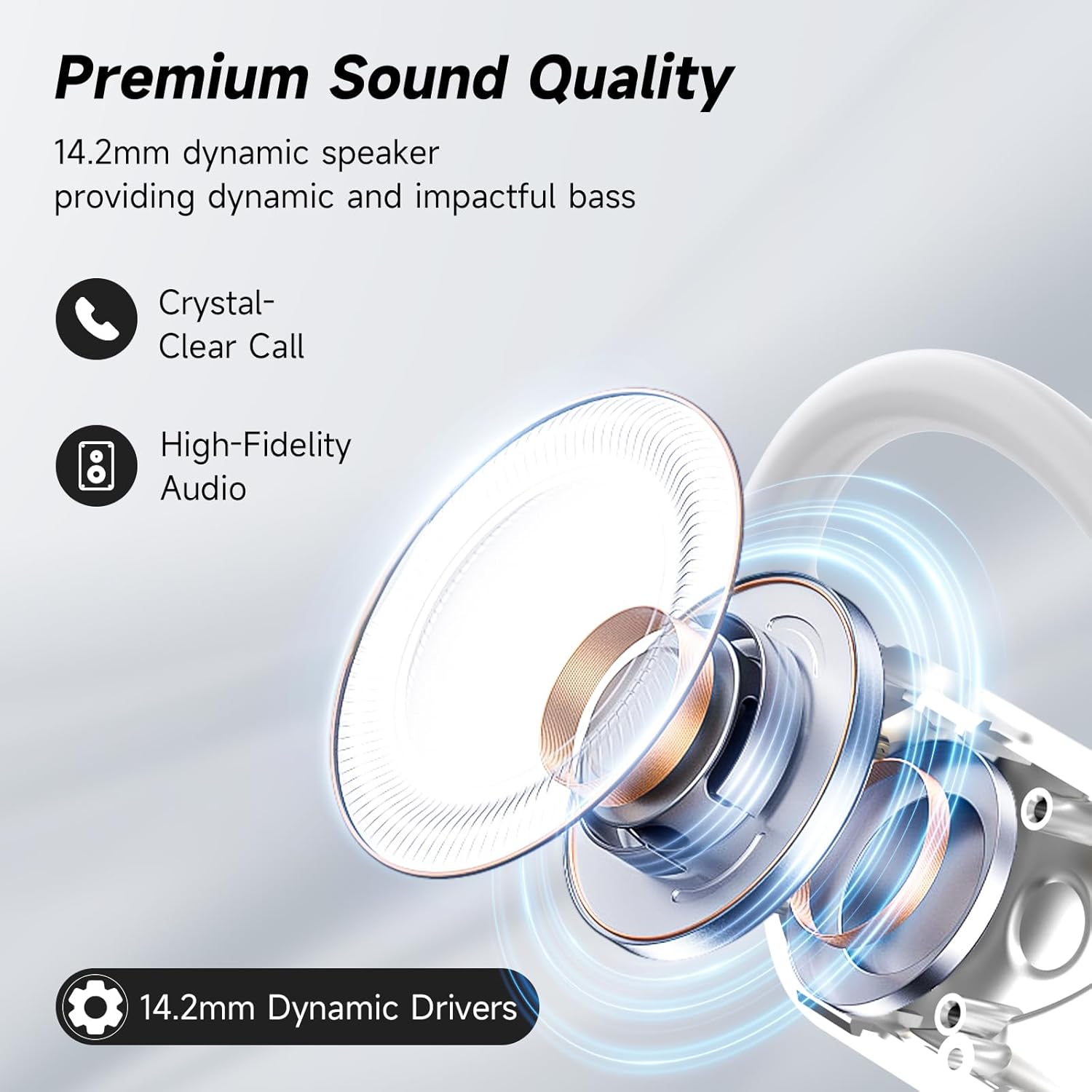
Image: An exploded view diagram illustrating the 14.2mm dynamic speaker component responsible for the premium sound quality of the headphones.

Image: A graphic highlighting the benefits of upgraded Bluetooth 5.4 technology, including more stable connection, lower latency, lower power consumption, and longer transmission range (15m).
Setup
1. Initial Charging
Before first use, fully charge both the headphones and the charging case.
- Place the earbuds into the charging case. Ensure they are properly seated.
- Connect the USB Type-C charging cable to the charging port on the case and the other end to a USB power source (e.g., wall adapter, computer USB port).
- The LED digital display on the charging case will show the charging status. A full charge for the case takes approximately 1 hour.
- The earbuds will charge automatically when placed in the case.

Image: The charging case displaying its 100% charge level and indicating the earbuds are charging, highlighting the 10 hours single playtime and 1 hour fast charging via Type-C.
2. Bluetooth Pairing
Pair your headphones with your device for the first time.
- Open the charging case. The earbuds will automatically power on and enter pairing mode.
- On your device (smartphone, tablet, computer), go to the Bluetooth settings.
- Search for "Q16-W" in the list of available devices.
- Select "Q16-W" to connect. Once connected, you will hear a confirmation tone, and the LED indicator on the earbuds will turn off.
- For subsequent uses, the earbuds will automatically connect to the last paired device when taken out of the case.

Image: A graphic illustrating the wide compatibility of the EUQQ headphones with various Bluetooth-enabled devices such as notebooks, desktops, watches, TVs, phones, and pads.
Wearing Instructions
The EUQQ Open Ear Headphones are designed for a secure and comfortable fit. Follow these steps for optimal wearing:
- Step 1: Take out the earphones from the charging case.
- Step 2: Hang the end of the earphones on the ear bone, positioning the main body of the earbud near your ear canal.
- Step 3: Turn the earphones and slide them behind the ear, ensuring the ear hook wraps around the back of your ear.
- Step 4: Adjust the ear hook and gently pull down the ear hook for a secure and comfortable fit. The multi-point support system distributes weight evenly.

Image: A visual guide demonstrating the four steps to correctly wear the EUQQ open ear headphones, from taking them out to adjusting for a secure fit.

Image: A man wearing the EUQQ open ear headphones, emphasizing their ergonomic ear hooks, skin-friendly material, and ultra-lightweight design for ultimate comfort and perfect fit.
Operating Instructions
The EUQQ Open Ear Headphones feature intuitive touch controls on each earbud.
Music Playback:
- Play/Pause: Single tap on either L or R earbud.
- Volume +: Double tap on the R earbud.
- Volume -: Double tap on the L earbud.
- Next Song: Long press (1s) on the R earbud.
- Previous Song: Long press (1s) on the L earbud.
Call Management:
- Answer Call: Single tap on either L or R earbud.
- Reject Call/Hang Up: Long press (1s) on either L or R earbud.
Voice Assistant:
- Activate Siri/Voice Assistant: Triple tap on either L or R earbud.
Reset Earbuds:
- Reset: Disconnect from the phone, then quickly press the left button 5 times at the same time to reset.

Image: A detailed diagram illustrating the touch control functions for volume, play/pause, track navigation, call management, and voice assistant activation on the earbuds.
Charging
Your EUQQ headphones and charging case provide extended listening time.
- Earbud Charging: Place earbuds into the charging case. They will automatically begin charging.
- Case Charging: Connect the Type-C cable to the case and a power source. The LED display indicates the charging progress.
- Battery Life: Earbuds offer approximately 10 hours of continuous playtime on a single charge. The charging case provides an additional 40 hours, totaling 50 hours of playtime.
- Charging Time: The charging case can be fully charged in approximately 1 hour.

Image: The charging case with its dual LED display, showing the power level of the case and individual earbuds, alongside icons indicating 10 hours of single playtime and 50 hours of total playtime.
Maintenance
Proper care will extend the lifespan of your headphones.
- Cleaning: Regularly wipe the earbuds and charging case with a soft, dry, lint-free cloth. Do not use harsh chemicals or abrasive materials.
- Storage: When not in use, store the headphones in their charging case to protect them from dust and damage.
- Water Resistance: The headphones have a waterproof rating. However, avoid submerging them in water or exposing them to excessive moisture for prolonged periods. Dry them thoroughly if they get wet.
- Temperature: Avoid exposing the headphones to extreme temperatures (hot or cold) or direct sunlight for extended periods.
Troubleshooting
If you encounter issues with your EUQQ Open Ear Headphones, try the following solutions:
| Problem | Possible Cause | Solution |
|---|---|---|
| Headphones not pairing. | Not in pairing mode, device Bluetooth off, interference. | Ensure earbuds are out of case and in pairing mode. Turn device Bluetooth off and on. Move closer to device. Try resetting earbuds (see Operating Instructions). |
| Only one earbud working. | Earbud not charged, not connected, or pairing issue. | Place both earbuds back in the case, close, then reopen. Ensure both are charged. Try resetting earbuds. |
| No sound or low volume. | Device volume low, earbuds volume low, improper fit. | Increase volume on both your device and the earbuds. Adjust the fit of the earbuds to ensure proper sound delivery. |
| Charging issues. | Cable or adapter fault, dirty charging contacts. | Try a different USB-C cable and power adapter. Clean the charging contacts on both the earbuds and the case with a dry cotton swab. |
| Short Bluetooth range. | Obstacles, interference, distance. | Reduce distance between headphones and device. Avoid physical obstructions and strong electromagnetic interference. |
Specifications
| Feature | Detail |
|---|---|
| Model Name | Q16-W |
| Connectivity Technology | Wireless (Bluetooth) |
| Bluetooth Version | 5.4 |
| Bluetooth Range | Up to 15 meters |
| Ear Placement | Open Ear |
| Form Factor | Over Ear (with ear hooks) |
| Audio Driver Type | 14.2mm Dynamic Speaker |
| Playtime (Single Charge) | Up to 10 Hours |
| Total Playtime (with Case) | Up to 50 Hours |
| Charging Time (Case) | Approx. 1 Hour (Type-C) |
| Control Type | Touch Control |
| Microphones | Dual Built-in Microphones |
| Water Resistance Level | Waterproof |
| Material | Plastic, Soft Silicone |
| Item Weight | 0.007 ounces (earbuds) |
Note on Audio Driver Type: While some specifications mention "Bone Conduction Driver", the product's primary description and visual aids emphasize an "Open Air Conduction" design with "14.2mm Dynamic Speakers" for sound delivery. This manual refers to the latter for clarity regarding the open-ear sound experience.

Image: A diagram illustrating the "Open Air Conduction Headphones Design," showing sound waves directed towards the ear without blocking the ear canal, ensuring comfort and reduced ear fatigue.

Image: A comparison table highlighting the differences between Air-Conduction (Open Ear), Bone-Conduction (Open Ear), and Traditional TWS headphones across categories like sound quality, charging case presence, situational awareness, wearing comfort, and Bluetooth version.
Warranty and Support
For warranty information and customer support, please refer to the warranty card included in your product packaging or visit the official EUQQ website.
If you experience any issues not covered in this manual, please contact EUQQ customer service for assistance.
- Manufacturer: EUQQ
- Date First Available: June 6, 2024
Official Product Videos
No official product videos from the seller were found in the provided data.

