
1. Introduction
This manual provides comprehensive instructions for the installation, operation, and maintenance of your MISONDA 9-inch Android Car Stereo. This device integrates advanced features such as the Android 13 operating system, wireless CarPlay, Android Auto, GPS navigation, Bluetooth 5.0, and a high-resolution IPS touchscreen. Please read this manual thoroughly before use to ensure proper functionality and safety.

Image 1.1: MISONDA 9-inch Android Car Stereo with Android 13, 8GB RAM, 256GB ROM, and GPS navigation interface.
2. Package Contents
Verify that all items listed below are included in your package. If any items are missing or damaged, please contact customer support.
- MISONDA 9-inch Android Car Stereo Unit
- Power Socket Harness
- RCA Output Socket A
- RCA Output Socket B
- RCA Output Socket C
- RCA Output Socket D
- GPS Antenna
- USB Cable
- Double USB Cable
- User Manual (this document)
- Installation Brackets
- Rear Camera
- External Microphone

Image 2.1: Visual representation of the 9-inch unit and its accompanying accessories, including various cables, antenna, camera, and microphone.
3. Setup and Installation
Installation of the MISONDA car stereo requires technical knowledge and experience with car audio systems. Professional installation is highly recommended to prevent damage to the unit or your vehicle.
3.1. Pre-Installation Checks
- Ensure the vehicle's ignition is off and the battery is disconnected before starting installation.
- Confirm compatibility with your vehicle's dashboard and wiring harness.
3.2. Wiring Connections
Refer to the included wiring diagram for specific connections. Key connections include:
- Power Socket: Connect to the vehicle's power supply (constant 12V, accessory 12V, ground).
- RCA Output Sockets: For connecting external amplifiers or subwoofers.
- GPS Antenna: Mount in a location with a clear view of the sky for optimal signal reception.
- USB Cables: For connecting USB devices, such as flash drives or smartphones.
- Rear Camera: Connect the included rear camera for parking assistance. Ensure proper power and video signal connections.
- External Microphone: Connect for improved call quality during hands-free operation.
3.3. Mounting the Unit
Use the provided installation brackets to securely mount the stereo into your vehicle's dashboard. Ensure the unit is firmly in place to prevent vibrations and movement during driving.
4. Operating Instructions
4.1. Android 13 System Overview
The unit operates on the latest Android 13 system, powered by an 8-core 64-bit processor, 8GB RAM, and 256GB ROM. This configuration allows for smooth multitasking, app downloads, and media playback.

Image 4.1: Overview of the system's core components including the Octa Core Android 13 processor, DSP, and integrated smartphone connectivity.
4.2. Wireless CarPlay and Android Auto
Connect your smartphone wirelessly via Bluetooth to access CarPlay or Android Auto. This feature allows you to use navigation, make calls, send messages, and listen to music directly from your phone's interface displayed on the car stereo screen.
4.3. GPS Navigation
The unit comes with pre-loaded offline maps. You can also use online maps by connecting to Wi-Fi, which provides real-time traffic conditions and route adjustments. The GPS antenna ensures accurate positioning.

Image 4.2: Demonstrates GPS functionality, Bluetooth phone interface, and steering wheel control integration.
4.4. Bluetooth 5.0
The integrated Bluetooth 5.0 module supports A2DP for high-quality audio streaming, hands-free calling, and phonebook synchronization. Connect your phone to make and receive calls safely while driving.
4.5. Built-in DSP (Digital Sound Processor)
The DSP features a 64-band equalizer, allowing you to fine-tune audio parameters such as equalization, bass filtering, and sound staging to optimize sound quality for your vehicle's environment.
4.6. Split Screen Function
Utilize the split-screen feature to display two applications simultaneously, such as navigation on one side and music playback on the other, enhancing convenience and multitasking.
4.7. Mirror-Link
The Mirror-Link function supports both Android and iOS phones, allowing you to mirror your smartphone's screen onto the car stereo display. For Android phones, two-way control is possible.
4.8. Wi-Fi Connectivity
With a built-in Wi-Fi modem and antenna, the unit can connect to the internet via a Wi-Fi hotspot. This enables online video streaming, app downloads, and real-time data access.

Image 4.3: Demonstrates the split screen, Mirror-Link, and Wi-Fi capabilities of the car stereo.
4.9. Radio (FM/AM/RDS)
The unit supports FM and AM radio reception with RDS (Radio Data System) functionality. You can preset up to 18 FM stations for quick access.
4.10. Steering Wheel Control (SWC)
The system supports steering wheel controls, allowing you to manage audio and other functions without taking your hands off the wheel, contributing to safer driving.
5. Optional Features (Requires Additional Purchase)
The following features can be added to enhance your car stereo experience:
- 360° Camera System: Provides a surround view of your vehicle, offering different angles and automatically switching views for parking and maneuvering. Supports 1080P AHD and night vision.
- DAB+ (Digital Audio Broadcasting): Connect an external DAB+ antenna box to enjoy high-quality digital radio broadcasts with a wider range of programs and clear, interference-free audio.
- 4G Dongle Support: Connect a 3G/4G dongle for mobile internet access, allowing you to stay connected on the go.
- DVR (Digital Video Recorder): For recording driving footage.
- OBD (On-Board Diagnostics): For monitoring vehicle performance data.
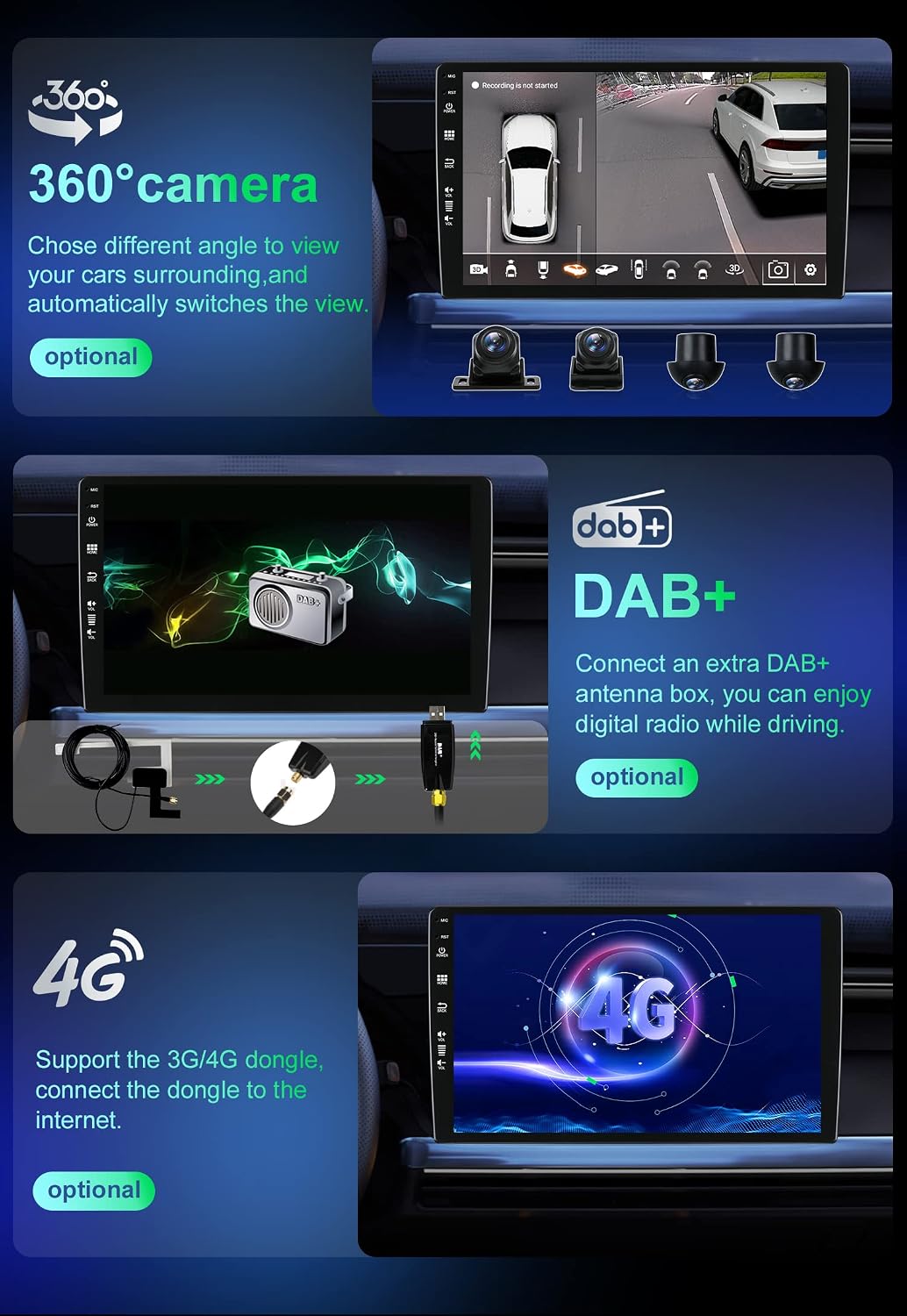
Image 5.1: Illustration of optional accessories such as the 360-degree camera, DAB+ module, and 4G connectivity.
6. Specifications
| Feature | Specification |
|---|---|
| Brand | MISONDA |
| Model Number | BX-D04-256G |
| Operating System | Android 13 |
| Processor | 8-core Cortex A53, 2.5 GHz |
| RAM | 8 GB |
| ROM | 256 GB |
| Screen Size | 9 inches |
| Screen Type | IPS Touchscreen |
| Screen Resolution | 1080 * 680 |
| Power Output | 4*45W |
| Radio Chip | TDA7786 |
| Power Amplifier Chip | TDA7851 |
| Bluetooth Version | 5.0 (with A2DP) |
| Connectivity | USB AM, RCA |
| Special Features | RDS, Touch Screen, Equalizer (DSP) |
| Compatible Devices | Android Phones |
| Operating Temperature | -40°C to 80°C |
| Video Encoding Support | AVI, DAT, VOB, MOV, ASF |
| Audio Output Mode | Stereo |
| Surround Sound Channel Configuration | 4.0 |
7. Troubleshooting
If you encounter issues with your MISONDA car stereo, please refer to the following common troubleshooting steps:
- No Power: Check all power connections, including the constant 12V, accessory 12V, and ground wires. Ensure the vehicle's fuse for the stereo is intact.
- No Sound: Verify speaker connections. Check audio settings, ensure volume is not muted, and confirm external amplifiers (if used) are powered on.
- GPS Signal Loss: Ensure the GPS antenna is securely connected and mounted in a location with an unobstructed view of the sky.
- Bluetooth Connection Issues: Ensure Bluetooth is enabled on both the stereo and your phone. Try unpairing and re-pairing the devices.
- Touchscreen Unresponsive: Try restarting the unit. If the issue persists, a factory reset might be necessary (note: this will erase all user data).
- System Freezes/Slow Performance: Close unnecessary applications. If the issue continues, a system restart or factory reset may resolve it.
For persistent issues not covered here, please contact MISONDA customer support.
8. Maintenance
Proper maintenance ensures the longevity and optimal performance of your car stereo:
- Screen Cleaning: Use a soft, lint-free cloth to gently wipe the touchscreen. Avoid abrasive cleaners or harsh chemicals that could damage the screen.
- Software Updates: Periodically check for and install available software updates to ensure the system runs efficiently and has the latest features and security patches.
- Environmental Conditions: Avoid exposing the unit to extreme temperatures, direct sunlight for prolonged periods, or excessive moisture.
- Connection Checks: Occasionally check all wiring connections to ensure they are secure and free from corrosion.
9. Warranty and Support
9.1. Manufacturer's Warranty
This MISONDA car stereo comes with a 1-year manufacturer's warranty from the date of purchase. This warranty covers defects in materials and workmanship under normal use.
9.2. Return Policy
The product is eligible for a refund or replacement within 31 days of receipt, subject to the seller's return policy.
9.3. Customer Support
For technical assistance, warranty claims, or any other inquiries, please contact the seller or MISONDA customer support through the platform where the product was purchased. Please have your model number (BX-D04-256G) and purchase details ready.