
GODOX TT685II-N
Godox TT685II-N Camera Flash & X2T-N TTL Wireless Trigger User Manual
Model: TT685II-N, X2T-N
1. Introduction
This manual provides detailed instructions for the safe and effective use of your Godox TT685II-N Camera Flash and Godox X2T-N TTL Wireless Trigger. The TT685II-N is a powerful camera flash designed for Nikon cameras, featuring a built-in Godox 2.4G Wireless X System, supporting TTL, Manual, and Multi flash modes, High-Speed Sync (HSS) up to 1/8000s, and a wide light coverage. The X2T-N trigger offers seamless wireless control over Godox flashes, enhancing your photographic capabilities.
Key features include:
- Integrated transmitter and receiver in the TT685II-N flash.
- TCM (TTL to Manual) instant conversion for efficient workflow.
- Broader tilt angle (-7° to 120°) and 330° rotation for flexible bounce flash.
- Type-C USB port for firmware updates and external power connection.
- X2T-N trigger with full TTL autoflash support, 1/8000s HSS, and mobile APP control via Bluetooth.
2. Product Overview

Figure 2.1: Godox TT685II-N Camera Flash and X2T-N TTL Wireless Trigger Kit. This image displays the main components included: the TT685II-N speedlight, the X2T-N wireless trigger, a mini stand for the flash, a protective pouch, and a cleaning cloth.

Figure 2.2: Transmitter & Receiver Flash Diagram. This diagram illustrates how the TT685II can function as both a transmitter and a receiver, and its compatibility with other Godox flash units like V1, AD200Pro, and AD300Pro when acting as a receiver, or with X1, X2, XPro, and V1 when acting as a transmitter.
3. Setup
3.1 Battery Installation
The TT685II-N flash uses 4 AA batteries. The X2T-N trigger uses 2 AA batteries. Ensure correct polarity when inserting batteries.
- Open the battery compartment cover on the back of the flash/trigger.
- Insert the AA batteries according to the polarity indicators (+/-).
- Close the battery compartment cover securely.
3.2 Mounting on Camera
Both the TT685II-N flash and X2T-N trigger are designed for hot shoe mounting.
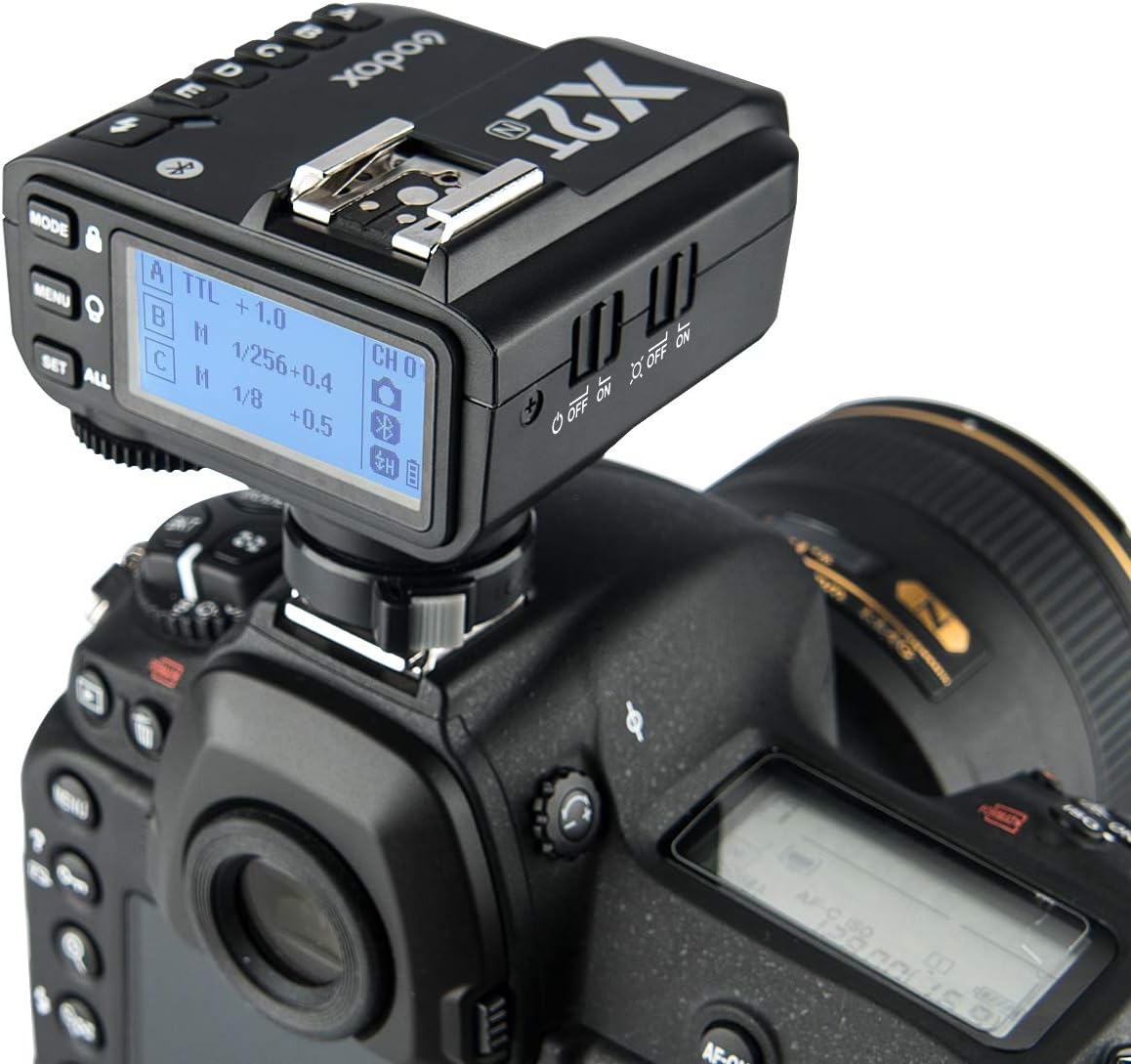
Figure 3.1: Godox X2T-N Trigger Mounted on a Nikon DSLR Camera. This image shows the X2T-N trigger securely attached to the camera's hot shoe, ready for wireless flash control.
- Slide the flash/trigger's hot shoe foot into the camera's hot shoe slot.
- Rotate the locking ring or lever clockwise until it is securely tightened. Do not overtighten.
3.3 Powering On
Press the power button on the flash or trigger to turn it on. The LCD screen will illuminate.
3.4 Initial Settings (Wireless X System)
To use the wireless system, ensure the flash and trigger are set to the same channel and group.
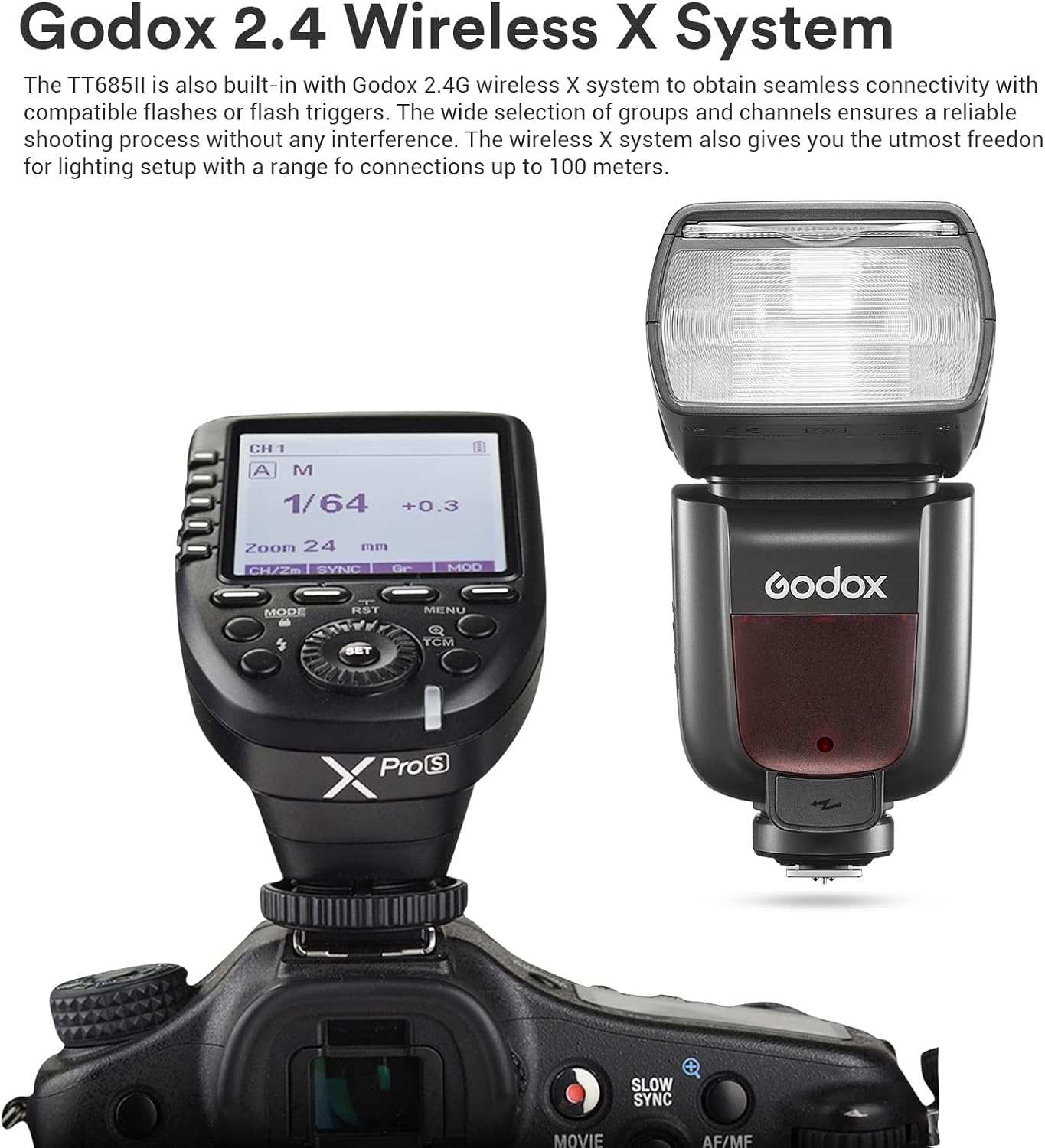
Figure 3.2: Godox 2.4 Wireless X System in Use. This image shows the TT685II flash mounted on a camera, with its display showing wireless settings (Channel 1, Group A, 1/64 power). This setup demonstrates the flash's integration into the Godox 2.4G Wireless X System for seamless connectivity.
- On the X2T-N trigger, press the CH button to select a channel (e.g., CH 01).
- On the TT685II-N flash, enter the wireless settings menu and set the flash to the same channel (e.g., CH 01) and a desired group (e.g., Group A).
- Ensure the flash is set to 'Receiver' mode if being triggered by the X2T-N.
4. Operating Instructions
4.1 Flash Modes
The TT685II-N supports TTL, Manual (M), and Multi (Stroboscopic) flash modes.
- TTL Autoflash: The flash output is automatically adjusted by the camera's metering system.
- Manual Flash: Allows you to manually set the flash output from 1/1 (full power) to 1/128 in 1/3 stop increments.
- Multi Flash: Fires a series of rapid flashes to capture multiple movements of a subject in a single photograph.

Figure 4.1: Examples of Various Flash Modes for Unlimited Creativity. This composite image demonstrates the creative possibilities with different flash modes, including capturing a splash (likely high-speed sync), a dance performance (possibly multi-flash), and a car in motion (rear-curtain sync or long exposure with flash).
4.2 High-Speed Sync (HSS)
HSS allows the flash to synchronize with shutter speeds up to 1/8000s, enabling you to use wider apertures in bright conditions or freeze fast motion.
4.3 TCM Instant Conversion
The TCM function allows for quick conversion of a TTL exposure value to a manual power setting, ensuring consistent light output when switching modes.
4.4 Bounce Flash
The flash head can tilt from -7° to 120° and rotate 330° horizontally, allowing you to bounce the flash off ceilings or walls for softer, more natural lighting.

Figure 4.2: Broader Bounce Angle of the Godox TT685II. This diagram illustrates the improved tilt range from -7° to 120° and the 330° rotation capability of the flash head, providing greater flexibility for directing light and achieving desired bounce effects.
4.5 Using the X2T-N Trigger
The X2T-N trigger provides comprehensive control over your Godox flashes.

Figure 4.3: Hand Holding Godox X2T-N Trigger. This image shows a hand holding the X2T-N trigger, highlighting its compact size and the group control buttons (A, B, C, D, E) on the side.

Figure 4.4: Godox X2T-N Trigger LCD Screen. This close-up view of the X2T-N's LCD screen displays various settings, including TTL mode for Group A, Manual mode for Group B (1/256 power), and Manual mode for Group C (1/8 power), along with channel information and battery status.
- Group Control: Use the A/B/C/D/E buttons to select and adjust individual flash groups.
- Mode Selection: Cycle through TTL, Manual, and Multi modes for each group.
- Power Adjustment: Use the dial to change flash output.
- Scan Setting: The newly added scan setting function helps automatically detect the channel with the least interference.
- Mobile APP Control: Download the 'GodoxPhoto' APP (iOS/Android) and connect via Bluetooth to control flash modes, power output, modeling lamp, and more.
4.6 External Power Port
The TT685II-N features a Type-C port and a sync cord jack, allowing connection to an external Lithium-Ion power pack like the Godox PB960 (optional purchase) for faster recycling times and extended shooting sessions.

Figure 4.5: Godox TT685II Connected to an External Power Pack. This image shows a photographer using the TT685II flash, which is connected to an external Godox PB960 power pack. This setup demonstrates how the external power port enhances flash performance for demanding shooting scenarios like weddings.
5. Maintenance
- Cleaning: Use a soft, dry cloth to clean the flash body and trigger. For stubborn dirt, a slightly damp cloth can be used, followed by a dry cloth. Do not use solvents or abrasive cleaners.
- Battery Care: Remove batteries if the unit will not be used for an extended period to prevent leakage. Store batteries in a cool, dry place.
- Storage: Store the flash and trigger in a dry, dust-free environment, away from direct sunlight and extreme temperatures.
- Firmware Updates: Periodically check the official Godox website for firmware updates for both the TT685II-N and X2T-N to ensure optimal performance and compatibility. Updates are typically performed via the Type-C USB port.
6. Troubleshooting
If you encounter issues, refer to the following common troubleshooting steps:
| Problem | Possible Cause | Solution |
|---|---|---|
| Flash does not fire. | Low batteries, incorrect mounting, incorrect wireless settings, flash in sleep mode. | Check battery level and replace if necessary. Ensure flash/trigger is securely mounted. Verify channel and group settings match. Press test button to wake from sleep. |
| Flash output is inconsistent. | Incorrect flash mode, subject too far/close, ambient light issues. | Switch to TTL mode or adjust manual power. Ensure subject is within flash range. Adjust camera ISO or aperture. |
| Wireless connection fails. | Different channels/groups, interference, distance. | Ensure flash and trigger are on the same channel and group. Use the scan function on X2T-N to find a clear channel. Reduce distance between units. |
| HSS not working. | HSS not enabled, camera not compatible, incorrect settings. | Ensure HSS is enabled on both flash and camera. Verify camera compatibility with HSS. |
If the problem persists, please contact Godox customer support.
7. Specifications
| Feature | Detail |
|---|---|
| Brand | GODOX |
| Model | TT685II-N, X2T-N |
| Compatible Mountings | Godox, Nikon |
| Camera Flash Type | Hotshoe |
| Wireless Communication Technology | Optical Pulse, 2.4G Wireless X System |
| Mounting Type | Hot Shoe Mount |
| High-Speed Sync (HSS) | Up to 1/8000s |
| Flash Modes | TTL, Manual, Multi |
| Tilt Angle | -7° to 120° |
| Rotation Angle | 330° |
| External Power Port | Type-C USB |
8. Warranty and Support
For detailed warranty information, please refer to the warranty card included with your product or visit the official Godox website. Warranty terms and conditions may vary by region.
For technical support, product inquiries, or service, please contact Godox customer service through their official website or authorized distributors. Keep your purchase receipt as proof of purchase for warranty claims.
Godox Official Website: www.godox.com
Related Documents - TT685II-N
 |
Godox X2T-N TTL Wireless Flash Trigger Instruction Manual Comprehensive instruction manual for the Godox X2T-N TTL Wireless Flash Trigger for Nikon cameras, detailing its features, operation, settings, compatibility, and maintenance. |
 |
Godox X2T-N TTL 无线引闪器 说明手册 Godox X2T-N TTL 无线引闪器是一款专为尼康相机设计的无线闪光灯触发器,提供稳定可靠的无线同步和多功能控制,支持i-TTL和高速同步。 |
 |
Godox X2T-N Wireless Flash Trigger for Nikon Cameras Comprehensive user guide for the Godox X2T-N wireless flash trigger, detailing its features, setup, compatibility with Nikon cameras, and advanced lighting control capabilities. |
 |
Godox X2T-N TTL Wireless Flash Trigger Instruction Manual Comprehensive instruction manual for the Godox X2T-N TTL Wireless Flash Trigger, detailing its features, operation, settings, compatibility, and troubleshooting for Nikon cameras. |
 |
Godox X2T-N TTL Wireless Flash Trigger Instruction Manual Comprehensive instruction manual for the Godox X2T-N TTL Wireless Flash Trigger, detailing its features, settings, usage, compatibility, and maintenance for Nikon cameras and compatible flashes. |
 |
Godox X2T-N TTL 无线引闪器说明手册 Godox X2T-N TTL 无线引闪器使用说明书,提供详细的设置、操作、兼容性及故障排除指南,适用于尼康相机用户,支持 i-TTL 和高速同步。 |
Ask a question about this manual
Ask about setup, troubleshooting, compatibility, parts, safety, or missing instructions. Manuals+ will review the question and use this page’s manual context to help answer it.