1. Introduction
This manual provides detailed instructions for the installation, operation, and maintenance of your ATOTO AC-44P4 HD 720P Front DVR Camera. Please read this manual thoroughly before using the device to ensure proper functionality and to maximize your user experience. This device is designed exclusively for use with ATOTO P5 Series car multimedia systems.
2. Product Overview
2.1 Key Features
- HD 720p Video Recording: Captures clear video footage at 720p resolution.
- 140° Wide-Angle Lens: Provides an expansive view of the road ahead.
- Automatic Start: Powers on and begins recording automatically when your ATOTO P5 system starts.
- Loop Recording: Continuously records by overwriting the oldest footage when the storage card is full, ensuring continuous operation.
- Video Lock Function: Protects important video segments from being overwritten during loop recording.
- Photo Capture: Allows instant capture of still images.
- Dedicated App Control: Manage camera settings and view footage via the 'DVR-CAM' app on your ATOTO P5 system.
- Built-in Microphone: Records audio within the vehicle, with an option to disable it.
- Micro SD Card Support: Includes a 32GB Micro SD card and supports cards up to 32GB.
2.2 Package Contents
Verify that all items are present in the package:
- ATOTO AC-44P4 On-dash DVR Recording Camera
- Extension Cable for AC-44P4 (3m / 9.8ft)
- 32GB MicroSD card
- Quick Start Guide (may be included)
- Car Mount (may be included)

Image: The ATOTO AC-44P4 dash camera, its USB-C extension cable, and a 32GB MicroSD card, representing the typical package contents.
3. Setup and Installation
3.1 Compatibility
Important: The ATOTO AC-44P4 is ONLY compatible with ATOTO P5 Series car multimedia systems. It is not compatible with other ATOTO series (e.g., S8, F7, A6PF, P9, P8) or other brands.

Image: A diagram illustrating the ATOTO AC-44P4's exclusive compatibility with ATOTO P5 series head units, explicitly showing other series as incompatible.
3.2 Micro SD Card Installation
The device comes with a 32GB Micro SD card pre-installed or included. Ensure the Micro SD card is properly inserted into the designated slot on the camera before use. The camera supports Micro SD cards up to 32GB.
3.3 Physical Installation
- Choose Mounting Location: Select a suitable location on your car's windshield, typically behind the rearview mirror, that does not obstruct your view of the road. Ensure the camera lens has a clear, unobstructed view.
- Clean Surface: Clean the chosen area on the windshield thoroughly to ensure proper adhesion of the camera mount.
- Attach Camera: Securely attach the AC-44P4 camera to the windshield using its mount.
- Connect to P5 System: Use the provided 3-meter USB Type-C extension cable to connect the AC-44P4 camera to the designated USB port on your ATOTO P5 Series head unit. Route the cable neatly to avoid interference with driving.
Note: The AC-44P4 cannot be installed on vertical car windshields.

Image: An illustration demonstrating the connection of the AC-44P4 camera to an ATOTO P5 head unit, showing the camera mounted on the windshield and the cable routing.
4. Operating Instructions
4.1 Automatic Start and Recording
Once connected to your ATOTO P5 system, the AC-44P4 camera will automatically power on and begin recording when you start your vehicle and the P5 system is active. No manual intervention is required for basic recording.
4.2 Loop Recording
The camera employs loop recording. When the Micro SD card reaches its capacity, the oldest video files will be automatically overwritten by new recordings. This ensures continuous recording without the need for manual deletion.
4.3 Video Lock Function
To prevent important video segments from being overwritten by loop recording, use the video lock feature. Specific instructions for activating this feature are available within the 'DVR-CAM' app on your ATOTO P5 system. Locked files are stored in a protected folder.
4.4 Photo Capture
You can capture still images at any time during operation. Access the photo capture function through the 'DVR-CAM' app on your ATOTO P5 system. Captured photos are saved to the Micro SD card.
4.5 Using the 'DVR-CAM' App
The 'DVR-CAM' app on your ATOTO P5 system provides comprehensive control over the AC-44P4 camera. Through the app, you can:
- View live camera feed.
- Playback recorded video footage.
- Access and manage locked video files and captured photos.
- Adjust camera settings, including microphone on/off.
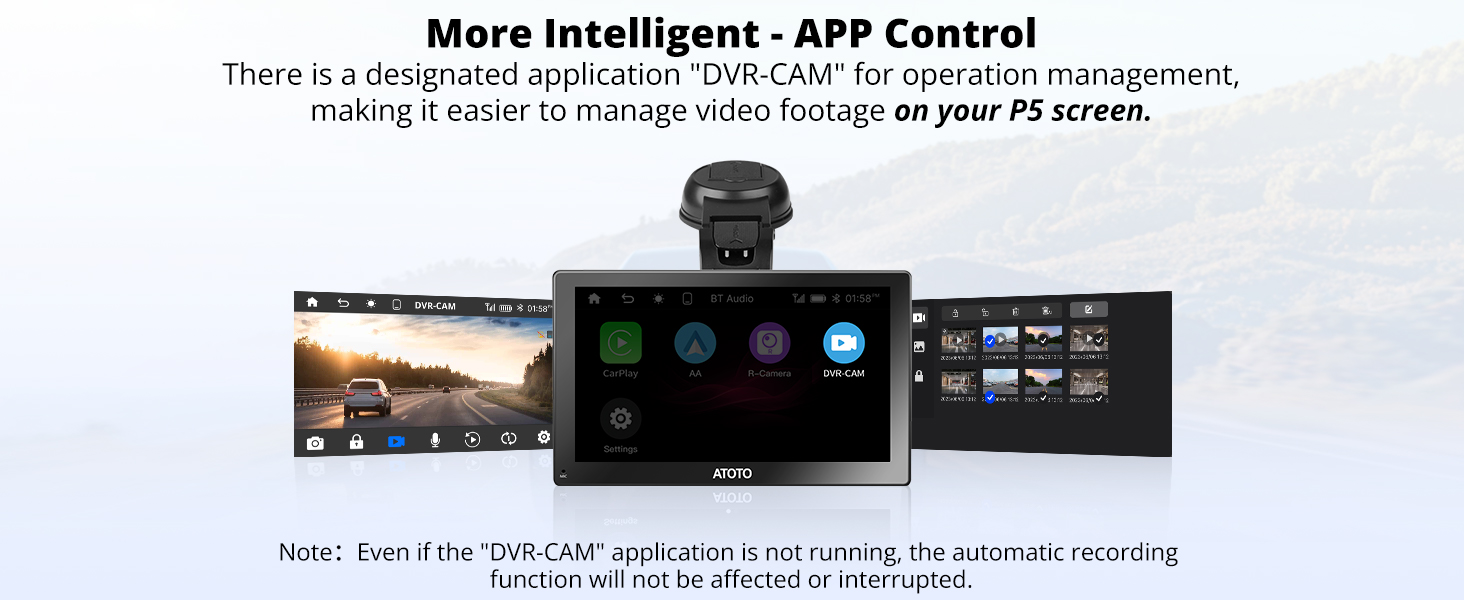
Image: A visual representation of the 'DVR-CAM' application interface displayed on an ATOTO P5 head unit, demonstrating app control and video management capabilities.
4.6 Microphone Control
The built-in microphone records audio. You can enable or disable the microphone through the 'DVR-CAM' app settings on your ATOTO P5 system according to your preference.
5. Maintenance
To ensure optimal performance and longevity of your ATOTO AC-44P4 camera, follow these maintenance guidelines:
- Cleaning: Gently wipe the camera lens and body with a soft, dry cloth. Avoid using abrasive cleaners or solvents that could damage the lens or casing.
- Micro SD Card Management: Periodically format the Micro SD card (via the 'DVR-CAM' app) to maintain optimal recording performance and prevent data corruption. Back up any important files before formatting.
- Environmental Conditions: Avoid exposing the camera to extreme temperatures, direct sunlight for prolonged periods, or excessive moisture.
6. Troubleshooting
If you encounter issues with your ATOTO AC-44P4 camera, refer to the following common troubleshooting steps:
- Camera Not Recording:
- Ensure the camera is securely connected to the ATOTO P5 system via the USB-C cable.
- Check if the Micro SD card is properly inserted and not full (unless loop recording is active).
- Restart your ATOTO P5 system.
- Poor Video Quality:
- Clean the camera lens.
- Ensure the camera is securely mounted and not vibrating.
- Verify that the recording resolution setting in the 'DVR-CAM' app is set to 720p.
- 'DVR-CAM' App Not Responding:
- Close and reopen the app on your ATOTO P5 system.
- Restart the ATOTO P5 system.
- No Audio Recording:
- Check the microphone setting within the 'DVR-CAM' app to ensure it is enabled.
If the issue persists after attempting these steps, please contact ATOTO customer support.
7. Specifications
| Brand | ATOTO |
| Model Name | ATOTO AC-44P4 |
| Video Capture Resolution | 720p |
| Viewing Angle | 140° |
| Flash Memory Type | Micro SD |
| Max Storage Support | 32GB (32GB card included) |
| Compatible Devices | ATOTO P5 Series |
| Connector Type | USB-C |
| Product Dimensions | 15 x 11.4 x 4.8 cm; 160 g |
8. Warranty and Support
For product assistance, technical support, or warranty inquiries, please contact ATOTO customer support through the following channels:
- Seller Support: Reach out via the order center on the platform where you purchased the product.
- Email Support: Send an email to support@myatoto.com. ATOTO aims to respond within 24 hours on business days.
Please have your product model and purchase information ready when contacting support to facilitate a quicker resolution.


