Introduction
This manual provides comprehensive instructions for the MECHEN H11 Pro MP3 Player. Designed for an exceptional audio-visual experience, this device features a smooth Android system, extensive storage, and versatile connectivity options. Please read this manual thoroughly to ensure proper usage and maintenance of your device.

Figure 1: MECHEN H11 Pro MP3 Player
The MECHEN H11 Pro is equipped with an 8-core processor, 3GB RAM, and 32GB ROM, expandable up to 1TB with an SD card. It features a 5-inch HD IPS touch screen, dual-frequency Wi-Fi (2.4GHz and 5GHz), and Bluetooth 4.1 for seamless connectivity. Pre-installed with popular music and e-book applications, it offers a versatile entertainment and reading platform.
Safety Information
- Do not expose the device to extreme temperatures, direct sunlight, or high humidity.
- Avoid dropping or subjecting the device to strong impacts.
- Use only the provided charging cable and adapter to prevent damage.
- Keep the device away from water and other liquids.
- Do not attempt to disassemble or repair the device yourself. Contact customer support for assistance.
- Prolonged listening at high volume levels may cause hearing damage.
Package Contents
Verify that all items are present in the package:
- 1 x MECHEN H11 Pro Music Player
- 1 x USB Cable (Type-C)
- 1 x Earphones
- 1 x Protective Film
- 1 x Protective Case
- 1 x User Manual
- 1 x 128GB TF Card

Figure 2: Included Accessories
Device Overview
Familiarize yourself with the physical components of your MECHEN H11 Pro MP3 Player.
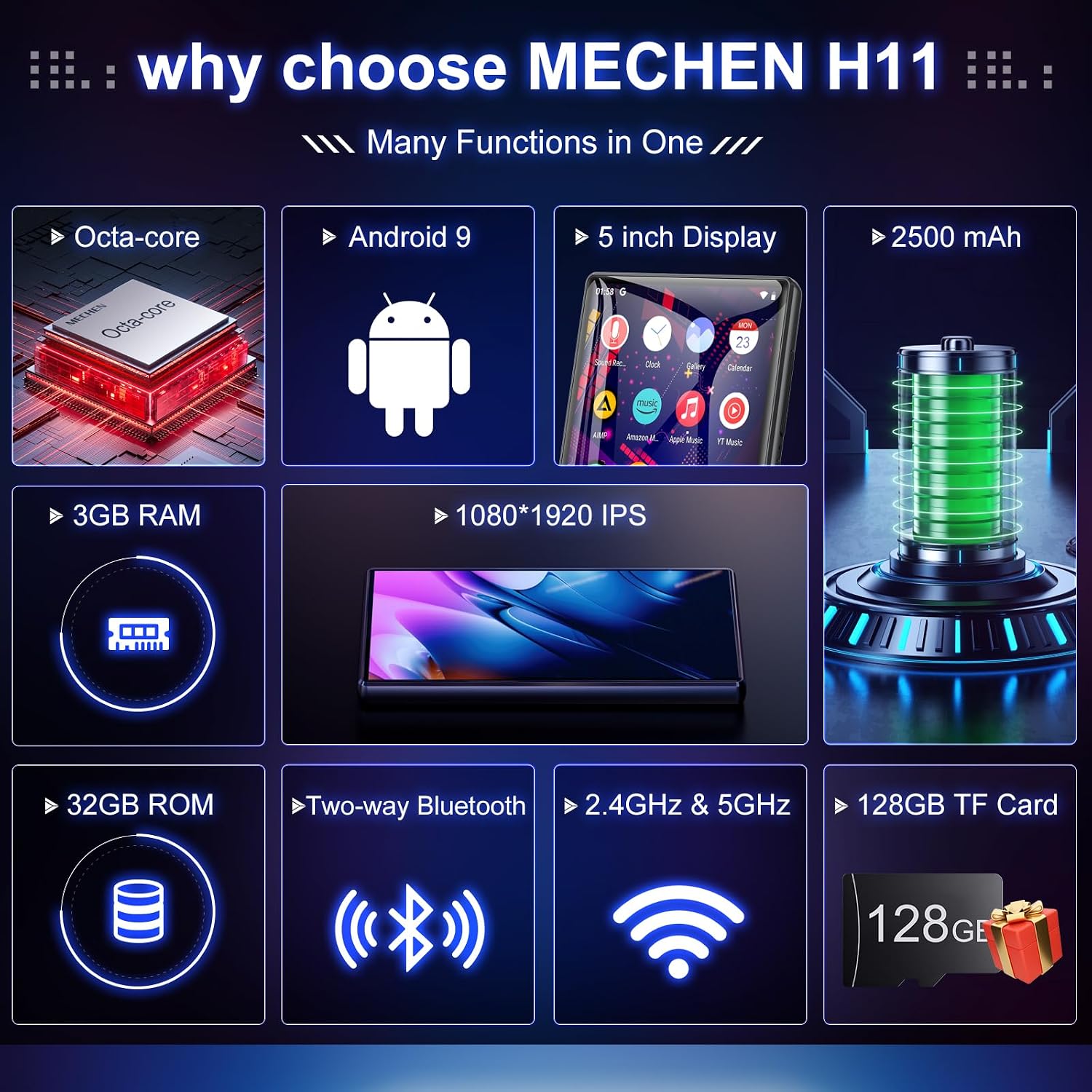
Figure 3: Key Features Overview
Physical Components:
- 5-inch HD IPS Touch Screen: Main display for all operations and content viewing.
- Power Button: Located on the side, used to power on/off and lock/unlock the screen.
- Volume Buttons: Adjust audio output level.
- USB Type-C Port: For charging and data transfer.
- 3.5mm Headphone Jack: For wired audio output.
- MicroSD Card Slot: For memory expansion up to 1TB.
- Built-in Speaker: For audio playback without headphones.
Setup
1. Initial Charging
Before first use, fully charge the device using the provided USB Type-C cable and a compatible power adapter. The battery indicator on the screen will show charging status. A full charge provides up to 27 hours of music playback or 8 hours of video playback.

Figure 4: Long-Lasting Battery
2. Power On/Off
- To Power On: Press and hold the Power button until the screen lights up.
- To Power Off: Press and hold the Power button, then select "Power off" from the options.
- To Lock/Unlock Screen: Briefly press the Power button.
3. Wi-Fi Connection
Connect your device to a Wi-Fi network to access online features and streaming services.
- Go to Settings > Network & internet > Wi-Fi.
- Toggle Wi-Fi On.
- Select your desired Wi-Fi network from the list.
- Enter the password if prompted, then tap Connect.

Figure 5: Bluetooth and Wi-Fi Connectivity
4. Bluetooth Pairing
Pair your device with Bluetooth headphones, speakers, or car audio systems.
- Go to Settings > Connected devices > Bluetooth.
- Toggle Bluetooth On.
- Ensure your Bluetooth accessory is in pairing mode.
- Select the accessory from the "Available devices" list and follow on-screen prompts to complete pairing.

Figure 6: Two-Way Bluetooth Connection
5. Storage Expansion (SD Card)
The device supports memory expansion up to 1TB via a MicroSD card. A 128GB TF card is included.
- Locate the MicroSD card slot on the side of the device.
- Gently insert the TF card into the slot until it clicks into place.
- The device will recognize the new storage. You may be prompted to format the card for optimal performance.

Figure 7: Large Storage Capacity
Operating Instructions
1. Navigating the Android System
The MECHEN H11 Pro runs on a smooth Android system. Swipe left/right to navigate between home screens, tap icons to open applications, and swipe down from the top for quick settings and notifications.

Figure 8: Octa-core Processor
2. Music Playback (HiBy Music)
The device supports various music formats including MP3, OGG, FLAC, AAC, WAV, WMA, APE, M4A, and DTS. Use the pre-installed HiBy Music app for local music playback.
- Open the HiBy Music application.
- Use the "Music Scan" feature to add songs from your internal storage or SD card.
- Browse by title, folder, album, or artist.
- Create and manage playlists.
- Adjust audio settings using the built-in equalizer.

Figure 9: Music Library Features
Watch this video for a detailed guide on using the HiBy Music player:
Video 1: HiBy Music - Listen to different kinds of music!
3. Video Playback
The 5.0-inch HD IPS display supports 720p and 1080p videos in various formats (RM, RMVB, FLV, MP4, DAT, MKV, MPG, MOV, TS).
- Open the Gallery or a dedicated video player app.
- Select the video file you wish to play.
- Use the on-screen controls for playback, pause, fast-forward, and rewind.

Figure 10: 1080P IPS Touch Screen for Video
4. E-book Reading (ReadEra)
The device comes with the ReadEra app, allowing you to read e-books in various formats.
- Open the ReadEra application.
- Import e-book files from your device storage or SD card.
- Adjust font size, font thickness, line spacing, and color mode for comfortable reading.
- Utilize features like bookmarks and collections to organize your library.
Learn how to use the e-book reading features with this video:
Video 2: H11 - Introduction to the use of reading e-books
5. Online Music Streaming
Access a massive music library with pre-installed applications such as Spotify, Amazon Music, YT Music, Audible, Deezer, and TIDAL.
- Ensure your device is connected to Wi-Fi.
- Open your preferred streaming application (e.g., Spotify).
- Log in to your account or create a new one.
- Browse and stream music directly from the internet.

Figure 11: Seamless Streaming Music
6. Internet Radio (Radio Mobi)
The Radio Mobi app allows you to listen to internet radio stations from around the world.
- Open the Radio Mobi application.
- Browse stations by country or genre.
- Add favorite stations for quick access.
- Set a sleep timer if desired.
See how to use the Internet Radio feature:
Video 3: H11 - Radio Mobi Introduction to the Use of Internet Radio
7. App Installation (Google Play Store)
The device includes the Google Play Store, allowing you to download and install a wide range of applications.
- Open the Google Play Store app.
- Sign in with your Google account.
- Search for desired apps and tap Install.
- Note: Installing too many apps may cause slowdowns or lagging. Ensure sufficient running space.

Figure 12: Download & Install Apps from Play Store
8. Parental Controls
The music player includes parental controls to manage screen time, allow/block apps, and restrict Chrome websites. Children can only download apps with parental authorization.
- Navigate to Settings > Parental controls.
- Set screen time limits for device usage.
- Enable or disable specific applications.
- Block or allow access to certain websites on Chrome.
- You can also easily delete unnecessary apps to save memory.

Figure 13: Parental Control Features
For detailed instructions on setting up parental controls, refer to this video:
Video 4: H11 - Set parental controls on Google Play
Maintenance
1. Charging Guidelines
- Charge the device regularly, even if not in frequent use, to maintain battery health.
- Avoid overcharging or completely draining the battery.
- If the device will not be used for an extended period, charge it to about 50% before storing.
2. Cleaning
- Use a soft, lint-free cloth to clean the screen and body of the device.
- Do not use abrasive cleaners, alcohol, or solvents.
- Keep ports free of dust and debris.
3. Software Updates (Firmware)
Periodically check for software updates to ensure optimal performance and access to new features. Firmware updates can be found in the device settings under "System Updates" or on the MECHEN official website.
Important: Ensure the battery is charged above 30% before performing any firmware upgrade. It is recommended to back up your data to an SD card before proceeding with an upgrade.
For general information about the MECHEN H11/H11 Pro MP3 Player, including software aspects, you can watch this video:
Video 5: MECHEN H11/H11 Pro MP3 Player with Bluetooth and WiFi
4. Data Management
- Regularly back up important files from your device to a computer or cloud storage.
- Delete unnecessary files and applications to free up internal storage space.
- Connect the device to a computer using the USB cable for easy file transfer.
Troubleshooting
| Issue | Possible Cause | Solution |
|---|---|---|
| Device won't power on. | Low battery; software crash. | Charge the device for at least 30 minutes. Press and hold the power button for 10-15 seconds to force restart. |
| Cannot connect to Wi-Fi. | Incorrect password; out of range; router issue. | Verify password. Move closer to the router. Restart router. |
| Bluetooth connection unstable. | Interference; distance from accessory. | Reduce interference from other devices. Keep device and accessory within close range. |
| Apps are slow or crashing. | Insufficient RAM/storage; too many apps running. | Close background apps. Clear app cache. Uninstall unused apps. |
| Cannot transfer files to/from computer. | Incorrect USB mode; faulty cable. | Ensure USB mode is set to "File transfer" on the device. Try a different USB cable or port. |
Specifications
| Feature | Detail |
|---|---|
| Brand | MECHEN |
| Model Name | H11 Pro |
| Product Dimensions | 0.35 x 5.51 x 2.36 inches |
| Item Weight | 6.6 ounces |
| Screen Size | 5 Inches |
| Display Resolution | 1080*1920 IPS (supports 720p and 1080p video) |
| Memory Storage Capacity | 160 GB (32GB ROM + 128GB SD Card) |
| Memory Expansion | Up to 1TB via MicroSD card |
| RAM | 3GB |
| Processor | 8-core processor |
| Connectivity Technology | Bluetooth 4.1 (bidirectional), Wi-Fi (2.4GHz and 5 GHz) |
| Battery Capacity | 2500mAh Lithium Ion |
| Battery Life | Up to 27 hours music playback, up to 8 hours video playback |
| Supported Music Formats | MP3, OGG, FLAC, AAC, WAV, WMA, APE, M4A, DTS |
| Supported Video Formats | RM, RMVB, FLV, MP4, DAT, MKV, MPG, MOV, TS |
| Special Features | Built-In Speaker, Video Playback, Voice Recorder, Touch Screen, Equalizer, Parental Controls |
| Color | Black |
Warranty and Support
MECHEN products are designed and manufactured to the highest quality standards. This product is covered by a limited warranty from the date of purchase. For detailed warranty terms and conditions, please refer to the warranty card included in your package or visit the official MECHEN website.
For technical support, troubleshooting assistance, or any inquiries regarding your MECHEN H11 Pro MP3 Player, please contact MECHEN customer service through the following channels:
- Email: Refer to your product packaging or the official MECHEN website for the most current contact email.
- Online Support: Visit the MECHEN official website for FAQs, support articles, and online chat options.
Please have your product model number (H11 Pro) and purchase information ready when contacting support.


