
Proster Giallo
Proster RJ45 Pass-Through Crimping Tool Kit User Manual
Model: Giallo
1. Product Overview
The Proster RJ45 Pass-Through Crimping Tool Kit is designed for efficient and precise termination of network cables. This multi-functional tool allows for stripping, cutting, and crimping of RJ45 connectors, supporting CAT6A, CAT6, and CAT5E standards. Its ergonomic design ensures comfortable and effortless operation.

Image: The Proster RJ45 crimping tool highlighting its three main functions: cutting, stripping, and crimping.
2. Package Contents
Your Proster RJ45 Pass-Through Crimping Tool Kit includes the following items:
- 1 x RJ45 Pass-Through Crimping Tool
- 1 x Mini Strip Cutter
- 50 x CAT6 Connectors
- 50 x RJ45 Cat6 Protective Covers
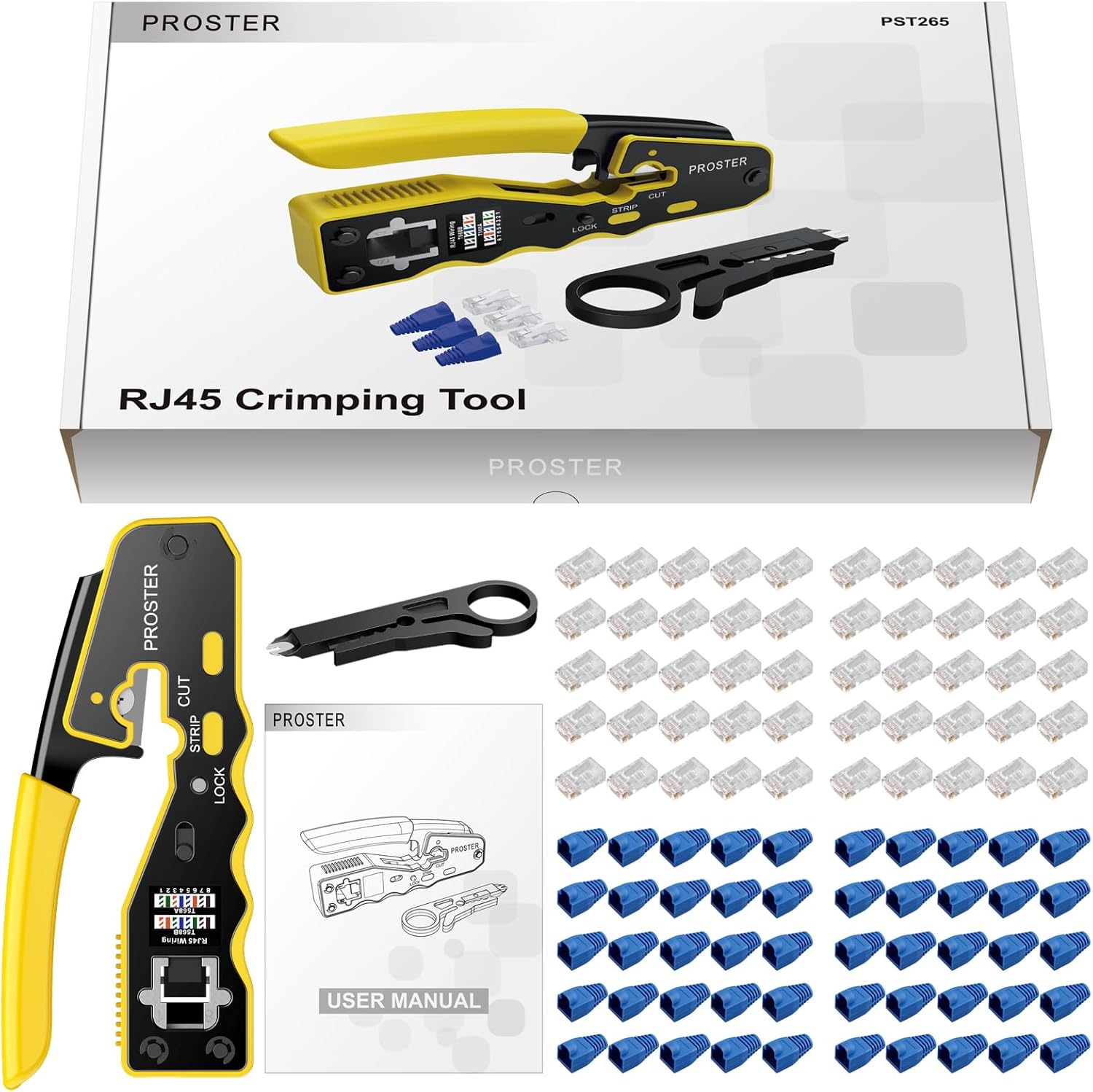
Image: A complete view of the kit contents, including the crimping tool, mini strip cutter, 50 CAT6 connectors, and 50 RJ45 Cat6 protective covers.
3. Safety Information
Always exercise caution when using tools. Keep hands clear of cutting blades and crimping mechanisms. Store the tool and accessories out of reach of children. Wear appropriate personal protective equipment (PPE) if necessary.
4. Operating Instructions
Follow these steps to properly terminate an RJ45 connector onto a network cable:
- Prepare the Cable:
First, slide a protective boot onto the cable. Then, use the mini strip cutter or the stripping function of the crimping tool to carefully remove approximately 1 inch (2.5 cm) of the outer jacket from the end of the network cable. Ensure not to damage the inner twisted pairs.
Image: Using the crimping tool's strip function to remove the cable's outer jacket.
- Untwist and Arrange Wires:
Carefully untwist the eight individual wires and straighten them. Arrange the wires according to either the T568A or T568B wiring standard. The crimping tool has a wiring diagram for reference. Ensure the wires are neatly aligned and free of kinks.
Image: Diagram illustrating the T568A and T568B wiring color codes for RJ45 connectors.
- Trim Wires:
Once the wires are in the correct order, use the cutting blade on the crimping tool to trim the ends of the wires straight, ensuring they are all the same length. The length should be appropriate for the RJ45 connector, typically around 0.5 inches (1.2 cm) from the jacket edge.
Image: The crimping tool's cutting function being used to trim the arranged wires to the correct length.
- Insert Wires into Connector:
Carefully insert the trimmed and arranged wires into the pass-through RJ45 connector. Push the wires all the way through until the cable jacket is inside the connector body and the wire ends protrude from the front of the connector. Verify the wire order through the transparent connector body.
Image: Wires being inserted into a pass-through RJ45 connector, showing them extending out the front.
- Crimping:
Place the RJ45 connector with the wires into the appropriate crimping slot on the tool (8P for RJ45). Squeeze the handles firmly and completely until the tool ratchets and releases. This action will seat the pins into the wires and simultaneously trim the excess wire ends protruding from the front of the connector.
Image: The crimping tool in action, securing the RJ45 connector onto the cable and trimming excess wires.
- Final Check:
After crimping, remove the connector from the tool. Inspect the connection to ensure all pins are properly seated and the wires are securely held. Slide the protective boot over the connector.
Video Demonstrations:
Proster RJ45 Crimping Tool Demonstration
Video: A detailed demonstration of how to use the Proster RJ45 crimping tool, including stripping, arranging wires, inserting into the connector, and crimping. This video is provided by Proster JP.
RJ45 Crimping Tool Usage Guide
Video: Another guide from Proster JP demonstrating the crimping process for RJ45 connectors.
How to use RJ45/RJ11 Crimping Pliers (568R)
Video: A demonstration by AMPCOM JP on using crimping pliers for RJ45/RJ11 connectors, including the 568R wiring standard.
RJ45 Crimping Tool Operation Overview
Video: An overview of the operation of an RJ45 crimping tool, provided by VCELink.
Easy LAN Cable Creation with Crimping Pliers
Video: This video from MacaCena demonstrates how to easily create LAN cables using crimping pliers, compatible with CAT5e, CAT6, and CAT7.
5. Maintenance
To ensure the longevity and optimal performance of your Proster RJ45 Crimping Tool, follow these maintenance guidelines:
- Cleaning: After each use, wipe down the tool with a clean, dry cloth to remove any dust, debris, or wire fragments.
- Lubrication: Periodically apply a small amount of light machine oil to the pivot points and moving parts to ensure smooth operation.
- Blade Inspection: Regularly check the cutting and stripping blades for sharpness and damage. Replace blades if they become dull or chipped to maintain clean cuts.
- Storage: Store the tool in a dry, clean environment, preferably in its original packaging or a tool bag, to prevent rust and damage.
6. Troubleshooting
If you encounter issues while using the crimping tool, consider the following:
- Poor Connection/No Connectivity:
- Double-check the wiring order (T568A or T568B) to ensure it matches both ends of the cable.
- Ensure the wires are pushed all the way to the front of the connector before crimping.
- Verify that the crimping action was complete and the pins are fully seated.
- Use a cable tester (like the NSS-468B LAN Cable Tester, if included in your kit) to check for continuity, open circuits, shorts, and miswires.
- Difficulty Stripping Cable Jacket:
- Ensure the cable is correctly positioned in the stripping slot.
- Check if the stripping blade is clean and sharp.
- Wires Not Trimming Cleanly:
- Ensure the cutting blade is sharp and free of debris.
- Make sure the wires are inserted correctly into the pass-through connector and are flush with the front before crimping.
7. Specifications
| Feature | Description |
|---|---|
| Brand | Proster |
| Model | Giallo, 50 Connectors |
| Product Dimensions | 21.2 x 14.7 x 3.4 cm |
| Item Weight | 494 g |
| Handle Material | Thermoplastic Elastomer (TPE) |
| Grip Type | Ergonomic |
| Handle Type | Soft Grip |
| Compatibility | CAT6A, CAT6, CAT5E RJ45 Pass-Through Connectors |
8. Warranty and Support
Proster products come with an 18-month warranty. If you have any questions or require assistance with your RJ45 Pass-Through Crimping Tool Kit, please do not hesitate to contact our customer support. We are committed to providing excellent service and support.
Ask a question about this manual
Ask about setup, troubleshooting, compatibility, parts, safety, or missing instructions. Manuals+ will review the question and use this page’s manual context to help answer it.