
1. Introduction
Welcome to your Homtronics KDM02 1700ml Portable Dehumidifier. This manual provides essential information for the safe and efficient operation, maintenance, and troubleshooting of your device. Please read it thoroughly before use and retain it for future reference.
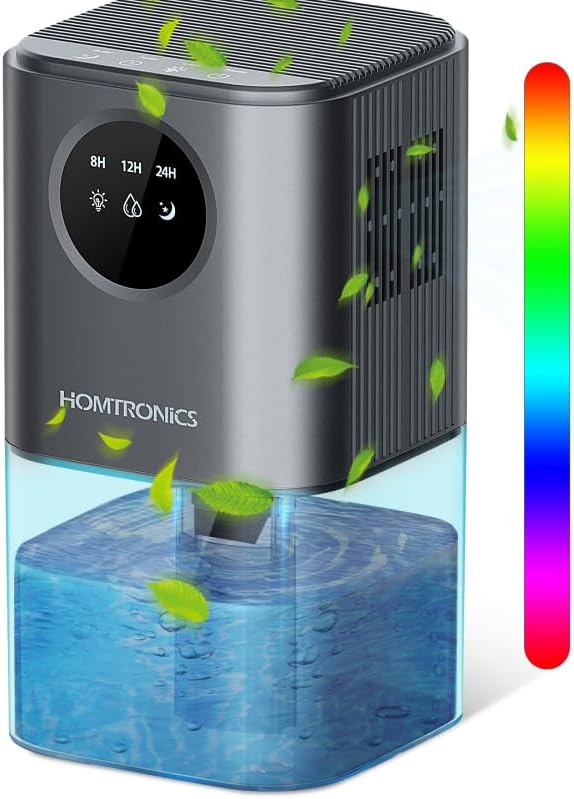
Image 1.1: The Homtronics KDM02 Portable Dehumidifier, showcasing its compact design and visible water tank.
2. Product Overview
2.1 Key Features
- High-Efficiency Dehumidification: Utilizes Peltier thermoelectric technology to effectively remove moisture.
- Large Capacity Water Tank: Features a 1700ml (60 oz) transparent water tank.
- Energy-Saving Operation: Designed for low power consumption.
- Timer Function: Offers 8, 12, and 24-hour timer settings.
- Quiet Operation: Operates below 44dB, suitable for quiet environments.
- 7-Color LED Ambient Light: Provides customizable lighting options.
- Automatic Shut-off: Automatically powers off when the water tank is full or incorrectly placed.
- Compact and Portable Design: Ideal for various small spaces.
2.2 Components
- Air Inlet/Outlet: Located on the sides and top for air circulation.
- Control Panel: Includes Power, Light, and Timer buttons.
- LED Display: Shows timer settings (8H, 12H, 24H) and mode indicators (Light, Water Drop, Moon).
- Water Tank: Removable, transparent tank at the base for collected water.
- Power Adapter Port: Located at the back of the unit.

Image 2.1: Internal view of the dehumidifier, illustrating the high-efficiency semiconductor refrigeration technology and the 1700ml water tank.
3. Setup
3.1 Unpacking
Carefully remove the dehumidifier and all accessories from its packaging. Inspect the unit for any signs of damage. If any damage is found, do not use the device and contact customer support.
3.2 Placement
- Place the dehumidifier on a flat, stable surface.
- Ensure there is at least 10 cm (4 inches) of clear space around the air inlet and outlet to allow for proper airflow.
- The unit is suitable for rooms between 10-30 square meters (107-323 sq ft). Ideal locations include bedrooms, bathrooms, closets, kitchens, RVs, and offices.
- Avoid placing the unit near heat sources, in direct sunlight, or in areas with excessive dust.

Image 3.1: Examples of suitable placement for the dehumidifier in different small rooms, highlighting its versatility.
3.3 Power Connection
Connect the provided power adapter to the power port on the back of the dehumidifier. Then, plug the adapter into a standard electrical outlet. Ensure the connection is secure.
4. Operation
4.1 Power On/Off
- Press the Power button (usually indicated by a circle with a vertical line) on the control panel to turn the unit on. The dehumidifier will start operating in its default mode.
- Press the Power button again to turn the unit off.
4.2 Dehumidification Mode
Upon powering on, the unit will automatically begin dehumidifying. It is designed to extract up to 350 ml of moisture per day under optimal conditions (86°F/30°C and 80% relative humidity).
4.3 Timer Function
- Press the Timer button (often indicated by a clock icon) repeatedly to cycle through the available timer settings: 8 hours, 12 hours, and 24 hours.
- The corresponding indicator (8H, 12H, or 24H) on the LED display will illuminate to confirm your selection.
- To cancel the timer, continue pressing the Timer button until no timer indicator is lit.

Image 4.1: The control panel illustrating the timer function buttons and display.
4.4 LED Light Control
- Press the Light button (often indicated by a light bulb icon) to turn on the 7-color LED ambient light.
- Press the Light button again to cycle through the different colors or to fix a specific color.
- Press and hold the Light button to turn off the LED light.

Image 4.2: The dehumidifier operating with its LED light on, demonstrating its quiet sleep mode.
4.5 Automatic Shut-off and Water Tank Handling
- The dehumidifier is equipped with an automatic shut-off feature. When the 1700ml water tank is full, or if it is not correctly positioned, the unit will automatically stop operating.
- A red indicator light will flash to alert you that the tank needs attention. This prevents water overflow and ensures safety.
- To empty the water tank: Turn off the unit, carefully slide out the water tank from the base, pour out the collected water, and then reinsert the empty tank firmly until it clicks into place. The unit will resume operation once powered on and the tank is correctly seated.

Image 4.3: Illustration of the automatic shut-off feature when the water tank is full, indicated by a flashing red light.
5. Maintenance
Regular maintenance ensures optimal performance and extends the lifespan of your dehumidifier.
5.1 Cleaning the Water Tank
- It is recommended to empty and clean the water tank regularly (e.g., once a week) to prevent mold, mildew, and bacterial growth.
- Remove the water tank as described in Section 4.5.
- Wash the tank with mild soap and warm water. Rinse thoroughly to remove any soap residue.
- Ensure the tank is completely dry before reinserting it into the unit.

Image 5.1: The separable design of the Homtronics KDM02 allows for easy removal and cleaning of the water tank.
5.2 Cleaning the Dehumidifier Exterior
- Wipe the exterior surfaces of the dehumidifier with a soft, damp cloth.
- Do not use abrasive cleaners, solvents, or harsh chemicals, as these can damage the finish.
5.3 Air Inlet/Outlet Cleaning
- Periodically check the air inlet and outlet vents for any accumulation of dust or debris.
- Use a soft brush or a vacuum cleaner with a brush attachment to gently remove any blockages. Ensure the unit is unplugged before cleaning these areas.
6. Troubleshooting
If you encounter any issues with your dehumidifier, please refer to the following troubleshooting guide before contacting customer support.
| Problem | Possible Cause | Solution |
|---|---|---|
| Unit does not turn on. | Power adapter not connected securely. Power outlet is not functioning. | Ensure the power adapter is firmly plugged into both the unit and a working electrical outlet. Test the outlet with another device. |
| Dehumidifier is not collecting water. | Water tank is not correctly inserted. Room temperature/humidity is too low. Air inlets/outlets are blocked. | Remove and reinsert the water tank firmly. Dehumidifiers are less effective in very dry or cold conditions (below 41°F/5°C). Ensure optimal operating conditions. Clear any obstructions from the air vents. |
| Red indicator light is flashing. | Water tank is full. Water tank is not properly seated. | Empty the water tank and reinsert it. Remove the tank and reinsert it firmly until it clicks into place. |
| Unit is noisy. | Unit is on an uneven surface. Obstruction in fan or air vents. | Place the unit on a flat, stable surface. Check and clear any obstructions. |
7. Specifications
| Feature | Specification |
|---|---|
| Brand | Homtronics |
| Model | KDM02 |
| Water Tank Capacity | 1700 ml (60 oz) |
| Dehumidification Capacity | Up to 350 ml/day (at 86°F/30°C, 80% RH) |
| Power Consumption | Approx. 0.54 kW per 24 hours |
| Noise Level | <44dB (in Sleep Mode) |
| Recommended Room Size | 10-30 m² (107-323 sq ft) |
| Dimensions (H x W x D) | Approx. 25.7 cm x 14 cm x 14 cm (10.12 in x 5.51 in x 5.51 in) |
| Special Features | Automatic humidity removal, Silent operation, Digital display, Separable design, Timer, 7-color LED light |
8. Warranty and Support
8.1 Warranty Information
This Homtronics KDM02 Dehumidifier comes with a manufacturer's warranty. Please refer to the warranty card included in your product packaging for specific terms, conditions, and duration of coverage. Keep your proof of purchase for warranty claims.
8.2 Customer Support
For any questions, technical assistance, or warranty-related inquiries, please contact Homtronics customer support. You can typically find contact information through the retailer's platform where you purchased the product or within the product documentation.