
1. Introduction
Thank you for choosing the TEENO 21V Cordless Angle Grinder. This tool is designed for efficient grinding and cutting of various materials, including metal, tiles, and stucco. This manual provides essential information for safe operation, proper assembly, maintenance, and troubleshooting to ensure optimal performance and longevity of your tool. Please read this manual thoroughly before first use and keep it for future reference.
2. Safety Instructions
Always observe basic safety precautions to reduce the risk of fire, electric shock, and personal injury. Keep this manual handy for quick reference.
General Power Tool Safety
- Work Area Safety: Keep the work area clean and well-lit. Cluttered or dark areas invite accidents. Do not operate power tools in explosive atmospheres, such as in the presence of flammable liquids, gases, or dust.
- Electrical Safety: Avoid body contact with earthed or grounded surfaces such as pipes, radiators, ranges, and refrigerators. There is an increased risk of electric shock if your body is earthed or grounded.
- Personal Safety: Always wear eye protection. Use hearing protection when operating the tool for extended periods. Wear a dust mask if working in dusty conditions. Dress properly; do not wear loose clothing or jewelry. Keep hair, clothing, and gloves away from moving parts.
- Tool Use and Care: Do not force the power tool. Use the correct power tool for your application. Disconnect the battery pack from the power tool before making any adjustments, changing accessories, or storing power tools.
Angle Grinder Specific Safety
- Guard Position: Always ensure the guard is correctly positioned and securely fastened before operation. The guard protects against fragments and accidental contact with the disc.
- Disc Selection: Use only discs that are rated for the maximum speed of the grinder and are appropriate for the material being worked on. Inspect discs for damage before use.
- Handling: Hold the tool firmly with both hands. Always use the auxiliary handle for better control. Be aware of kickback, which can occur if the disc snags or binds.
- Sparks and Debris: Grinding and cutting operations produce sparks. Ensure no flammable materials are nearby. Direct sparks away from yourself and others.
- Material Securement: Always secure the workpiece. Never hold small pieces in your hand while grinding or cutting.
Battery Safety
- Charging: Use only the charger supplied with the tool. Do not charge batteries in damp or wet locations.
- Storage: Store batteries away from metal objects that could short the terminals. Do not expose batteries to extreme heat or direct sunlight.
- Disposal: Dispose of batteries responsibly according to local regulations. Do not incinerate batteries.
3. Package Contents
Carefully unpack the contents and check for any damage. If any items are missing or damaged, please contact your retailer.
- 1 x TEENO Cordless Angle Grinder
- 2 x 3.0Ah 21V Lithium-ion Batteries
- 1 x Battery Charger
- 3 x Cutting Discs (125mm)
- 3 x Grinding Discs (125mm)
- 1 x Protective Guard
- 1 x Wrench
- 1 x Auxiliary Handle
- 1 x User Manual (English)
- 1 x Plastic Carrying Case
4. Product Components
Familiarize yourself with the parts of your angle grinder before operation.

Figure 1: Labeled components of the TEENO 21V Cordless Angle Grinder. Key components include the spindle lock, cooling vent, on/off switch, 3-speed change gears, 21V 3.0Ah battery, auxiliary handle, 125mm wheel guard, and grinding wheel.
- Spindle Lock: Used to lock the spindle for disc changes.
- Cooling Vent: Ensures proper airflow to prevent overheating.
- On/Off Switch: Controls power to the tool.
- Speed Change Gears: Allows selection of three different operating speeds.
- Battery (21V, 3.0Ah): Provides cordless power to the grinder.
- Auxiliary Handle: Provides additional grip and control during operation.
- Wheel Guard (125mm): Protects the user from sparks and debris.
- Grinding/Cutting Wheel: The abrasive disc used for material removal or cutting.
5. Assembly and Setup
Attaching the Auxiliary Handle
The auxiliary handle can be attached to either side of the grinder head for left or right-handed operation.
- Identify the threaded holes on the grinder head.
- Screw the auxiliary handle clockwise into the desired hole until it is securely tightened.

Figure 2: The TEENO Angle Grinder with its removable auxiliary handle. The handle can be easily attached or detached for user comfort and control.
Installing/Changing Discs
Always ensure the battery is removed before changing discs.
- Press and hold the spindle lock button.
- Using the provided wrench, loosen the outer flange nut by turning it counter-clockwise.
- Remove the outer flange nut and the old disc.
- Place the new grinding or cutting disc onto the inner flange, ensuring it is centered.
- Replace the outer flange nut and tighten it securely with the wrench while holding the spindle lock button. Do not overtighten.
Adjusting the Protective Guard
The protective guard can be adjusted to suit the working angle and protect against sparks and debris.
- Loosen the guard's clamping screw or lever.
- Rotate the guard to the desired position, ensuring it provides maximum protection.
- Tighten the clamping screw or lever firmly to secure the guard.
6. Battery Charging and Installation
Charging the Battery
Ensure the battery is fully charged before first use.
- Connect the charger to a standard power outlet.
- Slide the battery pack onto the charger. Ensure it clicks into place.
- The charger's indicator lights will show the charging status. A green light typically indicates sufficient energy, a yellow light indicates normal power supply, and a red light indicates a low battery or charging error. Refer to the charger's labels for specific light indications.
- Once fully charged, disconnect the battery from the charger and unplug the charger from the outlet.
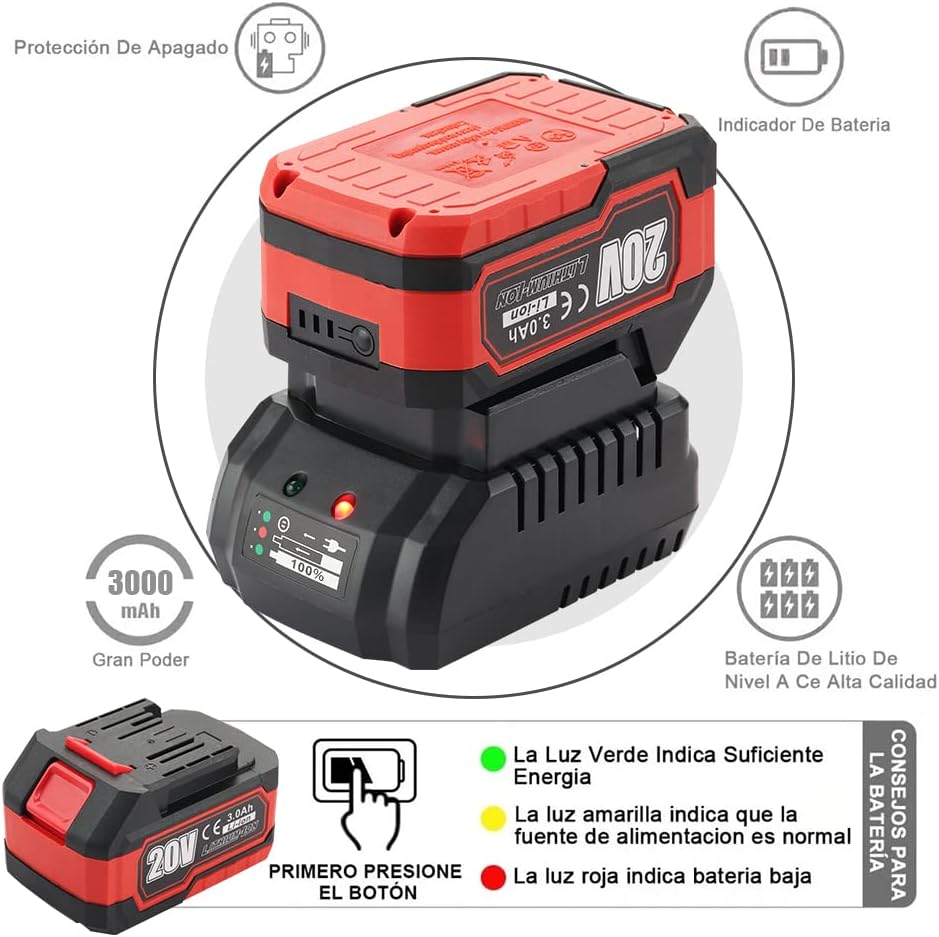
Figure 3: The 21V 3.0Ah Lithium-ion battery and charger. The battery features a power indicator, and the charger shows charging status via LED lights: green for sufficient energy, yellow for normal power, and red for low battery.
Installing the Battery
- Align the battery pack with the battery slot on the angle grinder.
- Slide the battery into the slot until it clicks securely into place.
- To remove the battery, press the release button and slide the battery out.
7. Operation
Powering On/Off
- To turn on the grinder, slide the On/Off switch to the 'On' position.
- To turn off the grinder, slide the On/Off switch to the 'Off' position.
Speed Adjustment
The grinder features a three-speed adjustment for different applications.

Figure 4: Speed adjustment mechanism on the TEENO Angle Grinder. Pressing the button cycles through three speed settings, indicated by the power/speed indicator lights.
- Locate the speed adjustment button on the tool body.
- Press the button to cycle through the three available speed settings. The current speed will be indicated by the LED lights on the power/speed indicator.
- Select the appropriate speed for your task. Lower speeds are suitable for polishing or lighter grinding, while higher speeds are for aggressive grinding and cutting.
Grinding and Cutting Techniques
Always wear appropriate personal protective equipment (PPE) including safety glasses, gloves, and hearing protection.
- Starting: Allow the disc to reach full operating speed before contacting the workpiece.
- Grinding: Apply light, even pressure. Move the grinder smoothly across the surface. Avoid excessive pressure, which can cause the disc to bind or overheat.
- Cutting: Use a cutting disc and ensure the guard is properly positioned. Make shallow cuts first, gradually increasing depth. Do not twist or bend the cutting disc.
- Finishing: After completing the task, lift the grinder from the workpiece and allow the disc to stop completely before setting the tool down.

Figure 5: The TEENO Angle Grinder in operation, demonstrating its capability for metal grinding at high speeds (up to 9800 RPM).
8. Maintenance
Regular maintenance ensures the longevity and safe operation of your angle grinder.
- Cleaning: Keep the tool's ventilation openings clean and free from dust and debris. Use a soft brush or compressed air to clean the vents. Do not use water or solvents.
- Disc Inspection: Regularly inspect grinding and cutting discs for wear, cracks, or damage. Replace worn or damaged discs immediately.
- Battery Care: Store batteries in a cool, dry place. Do not store fully discharged batteries for extended periods. Charge batteries before long-term storage and recharge every 3-6 months.
- General Inspection: Periodically check all screws and fasteners for tightness. Ensure the auxiliary handle and guard are securely attached.
9. Troubleshooting
If you encounter issues with your TEENO Angle Grinder, refer to the following common problems and solutions.
| Problem | Possible Cause | Solution |
|---|---|---|
| Grinder does not start | Battery not installed correctly Battery discharged On/Off switch faulty | Ensure battery is fully inserted and clicked into place Charge the battery fully Contact customer support |
| Reduced power or speed | Battery low Disc worn or incorrect type Overload | Recharge battery Replace disc with appropriate type Reduce pressure on workpiece |
| Excessive vibration | Disc damaged or improperly installed Loose components | Inspect and replace disc if damaged; ensure proper installation Check all fasteners and tighten if necessary |
| Tool overheats | Blocked cooling vents Continuous heavy use | Clean cooling vents Allow tool to cool down; reduce workload |
If the problem persists after attempting these solutions, or if you experience any other malfunction, please contact TEENO customer support.
10. Technical Specifications
| Feature | Specification |
|---|---|
| Brand | TEENO |
| Model | 2231-2 |
| Voltage | 21V |
| Battery Capacity | 3.0Ah (Lithium-ion) |
| No-load Speed | Up to 9800 RPM |
| Disc Diameter | 125 mm |
| Speed Settings | 3-speed adjustable |
| Material | Metal |
| Dimensions (L x W x H) | 42 x 12.2 x 33.8 cm |
| Power Source | Battery-powered (Cordless) |
11. Warranty and Support
TEENO provides a 24-month warranty for this product from the date of purchase. This warranty covers defects in materials and workmanship under normal use.
If you encounter any problems with your TEENO 21V Cordless Angle Grinder within the warranty period, or require technical assistance, please do not hesitate to contact TEENO customer service. Please have your purchase receipt and product model number (2231-2) ready when contacting support.
Contact Information: Please refer to your product packaging or the official TEENO website for the most up-to-date customer service contact details.