Instruction Manual for WDZP AC Remote Control
Model: DG11J1-01
Product Overview
This manual provides instructions for the WDZP AC Remote Control, designed as a replacement for various Hisense and Kelon Portable Air Conditioner models. It offers immediate functionality without programming, once batteries are installed.

Image: Front and back view of the WDZP AC Remote Control, showing the model number DG11J1-01 on the back and the LCD display with buttons on the front.
Compatibility
This remote control is compatible with the following Hisense and Kelon Portable Air Conditioner models:
- DG11J1-01
- DG11J1-04
- DG11J1-05(E)
- DG11J1-72
- DG11J1-98
- K1849621
- AP10CR1W
- AP10CW2G
- AP14CR2WG
- AP08CR2W
- AP10CR2W
- AP12CR2G
- AP13HR2G
- AP10CR1SEJS
- AP08CR1W
- AP14DR1SFJS2
- AP12CR1SEPS
- AP13HR1SEJS00
- AP12CR1G
- AP14DR1G
- AP14CR1WG
- AP13HR1G
- AP08CR1SEJS
- CAP14DR1SFJS2
- AP10CW1G
Setup
The WDZP AC Remote Control requires no programming. Simply install batteries to begin operation.
- Unpack: Carefully remove the remote control from its packaging.
- Install Batteries: Locate the battery compartment on the back of the remote. Open the compartment cover. Insert two (2) 1.5V AAA batteries, ensuring correct polarity (+/-). Close the battery compartment cover securely.
- Test Operation: Point the remote control towards your air conditioner unit and press any button, such as the "ON/OFF" button. The air conditioner should respond.

Image: A diagram illustrating the simple setup process, including unpacking and installing two AAA batteries into the remote control. Note: Batteries are not included.
Operating Instructions
The remote control features a large LCD display and clearly labeled buttons for intuitive operation of your air conditioner.
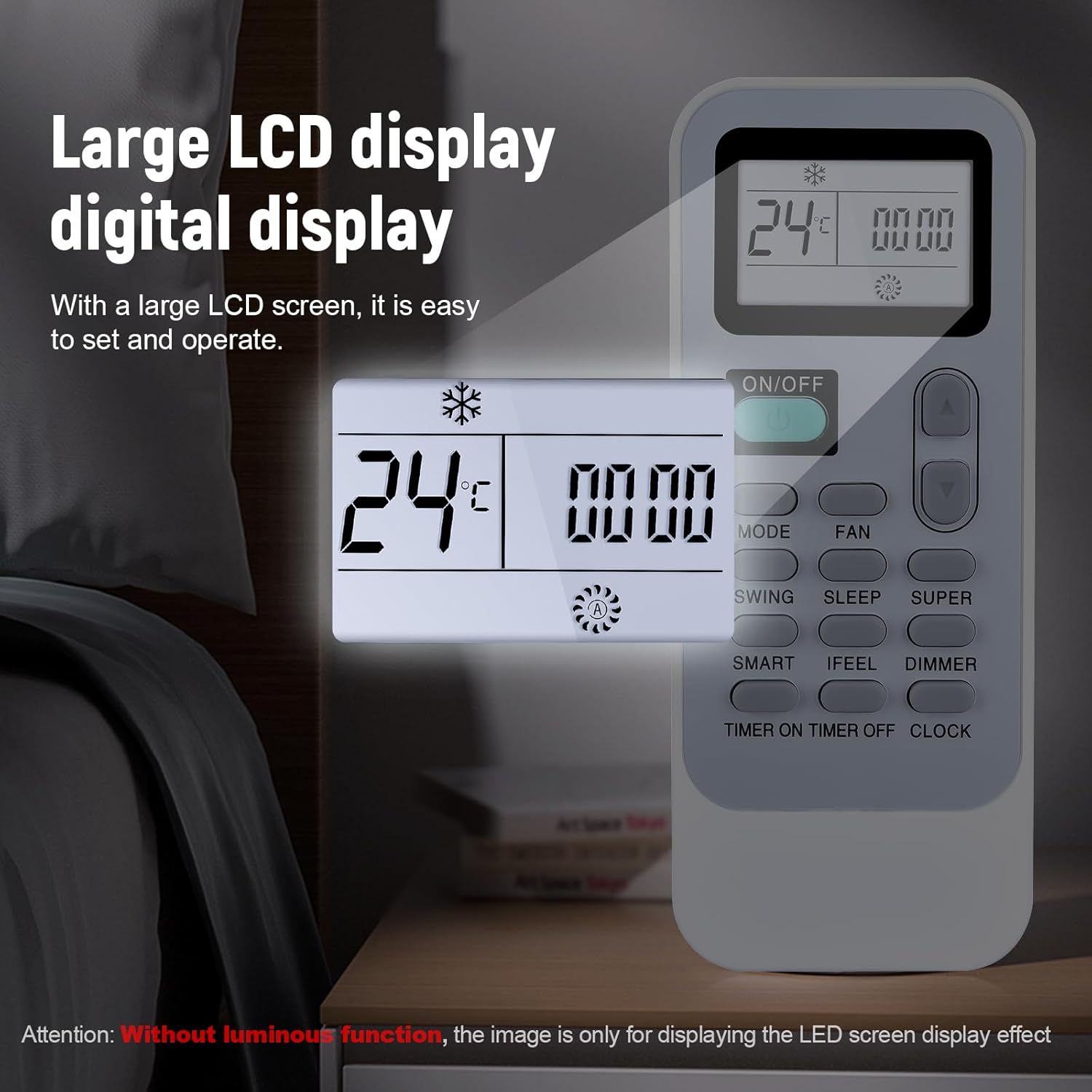
Image: A close-up view of the remote control's LCD display, showing temperature and mode indicators. The display is designed for easy readability.
Button Functions:
- ON/OFF: Powers the air conditioner on or off.
- MODE: Cycles through operating modes (e.g., Cool, Heat, Fan, Dry, Auto).
- FAN: Adjusts fan speed (e.g., Low, Medium, High, Auto).
- Temperature Up/Down Arrows: Increases or decreases the set temperature.
- SWING: Activates or deactivates the louver swing function.
- SLEEP: Engages the sleep mode for quiet operation and energy saving.
- SUPER: Activates rapid cooling or heating mode.
- SMART: Automatically adjusts settings based on room conditions.
- IFEEL: Activates the "I Feel" function, which senses temperature at the remote's location.
- DIMMER: Adjusts the brightness of the air conditioner's display.
- TIMER ON: Sets a timer for the air conditioner to turn on.
- TIMER OFF: Sets a timer for the air conditioner to turn off.
- CLOCK: Sets the current time on the remote control.
The remote operates using infrared technology, providing a strong signal up to 40 feet (12 meters) away, even at a 180-degree angle.

Image: A visual representation of the remote control's effective signal range, demonstrating its ability to control the air conditioner from various distances and angles within a room.
Maintenance
To ensure optimal performance and longevity of your remote control, follow these maintenance guidelines:
- Battery Replacement: Replace batteries when the remote's response becomes sluggish or the display fades. Always replace both batteries simultaneously with new 1.5V AAA batteries. Do not mix old and new batteries, or different types of batteries.
- Cleaning: Wipe the remote control with a soft, dry cloth. Do not use liquid cleaners, aerosols, or abrasive materials, as these can damage the remote's surface or internal components.
- Storage: If the remote control will not be used for an extended period, remove the batteries to prevent leakage and potential damage. Store the remote in a cool, dry place away from direct sunlight and extreme temperatures.
- Avoid Drops: While the remote is made of durable ABS material, avoid dropping it to prevent internal damage.
Troubleshooting
| Problem | Possible Cause | Solution |
|---|---|---|
| Remote not responding | Dead or incorrectly installed batteries. Obstruction between remote and AC unit. Remote out of range. | Replace batteries, ensuring correct polarity. Remove any obstructions. Move closer to the AC unit (within 40 feet/12 meters). |
| Display is dim or blank | Low battery power. | Replace batteries. |
| AC unit not responding to specific functions | Incorrect mode selected. AC unit limitation. | Ensure the correct operating mode is selected on the remote. Verify if your specific AC model supports the function. |
Specifications
- Model: DG11J1-01
- Brand: WDZP
- Compatible Devices: Hisense & Kelon Portable Air Conditioners (specific models listed in Compatibility section)
- Power Source: 2 x 1.5V AAA Batteries (not included)
- Material: High-quality ABS
- Item Weight: Approximately 2.18 ounces (0.10 kg)
- Package Dimensions: Approximately 5.71 x 2.76 x 0.94 inches
- Control Distance: Up to 40 feet (12 meters)
- Special Feature: Ergonomic design
- Color: Black

Image: A diagram showing the approximate dimensions of the remote control: 5.35 inches in length and 2.20 inches in width.
Warranty and Support
WDZP offers a 6-month warranty for this product. If you encounter any issues or have questions regarding compatibility or functionality, please contact the seller or manufacturer for support. Options for free exchange or refund are available for quality problems or compatibility issues.
For further assistance, please refer to the contact information provided with your purchase or visit the official WDZP store page on Amazon: WDZP Store