1. Introduction
This manual provides detailed instructions for the installation, operation, maintenance, and troubleshooting of your Biorunn Android Car Stereo. This unit is specifically designed for Hyundai Veracruz ix55 models manufactured between 2007 and 2013, equipped with manual air conditioning. Please read this manual thoroughly before installation and use to ensure proper functionality and safety.
The Biorunn Android Car Stereo features a 9-inch IPS touchscreen, 8-Core processor, 8GB RAM, and 128GB ROM, offering advanced features such as GPS navigation, Wireless Car-Play, Android Auto, Bluetooth 5.0, 5G WiFi, and FM/AM RDS radio.
2. Setup and Installation
Before proceeding with installation, please verify that your vehicle is a Hyundai Veracruz ix55 (2007-2013) with manual AC. It is recommended to consult a professional for installation if you are unfamiliar with car audio systems.
2.1 Compatibility Check
Ensure your car's center console matches the design shown in the 'After Installation' image. If you are unsure, please provide a picture of your center console to the seller for confirmation before installation.
2.2 Installation Overview
The installation process typically involves removing the original car stereo, connecting the new unit's wiring harness, GPS antenna, and other peripherals, and then securing the new head unit into the dashboard.
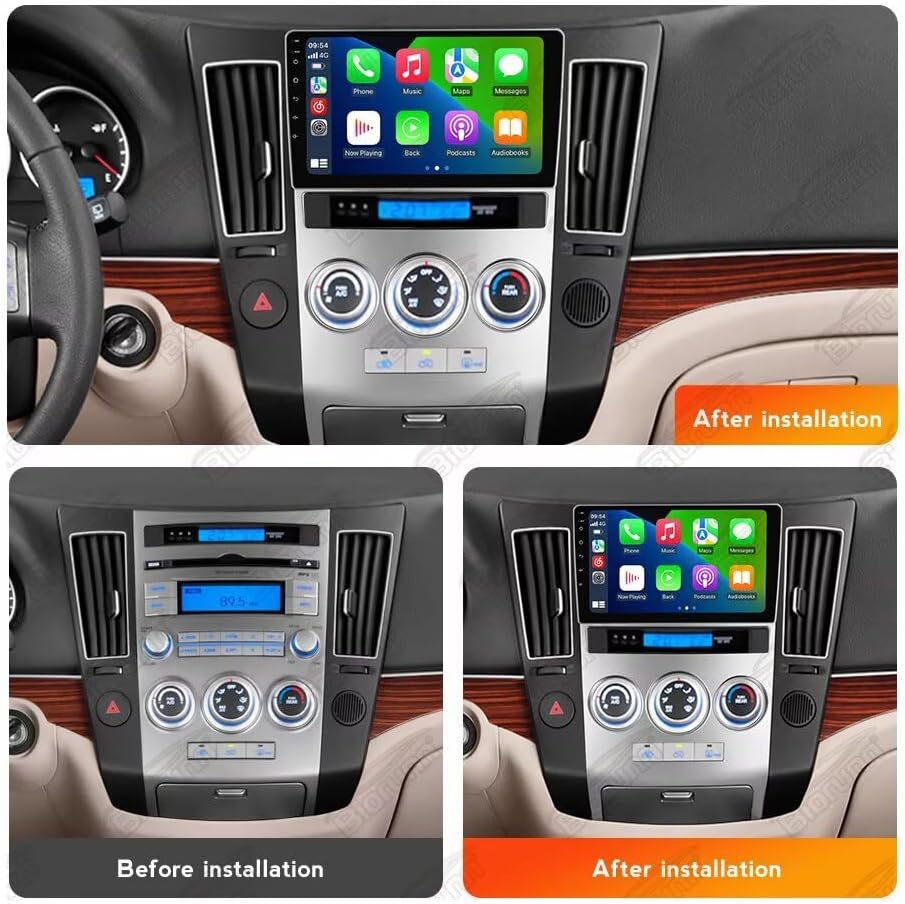
This image illustrates the appearance of the car dashboard before and after the Biorunn Android Car Stereo installation. The top panel shows the new 9-inch display integrated into the dashboard, while the bottom left shows the original setup and the bottom right shows the new unit installed.
2.3 Initial Power-On and Configuration
After installation, power on the unit. The system will boot into the Android operating system. Follow the on-screen prompts for initial setup, including language selection, time zone, and network connection (WiFi).
3. Operating Instructions
3.1 Android System Overview
The unit runs on an Android operating system, providing access to various applications. The 9-inch IPS touchscreen offers a clear and responsive interface. Navigate through menus by tapping and swiping, similar to a smartphone or tablet.
3.2 Wireless Car-Play and Android Auto
The car stereo supports both Wireless Car-Play (for iOS devices) and Wireless Android Auto (for Android devices). This feature allows you to integrate your smartphone's functions directly onto the car's display.

This image displays the connection steps for Wireless Car-Play (iOS system) and Wireless Android Auto (Android system). Both require connecting via Bluetooth first, then clicking 'Car Link' and waiting for connection. Wired connection via USB cable is also an option.
Connection Steps:
- Connect your smartphone to the car stereo via Bluetooth.
- On the car stereo, select the 'Car Link' application.
- Wait for the connection to establish.
Car-Play and Android Auto can also be connected via a USB cable.
3.3 GPS Navigation
The unit features a built-in global positioning system (GPS) for accurate navigation. It supports various mapping applications and provides real-time traffic conditions.
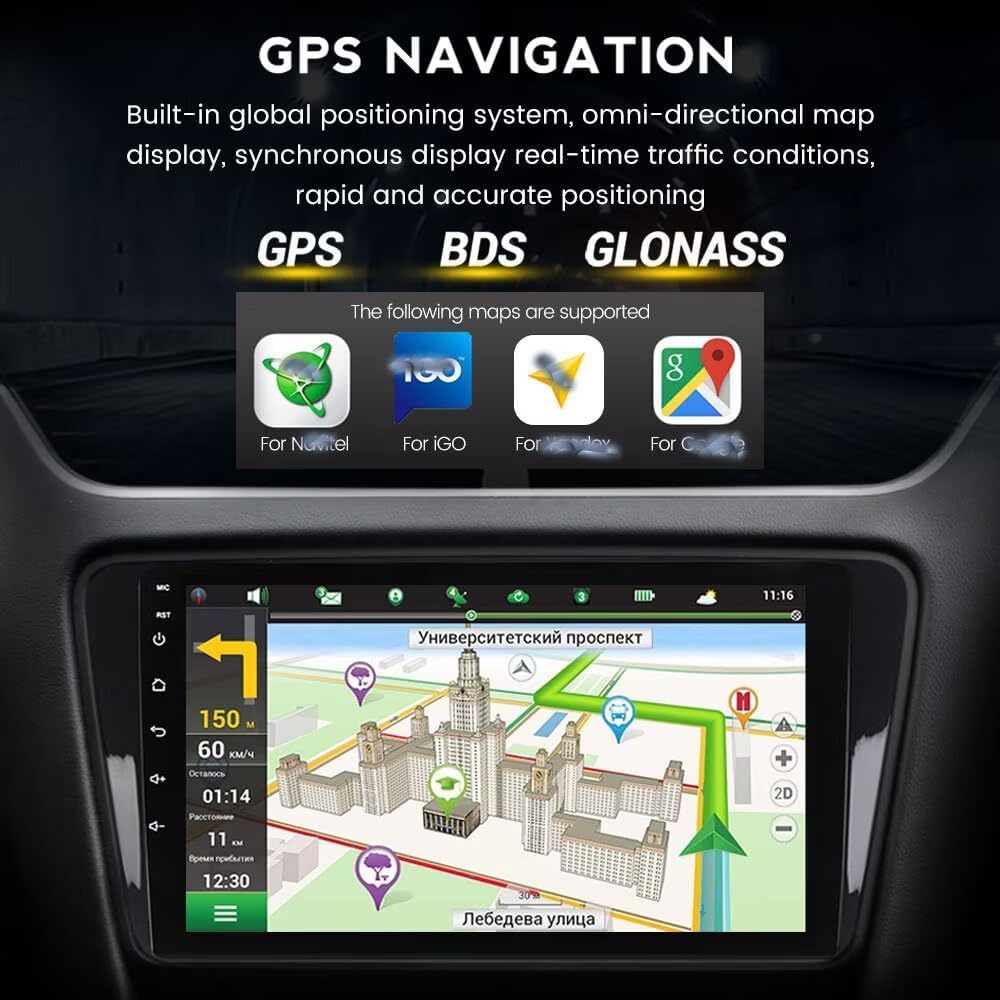
This image shows the GPS navigation interface with a map display. It highlights support for GPS, BDS, and GLONASS positioning systems, and indicates compatibility with various map applications such as Navitel, IGO, Waze, and Google Maps.
3.4 DSP Processor
The integrated Digital Signal Processor (DSP) enhances audio quality, providing multi-dimensional surround sound effects and a high-definition audio-visual experience. You can adjust equalizer settings to customize your sound.

This image displays the DSP processor interface, showing equalizer settings (e.g., 7862S DSP) and various sound enhancement options like surround, bass enhancement, and sound filter (e.g., 9863 DSP).
3.5 Split Screen Functionality
The split-screen feature allows two applications to be displayed simultaneously on the screen, improving convenience and multitasking. For example, you can view navigation while listening to the radio or playing music.
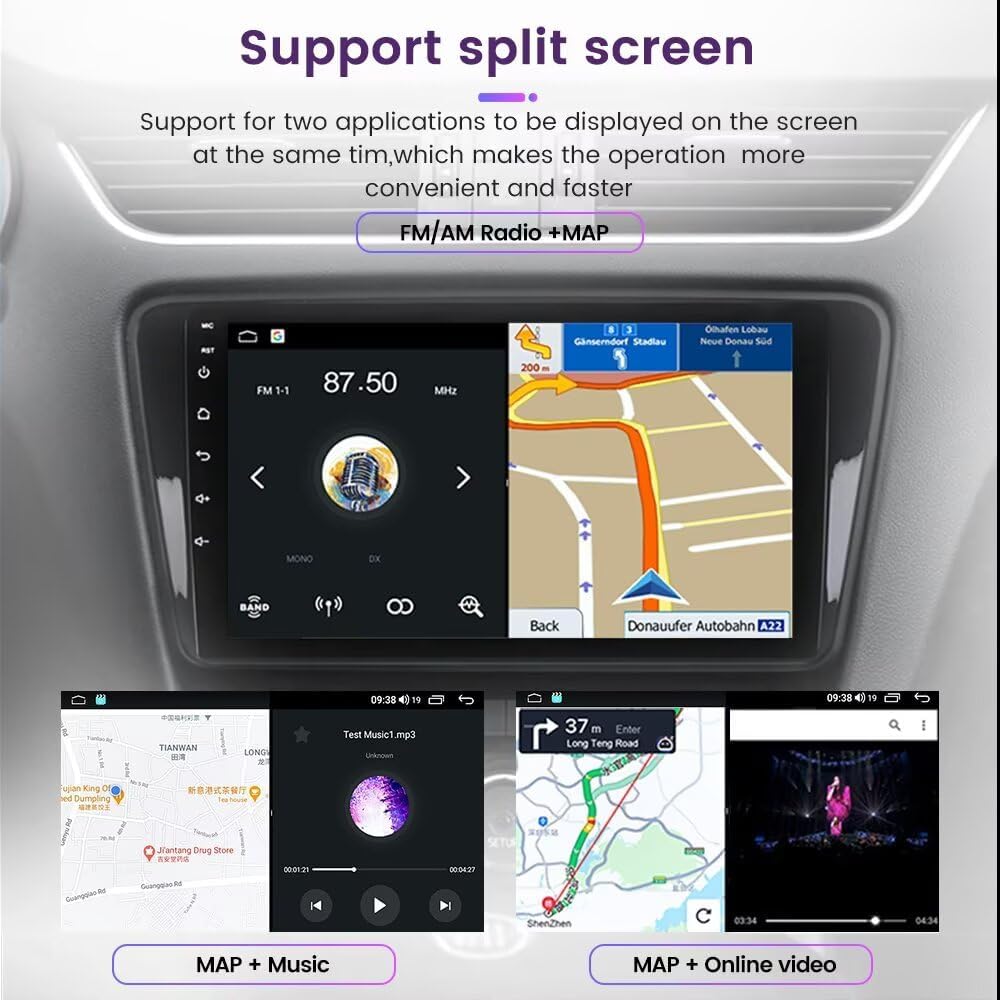
This image demonstrates the split-screen function, showing examples like FM/AM Radio + Map, Map + Music, and Map + Online video running concurrently on the display.
3.6 Bluetooth Function
Bluetooth 5.0 enables hands-free calling, phone book download, and music streaming. This ensures safer driving by allowing you to manage calls and audio without diverting attention from the road.

This image illustrates the Bluetooth functions, including BT music streaming, synchronizing contacts, and synchronous call recording. It also shows a driver interacting with the touchscreen for a hands-free call, emphasizing safety.
3.7 Steering Wheel Control (SWC)
The unit supports original steering wheel controls, allowing you to manage music playback, volume, and hands-free calling directly from your steering wheel. This feature enhances driving safety by keeping your hands on the wheel.

This image depicts a driver utilizing steering wheel controls to operate the car stereo, showing the integration of music playback and volume control with the vehicle's existing controls.
3.8 4G LTE and WiFi Connectivity
The built-in 4G module allows connection to cellular networks (requires a 4G SIM card, not included) for internet access on the go. It also supports 5GHz WiFi for high-speed internet connectivity.

This image provides a close-up view of the rear of the car stereo unit, highlighting the slot for a 4G SIM card, indicating its built-in 4G LTE capability. Note that the 4G card is not included.
3.9 Multimedia Playback
The unit supports various audio, video, and photo formats for multimedia playback:
- Audio Formats: MP3, WMA, AAC, RM, FALC, etc.
- Video Formats: MPEG-1/2/4, H264, H263, VC1, RV, RMVB, DivX, Sorenson SparK, Spark, VP8, AVS Stream.
- Photo Formats: JPG, BMP, JPEG, GIF, PNG.
3.10 USB Ports
The unit includes multiple USB ports (USB1, USB2) for connecting external devices such as USB drives for media playback or for wired Car-Play/Android Auto connections.
4. Maintenance
To ensure the longevity and optimal performance of your Biorunn Android Car Stereo, follow these maintenance guidelines:
- Screen Cleaning: Use a soft, lint-free cloth to gently wipe the touchscreen. Avoid abrasive cleaners or harsh chemicals that could damage the screen.
- Temperature Control: Avoid exposing the unit to extreme temperatures, both hot and cold, as this can affect electronic components.
- Software Updates: Periodically check for and install software updates provided by Biorunn to ensure the system runs efficiently and has the latest features and security patches.
- Ventilation: Ensure that the unit's ventilation openings are not blocked to prevent overheating.
5. Troubleshooting
If you encounter issues with your car stereo, refer to the following common problems and solutions:
| Problem | Possible Cause | Solution |
|---|---|---|
| Unit does not power on | Incorrect wiring, blown fuse, power supply issue | Check all power connections and fuses. Ensure the car's ignition is on. |
| No sound | Speaker wiring issues, volume too low, audio settings | Verify speaker connections. Increase volume. Check audio output settings in the system. |
| GPS signal lost or inaccurate | GPS antenna not properly connected or obstructed, poor satellite reception | Ensure GPS antenna is securely connected and placed in an unobstructed location (e.g., dashboard). Move to an open area for better reception. |
| Bluetooth not connecting | Bluetooth off on unit or phone, pairing mode not active, interference | Ensure Bluetooth is enabled on both devices. Put the unit in pairing mode. Delete previous pairings and try again. |
| Car-Play/Android Auto not working | Incorrect connection steps, phone compatibility, app issues | Follow the connection steps carefully (Bluetooth first, then 'Car Link'). Ensure your phone's OS is compatible. Try a different USB cable for wired connection. |
| Touchscreen unresponsive | System freeze, debris on screen | Restart the unit. Clean the screen. If the issue persists, a factory reset might be necessary (consult support). |
If these solutions do not resolve the issue, please contact customer support for further assistance.
6. Specifications
Below are the technical specifications for the Biorunn Android Car Stereo (Model B0D671XQR1):
- Operating System: Android
- Core: 8-Core Processor
- Screen Size: 9 Inches
- Display Resolution: 1280x720 (IPS Screen)
- RAM: 8GB
- ROM (Internal Storage): 128GB
- Bluetooth: Version 5.0
- Built-in DSP Processor: Yes
- Built-in Car-Play & Android Auto: Yes (Wireless/Wired)
- Split Screen Support: Yes
- 4G LTE Support: Yes (4G SIM card not included)
- WiFi: 5GHz Support
- GPS Navigation: Built-in Global Positioning System (GPS, BDS, GLONASS)
- Radio: FM/AM RDS
- USB Sockets: USB1, USB2
- Voice Command: Buttons, Keyboard, Mouse, Touchscreen
- Supported Languages: English, German, French, Spanish, Italian, Portuguese, Russian, Dutch, Polish, Japanese, Simplified & Traditional Chinese, Arabic, etc.
- Optional Accessories Support (Not Included): ADAS DVR, OBD II, TPMS
7. Warranty and Support
For any questions, technical assistance, or warranty inquiries regarding your Biorunn Android Car Stereo, please contact the seller or Biorunn customer support. Refer to your purchase documentation for specific warranty terms and contact information.
It is recommended to keep your proof of purchase for warranty claims.