
1. Introduction
The LUMI Flex Mount PLB-M06 is a motorized swing TV wall mount designed to provide optimal viewing angles for televisions ranging from 32 to 75 inches. This mount offers convenience and flexibility, allowing you to adjust your TV's position with a simple press of a button on the included remote control. Its robust design supports TVs up to 50kg (110lbs) and features a quiet motorized mechanism for smooth, precise movement up to 170 degrees.
Key features include a programmable position memory function, a collision avoidance system for safety, and integrated cable management to maintain a tidy appearance. The slim design ensures the TV sits just 56mm from the wall when retracted.
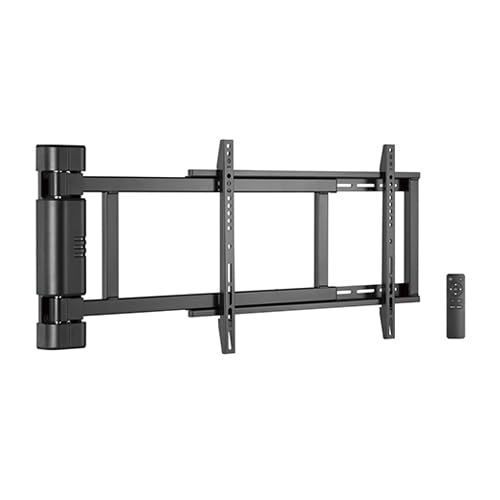
Image: The LUMI Flex Mount PLB-M06 allows for multiple viewing positions in a room, controlled by a remote.
2. Safety Information
Please read all instructions carefully before installation and use. Failure to follow these instructions may result in property damage, serious injury, or death.
- Weight Capacity: Do not exceed the maximum weight capacity of 50kg (110lbs). This mount is designed for TVs between 32 and 75 inches.
- Wall Structure: Ensure the mounting surface can safely support the combined weight of the mount and the television. Professional installation is highly recommended.
- Power: Connect the mount to a grounded power outlet. Do not use damaged power cords or adapters.
- Children: Keep children away from the motorized mount during operation. The collision avoidance system is a safety feature, but direct supervision is always advised.
- Moving Parts: Keep hands and objects clear of moving parts during operation.
3. Package Contents
Verify that all components are present and undamaged before proceeding with installation. If any parts are missing or damaged, contact customer support.
- Motorized TV Wall Mount Assembly
- TV Bracket Arms (2x)
- Hardware Kit (screws, anchors, washers, spacers for various TV models)
- Remote Control
- Power Adapter and Cable
- Cable Management Ties
- Instruction Manual
4. Setup and Installation
Installation requires basic tools (drill, stud finder, level, screwdriver). It is recommended to have at least two people for safe installation.
- Wall Preparation: Locate suitable wall studs or use appropriate wall anchors for concrete/brick walls. Mark the desired mounting height.
- Mounting the Wall Plate: Secure the main wall plate of the motorized mount to the wall using the provided hardware. Ensure it is level and firmly attached.
- Attaching TV Brackets: Attach the TV bracket arms to the back of your television using the appropriate screws and spacers from the hardware kit. Ensure the brackets are centered and securely fastened to the VESA mounting holes on your TV.
- Mounting the TV: Carefully lift the TV with the attached brackets and hook them onto the wall mount assembly. Secure the TV to the mount using the reinforced TV holders.
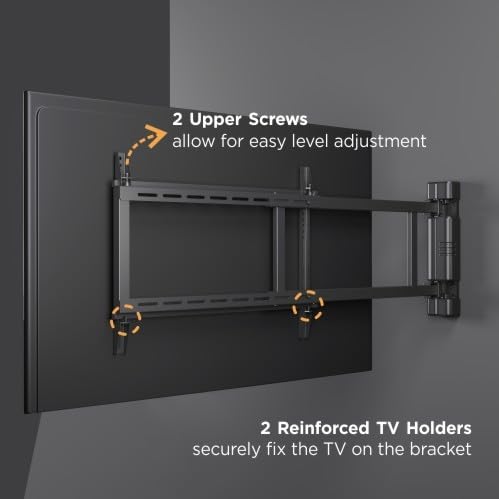
Image: The mount features two upper screws for easy level adjustment and reinforced TV holders for secure attachment.
- Power Connection: Connect the power adapter to the mount and plug it into a power outlet.
- Cable Management: Use the integrated cable management system and provided ties to route and secure all TV and power cables along the mount arms for a clean and organized look.
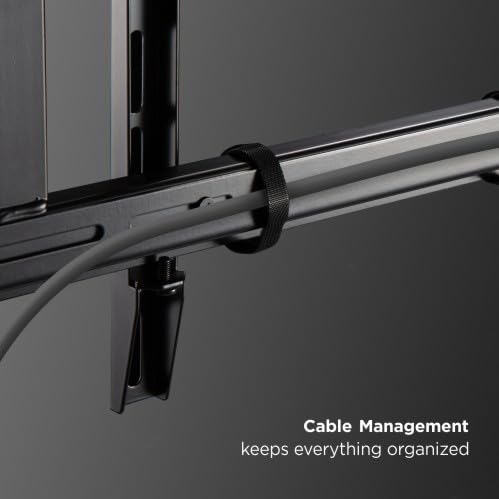
Image: Integrated cable management keeps cables organized and out of sight.
5. Operating Instructions
The LUMI Flex Mount PLB-M06 is operated using the included remote control.
- Power On/Off: Press the power button on the remote to activate or deactivate the mount.
- Adjusting Position: Use the directional buttons (left/right) on the remote to swing the TV to your desired viewing angle. The mount can swing up to 170 degrees.
- Programmable Memory Positions: The mount features a programmable memory function. To set a position:
- Move the TV to the desired position using the directional buttons.
- Press and hold one of the memory preset buttons (e.g., M1, M2, M3) until you hear a beep or see an indicator light flash, confirming the position is saved.
- To recall a saved position, simply press the corresponding memory preset button.
- Collision Avoidance System: The mount is equipped with a collision avoidance system that automatically stops movement if an obstruction is detected. If this occurs, remove the obstruction and resume operation.
6. Maintenance
Regular maintenance ensures the longevity and safe operation of your TV mount.
- Cleaning: Wipe the mount with a soft, dry cloth. Do not use abrasive cleaners or solvents.
- Periodic Checks: Periodically check all screws and bolts to ensure they remain tight and secure. Re-tighten if necessary.
- Cable Inspection: Inspect cables for any signs of wear or damage. Replace if necessary.
7. Troubleshooting
If you encounter issues with your LUMI Flex Mount PLB-M06, refer to the following common problems and solutions:
- Mount Not Moving:
- Ensure the power adapter is securely plugged into both the mount and a working power outlet.
- Check if the remote control batteries need replacement.
- Verify there are no obstructions triggering the collision avoidance system.
- Remote Control Not Responding:
- Replace the batteries in the remote control.
- Ensure there is a clear line of sight between the remote and the mount's receiver.
- TV Not Level:
- Adjust the two upper screws on the TV bracket arms as shown in the installation section to fine-tune the level.
- Ensure the wall plate is perfectly level during installation.
If problems persist, please contact customer support.
8. Specifications
| Feature | Specification |
|---|---|
| Model | PLB-M06 |
| Brand | LUMI |
| Mounting Type | Wall Mount |
| Movement Type | Motorized Swing (up to 170 degrees) |
| Compatible Screen Sizes | 32" - 75" |
| Maximum Weight Capacity | 50 kg (110 lbs) |
| Distance from Wall (Retracted) | 56 mm |
| Material | Metal |
| Color | BLACK |
| Compatible Devices | Television |
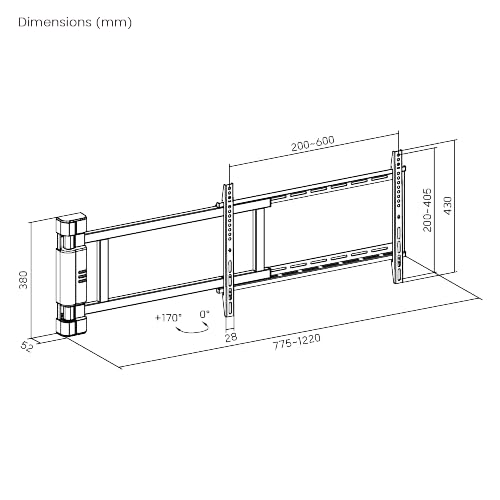
Image: Dimensional drawing of the PLB-M06 mount.
9. Warranty Information
This LUMI Flex Mount PLB-M06 comes with a 3-year warranty from the date of purchase. The warranty covers manufacturing defects and material faults under normal use. It does not cover damage caused by improper installation, misuse, accidents, or unauthorized modifications. Please retain your proof of purchase for warranty claims.
10. Support and Contact Information
For technical assistance, warranty claims, or any questions regarding your LUMI Flex Mount PLB-M06, please contact:
Manufacturer/Importer: ARIHANT INFOMATICS
Contact Number: 8108164916
Please have your model number (PLB-M06) and proof of purchase ready when contacting support.
