
1. Introduction
Thank you for choosing the WESTTREE X98 Solar Rechargeable Camping Fan. This versatile device combines a powerful fan, an LED lantern, and a power bank, making it ideal for camping, outdoor activities, travel, and emergency use. Please read this manual carefully before operation to ensure proper use and maintenance.
2. Product Overview
The WESTTREE X98 is designed for portability and multi-functionality. Key features include:
- Dual Charging Options: Solar panel and USB-C port for convenient recharging.
- Powerful Airflow: Advanced brushless motor with 4 adjustable fan speeds.
- Integrated LED Lantern: 3 brightness settings for illumination.
- Power Bank Function: USB-A output port to charge other devices.
- Adjustable Angle: Fan head can be adjusted 0-90 degrees.
- Timer Function: Set operation for 2, 4, or 8 hours.
- Durable Construction: Made from robust ABS material.

Image 2.1: The WESTTREE X98 Solar Rechargeable Camping Fan, showcasing its fan, LED lights, and control panel.
3. Setup
- Unpacking: Carefully remove the fan from its packaging. Ensure all components are present: the fan unit and a USB-C charging cable.
- Initial Charge: For optimal performance, fully charge the fan before first use. Connect the provided USB-C cable to the fan's charging port and a 5V2A USB power adapter (not included). The charging indicator lights will show the battery level.
- Positioning: Place the fan on a stable, flat surface. The integrated stand allows for angle adjustment. For solar charging, position the solar panel directly towards sunlight.
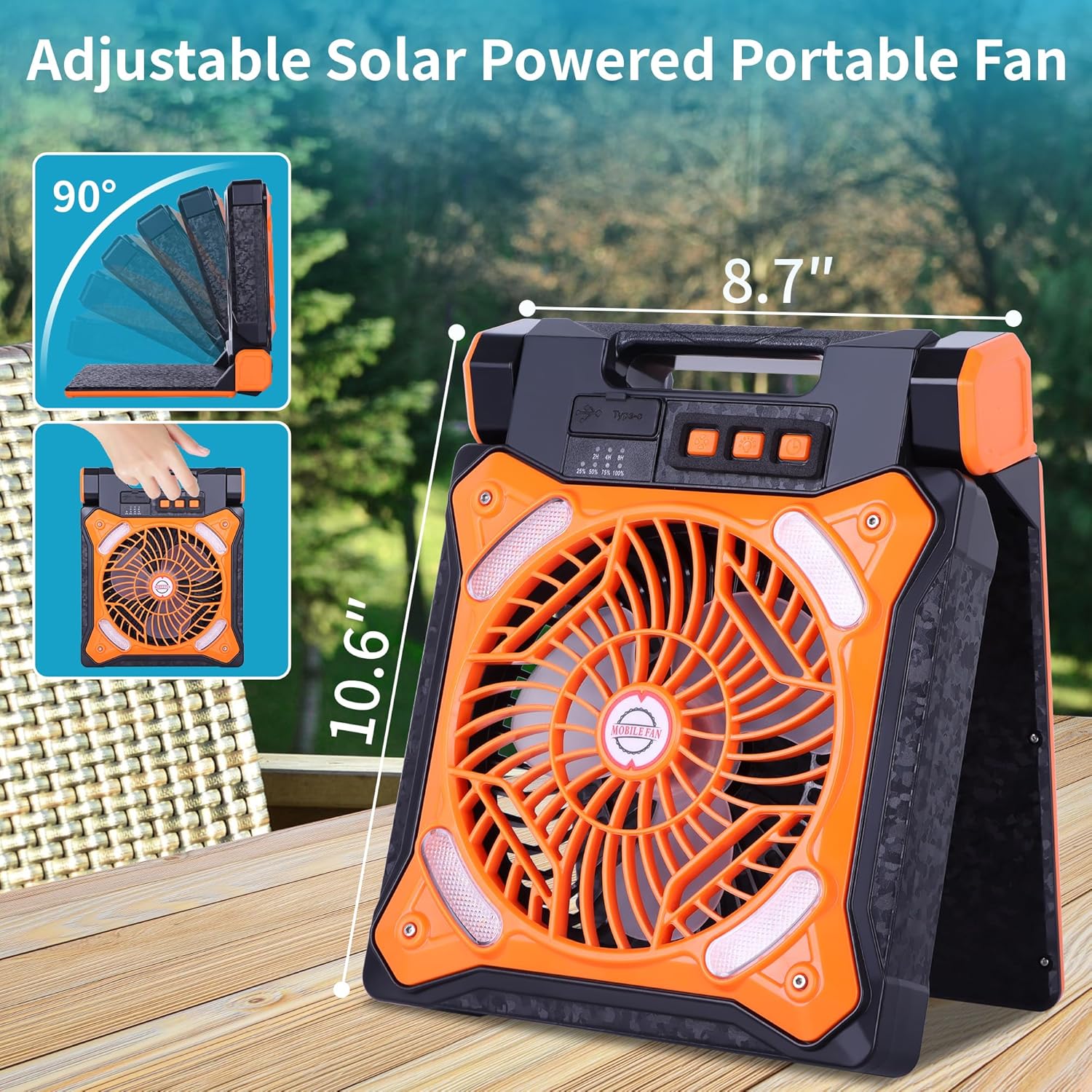
Image 3.1: The fan's adjustable stand, allowing for a 0-90 degree tilt for optimal airflow or solar panel positioning.
4. Operating Instructions
4.1 Fan Operation
- Power On/Off: Press the power button (usually marked with a fan icon) once to turn on the fan. Press and hold to turn off.
- Adjust Fan Speed: While the fan is on, press the power button repeatedly to cycle through the 4 available fan speeds (Low, Medium, High, Natural Wind).
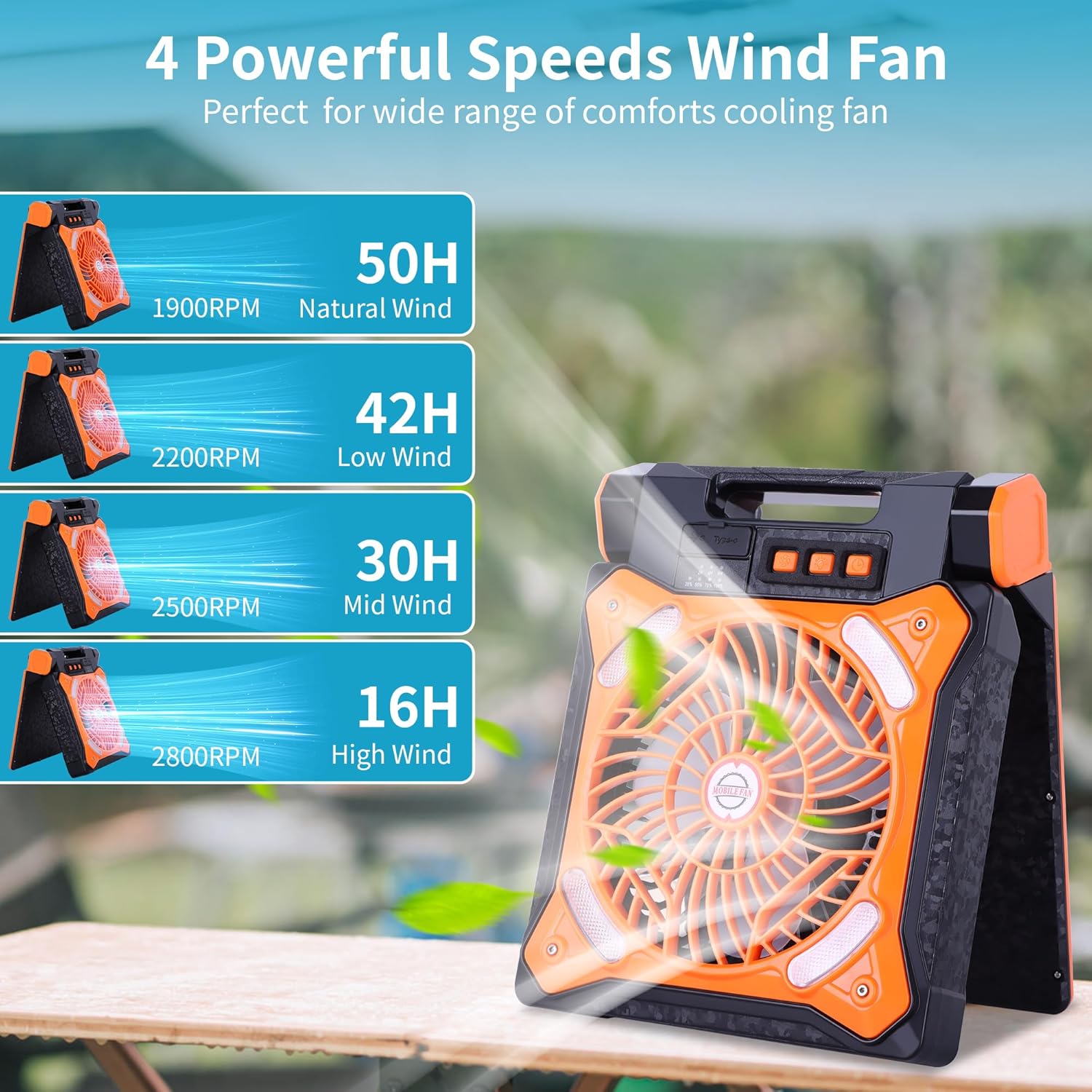
Image 4.1: Illustration of the four fan speed settings and their approximate runtimes: 50 hours (1900RPM), 42 hours (2200RPM), 30 hours (2500RPM), and 16 hours (2800RPM).
4.2 LED Light Operation
- Turn On/Off Light: Press the light button (usually marked with a light bulb icon) once to turn on the LED light. Press and hold to turn off.
- Adjust Brightness: While the light is on, press the light button repeatedly to cycle through the 3 brightness settings (Low, Medium, High).

Image 4.2: Depiction of the three LED light brightness levels and their approximate runtimes: 120 hours (Low), 40 hours (Middle), and 18 hours (High).
4.3 Timer Function
- Set Timer: Press the timer button (usually marked with a clock icon) to set the fan or light to automatically turn off after 2, 4, or 8 hours. Each press cycles through the timer options.
- Cancel Timer: Continue pressing the timer button until no timer indicator is lit, or turn off the device.
5. Charging the Fan
The WESTTREE X98 fan offers two methods for recharging its internal battery:
5.1 USB-C Charging
- Connect the provided USB-C cable to the fan's USB-C input port.
- Connect the other end of the cable to a 5V2A USB power adapter (not included) or a compatible power source.
- The battery indicator lights on the control panel will illuminate to show charging progress.
- A full charge typically takes approximately 3 hours.
5.2 Solar Charging
- Unfold the solar panel and position it directly towards strong sunlight.
- Ensure no obstructions are blocking the solar panel from receiving direct sunlight.
- The solar charging indicator light will illuminate when charging via solar power.
- Solar charging time varies significantly based on sunlight intensity and duration.

Image 5.1: Visual representation of the two charging methods: USB-C charging via an adapter and solar charging using the integrated panel.
6. Power Bank Function
The WESTTREE X98 fan can also serve as a power bank to charge other USB-powered devices.
- Connect your device's USB charging cable to the USB-A output port on the fan.
- The fan's internal battery will begin charging your connected device.
- Monitor the battery level of the fan to ensure sufficient power for both fan operation and device charging.
7. Maintenance
- Cleaning: Ensure the fan is turned off and unplugged before cleaning. Use a soft, dry cloth to wipe the exterior. For the fan blades, use a soft brush or compressed air to remove dust. Do not use abrasive cleaners or immerse the unit in water.
- Storage: When not in use for extended periods, store the fan in a cool, dry place. It is recommended to charge the battery every 3-6 months to maintain battery health.
- Battery Care: Avoid fully depleting the battery frequently. Recharge the fan promptly when the battery level is low.
8. Troubleshooting
| Problem | Possible Cause | Solution |
|---|---|---|
| Fan does not turn on | Low battery; Power button not pressed correctly | Charge the fan; Press and hold the power button firmly. |
| Fan airflow is weak | Low battery; Fan speed set too low; Obstruction | Charge the fan; Increase fan speed; Clear any obstructions from the fan grille. |
| LED light does not turn on | Low battery; Light button not pressed correctly | Charge the fan; Press the light button firmly. |
| Solar charging is slow or not working | Insufficient sunlight; Solar panel obstructed or dirty | Ensure direct, strong sunlight; Clean the solar panel; Adjust angle for optimal sun exposure. |
| Power bank not charging devices | Fan battery too low; Incorrect cable; Device not compatible | Charge the fan; Use a functional USB cable; Ensure device is compatible with USB charging. |
9. Specifications
- Model Name: X98
- Brand: WESTTREE
- Power Source: Solar & Battery Powered
- Battery Type: Lithium Ion (included)
- Voltage: 5 Volts (DC)
- Number of Fan Speeds: 4
- Control Method: Touch
- Special Features: Foldable, LED Light, Lightweight, Portable, Timer, Power Bank
- Product Dimensions: 1"D x 1"W x 1"H (Note: These dimensions appear to be placeholders and may not reflect actual product size.)
- Item Weight: 1.56 Kilograms (approximately 3.43 pounds)
- Indoor/Outdoor Usage: Outdoor
- Main Power Connector Type: USB Type C
10. Safety Information
- Do not disassemble or attempt to repair the fan yourself. Contact qualified personnel for service.
- Keep the fan away from water and high humidity.
- Do not insert fingers or foreign objects into the fan grille.
- Keep out of reach of children.
- Avoid exposing the solar panel to extreme heat or direct flame.
- Use only the specified charging cable and compatible power adapters.
11. Warranty and Support
For warranty information or technical support, please contact WESTTREE customer service through the platform where you purchased the product. Please retain your proof of purchase for any warranty claims.