
1. Introduction
This manual provides detailed instructions for the installation, operation, maintenance, and troubleshooting of your Moman RS-S Motorcycle Helmet Headset and PME1 Bike Motorcycle Phone Holder. Please read this manual thoroughly before using the product to ensure proper function and safety. Keep this manual for future reference.
2. Product Overview
2.1 Components

Figure 2.1: Moman RS-S Helmet Headset and PME1 Phone Holder
Moman RS-S Helmet Headset
- Main Unit: Control buttons (Power, Microphone, FM), LED indicator, charging port.
- Speakers: Two 40mm high-fidelity speakers for immersive audio.
- Microphone: Integrated microphone for clear communication.
- Mounting Clip: For attaching the main unit to the helmet.
Moman PME1 Phone Holder
- Mounting Clamp: Securely attaches to handlebars.
- Telescopic Arms: Stainless steel arms to firmly hold the phone.
- Silicone Pads: Full silicone pads for anti-shock and anti-slip protection.
- Security Lock: Mechanism to tightly lock the clamp, preventing accidental release.
- Rotatable Joint: Allows for 360-degree rotation and angle adjustment.
2.2 Key Features
- Hi-Fi Stereo & Advanced Noise Cancellation: Premium 40mm high-fidelity speakers deliver rich audio. Advanced noise cancellation reduces wind, engine, and background noise for clear sound.
- AI Voice Assistant & Auto Answer: Hands-free control for music, calls, navigation, and weather. Features a 10-second auto-answer function for incoming calls.
- Perfect for Solo Riders with FM Radio: Built-in FM radio provides access to various channels for music, news, and entertainment during solo rides.
- All Round Protection, Never Fall Off: The phone mount uses stainless steel telescopic arms, full silicone pads, and a security lock for triple protection against scratches, shocks, and slips.
- Wide Compatibility For Big Phone & Thick Case: Accommodates mobile phones from 4.5-7 inches with a thickness up to 15mm (including phone cases).
- Unique Design For Easier Use: Features raised, glove-friendly buttons. The headset is designed to be 30% smaller and 30% lighter than comparable models.
- Easy ONE-HAND Operation: The phone holder allows for quick and easy phone insertion and removal with one hand.
- 360° Rotatable Design: The phone holder offers full 360-degree rotation for optimal viewing angles.
- Grip Solid As Rock: The robust clamping mechanism ensures the phone holder remains stable and wobble-free on various handlebars.

Figure 2.2: Hi-Fi Stereo Sound with 40mm Dynamic Speaker

Figure 2.3: AI Voice Assistant for Hands-Free Operation

Figure 2.4: Stereo FM Radio with Stable Signals
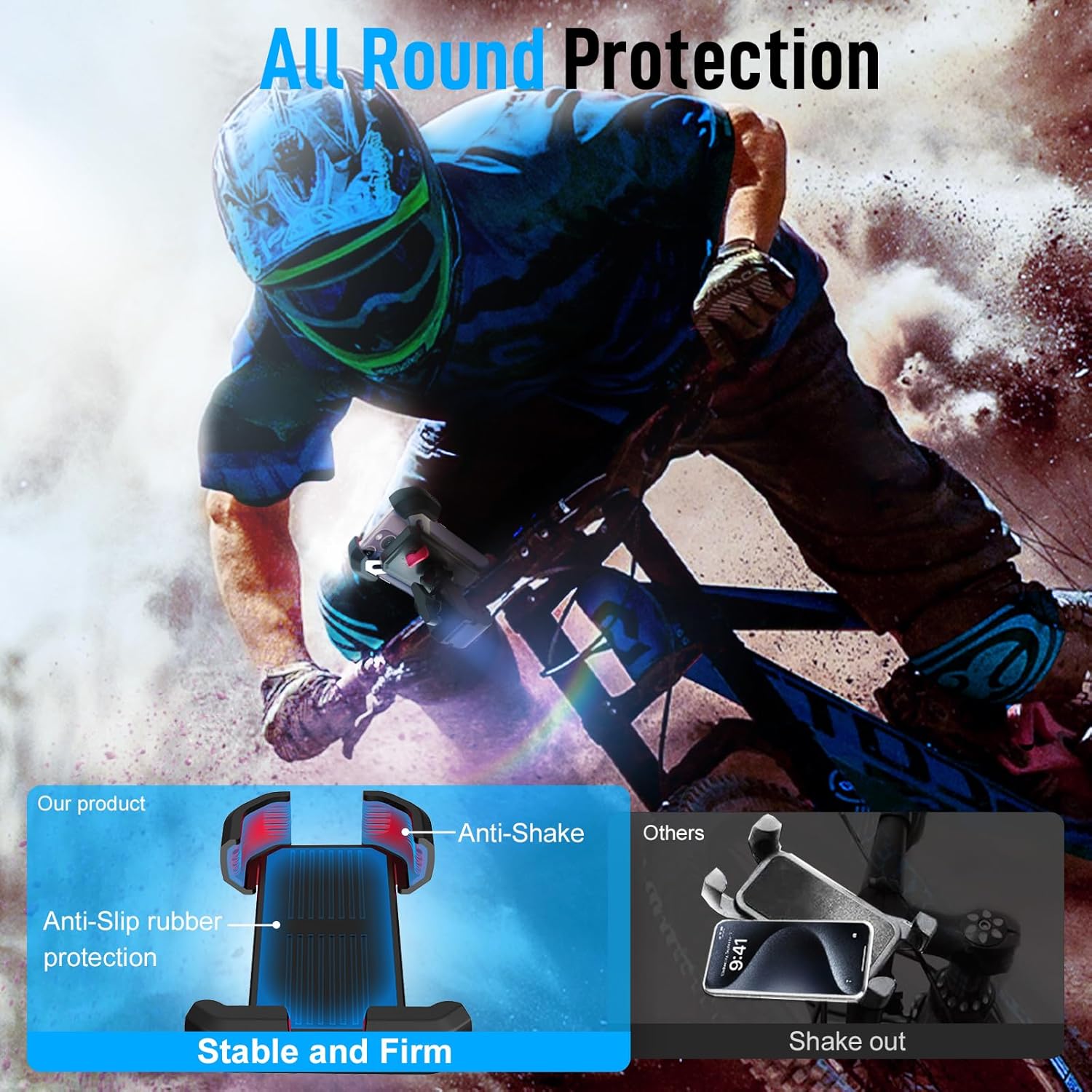
Figure 2.5: All-Round Protection for Phone Holder

Figure 2.6: Unique Design with Raised Buttons, Smaller and Lighter Headset
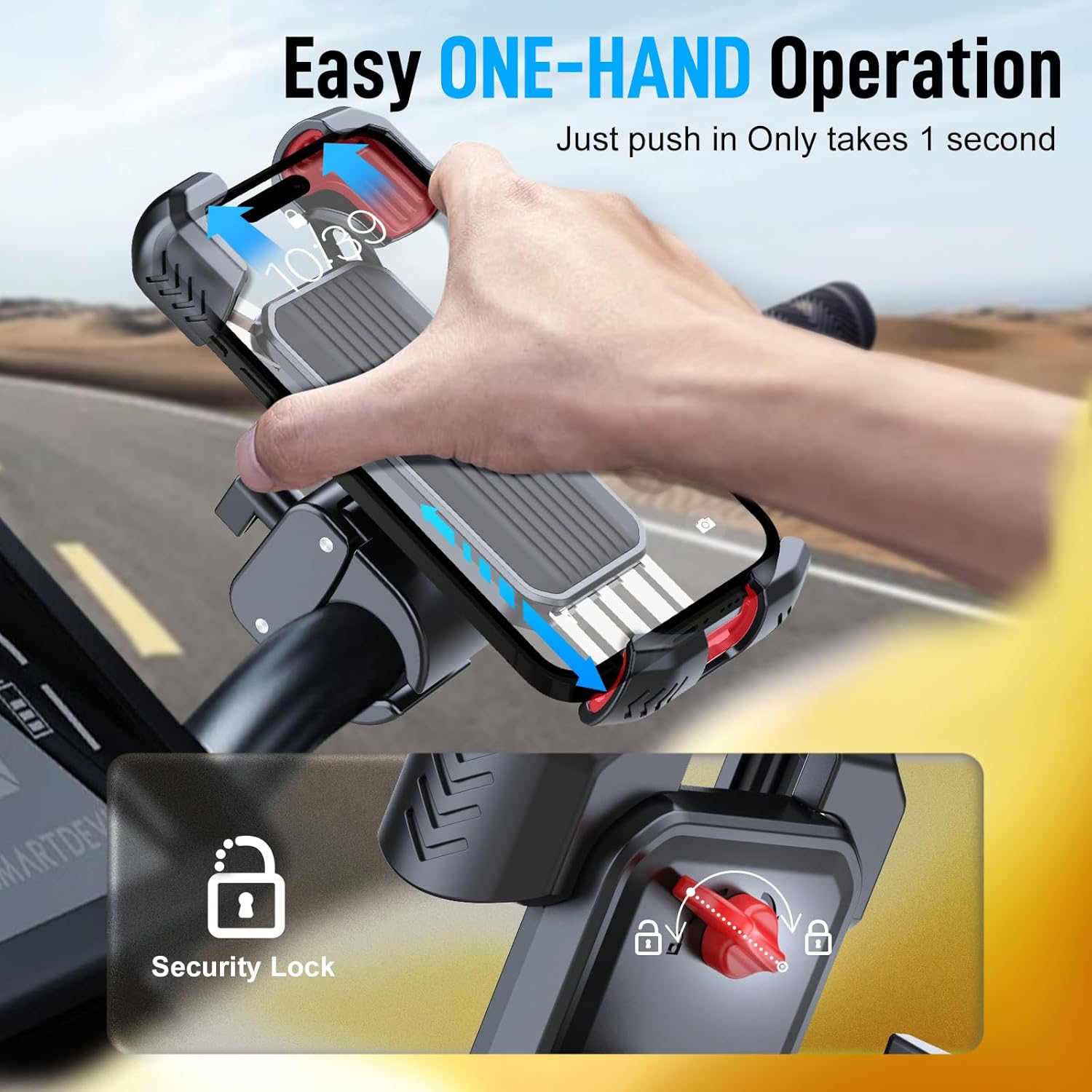
Figure 2.7: Easy One-Hand Operation for Phone Holder
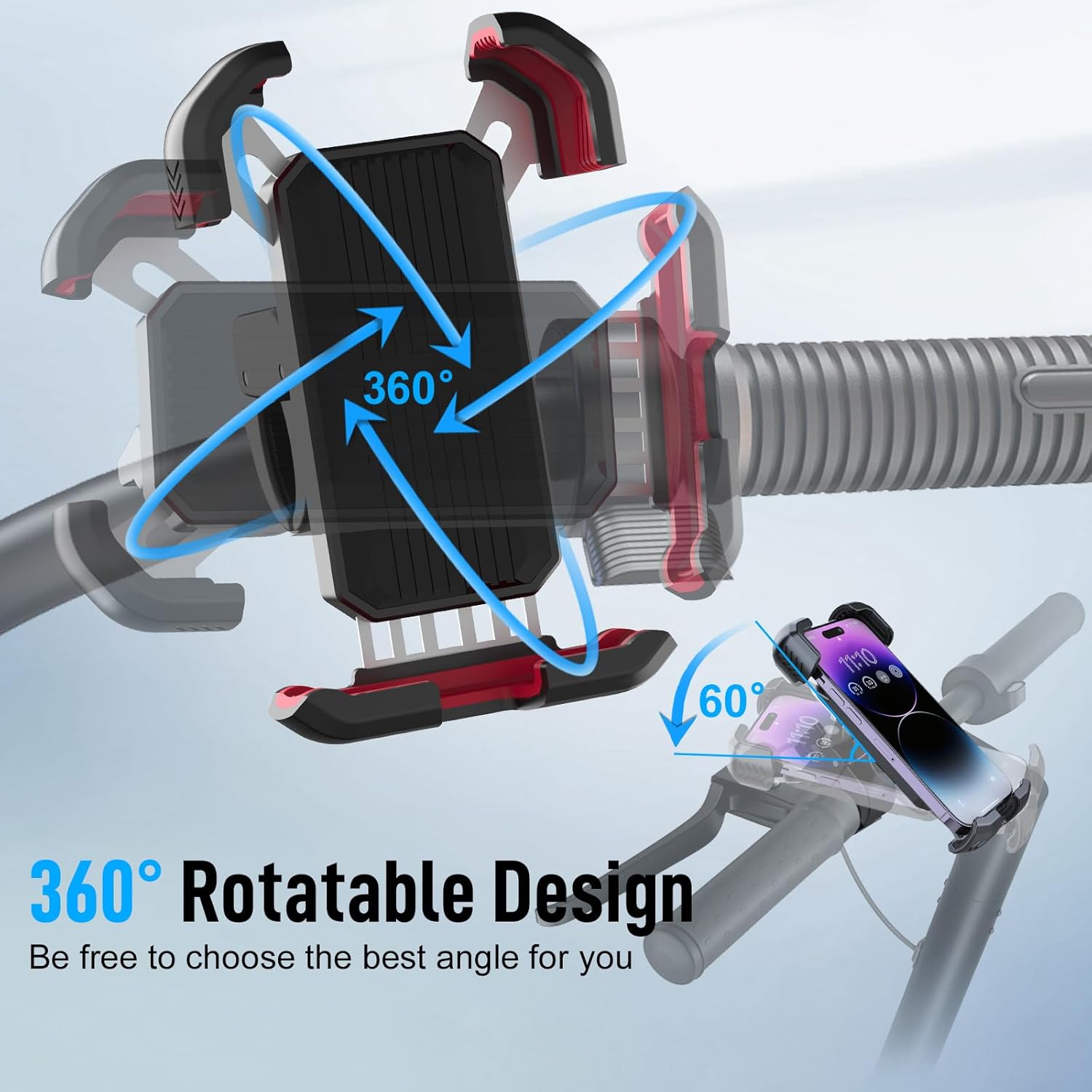
Figure 2.8: 360 Degree Rotatable Design for Phone Holder

Figure 2.9: Solid Grip and Compatibility for Phone Holder
3. Setup
3.1 Moman RS-S Helmet Headset Installation
3.1.1 Charging the Headset
Before first use, fully charge the headset. Connect the provided USB charging cable to the headset's charging port and to a standard USB power adapter (not included). The LED indicator will show charging status and turn off when fully charged.
3.1.2 Installing the Headset in Your Helmet
- Speaker Placement: Locate suitable positions inside your helmet, typically near your ears, where the speakers can be comfortably placed without obstructing airflow or causing pressure points. Use the adhesive backing on the speakers to secure them.
- Microphone Attachment: Attach the microphone to a position inside the helmet where it is close to your mouth but not directly in front of it, to minimize wind noise. Ensure the microphone cable is routed neatly.
- Main Unit Mounting: Secure the main headset unit to the side of your helmet using the provided mounting clip. Ensure it is easily accessible for operation and does not interfere with helmet functionality. Route all cables neatly under the helmet padding.
3.1.3 Bluetooth Pairing
- Ensure the headset is powered off.
- Press and hold the Power button until the LED indicator flashes red and blue alternately, indicating pairing mode.
- On your smartphone, enable Bluetooth and search for available devices.
- Select "Moman RS-S" from the list of devices.
- Once paired, the LED indicator will flash blue slowly.
3.2 Moman PME1 Phone Holder Installation
3.2.1 Mounting on Handlebars
- Choose a suitable location on your motorcycle or bicycle handlebars that does not obstruct your view or controls.
- Open the mounting clamp and place it around the handlebar.
- Tighten the screw on the clamp until the holder is securely fastened and does not rotate freely.
3.2.2 Securing Your Phone
- Press the release button or mechanism on the phone holder to extend the telescopic arms.
- Place your phone into the holder, ensuring it sits firmly against the silicone pads.
- Release the arms to grip the phone securely. Verify that the phone is held tightly and does not wobble.
- Engage the security lock (if applicable) to prevent accidental release, especially on bumpy roads.
4. Operating Instructions
4.1 Moman RS-S Helmet Headset Operation
4.1.1 Power On/Off
- Power On: Press and hold the Power button for approximately 3 seconds until the LED indicator flashes blue.
- Power Off: Press and hold the Power button for approximately 5 seconds until the LED indicator flashes red and then turns off.
4.1.2 Music Playback
- Play/Pause: Short press the Power button.
- Next Track: Short press the FM button.
- Previous Track: Short press the Microphone button.
- Volume Up/Down: Use your connected smartphone's volume controls.
4.1.3 Call Management
- Answer Call: Short press the Power button when an incoming call is detected. The headset also features a 10-second auto-answer function.
- End Call: Short press the Power button during a call.
- Reject Call: Press and hold the Power button for 2 seconds when an incoming call is detected.
- Redial Last Number: Double-press the Power button when not on a call.
4.1.4 FM Radio
- Turn On/Off FM Radio: Press and hold the FM button for 2 seconds.
- Scan Channels: Short press the FM button to scan for the next available station.
4.1.5 AI Voice Assistant
- Activate Voice Assistant: Short press the Microphone button to activate your smartphone's AI voice assistant (e.g., Siri, Google Assistant).
4.2 Moman PME1 Phone Holder Operation
4.2.1 Inserting and Removing Phone
- Inserting: With one hand, push the phone into the holder. The telescopic arms will automatically adjust and grip the phone.
- Removing: Gently pull the phone upwards or outwards from the holder. The arms will release the phone.
4.2.2 Adjusting Viewing Angle
- The phone holder features a 360-degree rotatable joint. Loosen the adjustment knob slightly, position your phone to the desired angle (portrait or landscape), and then tighten the knob to secure it.
4.2.3 Using the Security Lock
- After securing your phone, engage the security lock mechanism, typically a switch or lever, to prevent accidental release of the phone, especially during vigorous riding.
5. Maintenance
5.1 Cleaning and Care
- Wipe the headset and phone holder with a soft, damp cloth. Do not use harsh chemicals or abrasive cleaners.
- Ensure the charging port of the headset is dry before charging.
- Keep the silicone pads of the phone holder free from dirt and debris to maintain optimal grip.
5.2 Storage
- Store the product in a cool, dry place away from direct sunlight and extreme temperatures.
- If storing for an extended period, ensure the headset is partially charged (around 50%) to preserve battery life.
6. Troubleshooting
6.1 Common Issues and Solutions
- No Power:
- Ensure the headset is fully charged. Connect it to a power source and check the charging indicator.
- Press and hold the Power button for a longer duration (5-7 seconds) to ensure it's not just in standby. - Cannot Pair with Phone:
- Ensure the headset is in pairing mode (LED flashing red and blue alternately).
- Turn off and on your phone's Bluetooth.
- Delete previous pairings on your phone and try pairing again.
- Ensure the headset is within the Bluetooth range of your phone (typically 10 meters). - No Sound or Low Volume:
- Check the volume levels on both the headset (via phone controls) and your smartphone.
- Ensure the speakers are correctly positioned inside the helmet and connected to the main unit.
- Re-pair the headset with your phone. - Microphone Not Working:
- Ensure the microphone is properly connected and positioned close to your mouth.
- Check your phone's privacy settings to ensure the app you are using has microphone access. - FM Radio Not Receiving Stations:
- Ensure you are in an area with good FM signal coverage.
- Try rescanning for stations by pressing the FM button. - Phone Not Secure in Holder:
- Ensure the telescopic arms are fully gripping the phone.
- Verify that the security lock is engaged.
- Check if your phone (with case) fits within the specified dimensions (4.5-7 inches, up to 15mm thickness). - Phone Holder Wobbles:
- Ensure the handlebar clamp is tightened securely.
- Check that the rotatable joint's knob is fully tightened after adjustment.
7. Specifications
| Feature | Specification |
|---|---|
| Model Name | H4 Plus |
| Connectivity Technology | Wireless |
| Wireless Communication Technology | Bluetooth |
| Bluetooth Version | 5.3 |
| Frequency Range | 2.400 GHz - 2.4835 GHz |
| Audio Driver Type | Dynamic Driver |
| Speaker Size | 40mm |
| Noise Control | Sound Isolation |
| Water Resistance Level | Waterproof |
| Control Type | Voice Control |
| Control Method | Voice |
| Compatible Devices | Smartphones |
| Recommended Uses For Product | Calling, Music |
| Specific Uses For Product | Motorcycle Riding |
| Phone Holder Material | Silicone, Stainless Steel |
| Phone Holder Compatibility | 4.5-7 inch phones, up to 15mm thickness |
| Color | Black |
| Manufacturer | Moman |
8. Safety Information
Please observe the following safety guidelines to prevent injury or damage to the product:
- Always prioritize road safety. Do not operate the headset or phone holder in a way that distracts you from riding.
- Do not attempt to disassemble or modify the product. This may void the warranty and cause damage.
- Keep the product away from extreme temperatures, direct sunlight, and open flames.
- Avoid exposing the headset to excessive moisture, despite its waterproof rating, to prolong its lifespan.
- Ensure all cables are securely routed within the helmet to prevent entanglement or discomfort.
- Verify the phone is securely mounted in the holder before each ride.
- Use only the provided charging cable.
- Do not listen to audio at excessively high volumes for prolonged periods, as this can cause hearing damage.


