
1. Safety Information
Please read and understand all safety instructions before using the VILTROX P12 RGB Tube Light. Failure to follow these instructions may result in electric shock, fire, or serious injury.
- Do not expose the device to water, rain, or moisture.
- Do not operate the device in environments with high humidity or extreme temperatures.
- Avoid direct eye exposure to the light source, as it may cause discomfort or vision impairment.
- Use only the specified charging cable and power adapter to prevent damage to the battery and device.
- Keep the device away from flammable materials and heat sources.
- Do not attempt to disassemble, repair, or modify the device. Contact qualified service personnel for assistance.
- Keep out of reach of children.
2. Product Components
The VILTROX P12 RGB Tube Light package includes the following items:
- VILTROX P12 RGB Tube Light (2 units)
- Hard Packing Round Box (2 units)
- User Manual (2 units)
- USB Type-C Charging Cable (quantity may vary, typically one per light or one for the pack)

Figure 2.1: The image displays the contents of the VILTROX P12 package, including two P12 Pixel Stick Lights, two brown packaging boxes, and two instruction manuals. The overall weight of the light is indicated as 405.5g, and its dimensions are 75.58cm (29.7in) in length and 4.08cm (1.6in) in width.
3. Product Overview
The VILTROX P12 RGB Tube Light is a versatile and portable lighting solution designed for photography and videography. It features advanced RGBWY technology, offering a wide spectrum of colors and precise control options.
3.1 Key Features
- RGBWY Full Color Spectrum: Utilizes 240pcs LED beads with RGBWY technology for 36000 colors, 2500K-8500K color temperature, and CRI97+/TLCI 97+ for accurate color reproduction.
- Pixel Effects: Features 12 independently controllable pixel sections with 11 pixel effects and 26 special scene effects, including a "Pickup" function (iOS compatible) that reacts to audio volume.
- Multiple Control Methods: Control via physical buttons on the light, "Viltrox Link" APP, RC-11 Remote (2.4G system), or DMX512 16bit for professional setups.
- Rechargeable Battery & PD Fast Charging: Built-in 7.4V/2500mAh battery provides approximately 160 minutes of battery life at 100% power (2500K). Supports charging while in use via Type-C interface with 10W/18W/24W PD fast charging.
- Portable & Magnetic Design: Weighs 14oz (405g) and measures 1.5"x30" (39x756mm). Features built-in 1/4" threads and magnets on both ends for versatile mounting.

Figure 3.1: This composite image illustrates the VILTROX P12 RGB Tube Light's versatility. It shows the light in various color modes, its handheld use, magnetic mounting, and the intuitive app interface for controlling brightness, color, and effects.
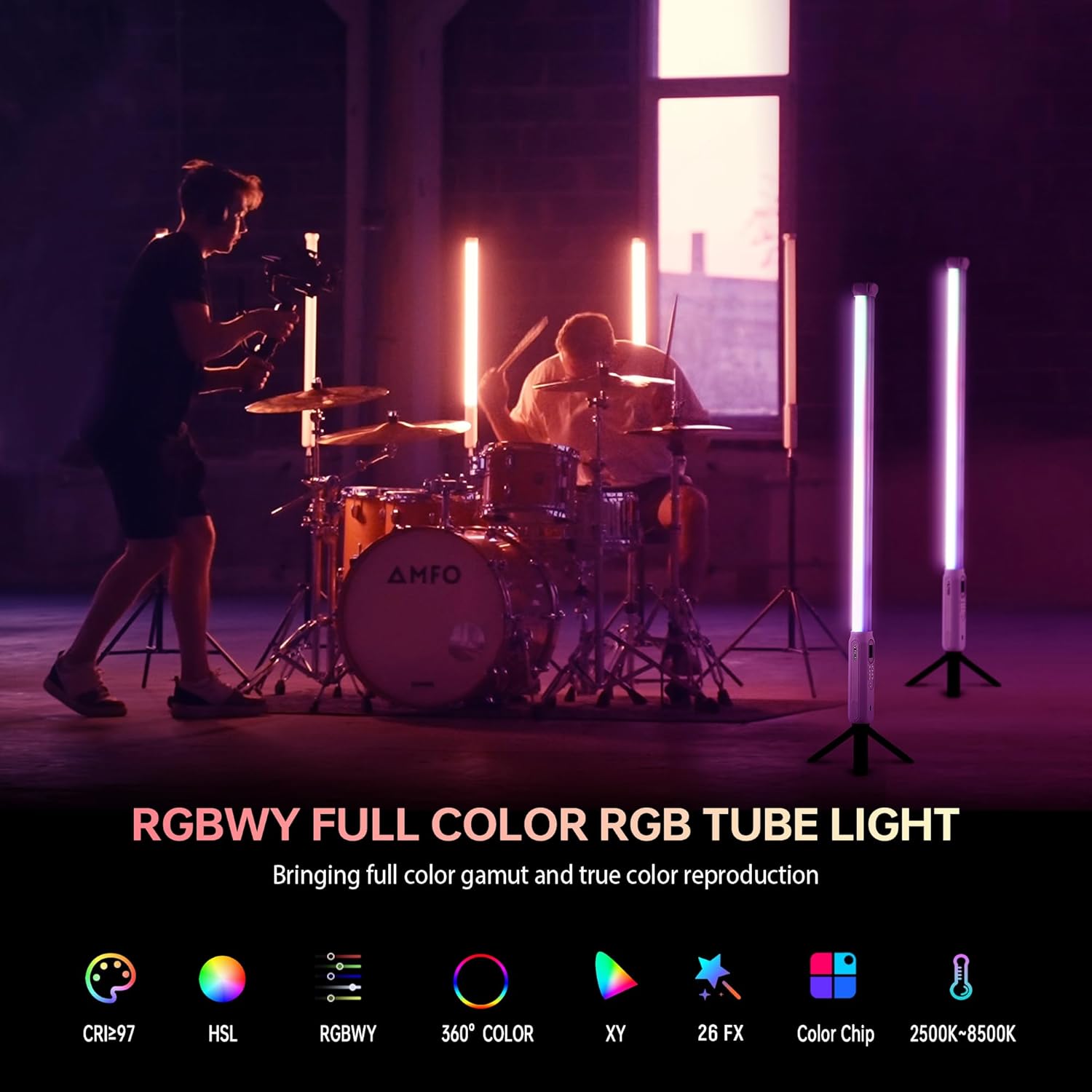
Figure 3.2: This image emphasizes the RGBWY Full Color capabilities of the VILTROX P12, detailing its high CRI (97+), HSL mode, 360° color range, XY coordinates, 26 special effects, color chip accuracy, and a wide color temperature range of 2500K-8500K.
4. Setup
4.1 Initial Charging
Before first use, fully charge the VILTROX P12 RGB Tube Light. Connect the provided USB Type-C charging cable to the charging port on the light and to a compatible USB power adapter (not included). The LCD screen will indicate charging status.

Figure 4.1: This image highlights the internal 7.4V/2500mAh lithium battery of the VILTROX P12, which provides approximately 162 minutes of battery life. It also shows the USB Type-C port for PD fast charging (up to 24W), with a typical charging time of 2 hours.
4.2 Mounting Options
The P12 offers multiple mounting options for flexibility:
- 1/4" Thread: Both ends of the tube light feature a 1/4" screw thread, allowing direct attachment to light stands, tripods, or other compatible accessories.
- Built-in Magnets: Integrated magnets on each end enable quick and secure attachment to metallic surfaces.
- Handheld Use: The lightweight and ergonomic design makes it suitable for handheld operation.

Figure 4.2: This image illustrates the magnetic mounting feature of the VILTROX P12, showing it attached to a metal surface. It also depicts the light mounted on a light stand via its 1/4" thread and used with a light clip or hanging wire, emphasizing its versatile setup options.
5. Operating Instructions
5.1 Power On/Off
To power on the device, press and hold the power button located on the control panel until the LCD screen illuminates. To power off, press and hold the power button again.
5.2 On-Device Controls
The integrated LCD screen and buttons allow for direct control of the light's functions:
- Brightness Adjustment: Use the '+' and '-' buttons to increase or decrease the light intensity from 0% to 100%.
- Color Temperature (CCT Mode): Adjust the color temperature between 2500K (warm) and 8500K (cool) using the dedicated controls.
- Mode Switching: Cycle through different lighting modes such as CCT (Correlated Color Temperature), HSI (Hue, Saturation, Intensity), and FX (Special Effects) using the 'M' button.
- Parameter Navigation: Use the arrow buttons to navigate between different parameters within each mode.

Figure 5.1: This image provides a detailed view of the VILTROX P12's control panel and LCD screen. The screen displays key information such as brightness percentage, current mode (PX for pixel effects), speed, and pixel settings. Additional smaller screens show CCT mode (20% brightness, 2700K), FX mode (1% brightness, slow speed), RGBW mode (R:3, G:3, Y:7, B:3), and HSI mode (20% brightness, 6° hue, 100L saturation).
5.3 App Control ("Viltrox Link")
For enhanced control and advanced features, download the "Viltrox Link" app on your smartphone. The app allows for wireless control of multiple lights and offers a more intuitive interface for color and effect selection.
- Download the app from the Apple App Store (for iOS) or Google Play Store (for Android).
- Enable Bluetooth on your device and open the "Viltrox Link" app.
- Follow the in-app instructions to connect to your P12 tube lights.
- The app supports simultaneous control of up to 4 pixel sections.

Figure 5.2: This image showcases the "Viltrox Link" app interface on a smartphone, demonstrating its capability for app control. The screen displays a color picker and sliders for adjusting Red, Green, Blue, White, and Yellow components, allowing for precise color tuning. QR codes for both iOS and Android app downloads are also visible.
5.4 DMX Control
For professional lighting setups, the VILTROX P12 supports DMX512 16bit control. This allows for precise control over each of the 12 pixel sections simultaneously, enabling complex programmable light arrays.
- Connect the P12 to a DMX console using appropriate DMX cables and adapters (not included).
- Refer to the DMX section of the full user manual for detailed DMX channel mapping and setup instructions.

Figure 5.3: This image illustrates the DMX console control capability of the VILTROX P12, showing the light connected to a DMX board for advanced programming. It also features smaller insets demonstrating other control methods: direct light body key control, app control via a smartphone, and remote control using a 2.4G RC-11 remote.
5.5 Pixel Effects and Special Scenes
The P12 offers a variety of dynamic lighting effects:
- 11 Pixel Effects: These effects allow for individual control and animation across the 12 pixel sections, creating unique visual patterns. Examples include RGB Loop, CCT Loop, Scroll, Rainbow, Gradient, and Pickup.
- 26 Special Scene Effects: Pre-programmed effects designed to simulate various real-world lighting scenarios, such as Police, Firework, Party, and Lightning Flash.

Figure 5.4: This image highlights the customizable pixel effects of the VILTROX P12. It lists 11 distinct pixel FX modes, including RGB Loop, CCT Loop, INT Loop, Scroll, Rainbow, Drive, RGBWY, Flame, Gradient, Trek, and Pickup (compatible only for iOS), demonstrating the light's dynamic capabilities.
6. Maintenance
- Cleaning: Use a soft, dry cloth to clean the surface of the light. Do not use abrasive cleaners or solvents.
- Storage: Store the light in a cool, dry place away from direct sunlight and extreme temperatures. If storing for extended periods, ensure the battery is partially charged (around 50%) to prolong its lifespan.
- Battery Care: Avoid fully discharging the battery frequently. Recharge the battery regularly, even if the light is not in use, to maintain battery health.
7. Troubleshooting
| Problem | Possible Cause | Solution |
|---|---|---|
| Light does not turn on. | Low battery; Power button not held long enough. | Charge the light fully. Press and hold the power button for 3-5 seconds. |
| App cannot connect to the light. | Bluetooth is off; Light is too far; App needs restart. | Ensure Bluetooth is enabled on your phone. Move closer to the light. Close and reopen the app. |
| Light output is inconsistent or flickering. | Low battery; Firmware issue. | Charge the light. Check for firmware updates via the app or VILTROX website. |
| DMX control not working. | Incorrect DMX settings; Cable issue. | Verify DMX channel settings. Check DMX cable connections. |
8. Specifications
| Product Model | P12 |
| Color Rendering Index (CRI) | 97+ |
| Pixel Effects | 11 in 12 Pixel Section |
| Maximum Luminous Flux | 408lm |
| Maximum Power | 10W |
| Maximum Illuminance | 473lux (100%, 5500K@0.5m) |
| Scene Effects | 26 |
| Built-in Lithium Battery | 7.4V/2500mAh/18.5Wh |
| Hue Range | 0-360° |
| Power Interface | Type-C Interface, 5V/2A, 9V/2A, 12V/2A (PD/QC) |
| Number of LED Beads | 240pcs |
| Battery Life | About 2.7h (100%, 2500K); About 1.7h (100%, 4000-5500K) |
| Color Temperature | 2500-8500K |
| Charging Time | About 2h (12V/2A); About 3h (9V/2A); About 4h (5V/2A) |
| Brightness | 0%-100% (1% increment) |
| Control Mode | Viltrox Link App/Light Panel/RC-11 Remote/DMX Control |
| Item Weight | 4.09 pounds (for 2 pack) |
| Product Dimensions | 1.61 x 1.55 x 29.76 inches (39x756mm) |
9. Warranty and Support
VILTROX products are designed and manufactured to the highest quality standards. For warranty information, technical support, or service inquiries, please refer to the official VILTROX website or contact their customer service directly. Keep your purchase receipt as proof of purchase for warranty claims.
Official VILTROX Store: https://www.amazon.com/stores/ViltroxOfficial/page/8CA74AE3-C461-4006-B5D7-190F49510F56
