
1. Introduction
This manual provides detailed instructions for the operation and maintenance of your KUIIYER U2 Wireless 2D QR 1D Barcode Scanner. Please read this manual thoroughly before using the device to ensure proper functionality and to maximize its lifespan.
2. Product Overview
The KUIIYER U2 is a versatile barcode scanner featuring an 800 x 600 pixel CMOS image sensor, capable of reading various 1D, 2D, and QR codes from both printed labels and digital screens. It offers both wireless (2.4GHz USB dongle) and wired (USB cable) connectivity options.

Figure 1: Components of the KUIIYER U2 Wireless Barcode Scanner. Key parts include the 800x600 pixel CMOS scanning window, built-in auxiliary light, scan button, indicator light, buzzer, USB charging port, and the 2000 mAh large capacity battery compartment. The scanner measures approximately 9.5 cm (3.7 inches) in length for the scanning head, 6 cm (2.4 inches) in width, and 16 cm (6.3 inches) in height.
Key Features:
- Advanced CMOS Sensor: 800 x 600 pixel resolution for fast and accurate scanning.
- Multi-Code Support: Reads 1D, 2D, and QR codes, including those on screens.
- Dual Connectivity: 2.4GHz wireless via USB dongle and wired USB connection.
- Long Battery Life: 2000mAh battery for extended continuous use.
- Built-in Auxiliary Light: Enhances scanning performance in various lighting conditions.
- Durable Design: IP54 dust and water resistance, with 1.5m drop protection.
- Multi-Language Support: Configurable for 32 different languages.
3. Setup
3.1 Charging the Scanner
Before initial use, fully charge the scanner's 2000mAh lithium-ion battery. Connect the scanner to a USB power source (e.g., computer USB port, USB wall adapter) using the provided USB cable. The indicator light will show charging status.
3.2 Connection Modes
The KUIIYER U2 scanner supports two primary connection methods:
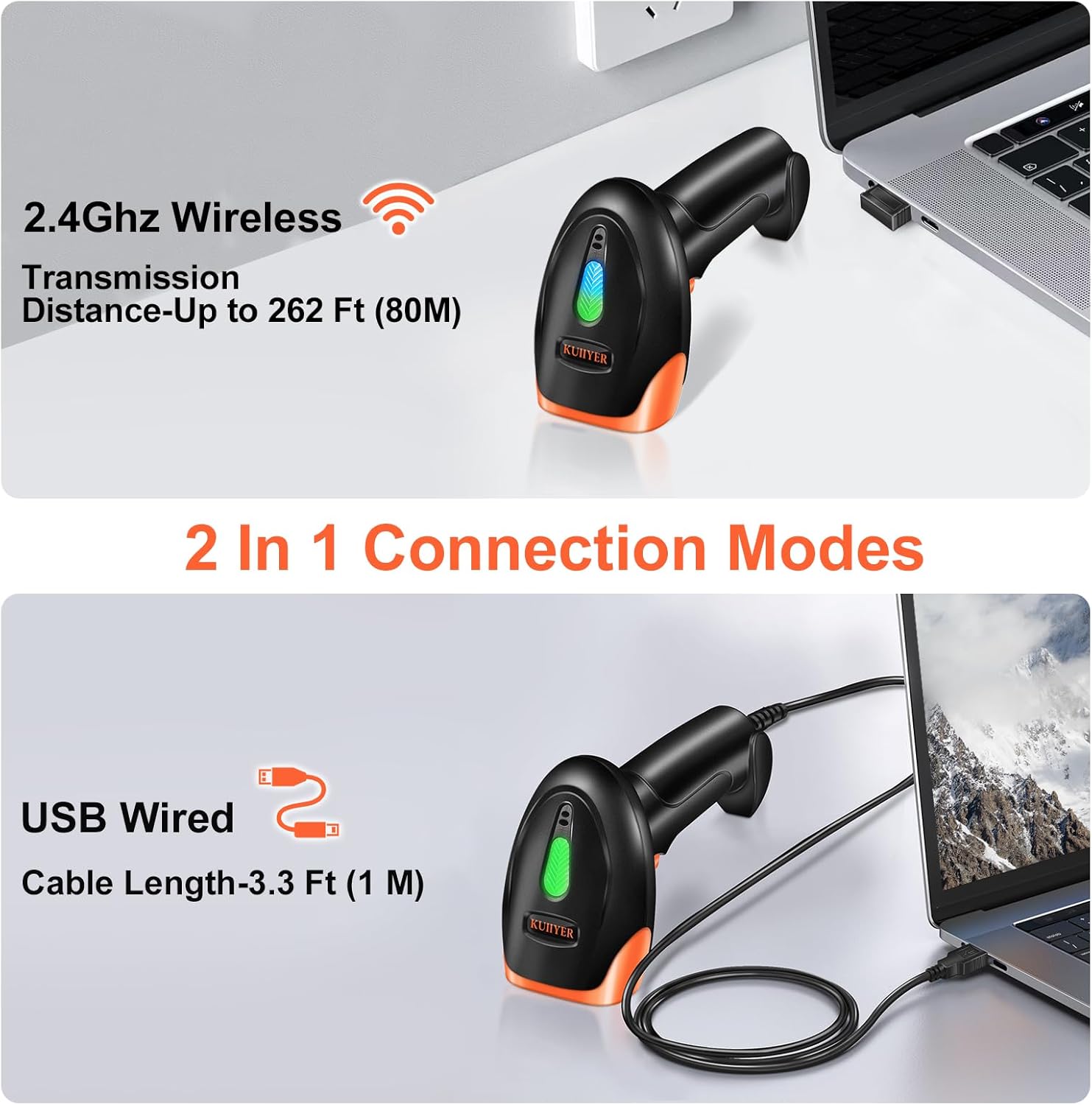
Figure 2: The scanner offers both 2.4GHz wireless connectivity with a transmission distance of up to 80 meters (262 feet) and a USB wired connection with a cable length of 1 meter (3.3 feet).
- 2.4GHz Wireless Connection:
- Insert the 2.4GHz USB dongle into an available USB port on your computer or POS system.
- The scanner will automatically pair with the dongle. A successful connection is indicated by a specific sound or light pattern (refer to the full user manual for details).
- This mode offers a transmission distance of up to 80 meters (262 feet) in open areas.
- USB Wired Connection:
- Connect the scanner directly to your computer or POS system using the provided USB cable.
- The device will be recognized as a standard HID keyboard device, requiring no additional driver installation.
- The cable length is approximately 1 meter (3.3 feet).
Note: The scanner is compatible with Windows, macOS, Linux, and square POS systems. It functions with common software applications like Word, Excel, and Novell. It requires a device with a USB port and does not support iPads, Google tablets, smartphones, or similar devices without USB host capabilities.
4. Operating Instructions
4.1 Scanning Barcodes
The KUIIYER U2 scanner can read a wide variety of 1D and 2D barcodes, including QR codes, Data Matrix, UPC/EAN, Code-128, and more. It is designed to read complex barcodes such as fuzzy, damaged, curved, screen-displayed, and colored codes.

Figure 3: The scanner's CMOS 800x600 pixel technology accommodates various complex 1D, 2D, and QR barcodes, including those that are fuzzy, damaged, curved, displayed on screens, or colored.
4.2 Scanning Modes
The scanner offers three operational modes, configurable by scanning specific barcodes found in the full user manual (PDF).
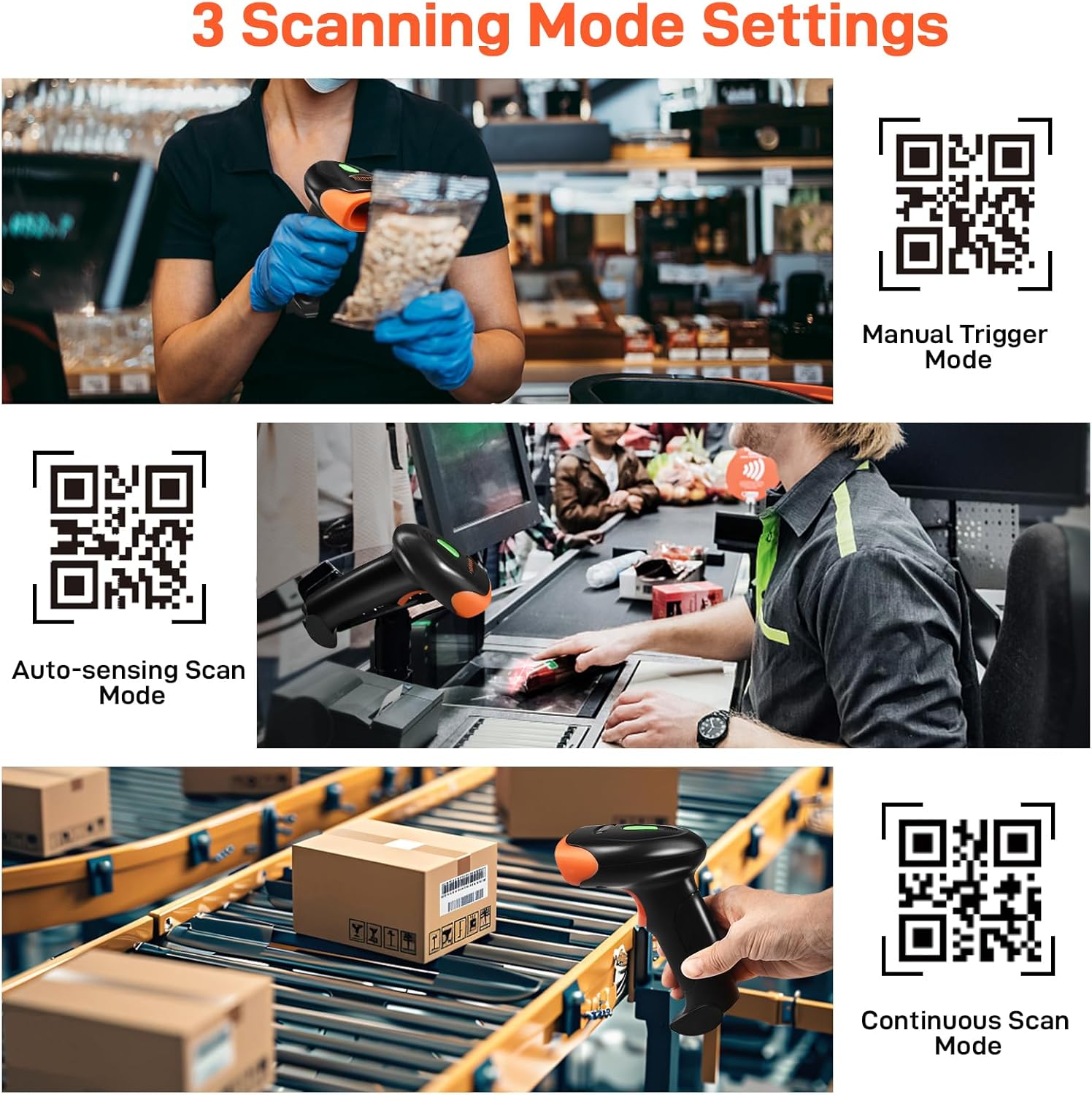
Figure 4: The three scanning modes: Manual Trigger Mode (scan by pressing the button), Auto-sensing Scan Mode (scanner activates when a barcode is detected), and Continuous Scan Mode (scanner continuously emits a beam).
- Manual Trigger Mode: Press the scan button to activate the scanning beam and read a barcode. This is the default mode.
- Auto-sensing Scan Mode: The scanner automatically detects a barcode within its field of view and activates the scanning beam without requiring a button press.
- Continuous Scan Mode: The scanning beam remains continuously active, allowing for rapid, successive scans without individual button presses.
4.3 Data Uploading Modes
The scanner supports two methods for uploading scanned data to your connected device.
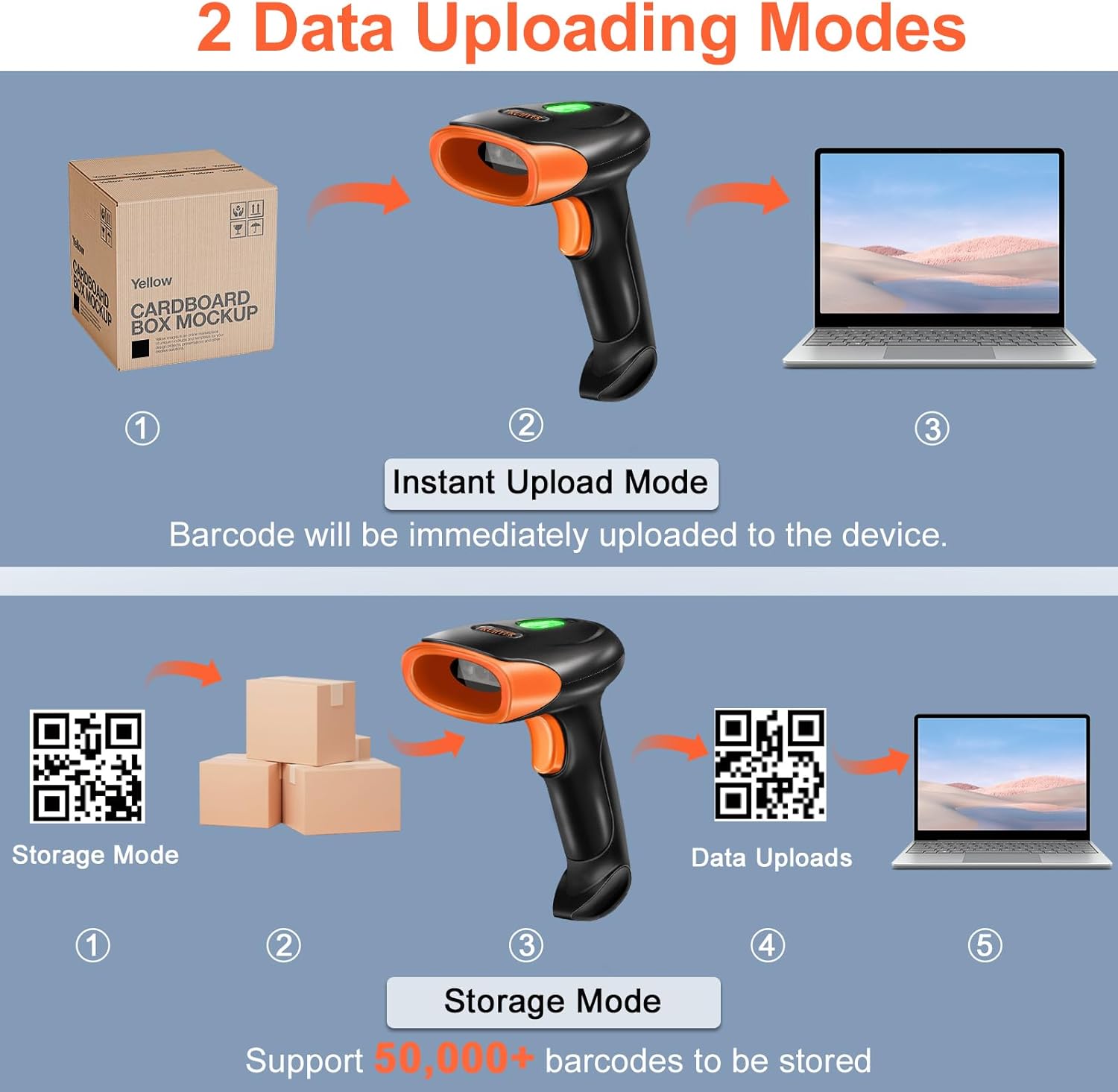
Figure 5: The two data uploading modes: Instant Upload Mode, where barcodes are immediately transmitted to the device, and Storage Mode, which allows storing over 50,000 barcodes internally before uploading them in a batch.
- Instant Upload Mode: Barcodes are transmitted to the connected device immediately after scanning. This is suitable for real-time data entry.
- Storage Mode: Scanned barcodes are stored in the scanner's internal memory. This mode is useful when working out of range of the receiver or when batch processing is preferred. The scanner can store over 50,000 barcodes. To upload stored data, scan the "Upload Data" barcode from the manual.
4.4 Multi-Language Configuration
The scanner supports 32 different language configurations for keyboard output. To change the language, refer to the specific barcodes in the full user manual (PDF) for your desired language setting.
5. Maintenance
5.1 Cleaning
To maintain optimal scanning performance, keep the scanning window clean. Use a soft, lint-free cloth, slightly dampened with water or a mild cleaning solution, to gently wipe the window. Avoid abrasive materials or harsh chemicals.
5.2 Battery Care
- Charge the battery regularly, even if the scanner is not in frequent use, to prolong its lifespan.
- Avoid exposing the scanner to extreme temperatures, which can degrade battery performance.
- If the scanner will not be used for an extended period, charge it to about 50% before storing.
5.3 Durability and Protection
The KUIIYER U2 scanner is built with high-strength Polycarbonate + ABS material, providing enhanced durability.

Figure 6: The scanner's high-strength shell (ABS+PC material) provides shockproof and drop-proof performance, capable of withstanding drops from up to 1.5 meters (5 feet). It also supports multiple languages.
- IP54 Rating: The device is rated IP54 for dust and water resistance, protecting it from limited dust ingress and water spray from any direction.
- Drop Resistance: It can withstand drops from up to 1.5 meters (5 feet) onto concrete, ensuring reliable operation in demanding environments.
6. Troubleshooting
If you encounter issues with your scanner, consider the following common solutions:
- Scanner not connecting: Ensure the USB dongle is properly inserted or the USB cable is securely connected. Check if the scanner is charged.
- Not scanning barcodes: Verify the scanner is in the correct scanning mode. Ensure the barcode is clean and not excessively damaged. Adjust the distance and angle of the scanner to the barcode.
- Incorrect data output: Check the language settings of the scanner. Ensure your computer's keyboard layout matches the scanner's output.
- Scanner times out/shuts off: This is a power-saving feature. Press the scan button to reactivate. For persistent issues, refer to the full user manual for advanced settings.
For a comprehensive list of troubleshooting steps and advanced configurations, please download the latest version of the user manual (PDF) from the product listing page.
7. Specifications
| Feature | Detail |
|---|---|
| Model Number | U2 |
| Brand | KUIIYER |
| Scanning Technology | CMOS 800 x 600 Pixels |
| Supported Barcodes | 1D, 2D, QR codes (including screen codes, fuzzy, damaged, curved, colored) |
| Connectivity | 2.4GHz Wireless (USB dongle), USB Wired |
| Wireless Range | Up to 80m (262 ft) |
| Battery Capacity | 2000mAh Lithium-ion |
| Data Storage | Over 50,000 barcodes (in Storage Mode) |
| Durability Rating | IP54 (Dust and Water Resistant) |
| Drop Resistance | Up to 1.5m (5 ft) |
| Compatible Systems | Windows, macOS, Linux, POS systems |
| Product Dimensions | 9.4 x 6.1 x 16 cm |
| Product Weight | 290 g |
| Manufacturer Part Number | KU061 |
8. Warranty and Support
KUIIYER provides the following support for your U2 Barcode Scanner:
- 90-Day Unconditional Return: For any quality-related issues within 90 days of purchase.
- 24-Month Warranty: A 24-month warranty covers manufacturing defects and quality-related problems.
- Professional Customer Service: A dedicated customer service team is available to resolve issues within 12 hours.
For further assistance, please refer to the contact information provided with your purchase or visit the official KUIIYER support channels.


