
Introduction
The Hodozzy 9-inch IPS Digital Wireless Backup Camera System provides enhanced visibility and safety for various vehicles. Utilizing advanced digital wireless technology, it offers clear video transmission up to 100 meters in open areas, ensuring real-time road condition monitoring. The system includes a 9-inch IPS display and two waterproof cameras, suitable for trucks, trailers, cars, and RVs.
Key features include a large 9-inch IPS screen with multiple viewing options, integrated blind spot detection, loop recording capability, and robust IP68 waterproof cameras with night vision for all-weather use.

Image: Overview of the Hodozzy Digital Wireless Backup Camera System, highlighting digital signal, 100m transmission, and 12V-24V power compatibility.
Setup
Package Contents
Before installation, verify that all components are present in the package:
- 9-inch IPS Monitor
- 2 x Wireless Cameras
- Antenna Heads
- Power Extension Cord
- Cigarette Lighter Power Cord
- Screws for mounting
- Sticker
- Bracket for monitor
- User Manual
- Remote Control

Image: Product dimensions and a visual list of all components included in the package.
Installation Steps
- Camera Installation: Connect each wireless camera to a 12-24V constant power source. This can typically be achieved by wiring them to your vehicle's taillights or another reliable power source. Ensure the cameras are securely mounted in a position that provides the desired viewing angle, such as the rear or sides of the vehicle.
- Monitor Installation: Mount the 9-inch IPS monitor in a suitable location within your vehicle's cabin, such as on the dashboard or windshield, using the provided bracket. Connect the monitor to a 12-24V cigarette lighter power source using the included power cord.
- System Pairing: The cameras and monitor are typically pre-paired at the factory. Upon powering on, the monitor should automatically display the camera feeds. If a connection is not established or lost, refer to the "Troubleshooting" section for re-pairing instructions.
Operating Instructions
Basic Operation
- Power On/Off: The system powers on automatically when the vehicle ignition is turned on and the monitor receives power.
- Viewing Modes: The 9-inch IPS screen supports up to 4 wireless cameras. Use the control buttons on the monitor or the remote control to cycle through various display modes: full view (single camera), split view (two cameras), 3-view, and 4-view.

Image: The 9-inch HD screen demonstrating various multi-view display options.
Advanced Features
- Reverse Line Adjustment: The parking assist lines can be toggled on or off via the monitor's settings. This feature aids in precise vehicle maneuvering.
- Image Orientation: The system allows you to switch between mirrored and non-mirrored images, ensuring correct display orientation regardless of camera placement.
- Blind Spot Detection (BSD): An integrated advanced digital function for detecting blind spots provides real-time monitoring, enhancing overall driving safety.
- Video Recording: The system supports loop recording. Insert an SD card (not included) into the monitor to enable continuous video recording. Older footage will be automatically overwritten when the storage is full.

Image: Display showing how to toggle reverse lines and adjust image orientation (flip screen).
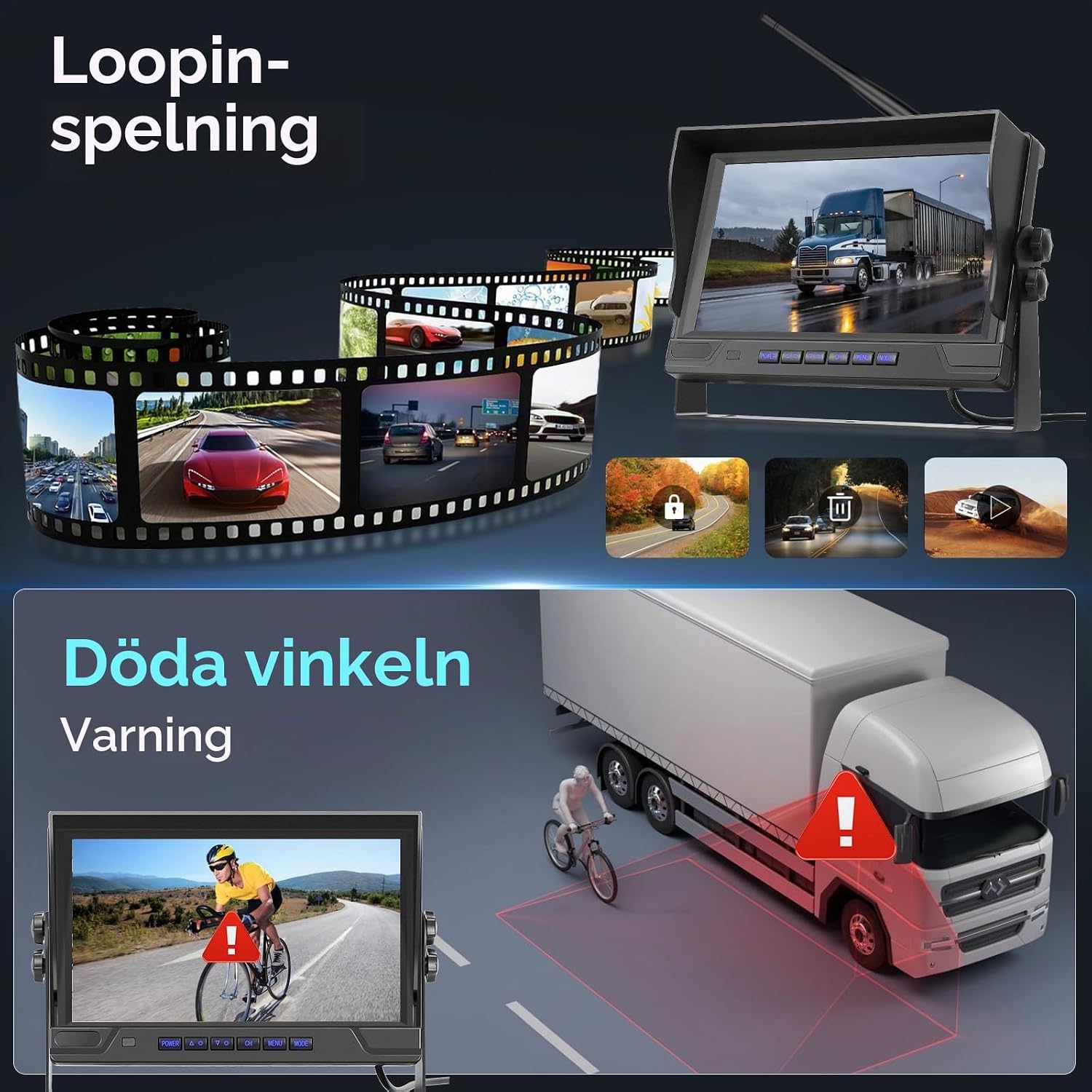
Image: Illustration of loop recording and the blind spot warning system in action.
Maintenance
- Cleaning: Regularly clean the monitor screen and camera lenses with a soft, damp cloth. Avoid using abrasive cleaners or solvents that could damage the surfaces.
- Waterproof Cameras: The cameras are rated IP68 waterproof, making them resistant to dust and water immersion. However, avoid directing high-pressure water jets directly at the camera lenses during vehicle washing.
- Cable Inspection: Periodically inspect all power and signal cable connections for any signs of wear, fraying, or damage. Ensure all connections remain secure.
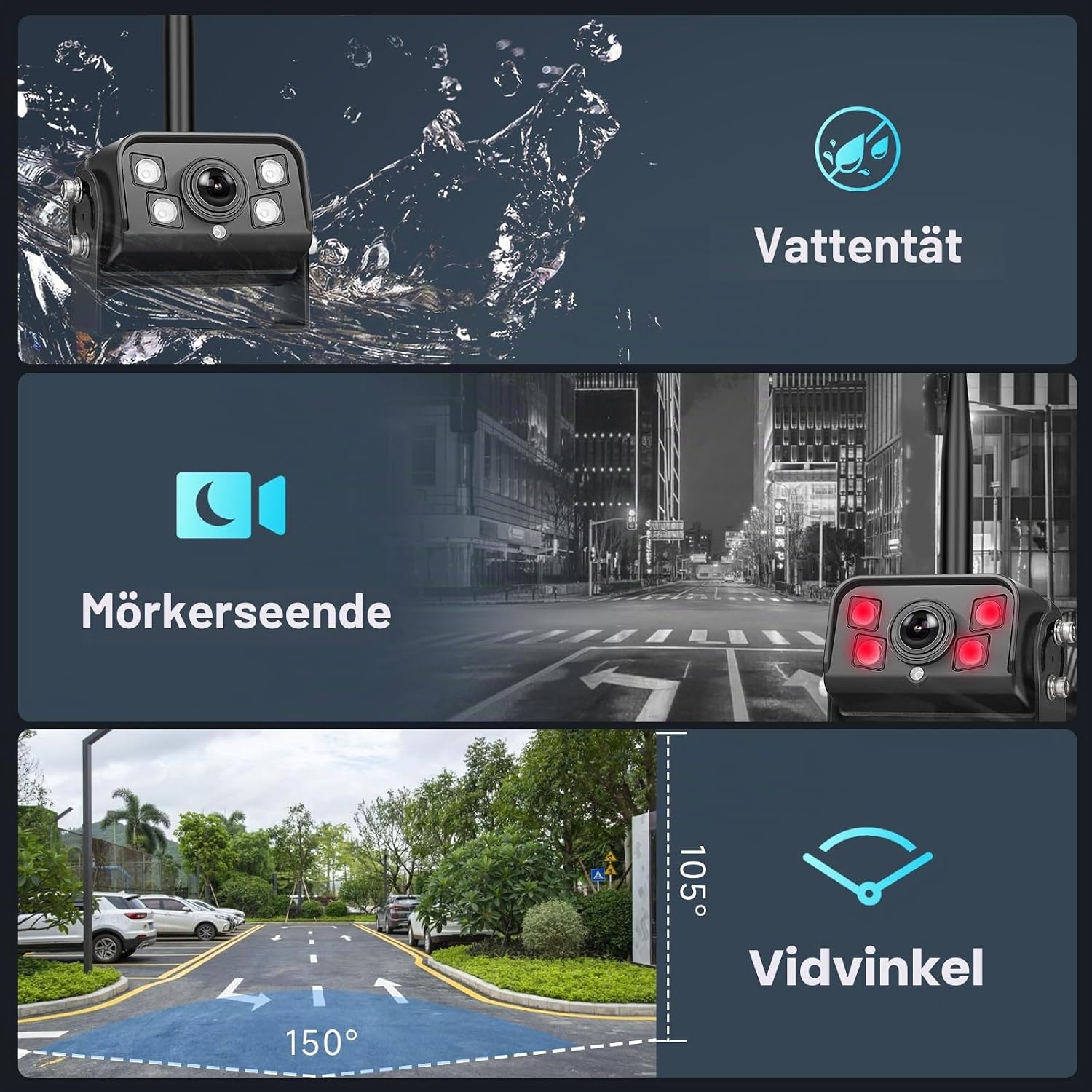
Image: Hodozzy camera highlighting its waterproof, night vision, and wide-angle capabilities.
Troubleshooting
- No Signal or Black Screen:
- Ensure all power connections to both the monitor and cameras are secure and receiving the correct 12-24V power.
- Verify that the cameras are powered on and functioning.
- Check for any physical obstructions or significant metal structures between the cameras and the monitor that might interfere with the wireless signal.
- If the connection is lost, you may need to re-pair the cameras with the monitor. Refer to the detailed user manual for specific pairing instructions.
- Poor Image Quality:
- Clean the camera lenses to remove dirt, dust, or water spots.
- Ensure cameras are securely mounted to prevent vibration, which can blur the image.
- Avoid strong electromagnetic interference sources near the cameras or monitor.
- Video Recording Not Working:
- Confirm that an SD card is correctly inserted into the monitor.
- Check if the SD card is full. While the system supports loop recording, a faulty or incompatible card might prevent it.
- Try formatting the SD card through the monitor's settings menu.
- Persistent Alarm Sounding:
- If an alarm sounds, it may be an alert from the blind spot detection system. Check your immediate surroundings for potential hazards.
- If the alarm is persistent and not related to blind spot detection, consult the full user manual for advanced settings or contact customer support.
Specifications
| Feature | Detail |
|---|---|
| Brand | Hodozzy |
| Screen Size | 9 inches |
| Product Dimensions (L x W x H) | 22.8L x 2.7W x 17.5H centimeters |
| Compatible Devices | Car, Truck, Trailer, RV |
| Installation Type | Wireless Installation |
| Voltage | 24 Volts (compatible with 12-24V) |
| Optical Sensor Technology | CMOS |
| Lens Type | Wide Angle, Fixed |
| Real Image Angle | 150 Degrees |
| Connectivity Type | Wireless |
| Optical Sensor Size | 1/2.9 inch |
| Field of View | 150 Degrees |
| Screen Technology | NTSC, PAL |
| Effective Still Resolution | 720 Pixels |
| Video Capture Resolution | 720p |
| Video Capture Format | H.264 |
| Number of Items | 2 (cameras) |
| Manufacturer | Hodozzy |

Image: Examples of vehicles compatible with the Hodozzy camera system, demonstrating its wide application.
Warranty & Support
Warranty: This Hodozzy product comes with a 2-year warranty from the date of purchase, covering manufacturing defects and malfunctions under normal use.
Customer Support: For technical assistance, troubleshooting guidance, or to inquire about warranty claims, please contact Hodozzy customer support directly.
Email: hodozzyofficial@163.com
Please have your product model number (B0D66FGS6Z) and purchase details ready when contacting support.