
AZZUNO MIG-165-2
AZZUNO Aluminum MIG Welder 165Amp User Manual
Model: MIG-165-2
Product Overview
The AZZUNO Aluminum MIG Welder 165Amp is a versatile 5-in-1 welding machine designed for various welding tasks. It supports Flux-cored MIG, Gas MIG, Aluminum MIG, MMA (Stick), and Lift TIG welding modes. This dual-voltage machine (110V/220V) offers adjustable current settings to accommodate a wide range of applications and material thicknesses. Its semi-enclosed structure is built to hold both 2 lbs and 10 lbs wire spools, providing flexibility for different projects.

Image: The AZZUNO Aluminum MIG Welder 165Amp, showcasing its compact design and included accessories such as the MIG torch, electrode holder, and ground clamp.
Key Features:
- Semi-Enclosed Design: Capable of holding both 2 lbs and 10 lbs wire spools, offering versatility and ease of operation.
- 5-in-1 Multifunctionality: Supports Flux-cored MIG, Gas MIG, Aluminum MIG, MMA (Stick), and Lift TIG welding modes.
- Streamlined Aluminum Welding: Designed for smooth and efficient aluminum MIG welding without requiring a Teflon liner or spool gun.
- Enhanced Safety and Cooling System: Features an overheat warning system with a lighted reminder and an efficient built-in cooling fan to maintain optimal performance and prevent overheating.
- Dual Voltage Capability: Operates on both 110V and 220V power supplies.
Setup and Installation
Before operating the welder, ensure all components are properly connected and the work area is safe and well-ventilated. Refer to the packing list to confirm all accessories are present.
Packing List:
- Aluminum MIG Welder (1)
- MIG Torch (1)
- Electrode Holder (1)
- Ground Clamp (1)
- .030"/2lbs Flux-cored Wire (1)
- Gas Hose (1)
- Hose Band (2)
- Contact Tip .030" (1) + .035" (1)
- Nozzle (1)
- V Groove Drive Roller .030" (1)
- U Groove Drive Roller .035"/.040" (1)
- Brush & Hammer (1)

Image: A visual representation of the accessories included with the AZZUNO MIG Welder, such as the MIG torch, electrode holder, ground clamp, various tips, and wire spools.
Initial Setup Steps:
- Power Connection: Connect the welder to a suitable 110V or 220V power outlet. Use the provided 110V-220V adapter if necessary. Ensure the power source matches the welder's voltage setting.
- Ground Clamp Connection: Attach the ground clamp securely to the workpiece or welding table. Ensure good electrical contact.
- MIG Torch/Electrode Holder Connection: Connect the MIG torch for MIG/MAG/Aluminum MIG welding or the electrode holder for MMA (Stick) welding to the appropriate terminals on the front panel.
- Wire Spool Installation: Open the wire spool compartment. Install either a 2 lbs or 10 lbs wire spool. Thread the wire through the drive roller system and into the MIG torch liner. Ensure the correct drive roller (V-groove for solid wire, U-groove for aluminum wire) is installed for your wire type.
- Gas Connection (for Gas MIG/MAG/TIG): If performing Gas MIG, MAG, or Lift TIG welding, connect the gas hose from your shielding gas cylinder to the gas inlet on the welder. Secure with hose bands.

Image: The semi-enclosed design of the AZZUNO welder, illustrating its capacity to accommodate both 10 lbs and 1-2 lbs wire spools without the need for changing the spool compartment.
Operating Instructions
The AZZUNO MIG-165-2 features a user-friendly control panel for easy selection of welding modes and parameter adjustments.
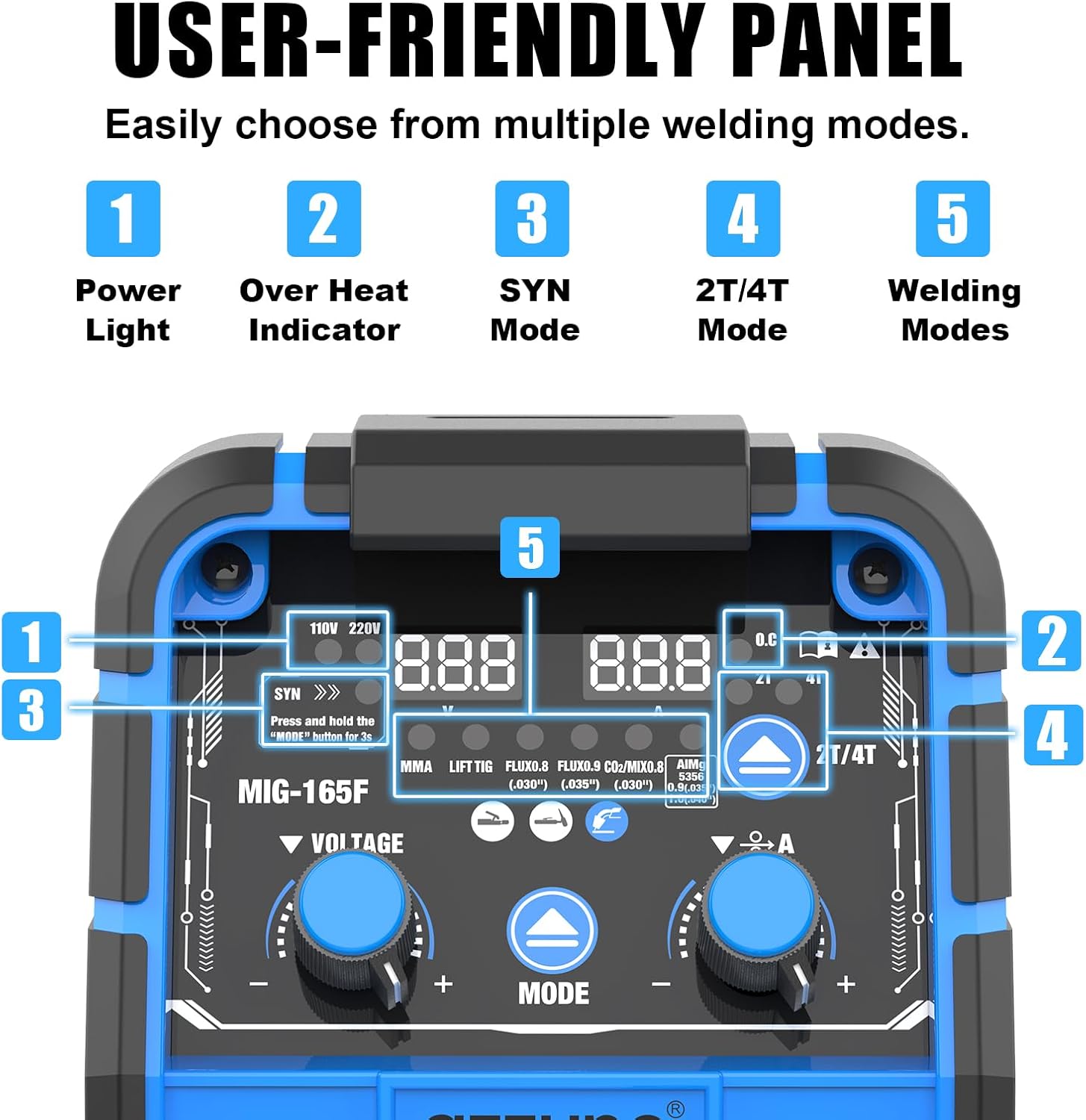
Image: A close-up of the welder's control panel, highlighting key indicators and controls such as Power Light, Over Heat Indicator, SYN Mode, 2T/4T Mode, and Welding Mode selection.
Control Panel Functions:
- 1. Power Light: Indicates the machine is powered on.
- 2. Over Heat Indicator: Illuminates if the machine exceeds safe operating temperatures, triggering a temporary pause in operation.
- 3. SYN Mode: Synchronous mode for simplified parameter setting. Press and hold the "MODE" button for 3 seconds to activate.
- 4. 2T/4T Mode: Toggle between 2-stroke (trigger held for arc) and 4-stroke (trigger press to start, press again to stop) operation.
- 5. Welding Modes: Select from Flux MIG, Lift TIG, MMA, Flux 0.8, Flux 0.9, CO2/MIX 0.8, CO2/MIX 0.9, AlMg5356 0.9, AlMg5356 1.0.
- Voltage/Amperage Adjustment: Use the dedicated knobs to fine-tune voltage and amperage settings for optimal welding performance.
Welding Modes:

Image: Visual examples of the five welding modes supported by the AZZUNO welder: Flux MIG, Gas MIG, Aluminum MIG, Stick (MMA), and Lift TIG, demonstrating their applications.
- Flux-cored MIG: For welding without external shielding gas, using flux-cored wire.
- Gas MIG/MAG: For welding with shielding gas (e.g., CO2, Argon/CO2 mix) for cleaner welds.
- Aluminum MIG: Optimized for welding aluminum, providing smooth and efficient results without specialized equipment like Teflon liners or spool guns.
- MMA (Stick): For manual metal arc welding using coated electrodes.
- Lift TIG: For precise TIG welding, requiring a separate TIG torch and shielding gas.
Achieving Optimal Welds:
Proper settings and technique are crucial for quality welds. The AZZUNO welder is designed to produce clean beads, a smooth arc, and less spatter when used correctly. For best results, consider using AZZUNO welding wire.

Image: Examples of welding results achieved with the AZZUNO welder, demonstrating clean beads, a smooth arc, and minimal spatter.

Image: An illustration highlighting the simplified aluminum welding process with the AZZUNO welder, indicating that a Teflon tube and spool gun are not required.
Maintenance
Regular maintenance ensures the longevity and optimal performance of your AZZUNO welder.
- Cleaning: Periodically clean the exterior of the machine with a dry cloth. Ensure ventilation openings are free from dust and debris to allow proper airflow for the cooling system.
- Torch and Cable Inspection: Regularly inspect the MIG torch, electrode holder, and ground clamp cables for any signs of wear, damage, or loose connections. Replace damaged components immediately.
- Contact Tip and Nozzle: Check and clean the contact tip and nozzle of the MIG torch frequently. Replace worn contact tips to ensure consistent wire feeding and arc stability.
- Drive Rollers: Inspect the drive rollers for wear and ensure they are clean and free of wire shavings. Use the correct drive roller for the wire type being used.
- Overheat Protection: The machine is equipped with an overheat warning system. If the indicator lights up, allow the machine to cool down before resuming operation. Do not bypass this safety feature.
Troubleshooting
This section provides solutions to common issues you might encounter with your welder.
| Problem | Possible Cause | Solution |
|---|---|---|
| Welder does not power on. | No power supply; faulty power cable/adapter; internal fault. | Check power outlet and connections. Ensure correct voltage (110V/220V) is selected and the adapter is functioning correctly. If the issue persists, contact customer support. |
| No arc or unstable arc. | Poor ground connection; incorrect settings; worn contact tip; wrong wire feed speed. | Ensure ground clamp has good contact. Adjust voltage and amperage settings. Replace contact tip if worn. Verify wire feed speed is appropriate for the material and wire size. |
| Wire feeding issues (stuttering, no feed). | Incorrect drive roller tension; clogged liner; wrong drive roller type; tangled wire spool. | Adjust drive roller tension. Clean or replace the MIG torch liner. Ensure the correct V-groove or U-groove drive roller is installed. Untangle wire spool. |
| Overheat indicator is on. | Extended use; insufficient ventilation; blocked cooling fan. | Allow the machine to cool down. Ensure adequate ventilation around the welder. Check that the cooling fan is not obstructed and is functioning. |
| Poor weld quality (excessive spatter, porosity). | Incorrect gas flow (if applicable); improper settings; dirty workpiece; wrong wire/electrode. | Adjust gas flow rate. Fine-tune voltage and amperage. Clean the workpiece thoroughly. Ensure you are using the correct wire or electrode for the material. |
Specifications
| Attribute | Value |
|---|---|
| Brand | AZZUNO |
| Model Number | MIG-165-2 |
| Item Weight | 5.72 Kilograms |
| Package Dimensions | 44.7 x 30.99 x 26.42 cm |
| Input Voltage | Dual Voltage 110V/220V |
| Welding Modes | Flux-cored MIG, Gas MIG, Aluminum MIG, MMA (Stick), Lift TIG |
| Wire Spool Capacity | 2 lbs and 10 lbs |
| First Available Date | 12 September 2024 |
Warranty and Support
For warranty information, technical support, or service inquiries, please contact AZZUNO customer service. Keep your purchase receipt and product model number (MIG-165-2) readily available when contacting support.
You can typically find contact information on the AZZUNO official website or through the retailer where the product was purchased.
Related documentsMIG-165-2


Ask a question about this manual
Ask about setup, troubleshooting, compatibility, parts, safety, or missing instructions. Manuals+ will review the question and use this page’s manual context to help answer it.