
BelFone BF-OG200
BelFone BF-OG200 Long Range Walkie Talkie Instruction Manual
Model: BF-OG200
1. Introduction
This manual provides detailed instructions for the safe and effective use of your BelFone BF-OG200 Long Range Walkie Talkies. Designed for adults, these professional two-way radios offer 20 channels, IP54 waterproofing, and essential outdoor functions like a flashlight, stopwatch, compass, FM radio, and SOS siren, with VOX function support. Please read this manual thoroughly before operating the device.

Figure 1.1: BelFone BF-OG200 Walkie Talkies and Included Accessories
2. What's in the Box
Your BelFone BF-OG200 package should contain the following items:
- 2 x BelFone BF-OG200 Walkie Talkies
- 2 x Chargers
- 2 x USB Cables
- 2 x Belt Clips
- 2 x User's Manuals
- 2 x Rechargeable Batteries (Lithium Ion)

Figure 2.1: Unboxing the BelFone BF-OG200 Walkie Talkies
3. Product Features
- Long-Range Communication & 20 Channels: Equipped with an 1800mAh rechargeable battery and 3W power output, offering an unobstructed reception distance of up to 5 miles. Features 20 preset channels and VOX voice control for hands-free operation.
- IP54 Waterproof & Durable Design: Designed for harsh outdoor environments with IP54 level dustproof, waterproof, and showerproof functions. Constructed from durable ABS PC fabric shell with well-sealed ports.
- Integrated Outdoor Functions: Includes an LED bright flashlight, stopwatch, countdown timer, FM radio, and a back-clip with a mechanical compass, making it suitable for various outdoor activities.
- SOS Alarm Function: An integrated SOS alarm function allows users to quickly alert others of their location for assistance in emergencies.
- Analog Dual-Channel Monitoring: Enables simultaneous reception of two messages without switching channels, ensuring critical information is not missed. Quick reply to the last active channel with a single PTT button press.
- Wide Frequency Compatibility: Operates within the 462-467mhz frequency range, compatible with other walkie-talkies in the same band.
- Flexible Power Options: Can be powered by the included Lithium Ion battery or replaced with 3 dry batteries for extended outdoor use.
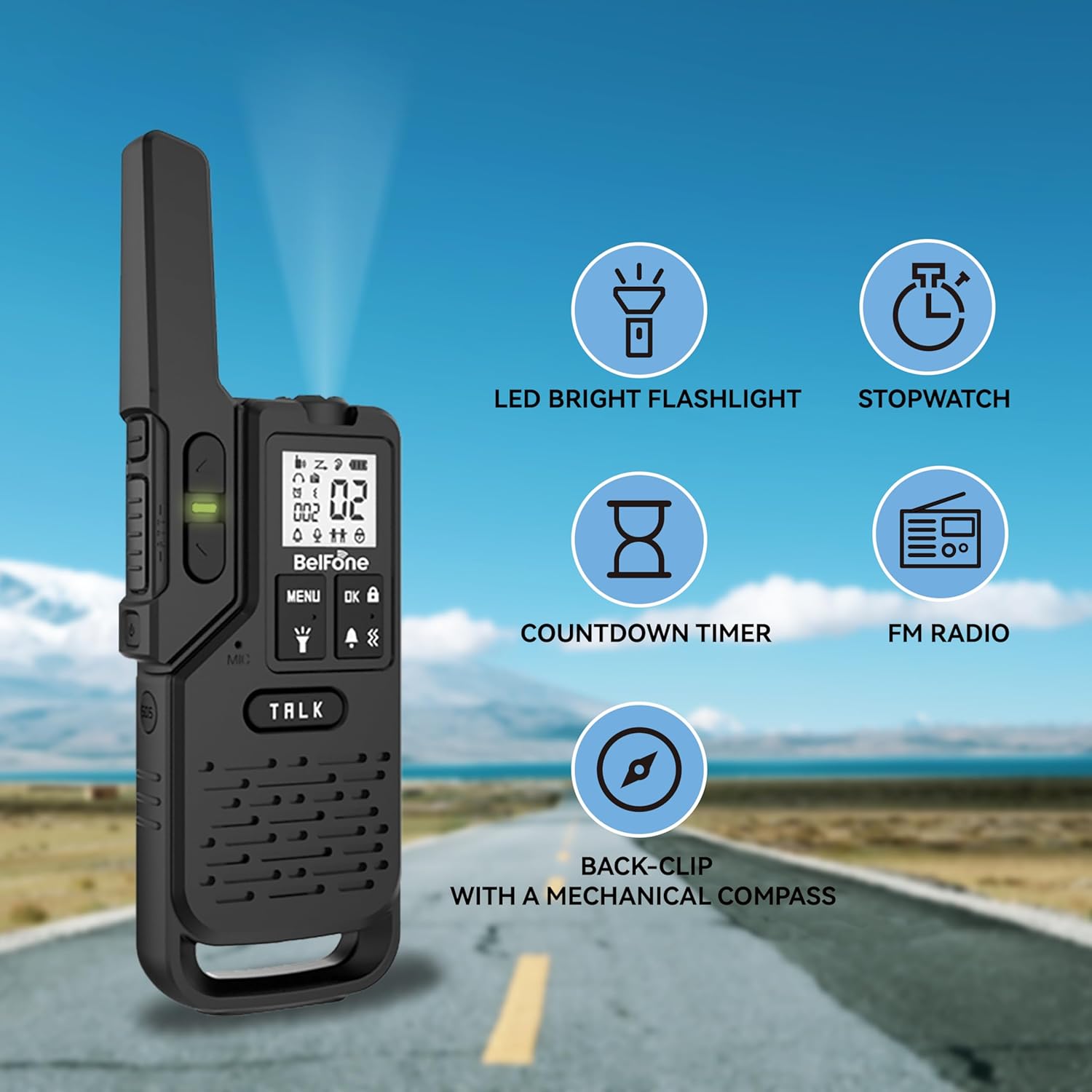
Figure 3.1: Key Features of the BF-OG200

Figure 3.2: IP54 Waterproofing
4. Setup Guide
4.1. Battery Installation
- Ensure the walkie talkie is powered off.
- Locate the battery compartment cover on the back of the unit.
- Slide the cover downwards to open the compartment.
- Insert the provided Lithium Ion battery, ensuring the contacts align correctly.
- Close the battery compartment cover by sliding it upwards until it clicks into place.
Video 4.1: Demonstrating Battery Installation and Basic Operation
This video illustrates the process of installing the battery into the BelFone walkie talkie and shows the initial power-on sequence.
4.2. Charging the Battery
- Connect the USB cable to the walkie talkie's USB port.
- Connect the other end of the USB cable to the provided charger.
- Plug the charger into a standard wall outlet. The battery indicator on the display will show charging status.
- A full charge typically takes several hours. Disconnect the charger once the battery is fully charged.
- Alternatively, the walkie talkie can operate using 3 dry batteries (not included) for convenience when a power source is unavailable.
4.3. Attaching the Belt Clip
- Align the belt clip with the designated slot on the back of the walkie talkie.
- Slide the clip upwards until it securely locks into place.

Figure 4.2: Walkie Talkie Components and Belt Clip Attachment Point
5. Operating Instructions
5.1. Power On/Off
Press and hold the Power On/Off button (refer to Figure 4.2) for approximately 3 seconds to turn the device on or off.
5.2. Channel Selection
The BF-OG200 has 20 preset channels. To select a channel:
- Press the MENU button.
- Use the Up or Down buttons to navigate to the channel setting.
- Use the Up or Down buttons to select your desired channel (01-20).
- Press OK to confirm your selection.
- Ensure both walkie talkies are tuned to the same channel for communication.

Figure 5.1: Fast Teaming for Communication
5.3. Transmitting and Receiving
- To transmit, press and hold the TALK (PTT) button. Speak clearly into the microphone.
- Release the TALK button to receive messages.
5.4. VOX (Voice Operated Exchange) Function
The VOX function allows for hands-free communication. When activated, the radio will automatically transmit when it detects your voice.
- Press the MENU button.
- Navigate to the VOX setting.
- Select the desired VOX sensitivity level (higher level means more sensitive).
- Press OK to activate.
5.5. SOS Alarm Function
In an emergency, activate the SOS alarm to alert others of your location.
- Press the dedicated SOS button (refer to Figure 4.2) to activate the alarm siren.
- Press the SOS button again to deactivate.

Figure 5.2: SOS Alarm Feature
5.6. Flashlight, Stopwatch, Countdown Timer, and FM Radio
These functions can typically be accessed via the MENU button and navigation keys. Refer to the on-screen prompts for specific operation of each feature.
- Flashlight: Press the dedicated flashlight button or navigate through the menu to turn the LED flashlight on/off.
- FM Radio: Access the FM radio function via the menu to scan for and listen to radio stations.
5.7. Dual-Channel Monitoring
The dual-channel feature allows the radio to monitor two channels simultaneously. If a signal is detected on either channel, the radio will switch to that channel. To enable this, navigate to the dual-channel setting in the menu.
5.8. Keyboard Lock
To prevent accidental button presses, you can lock the keyboard. Typically, this is done by pressing and holding the OK button or a designated lock button (refer to Figure 4.2).
6. Maintenance
6.1. Cleaning
Wipe the walkie talkie with a soft, damp cloth. Do not use harsh chemicals or abrasive cleaners. Ensure all ports are sealed when cleaning to maintain IP54 rating.
6.2. Battery Care
- Always use the provided charger and USB cable.
- Avoid overcharging or completely draining the battery.
- If using dry batteries, ensure they are inserted with correct polarity and replace them when low.
6.3. Storage
Store the walkie talkie in a cool, dry place away from direct sunlight and extreme temperatures. If storing for extended periods, remove the batteries.
7. Troubleshooting
| Problem | Possible Cause | Solution |
|---|---|---|
| No power | Battery low or not installed correctly. | Charge the battery or ensure it is properly installed. Check if dry batteries are needed. |
| Cannot communicate with other radios | Different channels, out of range, or obstacles. | Ensure both radios are on the same channel. Move closer to the other radio. Avoid large obstacles. |
| Poor audio quality | Weak signal, interference, or microphone/speaker obstruction. | Move to an open area. Check for obstructions on microphone/speaker. |
| VOX not working | VOX sensitivity too low or function not activated. | Adjust VOX sensitivity in the menu or ensure VOX is enabled. |
8. Specifications
- Model Number: BF-OG200
- Item Weight: 1.57 pounds
- Package Dimensions: 8.35 x 6.26 x 4.69 inches
- Country of Origin: China
- Batteries: 1 Lithium Ion battery required (included)
- Number of Channels: 20
- Special Features: Long Range, Dust Proof, Shockproof, Flashlight, Stopwatch, Compass, FM Radio, SOS Siren, VOX Function
- Frequency Range: 462-467mhz
- Talking Range Maximum: 5 Miles (unobstructed)
- Tuner Technology: UHF
- Voltage: 3.7 Volts (DC)
- Water Resistance Level: IP54 Waterproof
9. Warranty & Support
Your BelFone BF-OG200 Walkie Talkies come with a 2-Year Warranty from the date of purchase, covering manufacturing defects.
For any questions, technical support, or warranty claims, please contact BelFone Communications customer service. We aim to reply to all inquiries within 24 hours.
Please refer to the official BelFone website or your purchase documentation for the most up-to-date contact information.