Introduction
This manual provides detailed instructions for the setup, operation, and maintenance of your Mersoco M483 Vinyl Record Player with Dual Stereo Bookshelf Speakers. Please read this manual thoroughly before using the product to ensure proper function and longevity.
Product Overview and Components
Familiarize yourself with the various parts of your record player system.
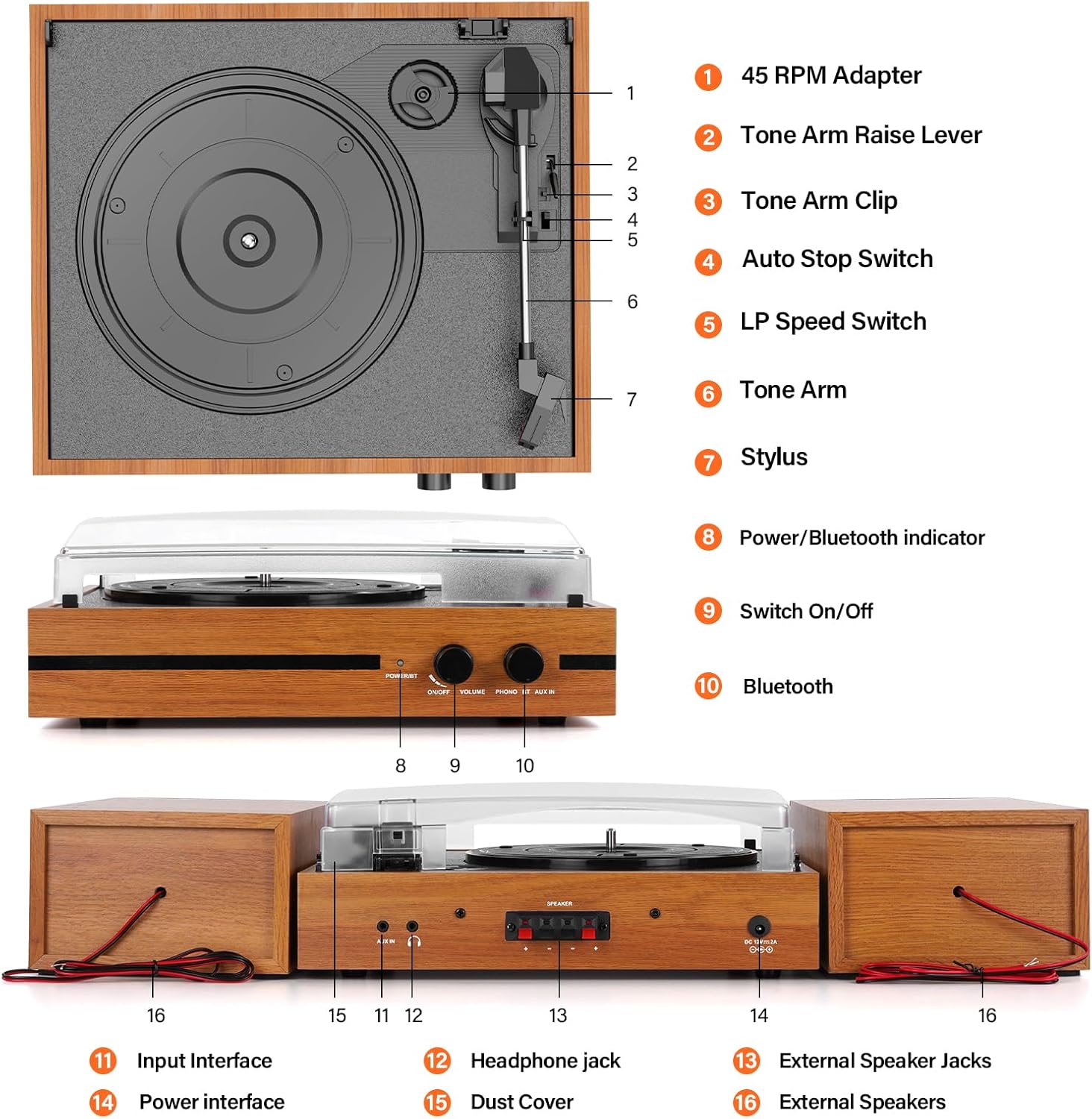
Image Description: An annotated diagram of the Mersoco M483 record player and its external speakers. Key components are numbered and labeled for easy identification. The turntable unit is in the center, flanked by two wooden bookshelf speakers. The diagram points out the 45 RPM adapter, tone arm raise lever, tone arm clip, auto stop switch, LP speed switch, tone arm, stylus, power/Bluetooth indicator, on/off switch, Bluetooth function, input interface, power interface, headphone jack, external speaker jacks, and external speakers.
- 45 RPM Adapter: Used for playing 7-inch records with large center holes.
- Tone Arm Raise Lever: Lifts and lowers the tone arm.
- Tone Arm Clip: Secures the tone arm when not in use.
- Auto Stop Switch: Enables or disables the auto-stop function for records.
- LP Speed Switch: Selects playback speed (33, 45, or 78 RPM).
- Tone Arm: Holds the stylus and tracks the record grooves.
- Stylus: The needle that reads the record grooves.
- Power/Bluetooth Indicator: Shows power status and Bluetooth connection status.
- Switch On/Off: Power control for the unit.
- Bluetooth: Activates Bluetooth pairing mode.
- Input Interface: For external audio sources (AUX IN).
- Headphone Jack: For private listening with headphones.
- External Speaker Jacks: Connects the external bookshelf speakers.
- Power Interface: Connects the power adapter.
- Dust Cover: Protects the turntable from dust.
- External Speakers: Provides stereo audio output.
Setup Instructions
- Unpacking: Carefully remove all components from the packaging. Retain packaging for future transport or storage.
- Placement: Place the record player unit and the two external speakers on a stable, level surface. Ensure adequate ventilation around the units.
- Connecting Speakers:
Connect the included speaker wires from the "External Speaker Jacks" (13) on the back of the record player to the corresponding terminals on the back of each external speaker. Ensure correct polarity (red to red, black to black).
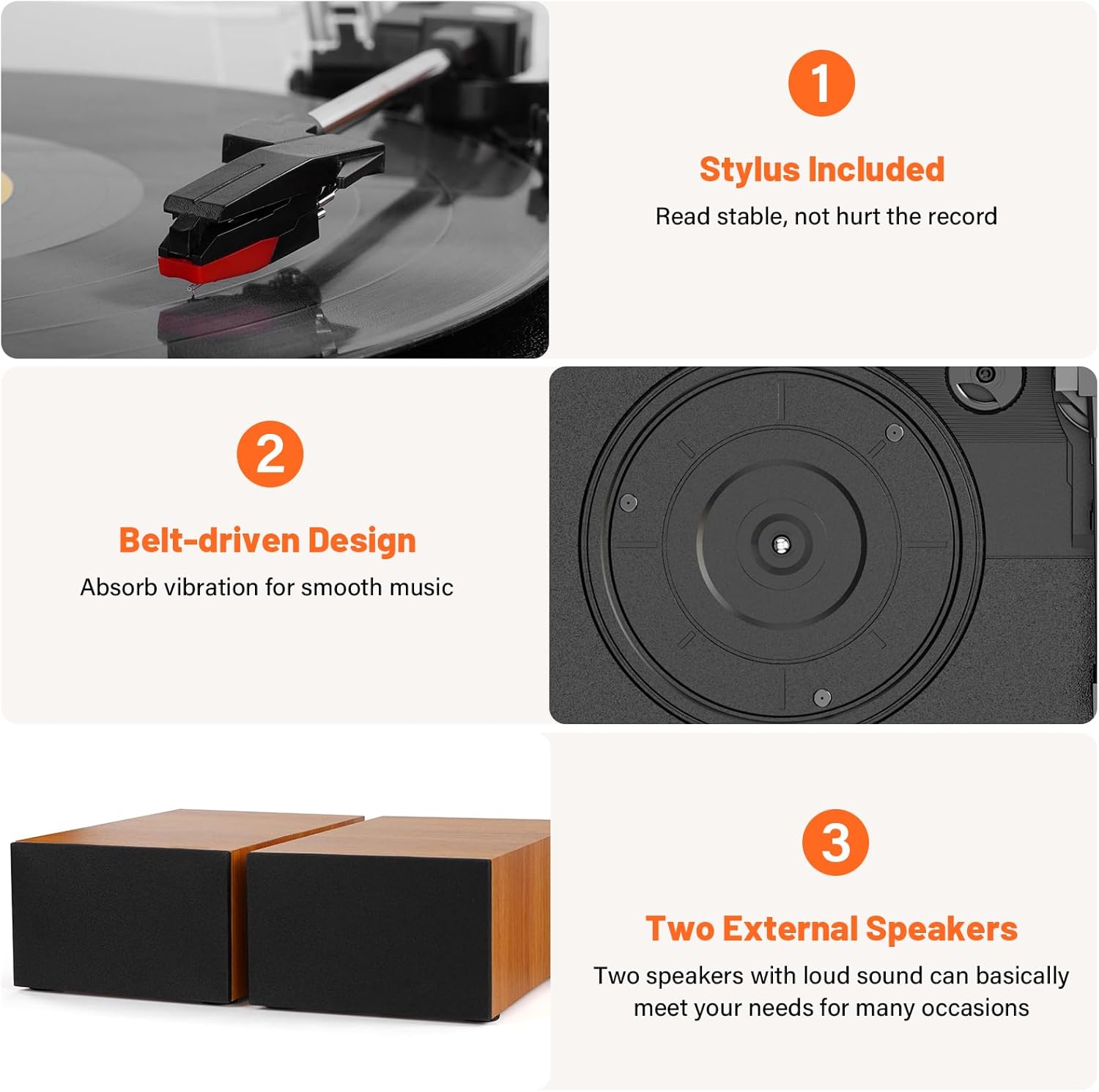
Image Description: A rear view of the Mersoco M483 record player unit with its two external speakers. The speaker wires are clearly shown connecting the main unit to each speaker, illustrating the correct wiring setup. The AUX IN, headphone jack, speaker terminals, and power input are visible on the back of the main unit.
- Power Connection: Connect the power adapter to the "Power Interface" (14) on the back of the record player, then plug the adapter into a wall outlet.
- Dust Cover: Install the transparent dust cover (15) onto the hinges of the record player.
Operating Instructions
Playing Vinyl Records
- Power On: Turn the "Switch On/Off" (9) to the ON position. The Power/Bluetooth indicator (8) will illuminate.
- Select Speed: Set the "LP Speed Switch" (5) to the appropriate speed (33, 45, or 78 RPM) for your record. For 7-inch records with a large center hole, place the 45 RPM adapter (1) on the turntable spindle.
- Place Record: Carefully place a vinyl record on the turntable platter. For 12-inch records, gently tilt the record towards the tone arm to ensure proper seating.
- Release Tone Arm: Release the "Tone Arm Clip" (3).
- Position Tone Arm: Use the "Tone Arm Raise Lever" (2) to lift the tone arm. Manually move the tone arm over the desired starting groove of the record.
- Lower Tone Arm: Gently lower the tone arm using the "Tone Arm Raise Lever" (2). The stylus (7) will descend onto the record, and playback will begin.
- Adjust Volume: Rotate the Volume knob to adjust the sound level.
- Auto Stop Function: The "Auto Stop Switch" (4) can be set to ON or OFF.
- ON: The turntable will automatically stop spinning when the record finishes playing.
- OFF: The turntable will continue to spin even after the record finishes.
- End Playback: At the end of the record, or when you wish to stop, use the "Tone Arm Raise Lever" (2) to lift the tone arm, then return it to its rest and secure it with the "Tone Arm Clip" (3). Turn the "Switch On/Off" (9) to OFF.
Bluetooth Connection
You can stream audio wirelessly from your Bluetooth-enabled devices to the record player's speakers.
- Power On: Turn the "Switch On/Off" (9) to the ON position.
- Activate Bluetooth: Rotate the function knob to the "BT" position. The Power/Bluetooth indicator (8) will flash, indicating pairing mode.
- Pair Device: On your mobile device (smartphone, tablet, etc.), enable Bluetooth and search for "Mersoco M483" or a similar device name. Select it to pair.
- Confirmation: Once successfully paired, the Power/Bluetooth indicator (8) will stop flashing and remain solid. You can now play audio from your device through the record player's speakers.
- Adjust Volume: Adjust the volume using both your connected device and the record player's Volume knob.

Image Description: The Mersoco M483 record player with its external speakers, shown on a wooden shelf. A hand holds a smartphone displaying a music player interface, with blue sound waves emanating from the speakers, indicating active Bluetooth audio streaming.
AUX Input
Connect external audio devices using the AUX IN port.
- Connect Cable: Use a 3.5mm audio cable (not included) to connect your external audio device to the "Input Interface" (11) on the record player.
- Select AUX Mode: Rotate the function knob to the "AUX IN" position.
- Play Audio: Start playback on your external audio device. The sound will be routed through the record player's speakers.
- Adjust Volume: Adjust the volume using both your connected device and the record player's Volume knob.
Headphone Output
For private listening, connect headphones to the dedicated jack.
- Plug your headphones into the "Headphone Jack" (12) on the back of the record player. The external speakers will mute automatically.
- Adjust volume using the record player's Volume knob.
RCA Output
Connect the record player to an external amplifier or powered speakers using the RCA output.
- Connect an RCA cable (included) from the RCA output ports on the back of the record player to the corresponding input on your external audio system.
- Ensure your external audio system is set to the correct input.
- Adjust volume via your external audio system.
Features Overview
- 3-Speed Turntable: Supports 33 1/3, 45, and 78 RPM playback for various record types (7", 10", 12").
- Dual Stereo Bookshelf Speakers: Provides clear and dynamic audio output.
- Bluetooth Connectivity: Allows wireless streaming from compatible devices.
- AUX IN: For wired connection to external audio sources.
- Headphone Output: For private listening.
- RCA Output: Connects to external amplifiers or powered speakers.
- Belt-Drive System: Designed to absorb vibrations for smoother playback.
- Stylus Included: Ensures stable tracking of record grooves.
Image Description: A composite image highlighting key features of the Mersoco M483. It shows a close-up of the stylus on a record, a view of the belt-driven platter mechanism, and the two external speakers, emphasizing the product's design and audio components.
Maintenance
- Cleaning the Stylus: Gently clean the stylus periodically with a soft brush, moving from back to front. Avoid touching the stylus with your fingers.
- Cleaning Records: Use a dedicated record cleaning brush or cloth to remove dust and debris from your vinyl records before and after each play.
- Cleaning the Unit: Wipe the record player and speakers with a soft, dry cloth. Do not use abrasive cleaners or solvents.
- Dust Cover: Keep the dust cover closed when the record player is not in use to prevent dust accumulation.
- Storage: Store records vertically in their sleeves to prevent warping.
Troubleshooting
| Problem | Possible Cause | Solution |
|---|---|---|
| No power | Power adapter not connected; power outlet not active. | Ensure power adapter is securely connected to the unit and a working power outlet. Check the power switch. |
| No sound from speakers | Speakers not connected; volume too low; wrong input mode; headphones connected. | Verify speaker connections. Increase volume. Ensure correct mode (Phono, BT, AUX). Disconnect headphones if present. |
| Turntable not spinning | Power off; belt dislodged; auto-stop engaged prematurely. | Check power. Inspect the drive belt (refer to maintenance for re-seating). Try setting auto-stop switch to OFF. |
| Skipping or distorted sound | Dirty or damaged record; dirty or worn stylus; improper tracking force (not user adjustable on this model, but can be related to placement); unit not level. | Clean record. Clean stylus. Ensure the unit is on a stable, level surface. Consider replacing stylus if worn. |
| Bluetooth pairing issues | Device too far; Bluetooth not enabled on device; wrong mode selected. | Ensure device is within range. Enable Bluetooth on your device. Select BT mode on the record player. Try restarting both devices. |
Specifications
- Brand: Mersoco
- Model: M483
- Product Dimensions: 15.63 x 12.87 x 11.61 inches
- Item Weight: 9.79 pounds (4.45 Kilograms)
- Maximum Rotational Speed: 78 RPM (supports 33 1/3, 45, 78 RPM)
- Included Components: BT Record Player with External Stereo Speakers, Power Cable, RCA Cable, Auxiliary Cable.
- Special Features: Vinyl record playback, Bluetooth playback, dual stereo speakers, RCA output, AUX IN input.
- Material: Wood
- Color: Orange (as per product variant)
- Compatible Devices: Headphones, external speakers, Bluetooth devices.
- On-mode power consumption: 30 watts
Warranty and Support
For warranty information and technical support, please refer to the documentation included with your purchase or contact Mersoco customer service. Keep your purchase receipt as proof of purchase for warranty claims.
Mersoco Customer Service: Please visit the official Mersoco website or refer to your product packaging for contact details.


