
Hisense AHW0823TW1W
Hisense 8,000 BTU Smart Window Inverter Air Conditioner
Instruction Manual
Introduction
This manual provides comprehensive information for the Hisense 8,000 BTU Smart Window Inverter Air Conditioner, model AHW0823TW1W. Designed for medium-sized rooms up to 350 square feet, this unit offers efficient cooling, quiet operation, and convenient Wi-Fi control. It features three operating modes (Cool, Fan, Dry), inverter technology for stable temperatures and energy savings, and smart capabilities via the ConnectLife app. Additional features include a sleep mode, 24-hour timer, auto-restart, and a washable air filter for easy maintenance. A window installation kit is included for straightforward setup.

Front view of the Hisense 8,000 BTU Smart Window Inverter Air Conditioner.
Key Features
- 3-in-1 Unit: This inverter window air conditioner features powerful cooling at 8,000 BTUs, 3 fan speeds, and a dry mode for excess moisture removal to keep you comfortable in rooms up to 350 square feet.
- Inverter Technology: This unit's inverter capability saves energy and maintains stable temperatures at the desired level by varying the rotation speed of the compressor, making it run quieter as well.
- Smart Capabilities: This Wi-fi enabled unit works with the ConnectLife app on your phone so you can adjust the settings wherever, whenever.
- Sleep Mode Function: Intelligent sleep mode slowly adjusts the temperature and fan speed to keep you comfortable overnight while saving you energy and money.
- Washable Filter: The reusable, easy-access filter alerts you when it is time to clean it for optimal efficiency and easy maintenance.

Overview of the unit's three primary operating modes: Fan, Dry, and Cool.
Setup
The Hisense Smart Window Inverter Air Conditioner is designed for easy installation. A comprehensive window installation kit is included to facilitate a secure and efficient setup in your chosen window. Ensure the unit is properly sealed within the window frame to maximize cooling performance and energy efficiency.

Visual guide for installing the air conditioner in a window opening.

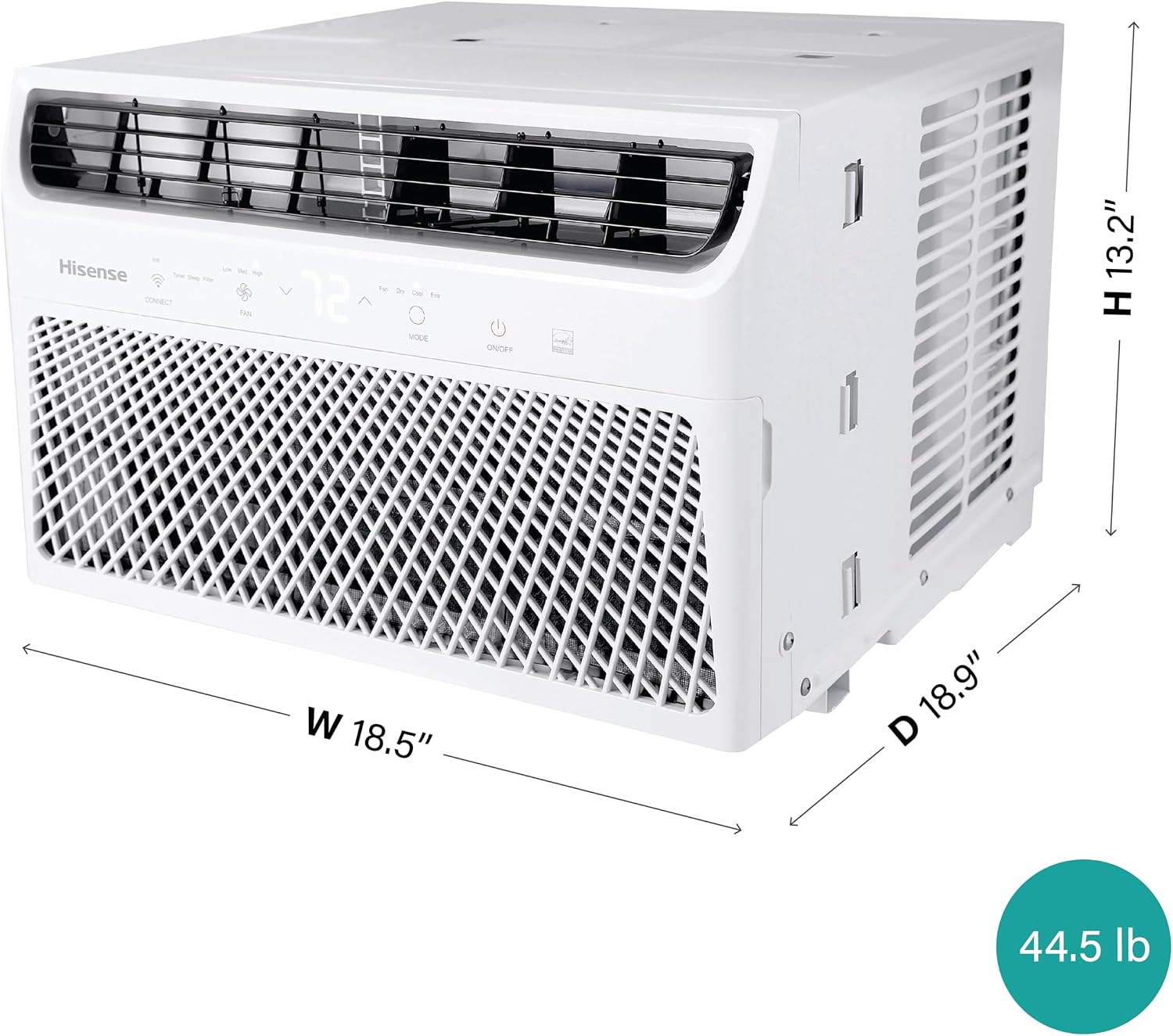
Detailed dimensions of the unit for proper window fitment.
Operating Instructions
Your Hisense air conditioner offers multiple ways to control its functions, ensuring maximum comfort and convenience.
Control Panel and Remote Control
The unit features an intuitive control panel on its front, allowing direct access to all settings. For added convenience, a remote control is included, enabling you to adjust settings from anywhere in the room.

The easy-to-use remote and illuminated control panel.
Operating Modes
- Cool Mode: Provides powerful cooling to lower room temperature.
- Fan Mode: Circulates air without cooling, ideal for ventilation.
- Dry Mode: Removes excess moisture from the air, reducing humidity.
- Eco Mode: Optimizes energy consumption while maintaining comfort.
Fan Speeds
Select from Low, Medium, or High fan speeds to control the intensity of air circulation.
Smart Control (Wi-Fi)
Utilize the ConnectLife app on your mobile device to control the air conditioner remotely. This allows you to adjust settings, change modes, and set schedules from anywhere with an internet connection.
Control your unit remotely using the ConnectLife App.
Sleep Mode and 24-Hour Timer
Activate Sleep Mode for quiet operation and gradual temperature adjustments overnight. The 24-hour timer allows you to program the unit to turn on or off at specific times, optimizing energy usage.
Maintenance
Regular maintenance ensures optimal performance and longevity of your air conditioner.
Washable Air Filter
The unit is equipped with a washable and removable air filter. Clean the filter regularly to maintain air quality and unit efficiency. The unit will provide an alert when filter cleaning is recommended.

Easy removal of the washable air filter for cleaning.
Troubleshooting
If you encounter any issues with your Hisense air conditioner, please refer to the full user manual for detailed troubleshooting steps. If problems persist, contact Hisense customer support for assistance.
Specifications
| Feature | Detail |
|---|---|
| Product Dimensions | 18.9 x 18.5 x 13.2 inches |
| Item Weight | 44.5 pounds |
| Manufacturer | Hisense |
| Item Model Number | AHW0823TW1W |
| Form Factor | Window |
| Capacity (Dehumidification) | 21.6 Pints |
| Floor Area (Cooling) | 350 Square Feet |
| Voltage | 115 Volts |
| Noise Level | 41 dB |
| Cooling Power | 8000 British Thermal Units |
| Special Features | Inverter Compressor, Remote Controlled, WiFi Enabled, Dehumidifier |
| Seasonal Energy Efficiency Ratio (SEER) | 15 |
Warranty
This Hisense air conditioner comes with a 2-year limited warranty. Please refer to the warranty documentation included with your product for full terms and conditions.
Customer Support
For any questions, technical support, or warranty claims, please visit the official Hisense support website or contact their customer service hotline. Refer to your product packaging or the full user manual for specific contact details.
Ask a question about this manual
Ask about setup, troubleshooting, compatibility, parts, safety, or missing instructions. Manuals+ will review the question and use this page’s manual context to help answer it.