
1. Introduction
Thank you for choosing the NOBIS 20000mAh 45W Portable Charger. This high-capacity power bank is designed to provide fast and reliable charging for a wide range of devices, including smartphones, tablets, and laptops. Its compact design and advanced safety features make it an ideal companion for travel, work, and everyday use. Please read this manual thoroughly before using the product to ensure optimal performance and safety.

Figure 1: The NOBIS 20000mAh 45W Portable Charger, showcasing its sleek design and included USB-C cables.
2. What's in the Box
- NOBIS 20000mAh/45W Power Bank (1 unit)
- 3A Type-C to Type-C charging cable (30cm) (1 unit)
- Instruction Manual (1 unit)
3. Product Overview
The NOBIS Portable Charger features multiple ports and a clear digital display for convenient use.

Figure 2: Digital display showing battery percentage and fast charging indicator.
- Digital Display: A high-precision LED digital display shows the remaining power from 0% to 100%. A green lightning icon indicates fast charging is active.
- Ports: The power bank is equipped with two USB-A output ports and two Type-C ports, which support both input and output. This allows for simultaneous charging of up to four devices.

Figure 3: The power bank connected to and charging multiple devices.
4. Specifications
| Feature | Description |
|---|---|
| Model Number | ZWPBWWA-202C2A45W |
| Battery Capacity | 20000mAh |
| Input (Type-C) | 45W Max |
| Output (Type-C) | 45W Max |
| Output (USB-A) | 30W Max (per port) |
| Charging Protocols | PD 3.0, QC 4.0, AFC, FCP, SCP, PPS |
| Dimensions | 5.39 x 2.76 x 1.04 inches |
| Weight | 13.8 ounces |
| Battery Type | Lithium Polymer |
5. Setup
5.1 Initial Charging of the Power Bank
Before first use, it is recommended to fully charge your NOBIS Power Bank. This ensures optimal battery performance and longevity.
- Connect the provided 3A Type-C to Type-C charging cable to one of the power bank's Type-C ports.
- Connect the other end of the cable to a 45W or higher power adapter (not included).
- The digital display will show the charging percentage, and a green lightning icon will indicate fast charging.
- The power bank will be fully charged in approximately 2 hours when using a 45W power adapter.

Figure 4: Recharging the power bank using a compatible wall adapter.
6. Operating Instructions
6.1 Charging Your Devices
The NOBIS Power Bank supports fast charging for a wide range of devices and can charge up to four devices simultaneously.
- Connect your device's charging cable to one of the available output ports (USB-A or Type-C) on the power bank.
- Connect the other end of the cable to your device.
- The power bank will automatically begin charging your device. The digital display will show the remaining power.
- For optimal fast charging, use a Type-C to Type-C cable with compatible devices. For example, an iPhone 15 Pro can charge from 0% to 60% in 30 minutes, and a MacBook Pro 14" from 0% to 47% in 30 minutes.
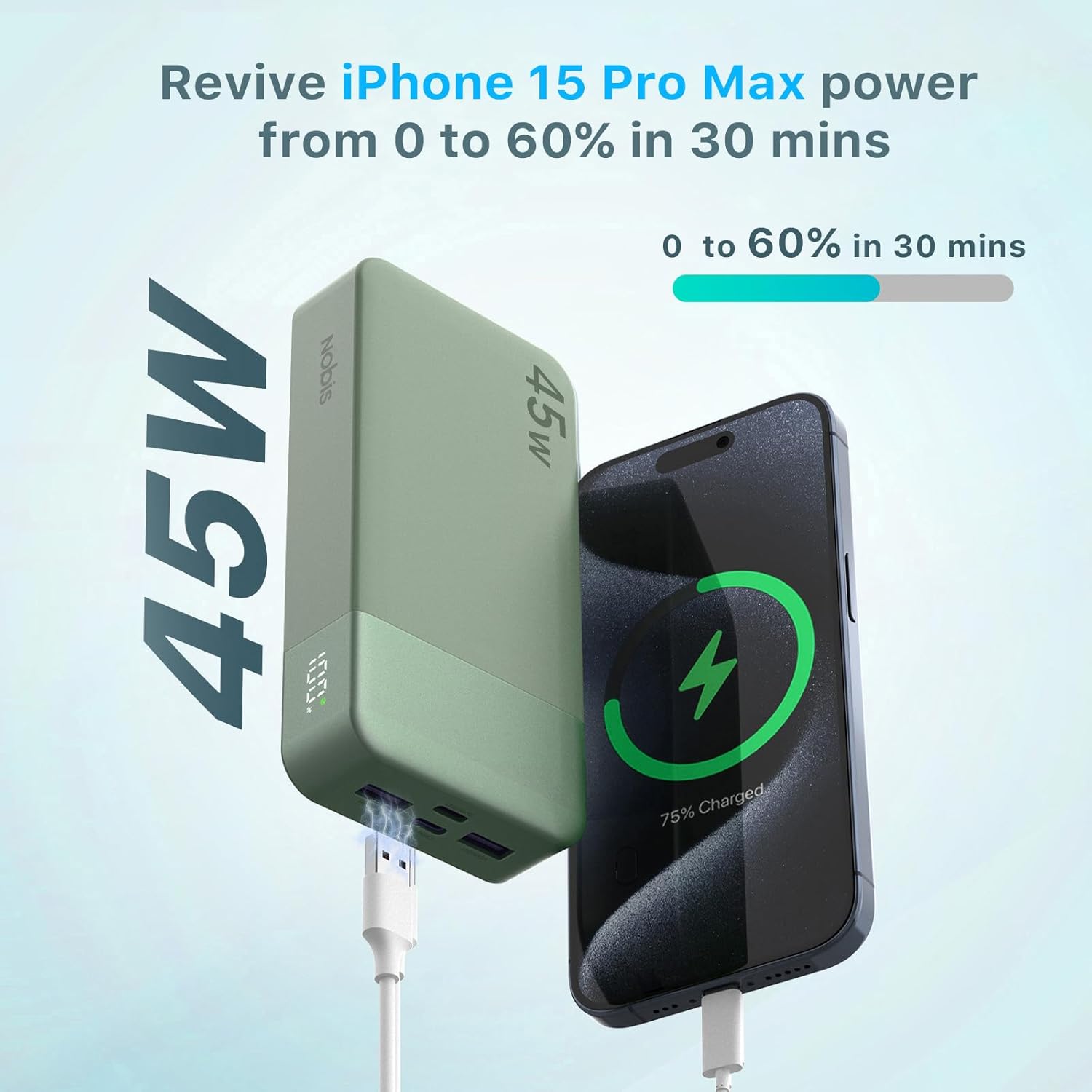
Figure 5: Fast charging capability demonstrated with an iPhone 15 Pro Max.
6.2 Trickle Charging Mode (Low Current Devices)
For low-current devices such as wireless earbuds or smartwatches, activate trickle charging mode to protect the devices and ensure stable charging.
- To activate: Double-click the power button on the side of the power bank. The indicator will start cycling.
- Connect your low-current device.
- To exit: Double-click the power button again.
7. Safety Features
The NOBIS Power Bank is built with multiple protection mechanisms to ensure safe and reliable operation:
- Over-heat Protection: Prevents overheating during charging or discharging.
- Over-current Protection: Safeguards against excessive current flow.
- Over-discharge Protection: Protects the battery from being fully depleted.
- Over-voltage Protection: Shields against voltage surges.
- Short-circuit Protection: Prevents damage from short circuits.
- Over-charge Protection: Stops charging once the battery is full to prevent overcharging.
- Auto Shut-Off: Automatically turns off when not in use or when charging is complete.
Figure 6: Visual representation of the multi-layered safety protections.
8. Maintenance
To ensure the longevity and optimal performance of your NOBIS Portable Charger, follow these maintenance guidelines:
- Storage: Store the power bank in a cool, dry place away from direct sunlight, extreme temperatures, and humidity.
- Cleaning: Use a soft, dry cloth to clean the surface of the power bank. Do not use harsh chemicals or abrasive materials.
- Charging Cycle: For best battery health, avoid completely draining the power bank frequently. Recharge it when the digital display indicates a low percentage.
- Avoid Drops: Protect the device from drops and impacts, which can damage internal components.
9. Troubleshooting
If you encounter any issues with your NOBIS Portable Charger, please refer to the following common troubleshooting steps:
- Power Bank Not Charging:
- Ensure the charging cable is securely connected to both the power bank and the power adapter.
- Verify that the power adapter is functioning correctly and provides at least 45W output for fast charging.
- Try a different Type-C cable or power adapter.
- Device Not Charging from Power Bank:
- Check if the power bank has sufficient charge (check the digital display).
- Ensure your device's charging cable is securely connected to both the power bank and your device.
- Try a different charging cable or a different port on the power bank.
- If charging a low-current device, ensure trickle charging mode is activated (double-click power button).
- Slow Charging:
- Ensure you are using a fast-charging compatible cable and power adapter (for recharging the power bank).
- Verify your device supports fast charging protocols (PD 3.0, QC 4.0) for optimal speed.
- Charging multiple devices simultaneously may reduce the charging speed for individual devices.
- Digital Display Not Working:
- Press the power button once to activate the display.
- If the issue persists, the unit may require service.
If these steps do not resolve the issue, please contact customer support.
10. Warranty and Support
NOBIS products are manufactured to the highest quality standards. For any warranty claims or technical support, please refer to the warranty information provided with your purchase or contact NOBIS customer service directly. Keep your proof of purchase for warranty validation.
Contact Information: Please visit the official NOBIS website or refer to the packaging for the most up-to-date customer support contact details.