
1. Introduction
The Aramox 3X Magnification LCD Viewfinder is designed to provide an enhanced viewing experience for DSLR and SLR cameras with 3.0-inch or 3.2-inch LCD screens. It offers 3x magnification for detailed observation during shooting, assists in focusing, and functions as a sunshade hood to improve screen visibility in bright conditions. This manual provides essential information for proper setup, operation, and maintenance of your viewfinder.
2. Safety Information
- Do not expose the viewfinder to extreme temperatures or direct sunlight for prolonged periods.
- Avoid dropping the device, as this may damage internal optical components.
- Keep out of reach of children.
- Use only the provided accessories or compatible replacements.
3. Package Contents
Please verify that all items listed below are included in your package:
- 1 x Viewfinder
- 1 x Quick Release Plate
- 1 x Anti-lost Lanyard
- 1 x Sweeping Dust Cloth

Image: The viewfinder shown with its quick release plate, anti-lost lanyard, and sweeping dust cloth.
4. Setup Instructions
Follow these steps to properly attach the viewfinder to your camera:
- Prepare the Camera: Ensure your camera's LCD screen is clean and free of debris.
- Attach the Quick Release Plate: Remove any existing fixing screws from the bottom plate of your camera. Align the provided quick release plate with the camera's tripod mount and secure it using the 1/4-inch screw.
- Connect Viewfinder to Plate: Slide the viewfinder onto the quick release plate. Ensure it is securely seated and aligned with your camera's LCD screen.
- Secure the Viewfinder: Use the fixing screw on the quick release plate to firmly attach the viewfinder to the camera. Adjust its position for optimal viewing.

Image: The viewfinder attached to a camera, demonstrating its compatibility with 3-inch and 3.2-inch screens.

Image: Two viewfinders, one attached to a camera and another detached, illustrating the mounting mechanism.
5. Operating Instructions
The viewfinder enhances your camera's LCD screen for improved visibility and focusing.
- Viewing: Place your eye against the soft rubber eye setting. The 3x magnification will provide a clear, zoomed-in view of your camera's LCD screen, which is particularly useful for observing shooting details and assisting with manual focusing.
- Diopter Adjustment: The viewfinder features an adjustable diopter. Rotate the blue ring (as shown in the image below) to fine-tune the focus to your individual eyesight, ensuring a sharp image.
- Sunshade Function: The design of the viewfinder also acts as a sunshade, blocking ambient light from hitting the LCD screen. This significantly improves screen visibility and reduces glare when shooting outdoors or in bright conditions.
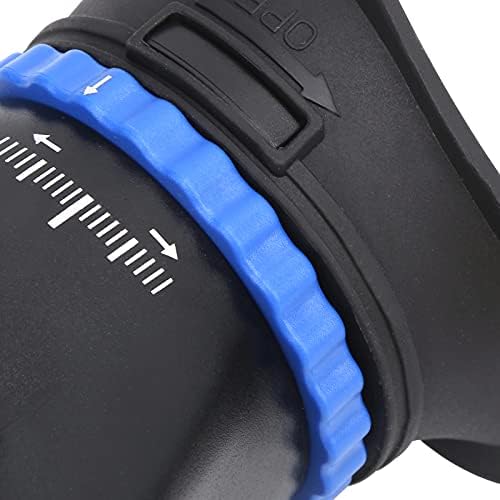
Image: A close-up view of the viewfinder's blue diopter adjustment ring, used to customize focus.
6. Maintenance
Proper maintenance ensures the longevity and performance of your viewfinder.
- Cleaning the Lens: Use the provided sweeping dust cloth or a soft, lint-free microfiber cloth to gently clean the optical glass lens. For stubborn smudges, a small amount of lens cleaning solution can be applied to the cloth, not directly to the lens.
- Cleaning the Body: Wipe the plastic and alloy body with a dry or slightly damp soft cloth. Avoid harsh chemicals or abrasive materials.
- Storage: When not in use, store the viewfinder in a clean, dry place, away from dust and direct sunlight.
7. Troubleshooting
If you encounter issues with your viewfinder, please refer to the following common solutions:
- Viewfinder does not attach securely: Ensure the quick release plate is correctly installed on your camera and the viewfinder is properly seated and tightened with its fixing screw. Verify compatibility with your camera's LCD screen size (3.0 or 3.2 inches).
- Image appears blurry: Adjust the diopter ring until the image through the viewfinder is clear and sharp for your vision. Ensure the camera's LCD screen itself is clean.
- Reduced visibility in bright light: Confirm the viewfinder is correctly positioned over the LCD screen to maximize its sunshade effect.
8. Specifications
| Feature | Detail |
|---|---|
| Amplification Factor | 3x |
| Interface | 1/4in Screw, 1/4in Screw Hole, 3/8in Screw Hole |
| Compatible Camera LCD Size | 3.0in / 3.2in |
| Material | Plastic, Alloy, Optical Glass |
| Color | Black |
| Item Weight | 12.9 ounces (Approx. 382g) |
| Package Dimensions | 7.87 x 4.13 x 3.94 inches |
| Model Number | Aramoxmrigcxug9b |
9. Warranty and Support
Aramox stands by the quality of its products. This viewfinder comes with a quality assurance guarantee. If you have any questions, concerns, or require assistance with your product, please contact our dedicated support team. We are committed to addressing your inquiries promptly.