1. Introduction
Welcome to the Blackstar ID:Core V4 Stereo 10 Digital Combo Amplifier user manual. This document provides essential information for the safe and effective operation of your new amplifier. The ID:Core V4 Stereo 10 is a versatile 10-watt, 2x3 inch digital combo amplifier featuring Bluetooth connectivity and a 4-channel USB-C output, designed for guitarists seeking a compact yet powerful practice and recording solution.
Please read this manual thoroughly before using the amplifier to ensure proper setup, operation, and to maximize your experience with its advanced features.
2. Safety Instructions
- Power Supply: Only use the power adapter supplied with your ID:Core V4 Stereo 10 amplifier. Ensure the voltage matches your local power supply.
- Ventilation: Do not block any ventilation openings. Ensure adequate airflow around the amplifier to prevent overheating.
- Moisture: Do not expose the amplifier to rain, moisture, or any liquids. Avoid placing objects filled with liquids on or near the amplifier.
- Heat Sources: Keep the amplifier away from heat sources such as radiators, heat registers, stoves, or other apparatus that produce heat.
- Cables: Protect the power cord from being walked on or pinched, particularly at plugs, convenience receptacles, and the point where they exit from the apparatus.
- Servicing: Do not attempt to service this product yourself. Refer all servicing to qualified service personnel.
- Cleaning: Unplug the amplifier from the power outlet before cleaning. Use a dry cloth for cleaning.
3. Product Overview
Front Panel Controls and Connections
The front panel of the ID:Core V4 Stereo 10 provides access to all primary controls and input/output connections.
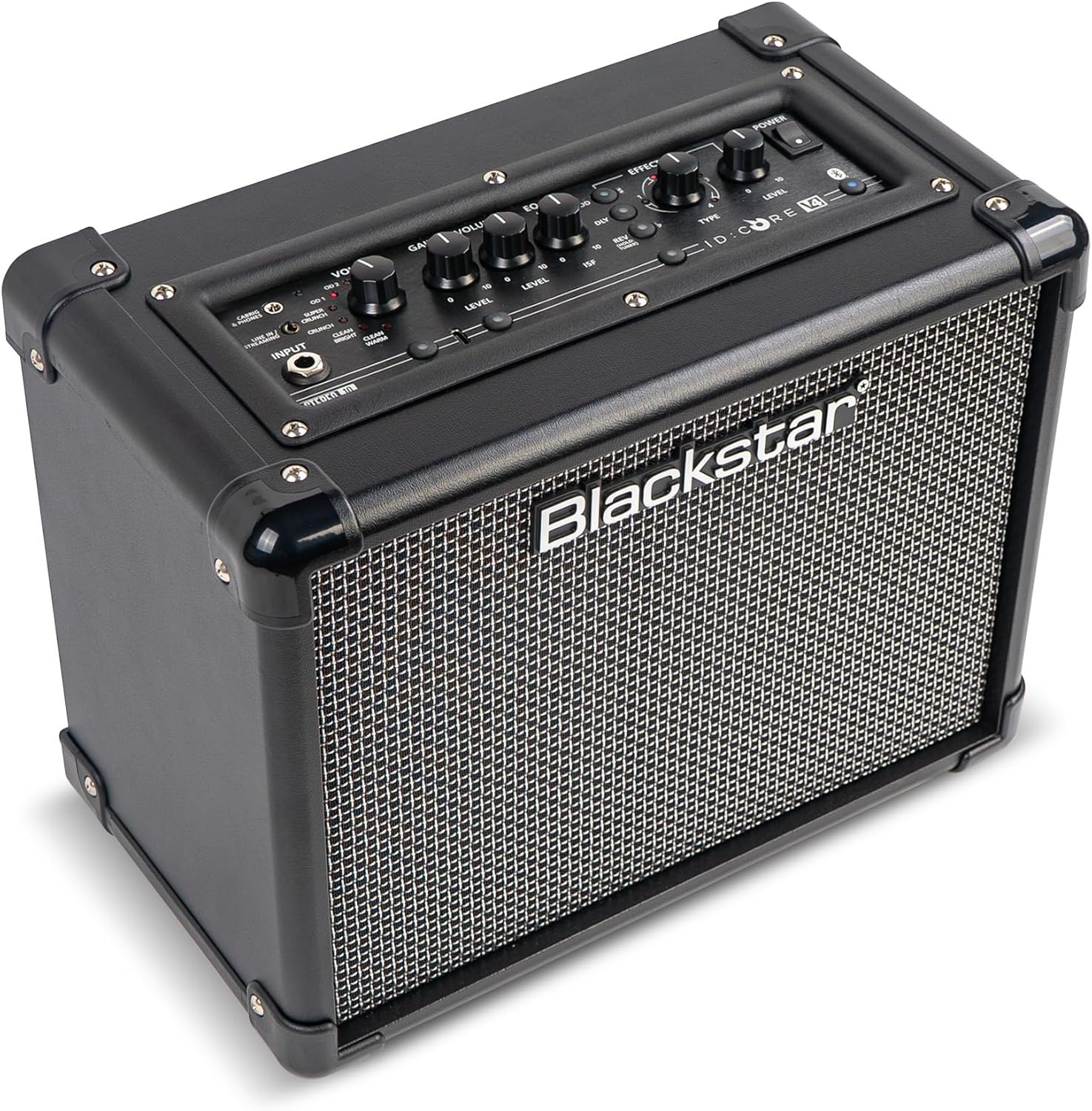
Image: Front view of the Blackstar ID:Core V4 Stereo 10 amplifier, highlighting the control layout and speaker grille.
- Input Jack: Connect your guitar here.
- Voice Selector: Rotary switch to select between six distinct amp voices: Clean Warm, Clean Bright, Crunch, Super Crunch, OD1, and OD2.
- Gain Control: Adjusts the amount of overdrive or distortion.
- Volume Control: Adjusts the overall output volume.
- EQ (ISF) Control: Blackstar's patented Infinite Shape Feature (ISF) control allows you to sweep between a 'British' and 'American' amplifier tone.
- Effects Section: Includes controls for Modulation (Type, Level), Delay (Type, Level), and Reverb (Type, Level).
- Tap Button: Used to set the tempo for delay and modulation effects.
- Power Switch: Turns the amplifier on or off.
- Bluetooth Button: Activates Bluetooth pairing mode.
- Line In / Streaming Input: 3.5mm jack for connecting external audio devices or streaming.
- CabRig & Phones Output: 3.5mm jack for headphones or direct recording with CabRig Lite emulation.
- USB-C Port: For direct recording to a computer and connection to Blackstar Architect software.
- Manual Button: Saves current settings or recalls manual mode.
- 1W/10W Power Reduction: Button to switch between 1-watt and 10-watt output for practice at different volume levels.
Rear Panel Connections
The rear panel houses the power input and product information.

Image: Rear view of the Blackstar ID:Core V4 Stereo 10 amplifier, displaying the DC power input and regulatory labels.
- DC Input: Connect the supplied 16V DC power adapter here.
4. Setup
- Unpacking: Carefully remove the amplifier from its packaging. Retain the packaging for future transport or storage.
- Power Connection: Connect the supplied 16V DC power adapter to the DC Input on the rear panel of the amplifier. Plug the other end into a suitable power outlet.
- Guitar Connection: Plug your guitar into the Input Jack on the front panel using a standard 1/4-inch instrument cable.
- Initial Power On: Ensure all volume controls are set to a low level. Press the Power Switch to turn on the amplifier. The power indicator LED will illuminate.
5. Operating Instructions
5.1 Basic Operation
- Selecting a Voice: Rotate the Voice selector knob to choose from the six available amp voices. Experiment with each to find the desired tone.
- Adjusting Gain and Volume: Use the Gain control to adjust the amount of drive, and the Volume control for the overall output level.
- Using the ISF Control: Turn the ISF knob clockwise for a more 'American' sound with a tight bottom end and aggressive mids, or counter-clockwise for a 'British' sound with a woody, less aggressive response.
- Applying Effects: Select the desired effect type (Modulation, Delay, Reverb) and adjust its Level. Use the Tap button to set the tempo for time-based effects.
- Power Reduction: Press the 1W/10W button to switch between full 10-watt output for louder playing or 1-watt output for quiet practice sessions.
5.2 Bluetooth Connectivity
The ID:Core V4 Stereo 10 features Bluetooth for wireless audio streaming.
- Ensure the amplifier is powered on.
- Press and hold the Bluetooth button on the front panel until the Bluetooth indicator LED begins to flash. This indicates pairing mode.
- On your audio device (smartphone, tablet, computer), navigate to Bluetooth settings and select 'Blackstar ID:Core V4' from the list of available devices.
- Once paired, the Bluetooth indicator LED on the amplifier will glow solid. You can now stream audio wirelessly to the amplifier.
5.3 USB-C Recording
The USB-C port allows for direct, high-quality recording to your computer.

Image: Detailed view of the amplifier's control panel, highlighting the USB-C port for recording and software connectivity.
- Connect a USB-C cable from the amplifier's USB-C port to your computer.
- The amplifier will be recognized as an audio interface.
- Utilize your preferred Digital Audio Workstation (DAW) to record the 4-channel output, which typically includes stereo emulated output and dry guitar signal.
5.4 Blackstar Architect Software
The Blackstar Architect software provides advanced control over your amplifier's settings.
- Download and install the Blackstar Architect software from the official Blackstar website.
- Connect your amplifier to your computer via the USB-C port.
- The software allows for deep patch editing, creating custom presets, and sharing your tones with other users.
5.5 CabRig Lite Emulated Output
The CabRig Lite feature provides realistic cabinet and microphone emulation for direct recording or headphone use.
- Connect headphones or a recording device to the CabRig & Phones output.
- Use the Blackstar Architect software to customize cabinet types, microphone models, and microphone placement for a tailored emulated sound.
6. Maintenance
- Cleaning: Use a soft, dry cloth to clean the exterior of the amplifier. Do not use abrasive cleaners or solvents.
- Storage: When not in use for extended periods, store the amplifier in a dry, cool place, away from direct sunlight and extreme temperatures.
- Transportation: When transporting the amplifier, ensure it is securely packed to prevent damage.
7. Troubleshooting
| Problem | Possible Cause | Solution |
|---|---|---|
| No sound from amplifier |
|
|
| Bluetooth not pairing |
|
|
| USB-C recording issues |
|
|
8. Specifications
| Feature | Detail |
|---|---|
| Model | IDCORE10V4BT |
| Output Wattage | 10 Watts (switchable to 1 Watt) |
| Speakers | 2 x 3 inch |
| Item Weight | 8.15 pounds (3.7 kg) |
| Product Dimensions | 7.24"D x 10.51"W x 13.19"H (18.4 x 26.7 x 33.5 cm) |
| Compatible Devices | Guitar |
| Connector Type | 3.5mm Jack (Line In/Streaming, CabRig & Phones), USB-C |
| Power Source | Corded Electric (16V DC) |
| Features | 6 Amp Voices, ISF Control, Built-in Effects, Bluetooth, 4-channel USB-C Output, CabRig Lite, Architect Software Compatibility |
9. Warranty and Support
Blackstar products are manufactured to high standards and are covered by a limited warranty. For detailed warranty information, registration, and technical support, please visit the official Blackstar Amplification website. You can also find FAQs, software downloads, and contact information for customer service.
Online Resources: For the latest software updates, additional guides, and community forums, please refer to the Blackstar Amplification website.


