
Introduction
Thank you for choosing the RedLemon 60-Inch L-Shaped Electric Standing Desk. This desk is designed to enhance your workspace with its versatile features, including electric height adjustment, integrated LED lighting, and convenient storage solutions. This manual provides detailed instructions for assembly, operation, maintenance, and troubleshooting to ensure optimal use and longevity of your product.
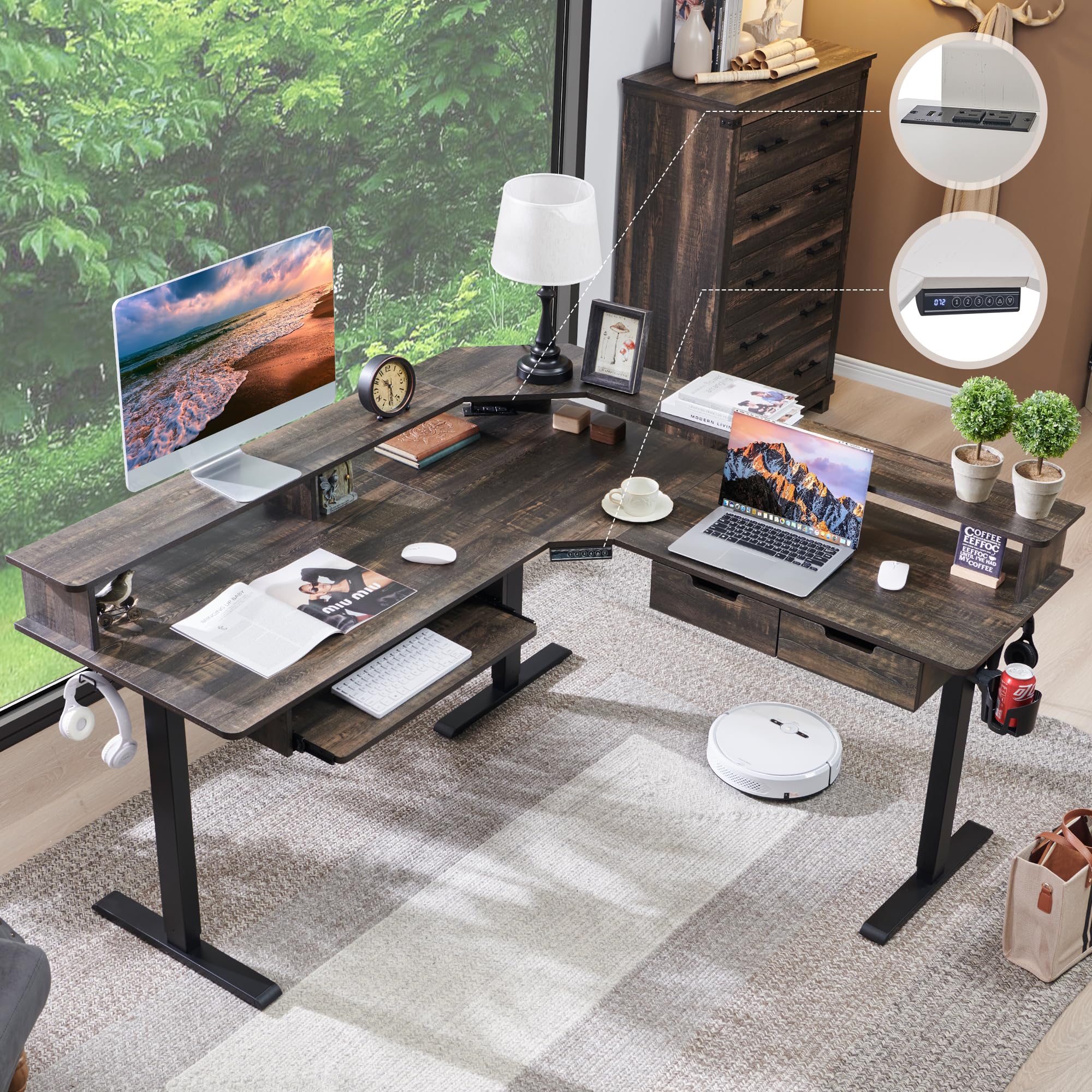
Image: The RedLemon 60-Inch L-Shaped Electric Standing Desk in Dark Rustic Oak, showcasing its spacious design and integrated features.
Safety Information
- Ensure all hardware is tightened and stable before using the desk.
- Keep children and pets away from the desk during operation, especially when adjusting height.
- Do not overload the desk. Refer to the specifications section for maximum load capacity.
- Avoid placing liquids directly on the desk surface, especially near electrical components.
- Disconnect power before cleaning or performing any maintenance.
Package Contents
Please verify that all components are present before beginning assembly. If any parts are missing or damaged, please contact customer support.
- Desktop Panels (L-shaped sections)
- Electric Lifting Columns (Legs)
- Control Panel with Digital Display
- Motor and Power Adapter
- Monitor Shelf
- Keyboard Tray
- Two Drawers
- Built-in Power Outlets (2 AC, 1 USB-A, 1 USB-C)
- Hooks for Hanging Items
- 360-degree Rotating Cup Holder
- RGB LED Light Strip and Remote Control
- Assembly Hardware and Tools (Allen wrench, etc.)
Setup and Assembly
Assembly of the RedLemon L-Shaped Electric Standing Desk is designed to be straightforward with clear instructions and labeled parts. We recommend two people for assembly to ensure safety and ease of construction. All necessary tools are included.
- Unpack Components: Carefully remove all parts from the packaging. Inspect for any damage.
- Assemble Frame: Follow the included step-by-step guide to connect the electric lifting columns and crossbars.
- Attach Desktop Panels: Secure the L-shaped desktop panels to the assembled frame.
- Install Accessories: Mount the monitor shelf, keyboard tray, drawers, control panel, power outlets, hooks, and cup holder as per the instructions.
- Connect Electronics: Plug in the motor, control panel, and LED lights. Ensure all cables are managed neatly.
- Final Check: Double-check all screws and connections to ensure the desk is stable and secure before use.

Image: A detailed diagram illustrating the dimensions, height adjustment range (28.5"-46"), load capacity (175 lbs), and low noise operation (55db) of the desk.
Assembly Video
Video: Official RedLemon Furniture installation guide for the standing desk, demonstrating the assembly process step-by-step.
Operating Instructions
Height Adjustment
The electric standing desk allows for a height range of 28 inches to 46 inches. Use the control panel to adjust the desk to your preferred sitting or standing positions.
- Up/Down Buttons: Press the up or down arrow buttons to manually adjust the desk height.
- Memory Presets: The desk features 4 height-memorizing presets. To save a height, adjust the desk to the desired level, then press the 'M' button followed by a number button (1-4). To recall a saved height, simply press the corresponding number button.

Image: The digital control panel with up/down arrows and four memory preset buttons for easy height adjustment.
LED Lighting
The integrated RGB LED light strip offers 12 scene modes and multiple color options to customize your workspace ambiance. Use the included wireless remote control to manage the lighting.
- Power On/Off: Use the power button on the remote to turn the LED lights on or off.
- Color Selection: Choose from various static colors using the color buttons on the remote.
- Scene Modes: Cycle through 12 dynamic scene modes for different effects.
- Brightness/Speed: Adjust the brightness of static colors or the speed of dynamic modes.

Image: The L-shaped desk illuminated with blue LED lighting, demonstrating the immersive ambient light design.
Integrated Features
- Built-in Power Outlets: The desk includes 2 standard AC power outlets, 1 USB-A port, and 1 USB-C port for convenient charging of your devices.
- Keyboard Tray: Utilize the pull-out keyboard tray for ergonomic typing and to free up desktop space.
- Drawers: Two integrated drawers provide storage for small office supplies, helping to keep your workspace organized.
- Cup Holder: The 360-degree rotating cup holder can be positioned for easy access and helps prevent spills.
- Hooks: Handy hooks on the sides of the desk are ideal for hanging headphones, bags, or other accessories.

Image: A composite image highlighting the built-in power strip, a multifunctional hook for headphones, a 360-degree rotatable cup holder, and leveling glides for stability.
Maintenance
- Cleaning: Wipe the desk surfaces with a dry, soft cloth. For stubborn marks, use a slightly damp cloth and mild cleaner, then dry immediately. Avoid abrasive cleaners or harsh chemicals.
- Hardware Check: Periodically check all screws and connections to ensure they remain tight.
- Cable Management: Keep cables organized and free from entanglement to prevent damage to the motor or power outlets.
Troubleshooting
| Problem | Possible Cause | Solution |
|---|---|---|
| Desk does not move or respond to controls. | Power cable disconnected; motor overload; control panel issue. | Check power connections. Reduce weight on desk. Try resetting the control panel (refer to specific instructions in the full manual if available, or unplug for 30 seconds). |
| Uneven height adjustment. | Obstruction; uneven weight distribution. | Remove any obstructions. Redistribute weight evenly on the desk surface. |
| LED lights not working. | Power connection issue; remote control battery dead. | Check LED power connection. Replace remote control battery. |
If you encounter issues not listed here or if the suggested solutions do not resolve the problem, please contact RedLemon customer support for assistance.
Specifications
| Feature | Detail |
|---|---|
| Brand | RedLemon |
| Model Number | RL-ELD60LS |
| Shape | L-Shape |
| Product Dimensions | 60"D x 60"W x 28.5"H |
| Color | Dark Rustic Oak |
| Minimum Height | 28 Inches |
| Maximum Height | 46 Inches |
| Lifting Mechanism | Electric |
| Number of Height Positions | 4 (Memory Presets) |
| Load Capacity | 175 lbs (from image) |
| Noise Level | 55db (from image) |
| Top Material Type | Oak Wood (Engineered Wood) |
| Base Material | Metal (Stainless Steel) |
| Item Weight | 103 Pounds |
| Number of Drawers | 2 |
| Number of Shelves | 1 (Monitor Shelf) |
| Included Components | Keyboard Tray, Power Outlets, Hooks, 360-degree Rotating Cup Holder, Two Drawers, LED Light |
| Required Assembly | Yes |
| Recommended People for Assembly | 2 |
Warranty
This RedLemon L-Shaped Electric Standing Desk comes with a Limited Warranty. Please refer to the warranty card included in your package for specific terms, conditions, and duration of coverage. Keep your proof of purchase for warranty claims.
Support
For any questions, assembly assistance, missing parts, or technical support, please contact RedLemon customer service. Our dedicated support team is available to provide professional assistance and ensure your satisfaction.
You can typically find contact information on the RedLemon brand store on Amazon or through the contact details provided in your product packaging.
Visit the RedLemon Store on Amazon for more information and support resources.