
1. Introduction
The GODIAG GD203 is a professional handheld diagnostic tool designed for comprehensive vehicle system analysis. It supports over 80 automotive brands and offers advanced diagnostic functions for Anti-lock Braking System (ABS) and Supplemental Restraint System (SRS), alongside a wide range of OBDII/EOBD+CAN functions and 28 special reset services. This manual provides detailed instructions for setting up, operating, maintaining, and troubleshooting your GD203 scanner.
2. Package Contents
Verify that all items listed below are included in your package:
- 1pc x GD203 OBD2 Scanner
- 1pc x Cipher paper
- 1pc x USB cable
- 1pc x Test line (OBDII connection cable)
- 1pc x Instruction manual and Upgrade guide
- 1pc x Black storage box

Image: The GODIAG GD203 package contents, including the scanner, cables, manual, and storage box.
3. Device Overview
The GD203 scanner features a compact design with an LCD screen, function keys, and a non-slip cover for comfortable handling. Familiarize yourself with the device's layout:

Image: Detailed view of the GODIAG GD203 scanner, highlighting the LCD screen, non-slip cover, function keys (F1, F2, F3), OK button, navigation arrows, back button, and USB charging port.
- LCD Screen: Displays diagnostic information and menu options.
- Non-slip Cover: Provides a secure grip and protection.
- Function Keys (F1, F2, F3): Perform specific actions as indicated on the screen.
- Navigation Keys (Up, Down, Left, Right): Used to scroll through menus and select options.
- OK Button: Confirms selections.
- Back Button: Returns to the previous screen or menu.
- USB Charging Port: For connecting to a computer for updates or power.
- OBDII Connector: Connects the scanner to the vehicle's OBDII port.
4. Setup
- Locate the Vehicle's OBDII Port: The OBDII port is typically located under the dashboard on the driver's side, though its exact position may vary by vehicle model. Refer to your vehicle's owner's manual if you cannot find it.
- Connect the Scanner: Plug the OBDII connector cable from the GD203 scanner firmly into the vehicle's OBDII port.
- Power On: The GD203 scanner does not require a separate battery. It will power on automatically once connected to the vehicle's OBDII port, drawing power directly from the vehicle.
- Start Vehicle (Optional): For some diagnostic functions, it may be necessary to turn the vehicle's ignition to the "ON" position or start the engine. Follow the on-screen prompts or specific function requirements.
5. Operating Instructions
5.1 General Navigation
Use the navigation keys (Up, Down, Left, Right) to move through menu options. Press the OK button to select an item or confirm an action. Press the Back button to return to the previous screen.
5.2 OBDII/EOBD+CAN Functions
These functions provide standard diagnostic capabilities for engine and emission-related issues.

Image: The GODIAG GD203 displaying the OBDII/EOBD+CAN functions menu, including options like Read Codes, Erase Codes, Live Data, Freeze Frame, and I/M Readiness.
- Read Codes: Retrieves Diagnostic Trouble Codes (DTCs) from the vehicle's computer.
- Erase Codes: Clears DTCs and turns off the Malfunction Indicator Lamp (MIL) after repairs.
- Live Data: Displays real-time Parameter Identification Data (PID) from the vehicle's sensors in text and graphic formats.
- Freeze Frame: Shows a snapshot of vehicle operating conditions at the moment a DTC was set.
- I/M Readiness: Checks the status of emission-related monitors to determine if the vehicle is ready for an inspection/maintenance test.
- O2 Monitor Test: Retrieves O2 sensor monitor test results.
- On-Board Monitor Test: Accesses results of on-board diagnostic monitoring tests for specific components/systems.
- Component Test: Allows initiation of a leak test for the vehicle's EVAP system.
- Vehicle Information: Retrieves vehicle identification number (VIN), calibration ID (CALID), and calibration verification number (CVN).
- Modules Present: Displays communication protocols and modules detected.
5.3 ABS/SRS Diagnostics
The GD203 provides in-depth diagnostic capabilities for the Anti-lock Braking System (ABS) and Supplemental Restraint System (SRS/Airbag).

Image: The GODIAG GD203 performing ABS and SRS dual system diagnosis, showing a visual representation of ABS operation and airbag deployment.
- ABS System Diagnosis: Reads and clears fault codes, views live data, and performs active tests for the ABS system. This helps identify issues with wheel speed sensors, ABS pump, and other related components.
- SRS/Airbag System Diagnosis: Reads and clears fault codes, views live data, and performs active tests for the SRS system. This assists in diagnosing issues with airbags, seatbelt pretensioners, crash sensors, and the SRS control module.
5.4 28 Special Functions
The GD203 offers a comprehensive suite of 28 special reset and service functions to assist with various vehicle maintenance tasks. Note: Availability of specific functions may vary by vehicle make, model, and year.
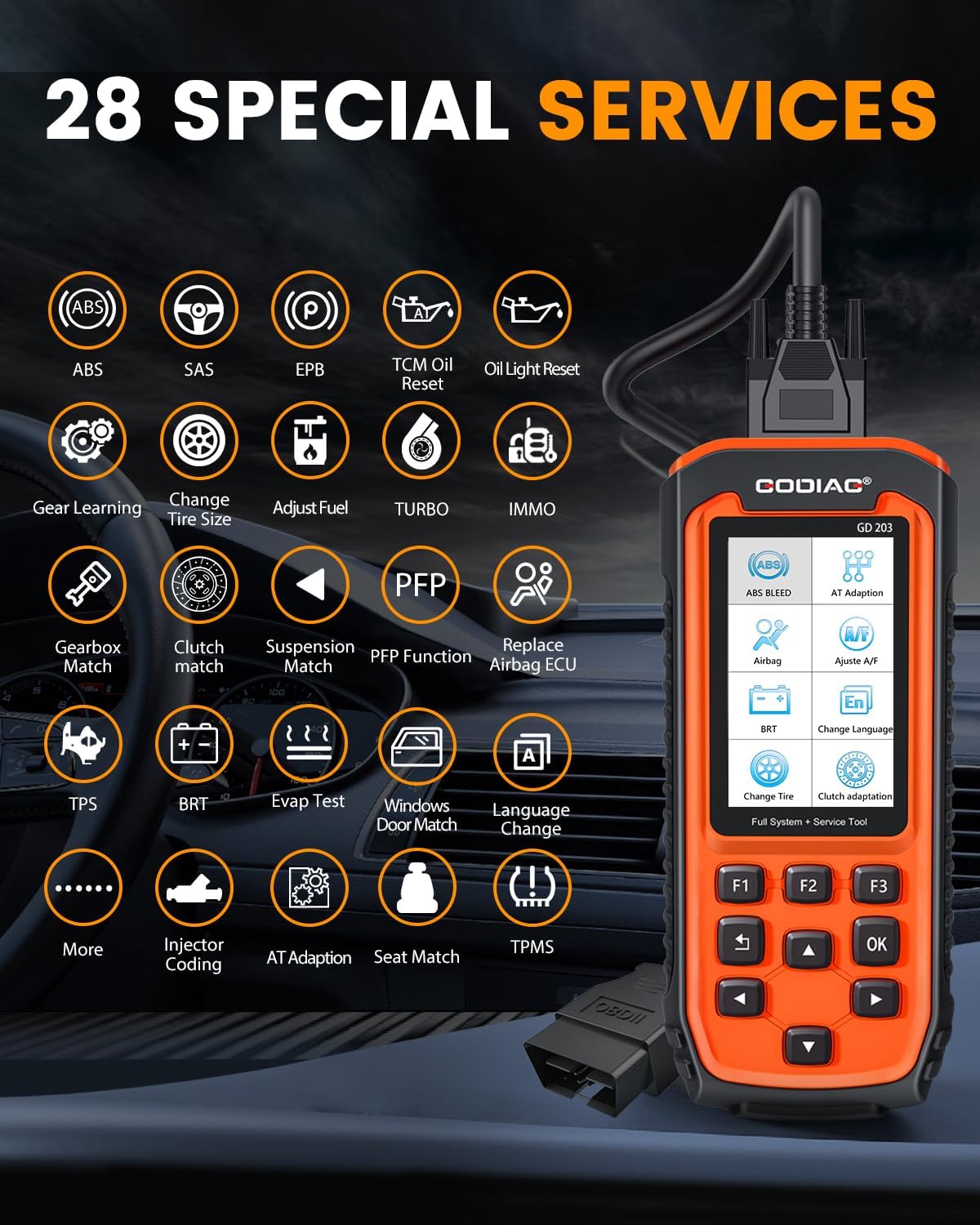
Image: The GODIAG GD203 displaying icons for its 28 special services, including ABS, SAS, EPB, Oil Reset, IMMO, BRT, TPMS, and more.
- 1. ABS Bleed
- 2. Airbag (SRS) Reset
- 3. Electronic Parking Brake (EPB) Reset
- 4. Injector Coding
- 5. Oil Light Reset (TCM Oil Reset)
- 6. Steering Angle Sensor (SAS) Calibration
- 7. Battery Reset (BRT)
- 8. Language Change (for instrument cluster)
- 9. Gear Learning
- 10. Tire Size Change
- 11. Fuel Adjustment
- 12. Turbo Calibration
- 13. Immobilizer (IMMO) Functions
- 14. Gearbox Match
- 15. Clutch Match
- 16. Suspension Match
- 17. PFP Function
- 18. Airbag ECU Replacement
- 19. Throttle Position Sensor (TPS) Reset
- 20. EVAP Test
- 21. Windows/Door Match
- 22. Automatic Transmission (AT) Adaptation
- 23. Seat Match
- 24. Tire Pressure Monitoring System (TPMS) Reset
- 25. AFS (Adaptive Front-lighting System)
- 26. And More...
5.5 Language Settings
The GD203 supports multiple languages for its interface. To change the language:
- Navigate to the "Settings" or "Setup" menu on the device.
- Select "Language" from the options.
- Choose your desired language from the list. The device supports 17 languages, including English, German, Italian, and Chinese.

Image: The GODIAG GD203 displaying various language options and indicating support for over 65 vehicle brands.
6. Maintenance
6.1 Software Updates
The GODIAG GD203 offers lifetime free online updates to ensure compatibility with new vehicle models and diagnostic protocols. To update your device:
- Download the update software from the official GODIAG website onto a computer.
- Connect the GD203 scanner to your computer using the provided USB cable.
- Follow the instructions in the update guide (included in the package) and on the computer software to perform the update.

Image: A visual representation of connecting the GODIAG GD203 scanner to a laptop for a lifetime free online software update.
6.2 Cleaning and Storage
- Clean the device with a soft, damp cloth. Do not use abrasive cleaners or solvents.
- Store the scanner in its black storage box when not in use to protect it from dust, moisture, and physical damage.
- Avoid exposing the device to extreme temperatures or direct sunlight for prolonged periods.
7. Troubleshooting
- Device does not power on:
- Ensure the OBDII cable is securely connected to the vehicle's OBDII port.
- Verify the vehicle's ignition is in the "ON" position or the engine is running (if required).
- Check the vehicle's fuse for the OBDII port.
- Communication error with vehicle:
- Confirm the vehicle supports the OBDII protocol.
- Ensure the ignition is on.
- Check for any damage to the OBDII cable or connector.
- Try connecting to a different OBDII-compliant vehicle to rule out scanner issues.
- Screen freezes or device is unresponsive:
- Disconnect the device from the vehicle and reconnect it.
- If the issue persists, perform a software update as described in Section 6.1.
- Specific function not working:
- Verify that your vehicle model supports the specific function. Some classic models without an electronic control system may not support certain reset services.
- Ensure the device software is up to date.
8. Specifications
| Feature | Specification |
|---|---|
| Model | GD203 OBD2 Scanner |
| Manufacturer | GODIAG |
| Item Weight | 2 pounds |
| Product Dimensions | 8.66 x 3.34 x 1.18 inches (22 x 8.5 x 3 cm) |
| Power Source | Corded Electric (via OBDII port) |
| Operating System | Android 4.0 (internal system) |
| Screen Size | 4 Inches |
| Supported Protocols | OBDII/EOBD+CAN |
| Special Functions | 28+ Reset and Service Functions |
| Update | Lifetime Free Online Update |
9. Support
If you encounter any problems while using the GODIAG GD203 OBD2 Scanner or require technical assistance, please contact GODIAG customer support. You can typically reach support through the Amazon platform by contacting the seller directly. Please provide your product model and a detailed description of the issue for efficient assistance.
GODIAG is committed to providing satisfactory solutions within 24 hours.