1. Introduction
This manual provides detailed instructions for the installation, operation, and maintenance of your EVERSECU 5MP IP PoE PTZ Camera (Model ES-HD45F). Please read this manual thoroughly before using the product to ensure proper setup and functionality. Keep this manual for future reference.
2. Product Overview and Key Features
The EVERSECU ES-HD45F is a high-performance 5-megapixel IP Power over Ethernet (PoE) Pan-Tilt-Zoom (PTZ) camera designed for both outdoor and indoor surveillance. It offers advanced features for comprehensive monitoring.
- 5MP High Resolution: Captures clear and detailed images.
- Pan/Tilt/Zoom (PTZ) Functionality: Features 355° endless pan range, 0°-90° tilt range, and 4x optical zoom for flexible viewing angles and detailed focus.
- Two-Way Audio: Built-in microphone and speaker allow for real-time communication.
- Infrared (IR) Night Vision: Equipped with 4 infrared lights, providing an effective night vision distance of 20-30 meters (98 feet).
- AI Human/Vehicle Detection: Intelligent detection capabilities reduce false alarms by distinguishing between human and vehicle movement.
- Durable Design: IP66 weatherproof rating ensures protection against dust and water, while IK10 vandal-proof rating provides resistance against impact.
- Local Storage: Supports TF card slot for local recording.
- ONVIF Compliant: Compatible with various Network Video Recorders (NVRs) and surveillance systems.
- Lightning Protection: Features 6000V transient voltage protection.
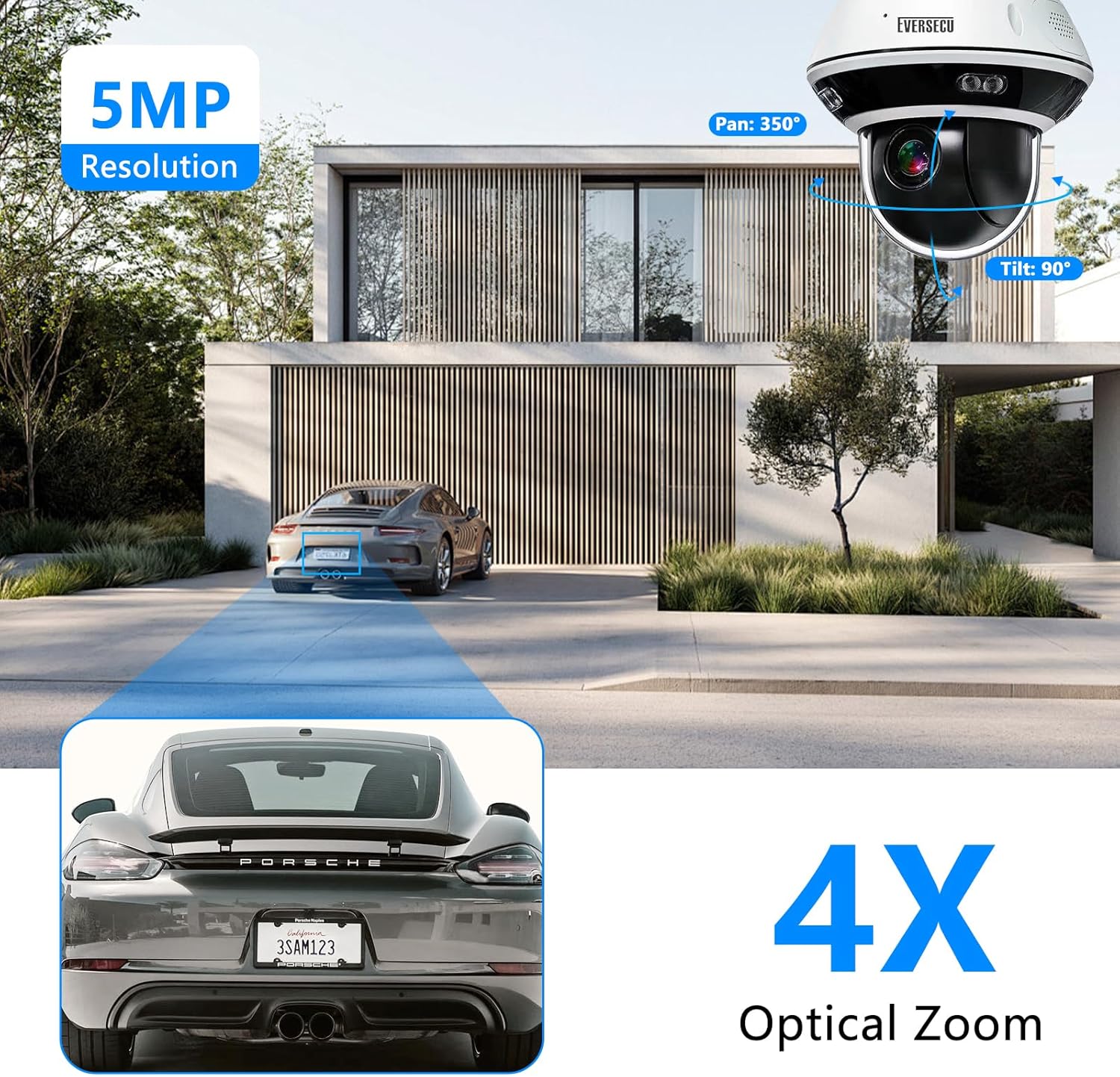
Image 2.1: Overview of the EVERSECU 5MP IP PoE PTZ Camera's key features including resolution, pan/tilt range, and optical zoom.

Image 2.2: Illustration of the camera's Smart Human/Vehicle Detection, highlighting how it differentiates between humans and vehicles for accurate alerts.

Image 2.3: The camera's robust design, showcasing its suitability for indoor/outdoor use and resistance to various weather conditions and impacts (IK10).
3. Package Contents
Verify that all items listed below are included in your package. If any items are missing or damaged, please contact customer support.
- 1x EVERSECU Motorized PoE PTZ Camera
- 1x User Manual (this document)
- 1x Metal Base Plate
- 3x Screws for installation
4. Setup and Installation
The EVERSECU ES-HD45F camera supports Power over Ethernet (PoE) for simplified installation, allowing both power and data transmission over a single Ethernet cable. It is designed for ceiling mount installation.
4.1 Mounting the Camera
- Choose a suitable ceiling location for optimal surveillance coverage.
- Use the provided metal base plate as a template to mark drilling points on the ceiling.
- Drill pilot holes and secure the metal base plate using the included screws.
- Attach the camera body to the secured base plate, ensuring it is firmly locked in place.
4.2 Connection Methods
The camera can be connected in two primary ways:

Image 4.1: Visual guide for connecting the EVERSECU camera to an NVR system or directly to a network for access via computer or smartphone.
- Connection 1: Via ONVIF NVR
Connect the camera directly to a PoE port on your ONVIF-compatible Network Video Recorder (NVR) using an Ethernet cable. The NVR will provide power and handle video recording and management. Connect the NVR to a monitor for local viewing.
- Connection 2: Via Router/Switch/Hub
Connect the camera to a PoE-enabled port on your network router, switch, or hub using an Ethernet cable. This allows the camera to be accessed via a computer, laptop, or smartphone connected to the same network. Ensure your router/switch provides PoE or use a PoE injector.
For detailed network configuration and ONVIF integration, refer to your NVR or network device's user manual.
5. Operating Instructions
5.1 Powering On and Initial Access
Once connected via PoE, the camera will power on automatically. Access the camera's live view and settings through your NVR interface or a compatible software/app on your computer or smartphone. The camera supports the ONVIF protocol for broad compatibility.
5.2 Pan, Tilt, and Zoom (PTZ) Control
Utilize the PTZ controls within your NVR software or mobile application to adjust the camera's viewing angle and zoom level:
- Pan: Rotate the camera horizontally up to 355 degrees.
- Tilt: Adjust the camera vertically from 0 to 90 degrees.
- Zoom: Use the 4x optical zoom to magnify distant objects without losing image quality.
- Presets and Tours: Configure up to 220 preset positions and 3 guard tours for automated monitoring of specific areas. The camera supports park action, which invokes presets/pattern/patrol/pan scan automatically after a defined period of inactivity.
5.3 Two-Way Audio and Remote Access
The camera features a built-in microphone and speaker, enabling two-way audio communication. This allows you to listen to the camera's surroundings and speak through the camera from your remote device.

Image 5.1: Demonstrates the two-way audio and remote access capabilities, allowing communication with individuals near the camera.
Remote access allows you to view live footage, control PTZ functions, and use two-way audio from anywhere using a compatible mobile application or web interface.
5.4 AI Human/Vehicle Detection and Recording
Configure the camera's AI detection settings to receive alerts only when humans or vehicles are detected, minimizing false alarms. The camera supports local recording to a TF card (not included) for continuous or event-triggered video storage.
- Insert a TF card into the designated slot on the camera for local storage.
- Configure recording schedules and motion detection sensitivity through the camera's interface.
6. Maintenance
Regular maintenance ensures optimal performance and longevity of your EVERSECU camera.
- Cleaning: Gently wipe the camera lens and body with a soft, damp cloth. Avoid abrasive cleaners or solvents that could damage the surface.
- Firmware Updates: Periodically check the manufacturer's website for firmware updates to ensure your camera has the latest features and security enhancements.
- Environmental Protection: While the camera is IP66 weatherproof and IK10 vandal-proof, extreme conditions can still affect performance. Ensure proper installation to minimize exposure to direct, prolonged harsh weather.
- Cable Inspection: Regularly inspect all cables for any signs of wear or damage.
7. Troubleshooting
If you encounter issues with your camera, refer to the following common troubleshooting steps:
- No Power/No Image:
- Ensure the Ethernet cable is securely connected to both the camera and the PoE source (NVR/PoE switch/injector).
- Verify that the PoE source is active and providing power.
- Check the network cable for damage.
- Cannot Access Camera on Network:
- Confirm the camera and your viewing device are on the same network segment.
- Check the camera's IP address and ensure it's not conflicting with another device.
- Verify that your NVR or software is ONVIF compatible and correctly configured.
- Temporarily disable any firewalls on your computer or router that might be blocking access.
- PTZ Controls Not Responding:
- Ensure the camera has a stable network connection.
- Restart the camera and your NVR/viewing software.
- Check for any physical obstructions preventing movement.
- Poor Image Quality:
- Clean the camera lens.
- Ensure adequate lighting in the surveillance area, especially for night vision.
- Check network bandwidth; insufficient bandwidth can affect streaming quality.
For further assistance, please contact EVERSECU customer support.
8. Specifications
| Feature | Detail |
|---|---|
| Model Number | ES-HD45F |
| Resolution | 5 Megapixel (1920p video capture resolution) |
| Sensor | 1/3 Sony Low illumination CMOS |
| Optical Zoom | 4x (2.8-12mm) |
| Pan Range | 0°~355° (endless) |
| Pan Speed | 25°/s |
| Tilt Range | 0°~90° |
| Tilt Speed | 30°/s |
| Presets | 220 |
| Guard Tours | 3 Groups |
| Night Vision Range | 20-30m (98 Feet) with 4PCS Infrared lights |
| Audio | 2 Way Audio (Built-in Microphone) |
| Detection | AI Human/Vehicle Detection |
| Storage | TF Card Slot (Local Recording) |
| Connectivity | Wired (PoE), ONVIF protocol |
| Weather Resistance | IP66 Waterproof |
| Vandal Resistance | IK10 (All metal case) |
| Lightning Protection | Transient Voltage 6000V |
| Mounting Type | Ceiling Mount |
| Dimensions (L x W x H) | 13.72 x 13.72 x 13.72 cm |
| Item Weight | 699 g |
| Compatible Devices | Desktop, Digital Video Recorder, Laptop, Smartphone |
| Recommended Uses | Baby Monitoring, Indoor Security, Outdoor Security, Pet Monitoring |

Image 8.1: Detailed dimensions of the EVERSECU ES-HD45F camera.
9. Warranty and Support
For information regarding product warranty, technical support, or service, please refer to the warranty card included with your purchase or visit the official EVERSECU website. Contact details for customer support are typically available on the manufacturer's website.


