
1. Introduction and Overview
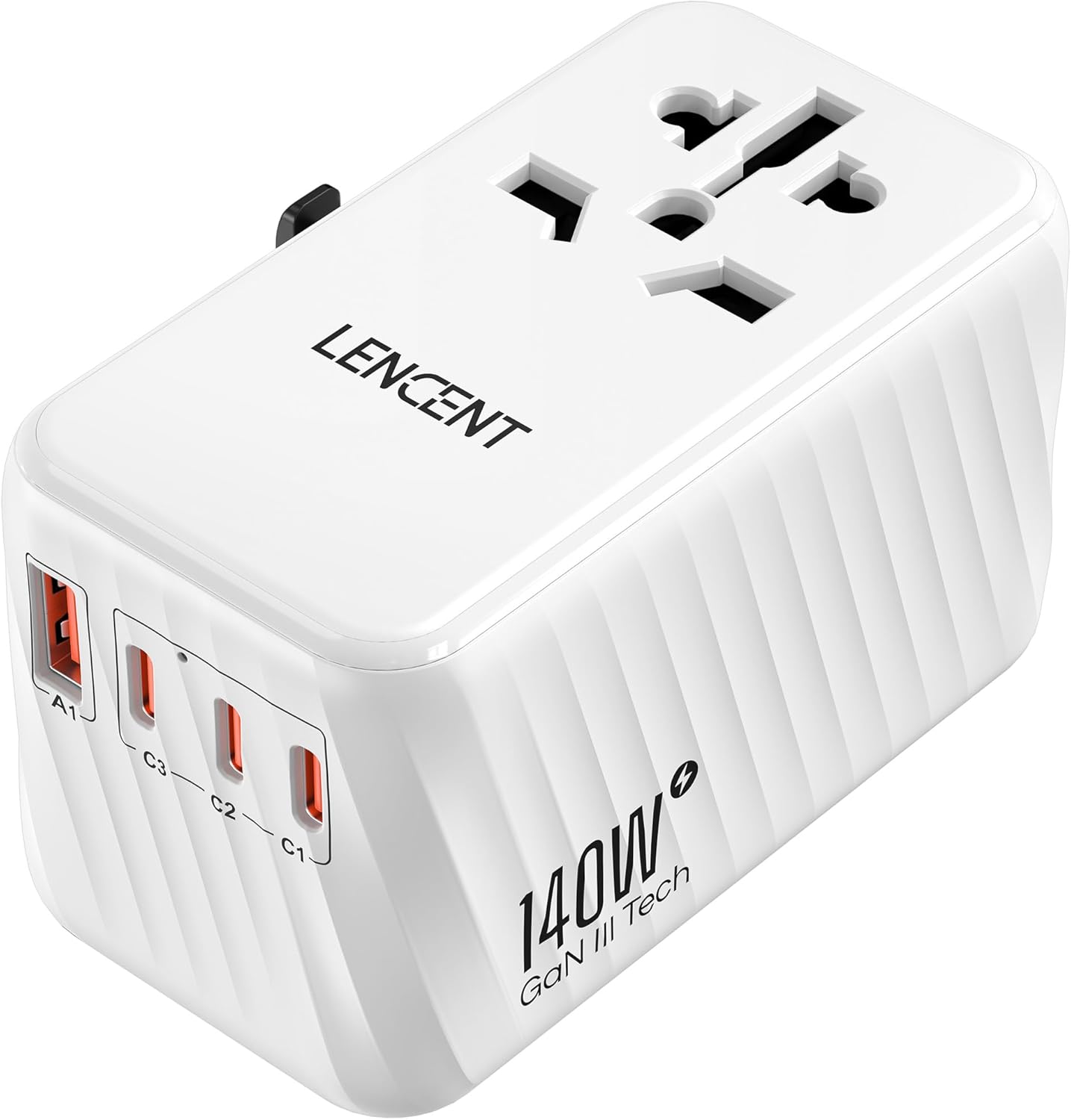
The LENCENT 140W Universal Travel Adapter is designed to provide efficient and safe power delivery for your electronic devices across various international power outlets. This compact adapter integrates multiple plug types and high-power USB charging ports, making it an essential companion for global travelers.
Key features include:
- 140W USB-C Super Fast Charging: Equipped with 2 USB-C ports capable of delivering up to 140W each, supporting PD 3.1 and QC 4+ protocols for rapid charging of laptops and other compatible devices.
- International Plug Compatibility: Features 4 integrated plugs (EU, UK, US, AU) for use in over 200 countries, easily deployed via a slide-and-press mechanism.
- GaN III Technology: Utilizes Gallium Nitride (GaN) technology for enhanced energy efficiency, superior power handling, and effective heat dissipation in a compact form factor.
- 5-in-1 Charging Solution: Offers 1 USB-A port, 3 USB-C ports, and 1 universal AC outlet (250V/10A, 2500W Max), allowing simultaneous charging of up to 5 devices.
- Multi-Safety Protection: Incorporates a 6-point safety system, including dual 10A fuses, fireproof materials, short-circuit protection, and over-voltage protection.
Note: This adapter is not a voltage converter. Ensure your device is compatible with the local voltage (100-250V) before use, especially for high-power appliances.
2. Setup and Plug Deployment
The adapter features retractable plugs for various regions. To deploy a plug, simply slide the corresponding button on the side of the adapter and push the plug out until it locks into place. To retract, press the button and push the plug back in.
2.1 Plug Types and Regions:
- US Plug (Type A): Used in the United States, Canada, Mexico, Japan, Thailand, Colombia, and more.
- EU Plug (Type C): Used in Europe including France, Germany, Italy, Netherlands, Belgium, and more.
- UK Plug (Type G): Used in the United Kingdom, Singapore, Hong Kong, Ireland, Dubai, Abu Dhabi, and more.
- AU Plug (Type I): Used in Australia, New Zealand, China, Argentina, Burma, Tuvalu, and more.


3. Operating Instructions
3.1 Connecting to a Power Outlet:
- Identify the correct plug type for your current location.
- Slide the corresponding button on the side of the adapter to deploy the correct plug.
- Insert the adapter firmly into the wall outlet.
3.2 Charging Devices:
The adapter features multiple charging ports:
- USB-C Ports (C1, C2, C3): Connect your USB-C compatible devices for fast charging. Ports C1 and C2 support up to 140W each, ideal for laptops like MacBook Pro.
- USB-A Port (A1): Connect your standard USB-A devices.
- Universal AC Outlet: Plug in appliances that require a direct AC connection. Ensure the appliance is compatible with the local voltage (100-250V) and does not exceed 2500W.


3.3 Official Product Video:
4. Safety Features and Precautions
The LENCENT Universal Travel Adapter is built with a comprehensive 6-point safety system to protect your devices and ensure safe operation:
- Dual 10A Fuses: Provides protection against overcurrent and short circuits. A spare fuse is included for convenience.
- Fireproof Material: Constructed from materials designed to resist fire.
- Short-Circuit Protection: Automatically cuts power in case of a short circuit.
- Over-Voltage Protection: Safeguards devices from damage due to excessive voltage.
- Over-Current Protection: Prevents damage from drawing too much current.
- Over-Temperature Protection: Manages internal temperature to prevent overheating.

Important Safety Notice:
This adapter does NOT convert voltage. It is compatible with input voltages from 100V to 250V. Always verify that your electronic devices are compatible with the local voltage of your destination. Using devices that require voltage conversion (e.g., some hair dryers, straighteners, or other high-power appliances) without a separate voltage converter may damage your device or the adapter.

5. Specifications
| Feature | Detail |
|---|---|
| Model Number | PA058W-140W |
| Product Dimensions | 3.62 x 2.13 x 2.13 inches |
| Item Weight | 9.5 ounces (268 Grams) |
| Input Voltage | 100-250 Volts AC, 50/60Hz |
| AC Outlet Max Load | 10A (Max), 2500W (Max) |
| USB-C Output (C1/C2) | PD3.1 140W Max (each) |
| USB-C Output (C3) | 18W Max |
| USB-A Output (A1) | QC 18W Max |
| Total USB Output | 140W Max |
| Safety Features | Dual 10A Fuse, Fireproof Material, Short-Circuit, Over-Voltage, Over-Current, Over-Temperature Protection |

6. Troubleshooting
- Device not charging: Ensure the adapter is securely plugged into the wall outlet and the correct plug type is deployed. Check if your device's charging cable is properly connected to the adapter and the device. Verify that your device is compatible with the adapter's output specifications.
- Adapter not powering on: Check the dual 10A fuse. If blown, replace it with the spare fuse provided.
- Slow charging: Ensure you are using the appropriate USB-C port for high-power devices (C1 or C2 for 140W). Some devices may limit charging speed based on their battery level or internal temperature.
- Overheating: While GaN technology helps with heat dissipation, prolonged use with multiple high-power devices may generate some heat. If the adapter feels excessively hot, disconnect some devices or allow it to cool down. Ensure proper ventilation.
- Incompatible voltage: Remember, this is not a voltage converter. If your device requires a different voltage than the local supply, you will need a separate voltage converter.
7. Warranty and Support
For warranty information and customer support, please refer to the official LENCENT website or contact their customer service directly. Keep your purchase receipt as proof of purchase for any warranty claims.
You can visit the LENCENT store for more information: LENCENT Official Store


