1. Introduction
The KZ EDX Pro X In-Ear Headphones are designed to deliver a high-fidelity audio experience with enhanced dynamic sound. Featuring an upgraded super-linear dynamic driver, these earphones provide clear sound, powerful bass, and a wide dynamic range. The ergonomic design ensures a comfortable and secure fit, making them suitable for extended listening sessions. The detachable 2-pin cable offers flexibility for replacement or upgrades.

Image 1.1: KZ EDX Pro X In-Ear Headphones with detachable cable. This image displays the black earphones with their transparent housing and the braided detachable cable, highlighting their design and connectivity.
2. Package Contents
Please verify that all items listed below are included in your package:
- 1 x Pair of KZ EDX Pro X Dynamic HiFi In-Ear Headphones
- 1 x Detachable Earphone Cable (3.5mm L-bending plug)
- 2 x Pairs of Eartips (various sizes)
- 1 x User Manual

Image 2.1: Contents of the KZ EDX Pro X package. This image shows the product box, the earphones, the detachable cable, and additional eartips, illustrating what is included with the purchase.
3. Setup
3.1 Attaching the Cable
- Identify the left (L) and right (R) earpieces and the corresponding connectors on the cable. The cable connectors are typically marked.
- Align the 2-pin connector on the cable with the receptacle on the earpiece. Ensure the pins are correctly oriented.
- Gently push the cable connector into the earpiece receptacle until it is firmly seated. Do not force the connection.
- Repeat for the other earpiece.

Image 3.1: Close-up of the 2-pin detachable cable connection. This image illustrates how the cable connects to the earphone unit, showing the gold-plated pins and the transparent housing.
3.2 Selecting Eartips
Proper eartip selection is crucial for optimal sound quality and comfort. Experiment with the included eartip sizes to find the best fit for your ears. A good seal will provide better bass response and passive noise isolation.
3.3 Wearing the Earphones
The KZ EDX Pro X earphones feature an over-ear hook design for a secure and comfortable fit.
- Insert the earpiece gently into your ear canal.
- Guide the cable over the top of your ear, allowing the ear-hook section to rest comfortably behind your ear.
- Adjust the earpiece and cable until you achieve a snug and comfortable fit.
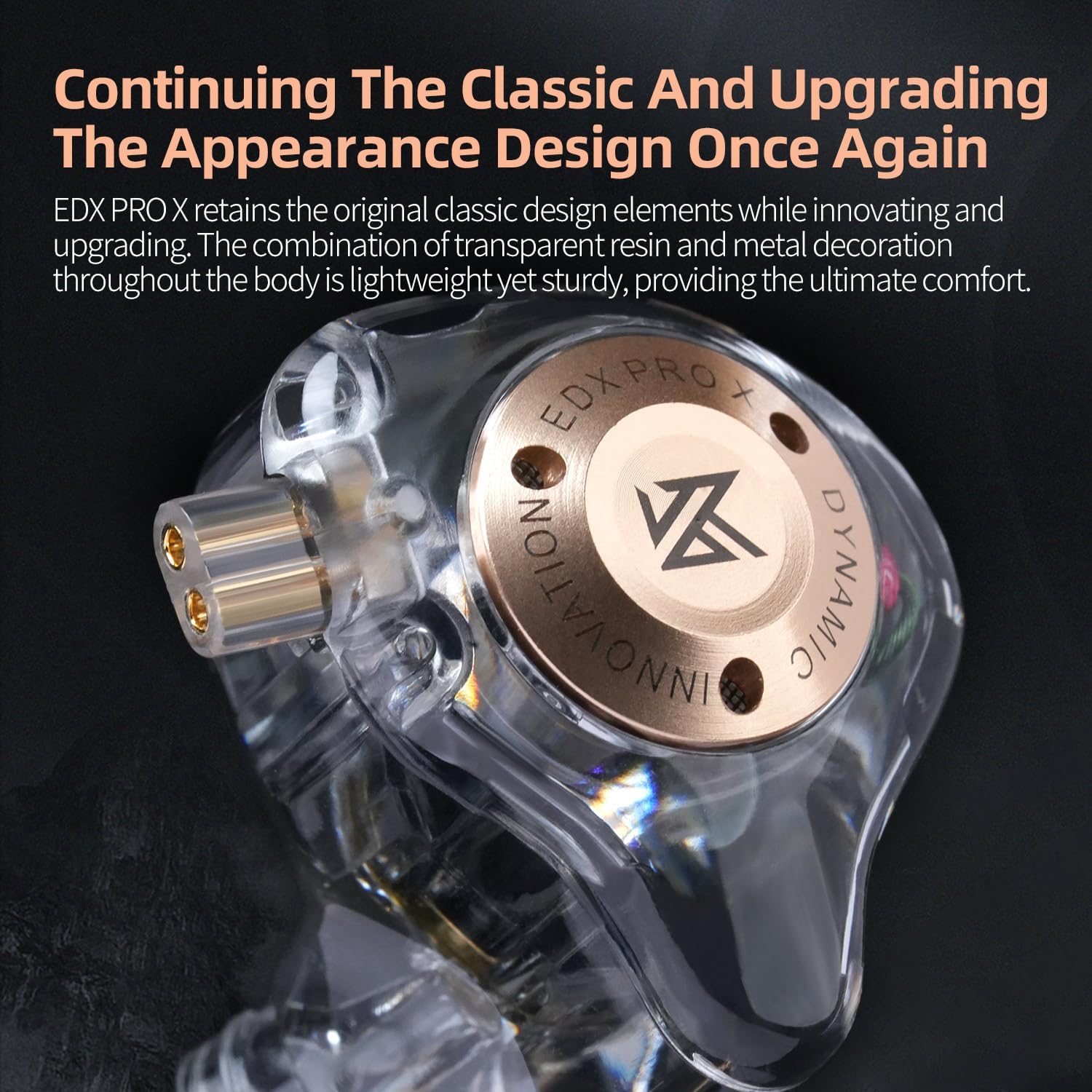
Image 3.2: Detailed view of the KZ EDX Pro X earphone design. This image highlights the ergonomic shape and transparent resin housing, which contributes to a comfortable and stable fit when worn.
4. Operating Instructions
4.1 Connecting to an Audio Source
Plug the 3.5mm L-bending jack of the earphone cable into the headphone output port of your audio device (e.g., smartphone, tablet, computer, digital audio player).
4.2 Volume Control
Since this specific variant of the KZ EDX Pro X does not include an inline microphone or remote, all volume adjustments must be made directly on your connected audio source device.
5. Maintenance
5.1 Cleaning
- Eartips: Remove the eartips from the earphones. Clean them with a soft cloth dampened with mild soap and water. Rinse thoroughly and allow them to dry completely before reattaching.
- Earphone Body: Wipe the earphone body with a soft, dry, lint-free cloth. Avoid using harsh chemicals or abrasive materials.
- Cable: Gently wipe the cable with a soft, dry cloth to remove any dirt or oils.
5.2 Cable Care
To prolong the life of your detachable cable:
- Avoid sharp bends or kinks in the cable.
- Do not pull the cable directly to disconnect it from the audio source or earpieces. Always grasp the plug or connector firmly.
- When storing, coil the cable loosely.
5.3 Storage
Store your KZ EDX Pro X earphones in a clean, dry place, away from extreme temperatures, humidity, and direct sunlight. Using a small carrying case can help protect them from damage when not in use.
6. Troubleshooting
- No Sound:
- Ensure the 3.5mm jack is fully inserted into your audio device.
- Check the volume level on your audio device.
- Verify that the detachable cable is securely connected to both earpieces.
- Test with a different audio source or another pair of headphones to isolate the issue.
- Distorted Sound:
- Reduce the volume on your audio device.
- Ensure the cable connections are secure.
- Check if the audio source is playing a high-quality file.
- Poor Fit or Discomfort:
- Try different sizes of eartips to find the most comfortable and secure seal.
- Adjust the ear-hook position for better stability.
- Cable Issues (e.g., intermittent sound):
- Inspect the cable for any visible damage.
- Ensure the 2-pin connectors are clean and free of debris.
- If possible, test with a replacement 2-pin detachable cable to determine if the cable is faulty.
7. Specifications
| Feature | Specification |
|---|---|
| Product Name | KZ EDX PRO X |
| Model | EDX PRO X |
| Earphone Type | In-ear, Dynamic Driver |
| Vocalism Principle | Dynamic |
| Impedance | 23Ω |
| Earphone Sensitivity | 108dB/mW |
| Frequency Range | 20-40000Hz |
| Interface | 3.5mm (L-bending plug) |
| Cable Length | 1.2m |
| Earphone Interface | 2Pin 0.75mm |
| Cable Feature | Detachable |
| Material | Resin, Metal |
| Color | Black (as per current variant) |
| Noise Control | Sound Isolation |
| Water Resistance Level | Not Water Resistant |
| Item Weight | 80 Grams (approx. 2.82 ounces) |
| Compatible Devices | Laptops, Desktops, Tablets, Telephones, Smart Speakers, Televisions, Car Audio Systems, Cellphones |

Image 7.1: Back of the KZ EDX Pro X packaging displaying key specifications. This image provides a visual reference for some of the technical details listed in the table.
8. Warranty and Support
For warranty information and customer support, please refer to the warranty card included in your package or contact the manufacturer directly.
- Manufacturer: KZ
- After-sales Support: after-sales@kzhifi.com
- Business Cooperation: sales@kzhifi.com
- Product UPC: 6970493063179