
1. Introduction
Welcome to the K&F Concept 67mm Variable ND2-32 Magnetic Phone Lens Filter Kit user manual. This guide provides instructions for the proper setup, operation, and maintenance of your new filter kit, designed to enhance your mobile photography and videography.
1.1 Package Contents
- K&F Concept 67mm Variable ND2-32 Filter
- Magnetic Phone Clip
- Magnetic Adapter Ring
- Storage Case
- Cleaning Cloth

Image 1.1: Overview of the K&F Concept 67mm Variable ND2-32 Magnetic Phone Lens Filter Kit components.
2. Setup and Installation
Follow these steps to correctly install the filter kit on your smartphone.
- Attach the Phone Clip: Position the magnetic phone clip over your smartphone's camera module. Ensure the clip is centered and securely covers the camera lenses. The clip features dual-side rubber pads to protect your phone from scratches.
- Adjust Tightness: Use the orange locking knob on the clip to adjust its tightness. Tighten it sufficiently to hold the clip firmly in place without applying excessive pressure to your phone.
- Attach the Magnetic Filter: Align the K&F Concept 67mm Variable ND2-32 filter with the magnetic adapter ring on the phone clip. The magnetic design will securely attach the filter.
- Rotate for Adjustment: Once attached, rotate the filter to adjust the neutral density level. Ensure the filter is seated correctly and does not wobble.

Image 2.1: Step-by-step installation process for the magnetic phone filter kit.

Image 2.2: The 67mm magnetic phone clip is compatible with a wide range of iPhone models.
3. Operating Instructions
3.1 Understanding the Variable ND Filter
The K&F Concept 67mm Variable ND2-32 filter provides 1 to 5 stops of light reduction. This allows you to control the amount of light entering your phone's camera sensor, which is crucial for achieving specific photographic effects in various lighting conditions.
3.2 Adjusting Light Reduction
Rotate the outer ring of the filter to increase or decrease the neutral density. The markings on the filter indicate the approximate stop reduction:
- ND2 (1 stop): Minimal light reduction, suitable for slight adjustments.
- ND4 (2 stops): Reduces light by half, useful for slightly brighter conditions.
- ND8 (3 stops): Reduces light by three-quarters, ideal for moderately bright scenes.
- ND16 (4 stops): Reduces light by seven-eighths, effective in bright sunlight.
- ND32 (5 stops): Maximum light reduction within this range, for very bright environments or achieving very long exposures.

Image 3.1: Visual representation of the 1-5 stop light reduction provided by the ND2-32 filter.
3.3 Applications
- Long Exposure Photography: Reduce shutter speed in bright conditions to capture motion blur effects, such as silky water or blurred clouds.
- Wide Aperture in Bright Light: Maintain a wide aperture (shallow depth of field) in bright environments without overexposing the image, allowing for creative background blur.
- Video Recording: Achieve cinematic motion blur by maintaining a shutter speed that is approximately double your frame rate, even in bright sunlight, for smoother video footage.
3.4 Cold Shoe Interface
The phone clip includes a cold shoe interface on top. This allows for the attachment of external accessories such as an LED fill light or a wireless microphone to enhance your mobile photography and videography setup.
4. Maintenance
Proper maintenance ensures the longevity and optimal performance of your filter kit.
- Cleaning the Filter: Use the provided cleaning cloth or a specialized lens cleaning solution and cloth to gently wipe the filter surface. Avoid abrasive materials that could scratch the glass.
- Storage: When not in use, store the filter and clip in the provided storage case to protect them from dust, scratches, and impacts.
- Handling: Always handle the filter by its edges to avoid leaving fingerprints on the glass surface, which can affect image quality.
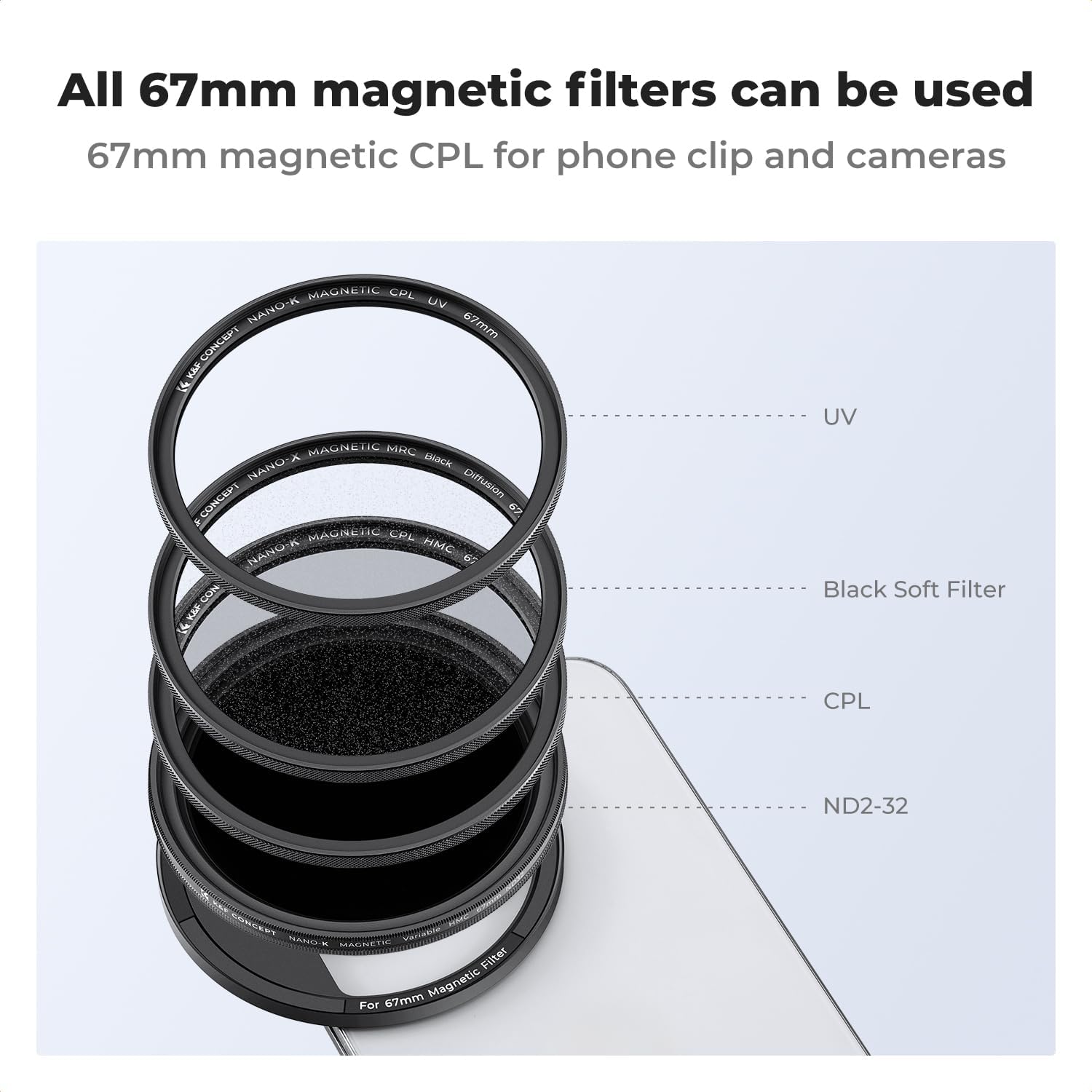
Image 4.1: The magnetic system allows for easy interchangeability with other K&F Concept magnetic filters.
5. Troubleshooting
Refer to this section for solutions to common issues.
- Filter Not Attaching Securely:
Ensure the magnetic phone clip is correctly positioned and tightened on your phone. Verify that the filter is aligned properly with the magnetic adapter ring. Check for any debris between the filter and the clip that might prevent a secure magnetic connection. - Vignetting or Dark Corners:
Vignetting can occur with some ultra-wide-angle phone lenses, especially at higher ND settings or if the clip is not perfectly centered. Adjust the clip's position or zoom in slightly if your phone camera allows. - "X" Pattern or Uneven Density:
This is a characteristic of variable ND filters when rotated beyond their effective range. Rotate the filter back slightly until the "X" pattern disappears. The ND2-32 range is designed to minimize this effect within its specified stops. - Difficulty Rotating Filter:
Ensure the filter is clean and free of debris. The rotation mechanism should be smooth. If it feels stiff, check for any obstructions. Do not force rotation. - Clip Does Not Fit Phone:
The clip is designed for most smartphones. Ensure your phone's camera module is within the compatible dimensions. Remove thick phone cases if they interfere with the clip's placement or secure attachment.
6. Specifications
| Feature | Detail |
|---|---|
| Product Dimensions | 3.39 x 3.39 x 1.57 inches |
| Item Weight | 4.9 ounces |
| Filter Type | Variable Neutral Density (VND) |
| Filter Size | 67mm |
| Density Range | ND2-32 (1-5 stops) |
| Material | Top AGC optical glass with 18 multi-layer coatings |
| Mounting | Magnetic Mount |
| Compatibility | Universal magnetic phone clip, compatible with various iPhone and Android models. Fits any K&F Concept magnetic filter. |
7. Warranty and Support
For warranty information or technical assistance regarding your K&F Concept 67mm Variable ND2-32 Magnetic Phone Lens Filter Kit, please refer to the official K&F Concept website or contact their customer support directly. It is recommended to keep your purchase receipt for any warranty claims.