
BOOMJOY BM 5008
BOOMJOY 52-Inch Ceiling Fan with Light User Manual
Model: BM 5008
Brand: BOOMJOY
1. Important Safety Information
Please read all instructions carefully before beginning installation and retain this manual for future reference. Improper installation can lead to electric shock, fire, or personal injury.
- Ensure the power is turned off at the circuit breaker before installation or maintenance.
- All electrical connections must be in accordance with local codes, ordinances, and the National Electric Code. If you are unfamiliar with electrical wiring, consult a qualified electrician.
- The mounting structure must be capable of supporting the weight of the fan (approximately 13.44 pounds).
- Do not bend the blade holders during installation or cleaning.
- Keep hands, clothing, and other objects clear of the fan blades when the fan is operating.
- This fan is suitable for both indoor and outdoor (covered patio) use. Ensure it is not directly exposed to water.
2. Package Contents
Verify that all components are present and undamaged before proceeding with installation.
- Ceiling Fan Motor Housing (Black)
- Fan Blades (5, reversible dark walnut/light walnut)
- Integrated LED Light Kit
- Remote Control
- Downrods (5-inch and 10-inch)
- Mounting Bracket
- Hardware Pack (screws, washers, wire nuts, etc.)
- Instruction Manual
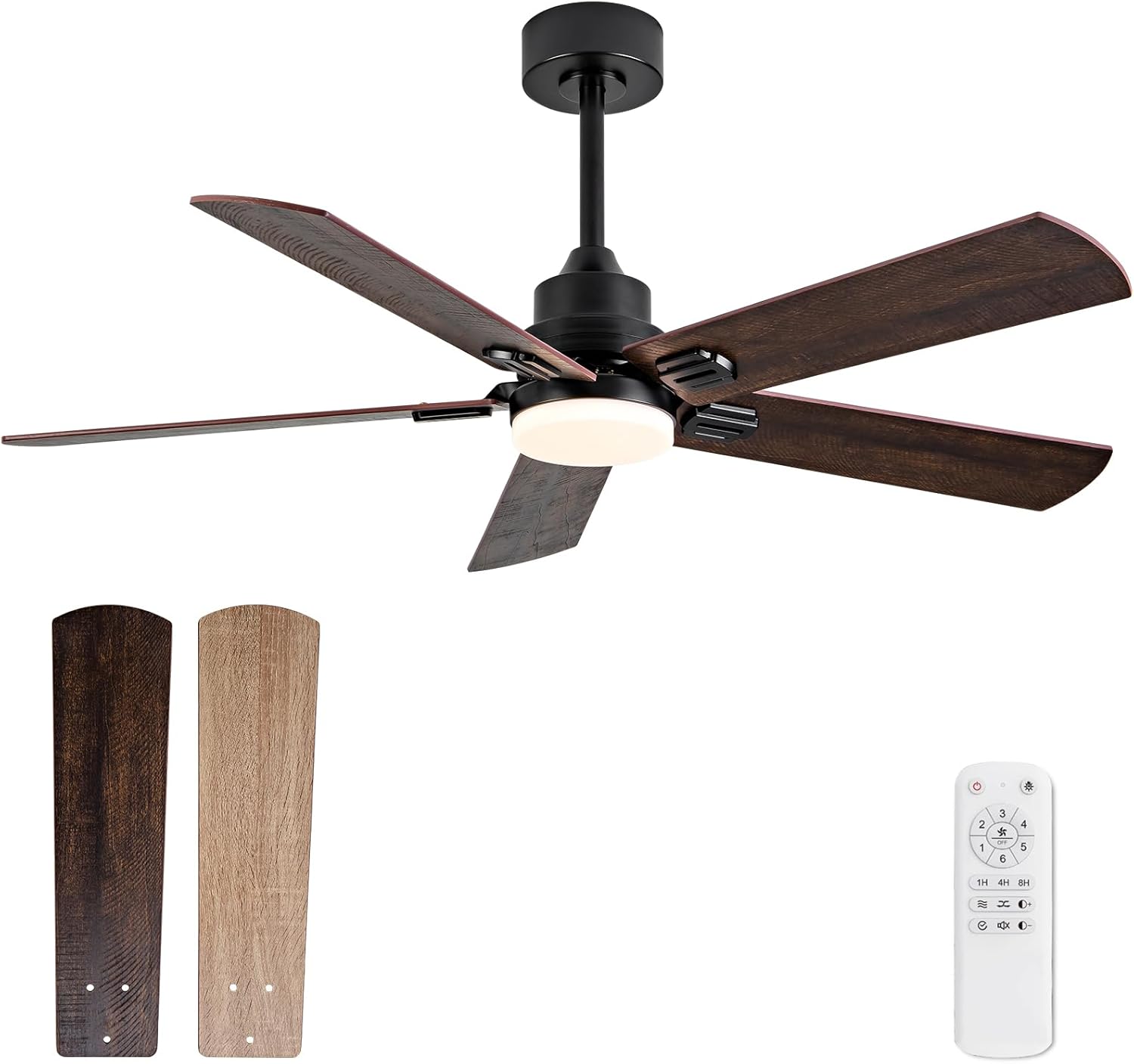
This image displays the complete BOOMJOY 52-inch ceiling fan assembly, featuring a matte black motor housing and five reversible blades. The blades are shown with both dark walnut and light walnut finishes. The included remote control is also visible, highlighting its compact design.

This image showcases the versatility of the fan's five blades, which are double-sided. One side features a deep walnut color, while the other offers a lighter walnut finish, allowing users to choose the aesthetic that best suits their decor.
3. Setup and Installation
Follow these steps for proper installation. It is recommended to have a second person assist with lifting and securing the fan.
- Prepare the Mounting Location: Ensure the electrical box is securely mounted to the building structure and can support the fan's weight.
- Install the Mounting Bracket: Attach the mounting bracket to the electrical box using the provided screws.
- Assemble the Downrod: Choose either the 5-inch or 10-inch downrod based on your ceiling height and desired fan placement. Securely attach it to the fan motor housing. The fan can be mounted horizontally or on a tilted ceiling (up to 15 degrees without additional accessories).
- Hang the Fan: Carefully lift the fan assembly and hang it from the mounting bracket.
- Make Electrical Connections: Connect the fan's wiring to your household wiring according to the wiring diagram in the separate detailed instruction sheet. Ensure all connections are secure.
- Secure the Canopy: Slide the canopy up and secure it to the mounting bracket, covering the electrical connections.
- Attach the Blades: Secure each fan blade to the blade holders. It is often easier to attach the blade holders to the fan first, then attach the blades once the fan is hung.
- Install the Light Kit: Connect and secure the integrated LED light kit to the bottom of the fan motor housing.
- Restore Power: Once installation is complete, turn the power back on at the circuit breaker.

This image provides key dimensions for the 52-inch ceiling fan, including its overall length and height with different downrod options (5'' and 10''). It also suggests suitable room sizes for optimal performance, specifically for medium rooms ranging from 12FTx12FT to 18FTx18FT.

The fan is designed to complement various indoor spaces, including living rooms, providing both air circulation and lighting.
4. Operating Instructions
Your BOOMJOY ceiling fan is operated by the included remote control.
Fan Functions:
- Power On/Off: Press the power button on the remote to turn the fan on or off.
- Speed Control: Select from 6 adjustable wind speeds (1-6) to customize airflow.
- Reversible DC Motor: The fan features a reversible DC motor for year-round comfort. Press the 'Forward/Reverse' button on the remote to change direction.
- Summer Mode (Downward Airflow): Blades rotate counter-clockwise to create a cooling breeze.
- Winter Mode (Upward Airflow): Blades rotate clockwise to draw warm air up and circulate it throughout the room.
- Timer Setting: Set the fan to turn off automatically after 1, 4, or 8 hours using the timer buttons.
- Mute Function: Press the mute button to turn the buzzer sound on or off.
Light Functions:
- Light On/Off: Press the light button on the remote to turn the light on or off.
- Dimmable LED: Adjust the light brightness from 10% to 100% using the brightness control buttons.
- Color Temperature Adjustment: Cycle through three color temperatures: 3000K (Warm Light), 4500K (Natural Light), and 6000K (Cool White Light).
- Memory Function: The light has a memory function that remembers the last light setting (color temperature and brightness) if powered off for more than 15 seconds.

This image details the various functions controlled by the included remote. It highlights options for 6 wind speeds, forward and reverse DC motor operation, 1-hour, 4-hour, and 8-hour timer settings, a mute function for buzzer sounds, and a dedicated fan stop button. The remote also controls light brightness and color temperature.

This image illustrates the adjustable light color temperature feature of the ceiling fan. It shows the integrated LED light emitting warm white (3000K), natural white (4500K), and cool white (6000K) light, demonstrating the versatility for different ambiance settings. The light is also 10-100% dimmable.

This image demonstrates the reversible airflow function of the fan. In summer mode, the blades rotate counter-clockwise to push cool air downwards. In winter mode, they rotate clockwise to draw warm air upwards, circulating heat more effectively.

This graphic emphasizes the quiet performance of the fan, indicating that its operation sound is less than 30dB, comparable to a whisper. This ensures minimal noise disruption in living spaces.
5. Maintenance
Regular maintenance helps ensure the longevity and optimal performance of your ceiling fan.
- Cleaning: To clean the fan, wipe with a soft, damp cloth. Do not use abrasive cleaners or solvents, as these may damage the finish or electrical components.
- Blade Cleaning: Dust the blades regularly to prevent dust buildup, which can affect fan balance and performance.
- Check Connections: Periodically check all screws and connections on the fan and mounting hardware to ensure they are secure.
- Light Source: The integrated LED light source is designed for long life and is not user-replaceable. If the light fails, please contact customer service.
6. Troubleshooting
If you experience issues with your ceiling fan, refer to the following common problems and solutions:
| Problem | Possible Cause | Solution |
|---|---|---|
| Fan does not start | No power to the fan; Loose wire connections; Remote control battery low or not paired. | Check circuit breaker; Ensure all wire connections are secure; Replace remote battery or re-pair remote. |
| Fan makes noise | Loose screws on motor housing or blade attachments; Blades unbalanced; Fan not securely mounted. | Tighten all screws; Check blade balance (balancing kit not typically needed but can be used if severe wobble); Ensure mounting bracket is secure. |
| Light does not work | Loose wire connection to light kit; LED driver issue; Light kit damaged. | Check light kit wiring connections; If integrated LED, contact customer service for support. |
| Remote control not working | Battery low or dead; Remote not paired with fan; Obstruction between remote and receiver. | Replace battery; Refer to pairing instructions in the full manual; Ensure clear line of sight. |
If the problem persists after attempting these solutions, please contact customer service.
7. Specifications
| Feature | Detail |
|---|---|
| Brand | BOOMJOY |
| Model Name | Ceiling Fans with Lights |
| Model Number | BM 5008 Ceiling Fans with Lights |
| Size | 52 inch |
| Color | 52inch-Dark Walnut (reversible blades) |
| Material | Metal, Plastic, Wood |
| Motor Type | DC Motor (Energy-saving, Reversible) |
| Light Source Type | Integrated LED |
| Light Color Temperature | 3000K (Warm), 4500K (Natural), 6000K (Cool White) |
| Brightness | 100 Lumen (10-100% Dimmable) |
| Control Method | Remote Control |
| Number of Speeds | 6 |
| Timer Settings | 1H, 4H, 8H |
| Voltage | 120 Volts |
| Wattage | 45 watts |
| Item Weight | 13.44 pounds |
| Product Dimensions | 52"L x 48"W x 12"H |
| Indoor/Outdoor Usage | Indoor, Outdoor (covered) |

This image highlights the energy efficiency of the fan's DC motor, stating it is 75% more efficient than traditional AC motors. An energy rating scale is included to visually represent the superior energy savings.
8. Warranty and Customer Support
BOOMJOY is committed to providing quality products and excellent customer service.
- Motor Warranty: We offer a two-year warranty on the fan motors.
- Parts Replacement: If you find any damaged or missing parts upon receipt or during the warranty period, please contact us directly. We will send you the necessary accessories.
- Customer Service: We are dedicated to resolving any issues you may encounter and ensuring your satisfaction. For assistance, please reach out to our customer support team.
No relevant official product videos were found in the provided data to embed in this manual.
Related documentsBM 5008


Ask a question about this manual
Ask about setup, troubleshooting, compatibility, parts, safety, or missing instructions. Manuals+ will review the question and use this page’s manual context to help answer it.