
1. Introduction
This manual provides instructions for the OONO DIN Rail Mount AC 250V IEC320 C13 Double Receptacle Outlet Power Strip Module, Model D-1589T. This module is designed for industrial and professional applications, offering two IEC320 C13 AC receptacles, a resettable rocker switch with a thermal circuit breaker for overload protection, and DIN rail mounting capability. It is intended for use with AC 250V systems.
2. Product Features
- Double IEC320 C13 AC Receptacles: Features two 3-prong grounded IEC320 C13 AC outlets with reinforced design for enhanced stability.
- Operating Voltage: Designed for AC 250V systems.
- Rated Current: Each receptacle is rated for 15 Amp (UL CSA) or 10 Amp (TUV CCC KC). The total output is limited to 15 Amps by the overload protector.
- Resettable Overload Protector: Includes a 15 Amp resettable rocker switch thermal circuit breaker with a built-in red indicator light. This allows for manual ON/OFF control and automatic overcurrent protection.
- Input Terminals: Features 7.62mm/0.3" pitch input terminals, supporting a maximum current of 30 Amps per position. Compatible with 26~10 AWG wire sizes, with a stripping length of 8mm. Uses Metric M3 slotted screws. Designed to support power supply expansion to other modules.
- DIN Rail Mount: Equipped with a carrier that supports standard 35mm DIN rails. Constructed from high-quality fireproof nylon material.
- Certifications: UL CE certified DIN rail nylon material mount carrier. UL 94-V0 certified FR-4 fiberglass material PCB. UL CE CQC certified terminal blocks. UL CSA TUV CCC certified IEC320 C13 receptacle. UL certified circuit breaker.
3. Package Contents
- 1x OONO DIN Rail Mount AC 250V IEC320 C13 Double Receptacle Power Strip Module (Model D-1589T)
4. Setup and Installation
Follow these steps for proper installation of your OONO D-1589T module:
- Mounting on DIN Rail:
Align the module's DIN rail carrier with a standard 35mm DIN rail. Press the module firmly onto the rail until it clicks into place. Ensure it is securely fastened.

Figure 4.1: The OONO D-1589T module securely mounted on a standard DIN rail.
- Wiring Input Terminals:
Connect your AC 250V power supply to the input terminals. The terminals are clearly marked L (Line), N (Neutral), and GND (Ground). Use 26~10 AWG wires, stripping 8mm of insulation. Ensure all connections are tight using a Metric M3 slotted screwdriver.

Figure 4.2: Detailed view of the input terminals (L, N, GND) and the rocker switch with the RESET button.
Refer to the wiring schematic for correct connections:
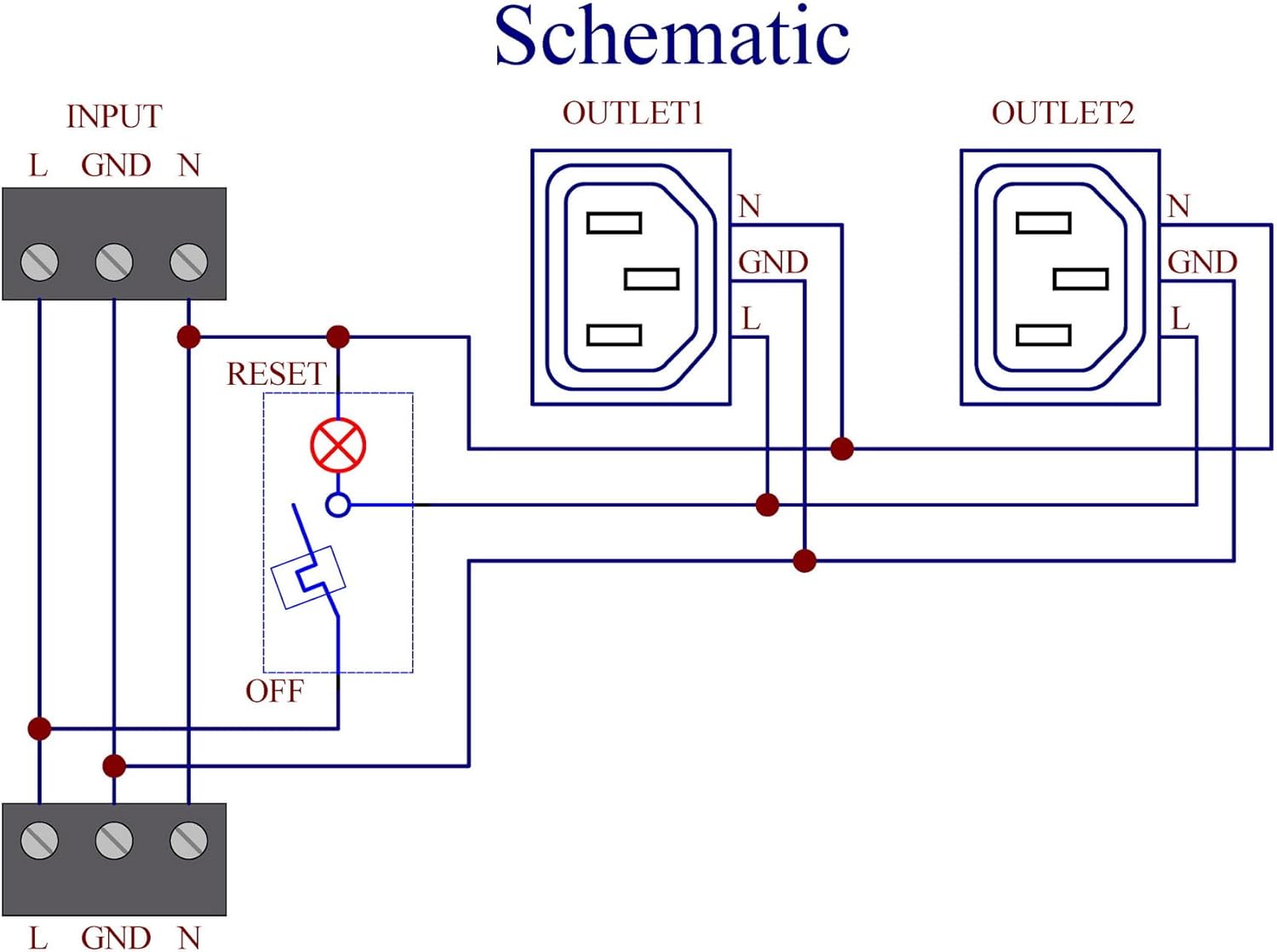
Figure 4.3: Electrical schematic illustrating the internal wiring and connections for the module.
- Connecting Devices:
Plug your IEC320 C14 compatible devices into the two IEC320 C13 receptacles on the module.

Figure 4.4: The module with its two IEC320 C13 outlets and the integrated rocker switch.
Installation Video Guide
Video 4.1: An official video demonstrating the installation and features of the DIN Rail Mount Power Strip Module. This video provides a visual guide to the product's functionality and mounting process.
5. Operating Instructions
The OONO D-1589T module features an integrated rocker switch with a thermal circuit breaker for power control and overload protection.
- Power ON/OFF: Use the rocker switch to manually turn the power to the receptacles ON or OFF.
- Overload Protection: The built-in thermal circuit breaker protects connected devices from overcurrent.
- When operating normally, the red indicator light on the switch is illuminated, and the receptacles provide power.
- If an overcurrent condition occurs, the overload protector will trip, disconnecting power to the receptacles. The red indicator light will turn off.
- Resetting the Circuit Breaker: After an overload trip, identify and resolve the cause of the overcurrent. Then, press the rocker switch to the RESET position to restore power.
6. Maintenance
To ensure optimal performance and longevity of your OONO D-1589T module, follow these maintenance guidelines:
- Regular Inspection: Periodically inspect the module for any signs of physical damage, loose connections, or discoloration.
- Cleaning: Ensure the module is disconnected from power before cleaning. Use a dry, soft cloth to wipe the exterior. Do not use liquid cleaners or solvents.
- Environmental Conditions: Operate the module within its specified environmental conditions to prevent premature wear or malfunction.
- Connection Integrity: Periodically check the tightness of the input terminal screws to prevent arcing or poor contact.
7. Troubleshooting
If you encounter issues with your OONO D-1589T module, refer to the following troubleshooting steps:
| Problem | Possible Cause | Solution |
|---|---|---|
| No power output from receptacles. |
|
|
| Red indicator light is off, but switch is ON. | Overload protector has tripped. | Reduce load on the module. Press the switch to RESET. If it trips again, investigate the connected devices for faults or excessive power draw. |
| Module feels excessively hot. | Overload or poor ventilation. | Immediately disconnect power. Check total current draw of connected devices. Ensure adequate airflow around the module. |
8. Specifications
| Model | D-1589T |
| Brand | OONO |
| Output Receptacles | Double 3-prong grounded IEC320 C13 AC |
| Working Voltage | AC 250V |
| Receptacle Rated Current | 15 Amp (UL CSA) / 10 Amp (TUV CCC KC) |
| Total Output Rated Current | 15 Amps (limited by overload protector) |
| Overload Protector Current | 15 Amps (Resettable rocker switch thermal circuit breaker) |
| Input Terminals Pitch | 7.62mm / 0.3" |
| Input Terminals Max Current | 30 Amps per position |
| Wire Size (Input) | 26~10 AWG |
| Stripping Length (Input) | 8mm |
| Screw Type (Input) | Metric M3 slotted screw |
| DIN Rail Support | 35mm width rail |
| Material | Fireproof nylon (DIN rail carrier), FR-4 fiberglass (PCB) |
| Color | Red (indicator), Black (module body) |
| Compatible Devices | IEC320 C13 (for output) |
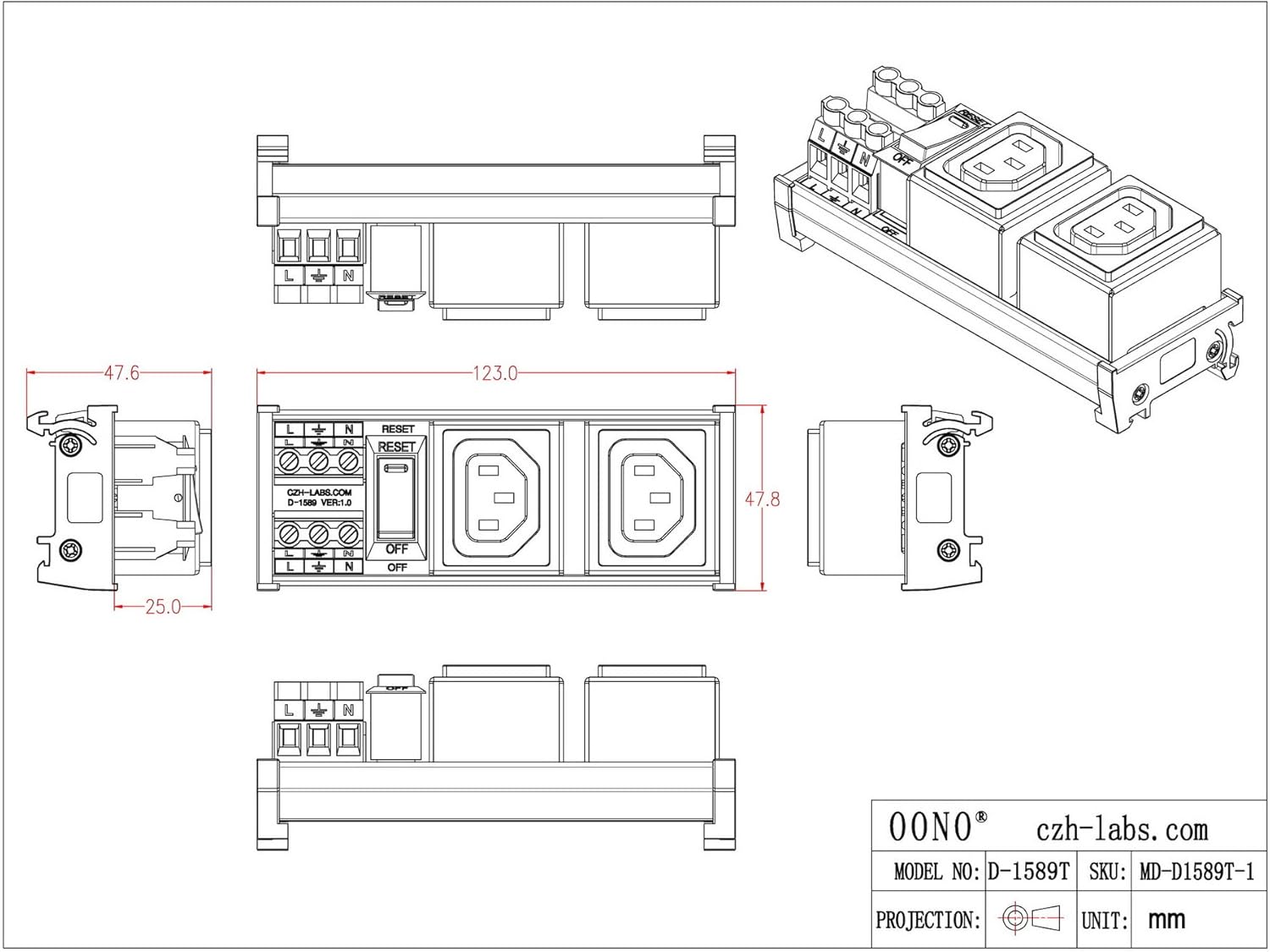
Figure 8.1: Dimensional drawing of the OONO D-1589T module, showing key measurements in millimeters.
9. Warranty and Support
For warranty information and technical support, please refer to the product packaging or contact OONO customer service directly. Keep your purchase receipt for warranty claims.