
MAGUS Metal 600
MAGUS Metal 600 Metallurgical Microscope User Manual
Model: Metal 600 | Brand: MAGUS
Introduction
This user manual provides detailed instructions for the safe and effective operation, maintenance, and troubleshooting of the MAGUS Metal 600 Metallurgical Microscope. Please read this manual thoroughly before using the instrument to ensure optimal performance and longevity.
The MAGUS Metal 600 is a high-precision metallurgical microscope designed for observing the microstructure of metals, alloys, and other opaque materials. Its robust construction and advanced optical system make it suitable for various industrial and research applications.
Safety Precautions
Always observe the following safety precautions to prevent injury and damage to the microscope:
- Ensure the microscope is placed on a stable, level surface to prevent tipping.
- Connect the power cord to a grounded outlet.
- Do not expose the microscope to direct sunlight, high temperatures, or excessive humidity.
- Avoid touching optical surfaces with bare hands. Use a soft, lint-free cloth for cleaning.
- Turn off the power and unplug the microscope before cleaning or performing any maintenance.
- Do not attempt to disassemble or repair the microscope yourself. Refer to qualified service personnel.
Product Components and Overview
The MAGUS Metal 600 Metallurgical Microscope consists of several key components, each playing a vital role in its operation.
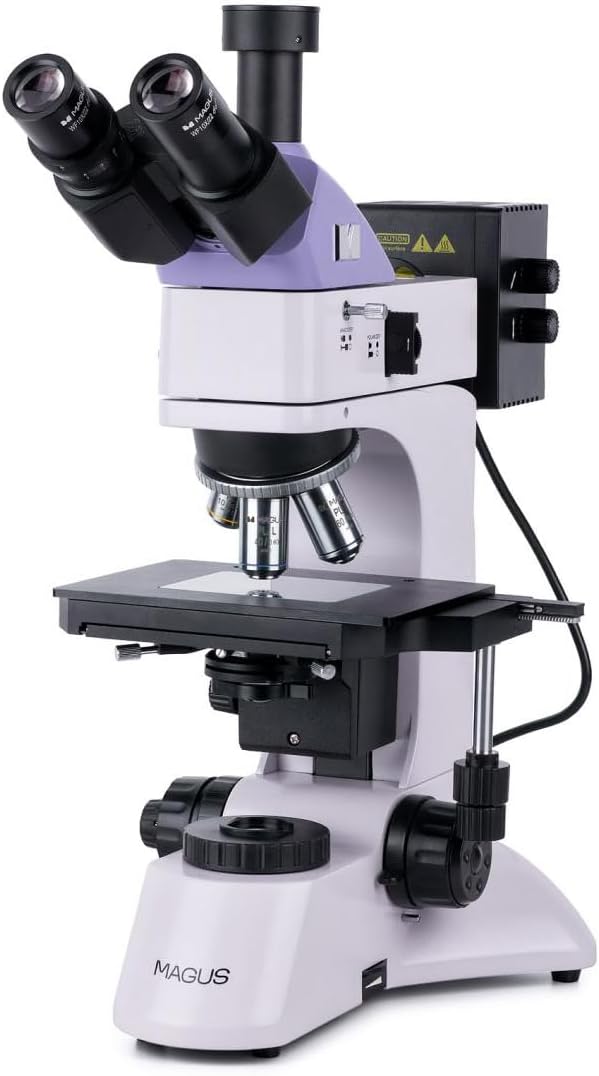
Figure 1: Overview of the MAGUS Metal 600 Metallurgical Microscope. This image shows the complete microscope unit, including the binocular head, objective turret, mechanical stage, and coarse/fine focus knobs.
Key Components:
- Binocular Head: Houses the eyepieces for viewing the magnified image.
- Eyepieces: Typically 10x magnification, providing the initial magnification of the sample.
- Objective Turret (Revolver): Rotatable mechanism holding multiple objective lenses.
- Objective Lenses: Provide primary magnification (e.g., 5x, 10x, 20x, 50x, 100x).
- Mechanical Stage: Platform for placing the sample, with X-Y movement controls.
- Coarse Focus Knob: For large adjustments to focus.
- Fine Focus Knob: For precise adjustments to focus.
- Illumination System: Provides light for viewing the sample, often with adjustable brightness.
- Field Diaphragm: Controls the diameter of the light beam entering the objective.
- Aperture Diaphragm: Controls the numerical aperture of the illumination.
Setup and Assembly
- Unpacking: Carefully remove all components from the packaging. Retain the original packaging for future transport or storage.
- Placement: Place the microscope body on a stable, vibration-free surface away from direct sunlight and heat sources.
- Install Binocular Head: Gently insert the binocular head into the top port of the microscope body. Secure it with the locking screw, if present.
- Insert Eyepieces: Insert the eyepieces into the eyepiece tubes of the binocular head.
- Install Objective Lenses: Rotate the objective turret to allow easy access. Screw each objective lens into its corresponding thread on the turret, starting with the lowest magnification.
- Connect Power: Connect the power cord to the microscope's power input and then to a grounded electrical outlet.
Operating Instructions
1. Preparing the Sample:
- Ensure your metallurgical sample is properly prepared (polished and etched, if necessary) and clean.
- Place the sample securely on the mechanical stage.
2. Initial Setup:
- Turn on the microscope's power switch.
- Adjust the illumination brightness to a comfortable level using the dimmer control.
- Rotate the objective turret to select the lowest magnification objective (e.g., 5x or 10x).
- Adjust the interpupillary distance of the binocular head to match your eyes.
- Adjust the diopter setting on one eyepiece to compensate for differences in vision between your eyes.
3. Focusing and Observation:
- Using the mechanical stage controls, position the sample so the area of interest is directly under the objective lens.
- While looking through the eyepieces, use the coarse focus knob to bring the sample into approximate focus.
- Use the fine focus knob for precise focusing.
- Adjust the field diaphragm and aperture diaphragm for optimal contrast and resolution.
- To change magnification, rotate the objective turret to the desired objective. Re-focus using the fine focus knob.
- For oil immersion objectives (e.g., 100x), apply a small drop of immersion oil directly onto the sample before rotating the objective into place. After use, clean the oil from the objective and sample immediately.
Maintenance and Care
Proper maintenance ensures the longevity and optimal performance of your MAGUS Metal 600 microscope.
- Cleaning Optics: Use a soft, lint-free cloth or lens paper specifically designed for optics. For stubborn smudges, a small amount of lens cleaning solution can be applied to the cloth, not directly to the lens.
- Cleaning Body: Wipe the microscope body with a soft, damp cloth. Avoid using harsh chemicals or abrasive cleaners.
- Storage: When not in use, cover the microscope with a dust cover to protect it from dust and debris. Store in a cool, dry place.
- Lubrication: Moving parts like the focus mechanism and mechanical stage are factory-lubricated. Do not attempt to lubricate them yourself unless specifically instructed by a qualified technician.
- Bulb Replacement: If the illumination bulb needs replacement, ensure the microscope is unplugged and the bulb has cooled down. Refer to the specifications for the correct bulb type.
Troubleshooting
| Problem | Possible Cause | Solution |
|---|---|---|
| No illumination | Power cord unplugged, bulb burnt out, dimmer set to minimum. | Check power connection, replace bulb, increase dimmer setting. |
| Image is blurry/out of focus | Incorrect focus, objective not fully engaged, dirty objective/eyepiece. | Adjust focus knobs, rotate objective turret until it clicks, clean optics. |
| Dark spots in field of view | Dust on eyepiece, objective, or sample. | Clean eyepieces, objectives, and ensure sample is clean. |
| Image too dark or too bright | Incorrect illumination setting, aperture/field diaphragm not adjusted. | Adjust dimmer, open/close aperture and field diaphragms. |
Technical Specifications
| Feature | Detail |
|---|---|
| Model | MAGUS Metal 600 |
| Product Dimensions | 35 x 30 x 75 cm |
| Manufacturer | MAGUS |
| Manufacturer Reference | 82896 |
| ASIN | B0D5TMWB5F |
| Microscope Type | Metallurgical, Upright |
| Illumination | Reflected (Epi-illumination) |
| Eyepieces | WF10x/22mm (typical) |
| Objectives | Plan Achromatic (e.g., 5x, 10x, 20x, 50x, 100x oil) |
Warranty Information
MAGUS provides a standard warranty for the Metal 600 Metallurgical Microscope against defects in materials and workmanship under normal use. The warranty period typically begins from the date of purchase.
For detailed warranty terms and conditions, including coverage, exclusions, and claim procedures, please refer to the warranty card included with your product or visit the official MAGUS website. Keep your proof of purchase for warranty claims.
Customer Support
If you encounter any issues not covered in the troubleshooting section or require further assistance, please contact MAGUS customer support.
- Online Support: Visit the official MAGUS website for FAQs, product registration, and online support forms.
- Email Support: Refer to your product documentation for the specific support email address.
- Phone Support: Contact numbers for regional support can be found on the MAGUS website.
When contacting support, please have your product model (Metal 600) and serial number (if applicable) ready.
Related documentsMetal 600


Ask a question about this manual
Ask about setup, troubleshooting, compatibility, parts, safety, or missing instructions. Manuals+ will review the question and use this page’s manual context to help answer it.