1. Introduction
The Battery Tender eCharge 40 AMP EV Charger is a Level 2 electric vehicle charging station designed for efficient and reliable charging. This unit is suitable for both indoor and outdoor installations and is compatible with most electric vehicles that use a J1772 plug. It features an intuitive LCD display for monitoring charging status and offers secure access control via RFID cards.
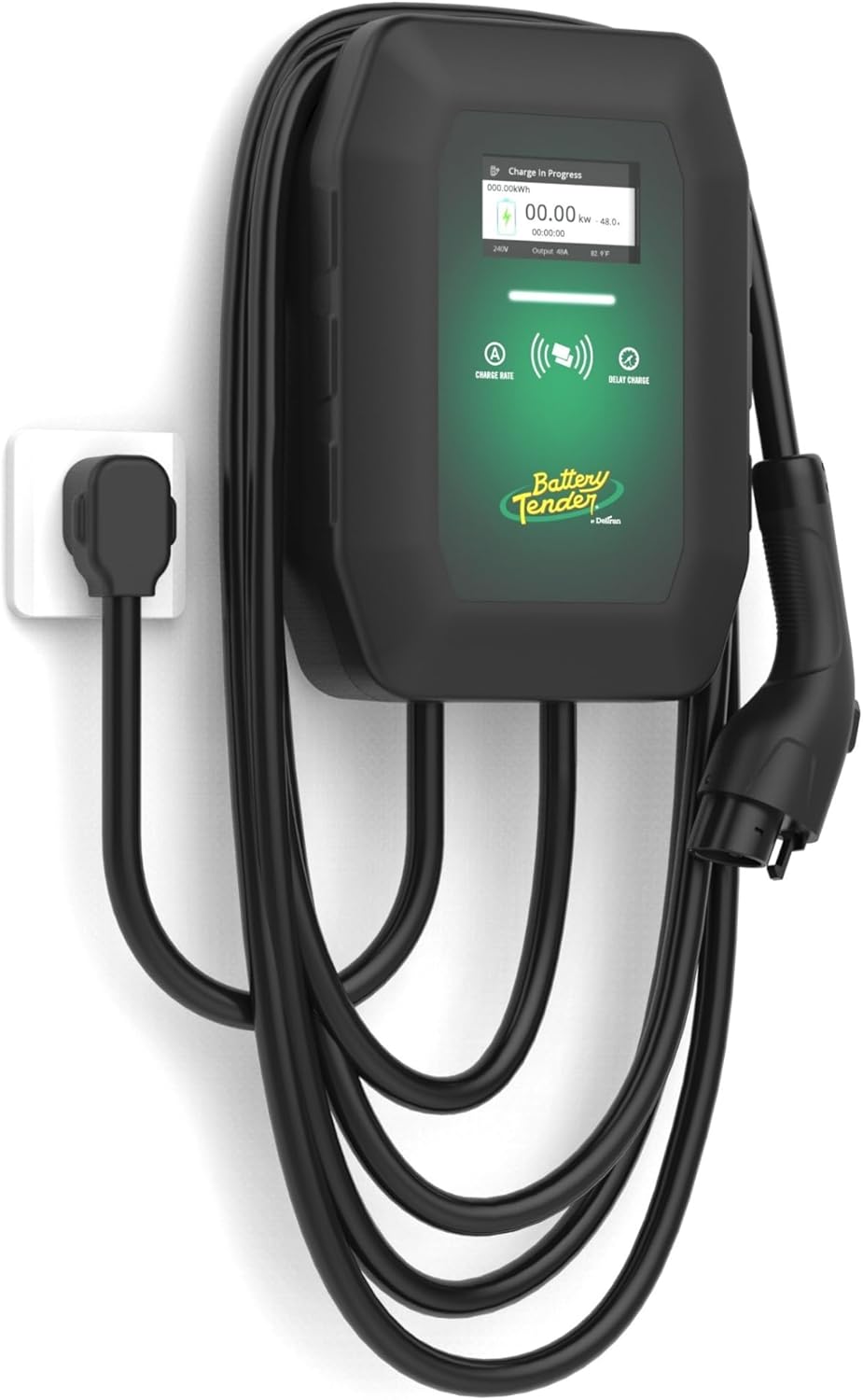
Image 1.1: The Battery Tender eCharge 40 AMP EV Charger, showcasing its compact design and integrated cable management.
2. Safety Information
Please read and understand all safety instructions before installing or operating the eCharge 40 AMP EV Charger. Failure to follow these instructions may result in electric shock, fire, or serious injury.
- Professional Installation: Installation of the 240V NEMA 14-50P outlet or hardwired connection should be performed by a qualified electrician in accordance with all local and national electrical codes.
- Grounding: Ensure the charging station is properly grounded to prevent electrical hazards.
- Damage Inspection: Do not use the charger if the charging cable, plug, or the unit itself shows any signs of damage. Contact customer support immediately.
- Environmental Conditions: The charger is rated for indoor and outdoor use (IP66), but avoid submerging it in water or exposing it to extreme temperatures outside its operating range.
- Children and Pets: Keep the charging station and cable out of reach of children and pets during operation.
- Emergency Disconnect: Know the location of your circuit breaker or fuse box for the charging circuit in case of an emergency.
3. What's Included
Verify that all items listed below are present in your package:
- eCharge 40 EV Charger Unit
- Mounting Bracket and Hardware
- Charge Plug Holder
- 2 RFID Cards
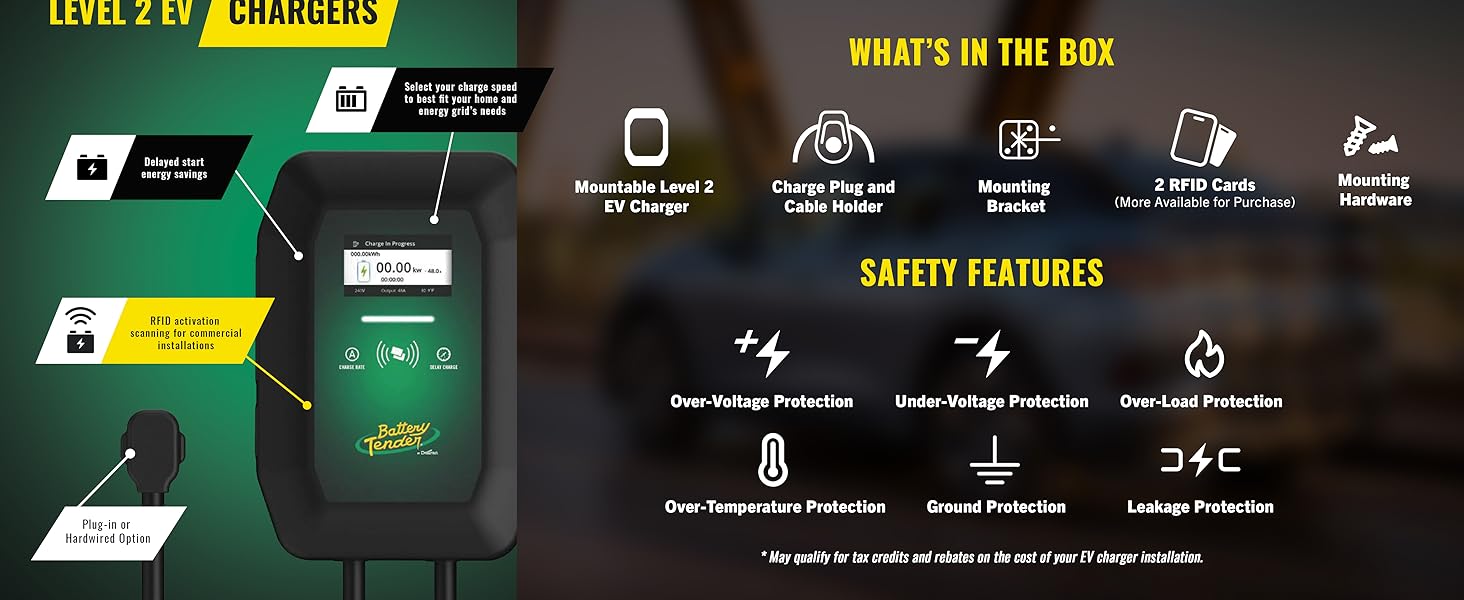
Image 3.1: An illustration detailing the items included in the package and highlighting key safety features such as Over-Voltage, Under-Voltage, Over-Load, Over-Temperature, Ground, and Leakage Protection.
4. Setup and Installation
The eCharge 40 EV Charger can be installed as a plug-in unit using a NEMA 14-50P outlet or hardwired directly into your electrical system. Professional installation by a certified electrician is highly recommended for both options to ensure compliance with electrical codes and safe operation.
4.1 Mounting the Charger
- Select Location: Choose a suitable location for mounting the charger, ensuring it is within reach of your vehicle's charging port and the power source. The 25-foot cable provides flexibility.
- Secure Mounting Bracket: Use the provided mounting bracket and hardware to securely attach the charger to a sturdy wall surface. Ensure the mounting surface can support the weight of the unit.
- Install Charge Plug Holder: Mount the charge plug holder near the charging unit for convenient storage of the J1772 connector when not in use.
4.2 Electrical Connection
For NEMA 14-50P plug-in installation, ensure a dedicated 240V, 50-amp circuit is available. For hardwired installation, consult a qualified electrician to connect the unit directly to your home's electrical panel.

Image 4.1: The eCharge 40 EV Charger installed in a garage, demonstrating a typical mounting setup and connection to a NEMA 14-50 outlet.
5. Operating Instructions
The eCharge 40 EV Charger is designed for straightforward operation. Follow these steps to charge your electric vehicle:
- Power On: Ensure the charging station is properly connected to power. The LCD display will illuminate.
- Connect to Vehicle: Take the J1772 charging connector from its holder and firmly insert it into your vehicle's charging port. Ensure it clicks into place.
- Monitor Display: The LCD display will show charging information such as status, output amperage, and any error messages. You can adjust the charging output amperage to optimize charging rates.
- Charging Complete: Once your vehicle is fully charged, or you wish to stop charging, safely disconnect the J1772 connector from your vehicle. Return the connector to its holder.

Image 5.1: A detailed view of the charger's LCD screen, indicating active charging status and real-time data.

Image 5.2: The J1772 connector properly inserted into a vehicle's charging port, indicated by a green light, signifying an active charging session.
6. RFID Secure Access
The eCharge 40 EV Charger includes RFID chip-enabled cards to provide secure access, which is particularly useful for shared or public installations. This feature allows you to control who can initiate a charging session.
- Activation: To activate a charging session using an RFID card, simply tap the card against the designated RFID reader area on the charger.
- Multiple Users: The included two RFID cards can be distributed to authorized users. Additional cards may be available for purchase.
- Control: This system ensures that only authorized individuals can use the charging station, preventing unauthorized usage in accessible locations.
7. Maintenance
Regular maintenance helps ensure the longevity and optimal performance of your eCharge 40 EV Charger.
- Cleaning: Periodically wipe the exterior of the charger and the cable with a soft, damp cloth. Do not use harsh chemicals or abrasive cleaners.
- Cable Inspection: Regularly inspect the charging cable and connector for any signs of wear, cuts, fraying, or damage. If any damage is found, discontinue use and contact customer support.
- Storage: When not in use, ensure the J1772 connector is securely placed in its holder to protect it from dirt and damage.
8. Troubleshooting
If you encounter issues with your eCharge 40 EV Charger, refer to the following common troubleshooting steps:
- No Power to Unit: Check the circuit breaker for the charging circuit. Ensure the NEMA 14-50P plug is fully inserted into the outlet, or that the hardwired connection is secure.
- Charging Not Initiating: Ensure the J1772 connector is fully and securely inserted into your vehicle's charging port. Verify that your vehicle is ready to accept a charge. If using RFID, ensure the card is properly scanned.
- Error Message on Display: The LCD display will show specific error codes or messages. Refer to the full product manual (if available from manufacturer) or contact customer support with the error code for assistance.
- Slow Charging: Check the selected output amperage setting on the charger. Ensure your vehicle is capable of accepting the desired charge rate.
9. Specifications
| Feature | Specification |
|---|---|
| Brand | Battery Tender |
| Model | eCharge 40 |
| Item Model Number | 022-3018-DL-WH |
| Input Voltage | 240 Volts AC |
| Output Amperage | 40 AMP |
| Cable Length | 25 feet |
| Connector Type | J1772 |
| Power Connection | NEMA 14-50P Plug-in or Hardwired |
| Product Dimensions | 4.59 x 10.15 x 14.48 inches (D x W x H) |
| Item Weight | 6.37 pounds |
| Environmental Rating | IP66 (Weather Resistant) |
| Safety Features | Over-Voltage, Under-Voltage, Over-Load, Over-Temperature, Ground, Leakage Protection |
10. Warranty Information
The Battery Tender eCharge 40 AMP EV Charger is reported to come with a 3-year warranty. Please retain your proof of purchase for warranty claims. For specific terms and conditions, refer to the warranty documentation included with your product or visit the official Battery Tender website.
11. Support
For technical assistance, product inquiries, or warranty support, please contact Battery Tender customer service. You can typically find contact information on the official Battery Tender website or within the product packaging.
Online Resources: Visit the Battery Tender Store on Amazon


