1. Setup
1.1 What's in the Box
- 1x NUROUM A05B Speakerphone
- 1x USB Cable
- Quick Start Guide
1.2 Device Overview
The NUROUM A05B features a compact design with intuitive touch controls on the top panel. These controls include power, call answer/end, volume up/down, microphone mute, and Bluetooth pairing. The device also includes a USB-C port for charging and wired connection.
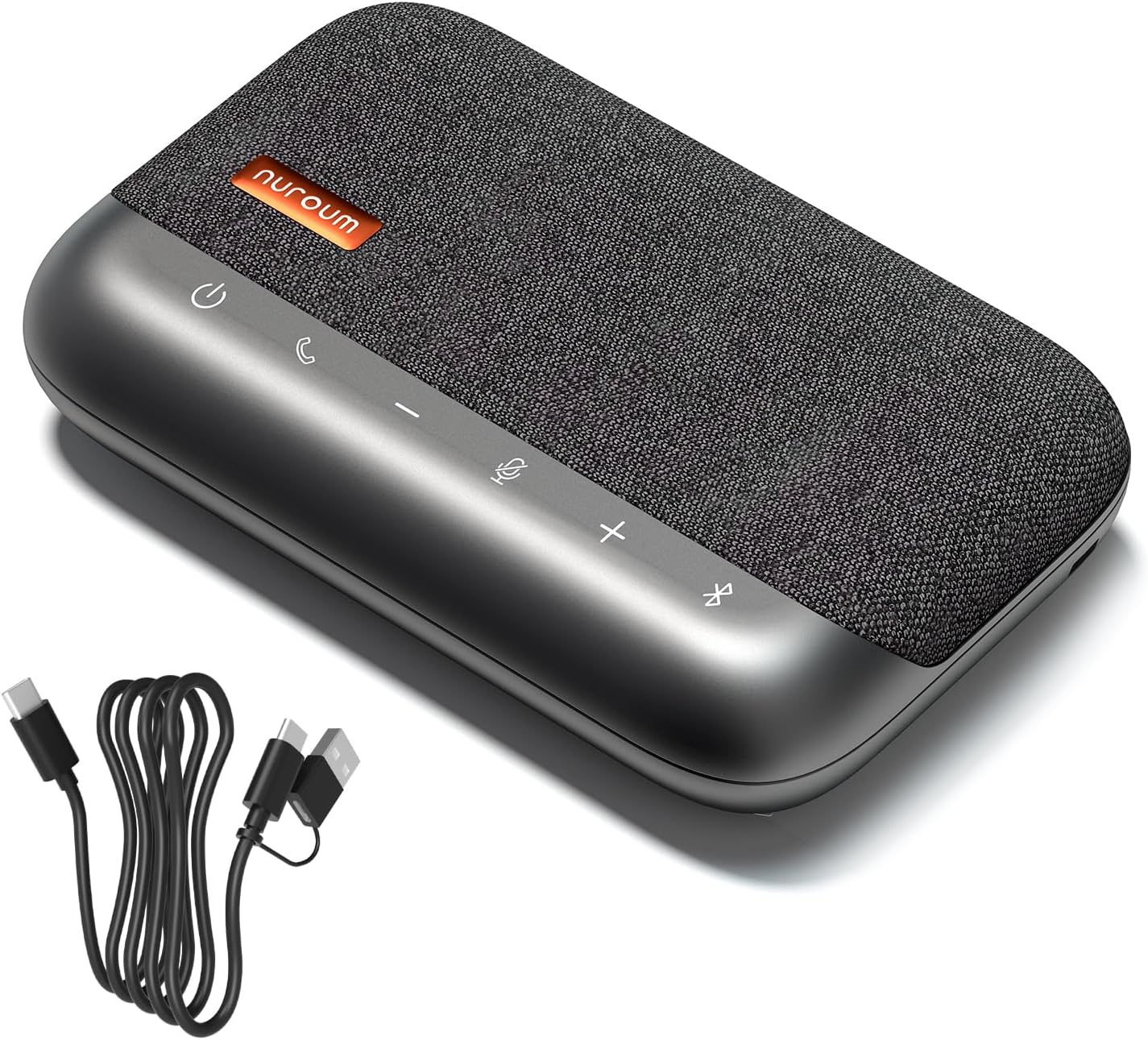
Image: The NUROUM A05B speakerphone, showcasing its top-mounted touch controls and included USB cable.
1.3 Charging the Device
Before initial use, fully charge your NUROUM A05B. Connect the provided USB cable to the device's USB-C port and a compatible USB power adapter (not included) or a computer's USB port. A full charge takes approximately 3 hours. The device has a 2600 mAh battery capacity.
1.4 Connectivity Options
The NUROUM A05B offers both Bluetooth and USB connectivity for versatile use.
1.4.1 Bluetooth Connection
- Press and hold the Bluetooth button on the speakerphone until the indicator light flashes, indicating pairing mode.
- On your device (smartphone, tablet, laptop), navigate to Bluetooth settings and select 'NUROUM A05B' from the list of available devices.
- Once connected, the indicator light will turn solid.
For mobile devices, Bluetooth connection is generally recommended. The Bluetooth range is up to 20 meters.

Image: Illustration of connecting the NUROUM A05B via Bluetooth to a smartphone and via USB to a laptop.
1.4.2 USB Connection
- Connect the provided USB cable from the NUROUM A05B to an available USB port on your computer (PC or Mac).
- The device will be automatically recognized as an audio input and output device.
- Select 'NUROUM A05B' as your speaker and microphone in your computer's sound settings or your conferencing software.
For PC/Mac devices, a USB cable connection is strongly recommended for a more stable connection and optimal performance.

Image: A laptop screen showing audio settings with the NUROUM A05B connected via USB, ready for use.
1.4.3 Universal Compatibility
The NUROUM A05B is compatible with various operating systems including Windows, macOS, and Linux. It works seamlessly with major conferencing platforms such as Zoom, Microsoft Teams, Google Meet, Webex, FaceTime, Skype, and more.

Image: A graphic displaying logos of popular conferencing platforms and operating systems, highlighting the wide compatibility of the A05B.
2. Operating Instructions
2.1 Power On/Off
- To power on, press and hold the power button until the indicator lights illuminate.
- To power off, press and hold the power button until the indicator lights turn off.
2.2 Audio Features
The NUROUM A05B is engineered with advanced audio technologies to ensure clear and effective communication.
2.2.1 360° Omnidirectional Microphone
The professional-grade 360° microphone captures voices from all directions within a 16-foot (3-meter) radius, ensuring all participants are heard clearly in a conference setting. The integrated HiFi4 DSP chip processes audio to maintain high fidelity, providing an immersive meeting experience.
Video: A demonstration of the NUROUM A05B's 360° omnidirectional voice capture and AI-based audio processing technology in a conference room setting.
2.2.2 Echo, Reverberation, and AI Noise Cancellation
Utilizing the ProperClean ENC algorithm, the A05B effectively suppresses echo, reverberation, and ambient noise. This AI-based technology filters out distractions such as keyboard clicks and background conversations, ensuring crystal-clear audio even in noisy environments or rooms with challenging acoustics.

Image: Two individuals in a modern office with glass walls, demonstrating how the A05B's advanced echo cancellation ensures clear conversations.
2.2.3 Full Duplex Communication
The full duplex audio processing allows multiple participants to speak simultaneously without any loss of conversation, facilitating natural and uninterrupted discussions.
2.2.4 Automatic Gain Control (AGC)
AGC technology automatically adjusts the volume of voices within a 10-foot (3-meter) range. This ensures that all participants are heard at a consistent and clear volume level, regardless of their distance from the speakerphone or individual speaking volume.

Image: A conference room with multiple people, illustrating the A05B's Automatic Gain Control (AGC) technology balancing voice levels for clear communication.
2.3 Controls
- Power Button: Press and hold to turn the device on or off.
- Call Button: Press to answer or end a call.
- Volume Up/Down Buttons: Adjust the speaker volume.
- Microphone Mute Button: Press once to mute or unmute the microphones. An indicator light will show the mute status.
- Bluetooth Button: Press and hold to enter Bluetooth pairing mode.

Image: A close-up view of the NUROUM A05B's touch controls, highlighting the microphone mute button.
2.4 Battery Life
The NUROUM A05B provides up to 20 hours of music playback or 18 hours of conference call time at 50% volume on a full charge. You can continue using the device while it is charging via the USB cable.
3. Care and Maintenance
3.1 Cleaning
To clean your NUROUM A05B, gently wipe the exterior surfaces with a soft, dry, lint-free cloth. Avoid using abrasive cleaners, solvents, or chemical sprays, as these can damage the device's finish and internal components.
3.2 Storage
When not in use, store the speakerphone in a cool, dry place, away from direct sunlight and extreme temperatures. Use the provided carrying case for protection during transport or storage.

Image: The portable NUROUM A05B speakerphone with its dedicated travel case, emphasizing its convenience for mobile use.
3.3 Battery Care
To prolong battery life, avoid fully discharging the battery frequently. If storing the device for an extended period, ensure it has a partial charge (around 50%) and recharge it every few months.
4. Troubleshooting Guide
If you encounter issues with your NUROUM A05B, refer to the following common problems and solutions:
4.1 No Power / Device Not Turning On
- Check Battery: Ensure the device is charged. Connect it to a power source using the USB cable.
- Power Button: Confirm you are pressing and holding the power button for a few seconds until the indicator lights appear.
4.2 Bluetooth Connectivity Issues
- Re-pair Device: Delete 'NUROUM A05B' from your device's Bluetooth list and attempt to pair again.
- Distance: Ensure the speakerphone is within the 20-meter Bluetooth range of your connected device.
- Interference: Minimize interference from other wireless devices.
- USB Connection: If persistent Bluetooth issues occur, consider using the USB cable for a more stable connection, especially with computers.
4.3 Poor Sound Quality / Microphone Pickup
- Device Placement: Ensure the speakerphone is centrally located on a flat surface, free from obstructions, to optimize 360° microphone pickup.
- Volume Levels: Check both the speakerphone's volume and your connected device's volume settings.
- Mute Status: Verify the microphone is not muted.
- Software Settings: Confirm 'NUROUM A05B' is selected as the default microphone and speaker in your conferencing application's audio settings.
- Environment: While the device has noise cancellation, extremely loud or reverberant environments can still impact performance.
4.4 Device Not Recognized by Computer (USB)
- Cable Connection: Ensure the USB cable is securely connected to both the speakerphone and the computer. Try a different USB port.
- Restart: Restart your computer and reconnect the device.
- Drivers: Most operating systems will automatically install necessary drivers. If issues persist, check your computer's device manager for any driver-related problems.
5. Technical Specifications
| Feature | Specification |
|---|---|
| Model Name | AW-A05B |
| Brand | NUROUM |
| Mounting Type | Tabletop Mount |
| Material | Plastic |
| Speaker Type | Surround Sound |
| Special Feature | Lightweight, Noise Canceling, Portable |
| Recommended Uses | For Computers, For Smartphones or Tablets |
| Compatible Devices | Desktop, Laptop, Smartphone |
| Color | Grey |
| Product Dimensions | 3"D x 4"W x 1"H |
| Item Weight | 14.1 ounces (400 Grams) |
| Maximum Range (Mic Pickup) | 10 Feet (3 Meters) |
| Control Method | Touch |
| Wireless Communication Technology | Bluetooth |
| Power Source | Battery Powered |
| Signal-to-Noise Ratio | 94 dB |
| Audio Driver Type | Dynamic Driver |
| Bluetooth Range | 20 Meters |
| Speaker Maximum Output Power | 3 Watts |
| Frequency Response | 20 KHz |
| Battery Capacity | 2600 Milliamp Hours |
| Charging Time | 3 Hours |
6. Warranty Information
The NUROUM A05B Bluetooth Conference Speaker and Microphone comes with a limited manufacturer's warranty. For specific details regarding warranty coverage, terms, and conditions, please refer to the warranty card included with your product or visit the official NUROUM website.
7. Customer Support
For further assistance, technical support, or to access additional resources, please visit the official NUROUM website or contact their customer service department. Contact information can typically be found on the product packaging or the NUROUM website.


