1. Introduction
This manual provides instructions for the JVC SPSG1BTB Portable Wireless Speakers. This product includes two distinct portable wireless speakers designed for enhanced audio experiences. One speaker offers 360° surround sound with Bluetooth 5.0 and an 1800mAh battery, providing up to 18 hours of playtime. The second speaker features a compact design with Bluetooth 5.3, offering up to 15 hours of battery life and integrated playback controls. Both speakers are IPX5 waterproof, making them suitable for various environments.
2. Package Contents
Verify that all items are present in the package:
- 2 x JVC Portable Wireless Speakers (Model SPSG1BTB)
- 1 x Charging Cable (Micro USB, specific to the speaker model)
- 1 x User Manual (this document)
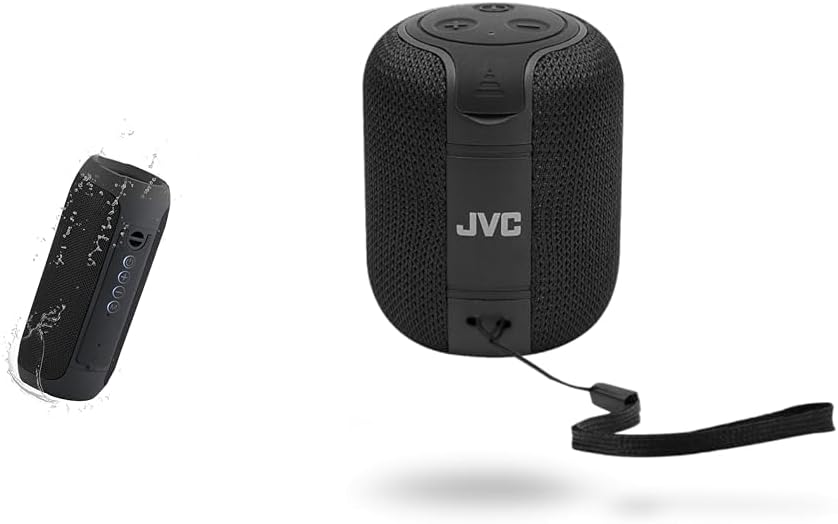
Image: The JVC SPSG1BTB speaker bundle, showing both the cylindrical and compact speaker models.
3. Important Safety Information
- Do not expose the speakers to extreme temperatures or direct sunlight for extended periods.
- Avoid dropping or subjecting the speakers to strong impacts.
- Do not disassemble or attempt to repair the speakers yourself. Contact qualified service personnel.
- Keep the speakers away from medical devices.
- Ensure charging ports are dry before connecting the charging cable.
- Dispose of batteries according to local regulations.
4. Setup
4.1 Charging the Speakers
Before first use, fully charge both speakers. Connect the provided charging cable to the speaker's charging port and a USB power source (e.g., computer, USB wall adapter). The charging indicator light will illuminate during charging and turn off or change color when fully charged.

Image: Speaker with visible charging port and control buttons.
4.2 Powering On/Off
Press and hold the Power button (usually marked with a power symbol) for a few seconds to turn the speaker on or off. A sound or indicator light will confirm the status change.
4.3 Bluetooth Pairing
- Ensure the speaker is powered on and in pairing mode. The Bluetooth indicator light will typically flash.
- On your device (smartphone, tablet, laptop), enable Bluetooth and search for available devices.
- Select "JVC SPSG1BTB" or a similar name from the list.
- Once paired, the speaker will emit a confirmation sound, and the Bluetooth indicator light will become solid.
4.4 True Wireless Stereo (TWS) Pairing (for two speakers)
To use both speakers for a stereo experience:
- Ensure both JVC SPSG1BTB speakers are charged and powered on.
- Disconnect both speakers from any previously paired Bluetooth devices.
- On one speaker (this will be the primary speaker), double-press the Power button or a dedicated TWS button (if available). The speaker will enter TWS pairing mode.
- The two speakers will automatically connect to each other. A confirmation sound will indicate successful TWS pairing.
- Once TWS paired, connect your device to the primary speaker via Bluetooth as described in section 4.3.
5. Operation
5.1 Basic Controls
| Button/Control | Function |
|---|---|
| Power Button | Press and hold to Power On/Off. Short press for Play/Pause (when connected). Double press for TWS pairing (on one speaker). |
| Volume Up (+) | Short press to increase volume. Long press for next track. |
| Volume Down (-) | Short press to decrease volume. Long press for previous track. |
| Mode (M) Button | Short press to switch between input modes (if available, e.g., Bluetooth, AUX). |
Note: Button functions may vary slightly between the two speaker models included in the bundle. Refer to the specific speaker's markings.

Image: Speaker with clear view of control buttons.
5.2 Making/Receiving Calls (if applicable)
If your speaker has a built-in microphone:
- Answer Call: Short press the Power/Play/Pause button.
- End Call: Short press the Power/Play/Pause button during a call.
- Reject Call: Press and hold the Power/Play/Pause button for 2 seconds.
5.3 Waterproof Functionality (IPX5)
The speakers are rated IPX5, meaning they are protected against low-pressure water jets from any direction. This makes them suitable for use near pools or in light rain. They are not designed for submersion in water.

Image: Speaker being splashed with water, highlighting its waterproof feature.
6. Maintenance
- Cleaning: Use a soft, dry cloth to clean the speaker's exterior. Do not use abrasive cleaners or solvents.
- Storage: Store the speakers in a cool, dry place away from direct sunlight and extreme temperatures.
- Battery Care: To prolong battery life, avoid fully discharging the speakers frequently. Charge them regularly, even if not in use for extended periods.
- Water Exposure: After exposure to water, ensure the charging port is completely dry before charging to prevent damage.
7. Troubleshooting
| Problem | Possible Solution |
|---|---|
| Speaker does not turn on. | Ensure the speaker is charged. Connect to a power source and try again. |
| Cannot pair via Bluetooth. |
|
| No sound or low volume. |
|
| TWS pairing fails. |
|
| Charging issue. |
|
8. Specifications
| Feature | Detail |
|---|---|
| Model Number | SPSG1BTB |
| Speaker Type | Portable Wireless, Surround Sound (2.0 Channel Configuration) |
| Wireless Technology | Bluetooth 5.0, Bluetooth 5.3 (True Wireless Stereo - TWS) |
| Wireless Range | Up to 33 feet (10 meters) |
| Waterproof Rating | IPX5 |
| Battery Life (Speaker 1) | Up to 18 hours (1800mAh battery) |
| Battery Life (Speaker 2) | Up to 15 hours |
| Power Source | Battery Powered |
| Control Method | Touch Buttons |
| Audio Driver Type | Dynamic Driver |
| Compatible Devices | Smartphones, Tablets, Laptops, Desktops |
9. Warranty & Support
9.1 Warranty Information
This product comes with a Full Warranty provided by JVC. Please refer to the warranty card included in your package or visit the official JVC website for detailed terms and conditions regarding warranty coverage, duration, and claims process.
9.2 Customer Support
For technical assistance, product inquiries, or warranty service, please contact JVC customer support through their official channels. You can typically find contact information (phone, email, support portal) on the JVC website or in the product packaging.
JVC Official Website: www.jvc.com (Please note: This is a placeholder link. Refer to your product documentation for the exact support website.)


