
MECHEER JK-PM07-US
MECHEER Watt Meter User Manual
Model: JK-PM07-US
Your comprehensive guide to energy monitoring.
1. Introduction
The MECHEER Watt Meter is an advanced energy monitoring device designed to help you track and manage the electricity consumption of your home appliances. This plug-in monitor provides detailed insights into various electrical parameters, enabling you to identify energy-hungry devices and optimize your power usage, ultimately leading to potential savings on your electricity bills.
It features multiple display modes, overload protection, a KWH alarm, and a data memory function to ensure comprehensive and convenient energy management.
2. Safety Information
Please read all safety instructions carefully before using the device. Failure to follow these instructions may result in electric shock, fire, or other hazards.
- Do not disassemble or modify the device.
- Do not expose the device to water or excessive humidity.
- Ensure the device is properly plugged into a grounded outlet.
- Do not exceed the maximum load capacity specified in the product specifications.
- Keep out of reach of children.
- Unplug the device from the power outlet before cleaning.
3. Product Overview
The MECHEER Watt Meter is a compact and user-friendly device. Below are key features and components:

Front View: Shows the LCD display and control buttons (MODE, SET, UP/CLK, DOWN).

Product Dimensions: Illustrates the compact size of the watt meter, measuring approximately 5.19 inches in height, 2.44 inches in width, and 2.55 inches in depth (including the plug). This image also highlights key specifications like operating voltage, power display range, and current accuracy.
Key Features:
- Various Monitoring Parameters: Monitors power (W), energy (kWh), volts, amps, hertz, power factor, cost, minimum and maximum power, and cumulative time.
- 8 Display Modes: Easily switch between different data displays to view comprehensive information about appliance power consumption.
- Overload Protection: Alerts users with flashing display and buzzer sound when appliance power exceeds the set overload limit. Adjustable from 0 to 3680W.
- KWH Alarm: Provides an audible and visual alarm when accumulated power consumption reaches a user-defined threshold.
- Data Memory Function: Automatically saves all setting data and cumulative data (electricity quantity, cost, unit price, time) even when unplugged or during power failure.
- Backlight Display: White backlight for clear readability in various lighting conditions. Manually controllable and adjustable backlight time.
- Durable Material: Constructed from high-quality PC material for enhanced durability, heat resistance, and fall resistance.
4. Setup and Installation
The MECHEER Watt Meter is designed for simple plug-and-play operation.
- Locate a standard US wall outlet (120V/60Hz).
- Plug the MECHEER Watt Meter directly into the wall outlet.
- Plug the appliance you wish to monitor into the socket on the front of the watt meter.
- The display will illuminate, and the device is ready to begin monitoring.

Plug-in Operation: The watt meter is shown plugged into a wall outlet, ready to monitor an appliance. This image also illustrates the data memory function, indicating that data is retained even when the device is unplugged.
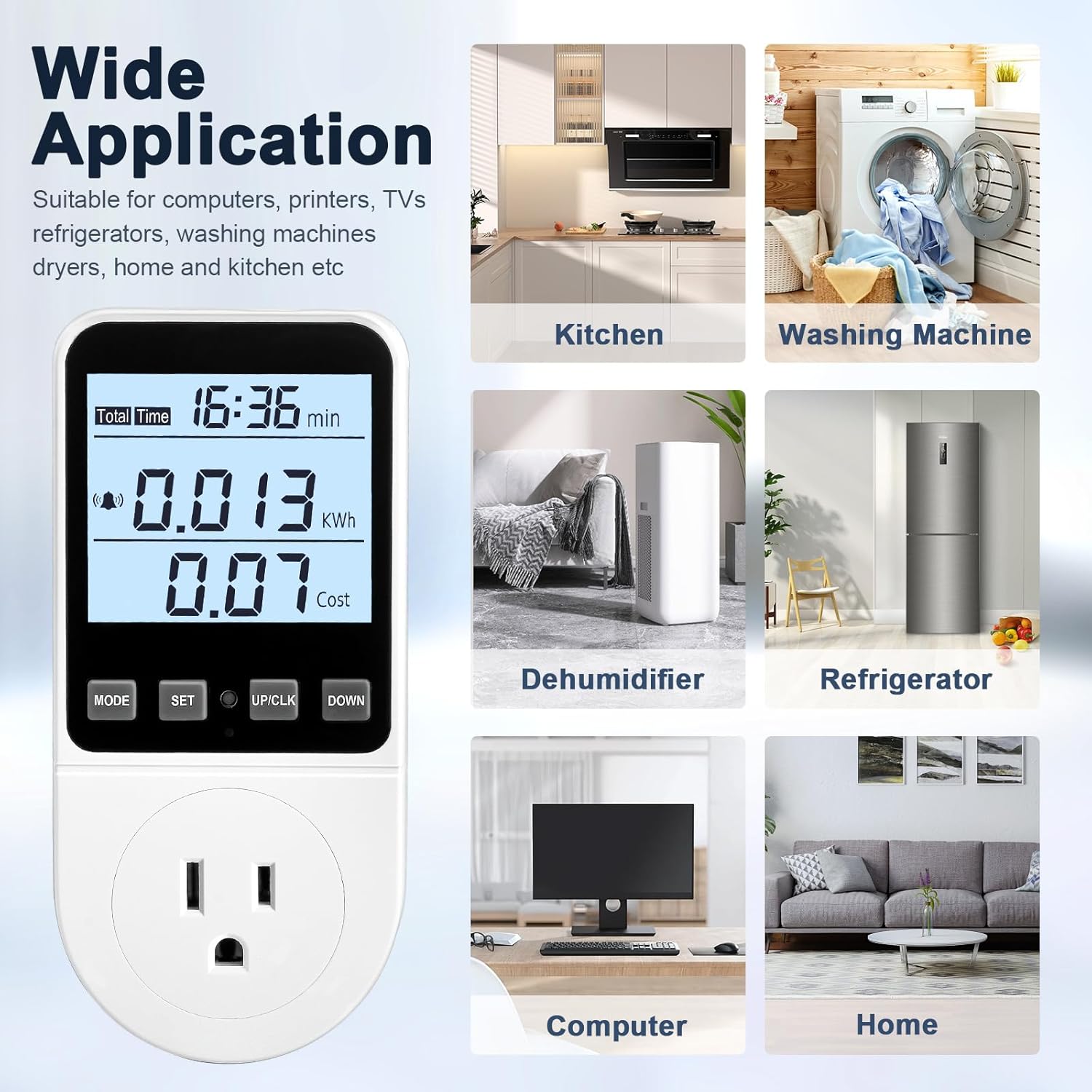
Wide Application: Demonstrates the versatility of the watt meter, showing it used with various household appliances such as microwaves, dehumidifiers, refrigerators, computers, and washing machines, highlighting its suitability for monitoring energy usage across different environments.
5. Operating Instructions
This section details how to operate your MECHEER Watt Meter and utilize its various functions.
5.1. Navigating Display Modes
The watt meter features 8 distinct display modes to show various electrical parameters. Press the "MODE" button to cycle through these modes.
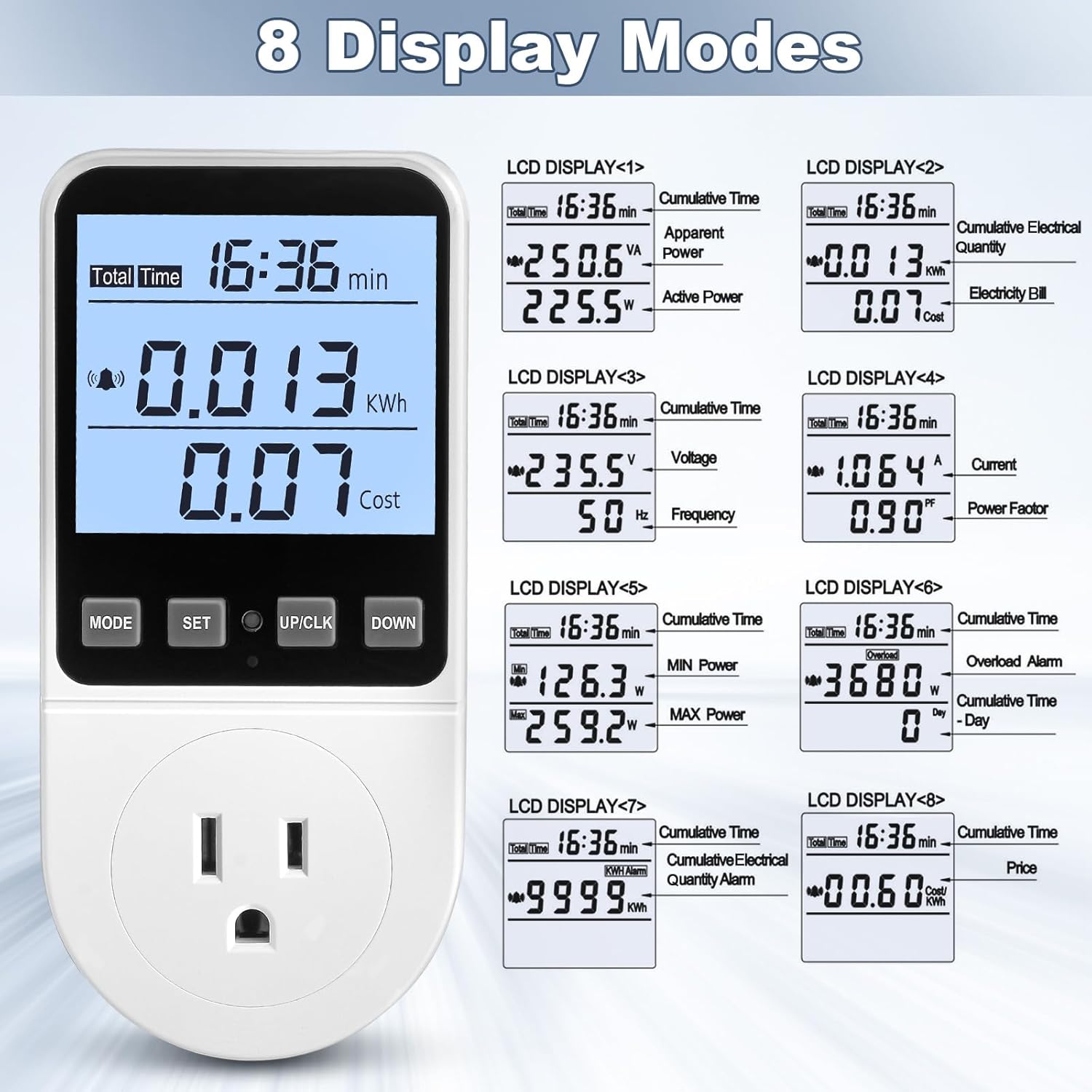
8 Display Modes: This image visually represents the eight different data display modes available on the watt meter, including cumulative time, apparent power, active power, cumulative electrical quantity, electricity bill, voltage, frequency, current, power factor, minimum power, maximum power, overload alarm, KWH alarm, and price settings.

Easy to Read Backlight: Compares the display with the backlight off (left) and on (right), demonstrating how the white backlight improves readability in dark environments. The image also notes that the backlight can be manually turned on and off by pressing the "DOWN" button.
5.2. Overload Protection Setting
The device has an adjustable overload protection feature. The default overload power is 3680W, but it is recommended to set it to 1800W for typical US household use.
- Press and hold the "MODE" button for more than 3 seconds to enter the overload settings.
- Press the "MODE" button to select the digit you wish to adjust.
- Use the "UP/CLK" and "DOWN" buttons to set the desired overload wattage (e.g., 1800W).
- Press the "SET" button to save the setting.
When an overload occurs, "OVERLOAD" will flash, and a buzzer will sound. All buttons will be disabled until the overload is cleared by reducing the load or adjusting the setting.

Overload Protection: This image shows the watt meter displaying an "Overload" warning, indicating that the connected appliance (an oven) has exceeded the set power limit. The text explains that the display will flash and a buzzer will sound to warn the user.
5.3. Electricity Price Setting
Set your local electricity price to calculate costs accurately.
- Press and hold the "SET" button for 3 seconds to enter the electricity price setting mode.
- Press the "MODE" button to select the digit you wish to adjust.
- Use the "UP/CLK" and "DOWN" buttons to set the price per kWh.
- Press the "SET" button to save the price setting.
5.4. KWH Alarm Setting
Set an alarm for accumulated power consumption.
- Press and hold the "DOWN" button for 3 seconds to enter the KWH alarm setting mode.
- Press the "MODE" button to select the digit you wish to adjust.
- Use the "UP/CLK" and "DOWN" buttons to set the desired KWH alarm value.
- Press the "SET" button to save the setting.
When the accumulated consumption reaches the set value, "kwh alarm" will flash, the LCD will flash, and the buzzer will sound.
5.5. Button Sound Setting
You can enable or disable the button press sound.
- Press and hold the "MODE" button and "DOWN" button simultaneously to toggle the button sound on or off.
5.6. Backlight On/Off and Time Settings
Control the backlight for optimal viewing.
- To manually turn the backlight on or off, press the "DOWN" button.
- To adjust backlight duration: Press and hold the "UP/CLK" and "DOWN" buttons simultaneously to enter backlight time setting.
- Use "UP/CLK" and "DOWN" to select duration (bL-0 = 10 min, bL-1 = 1 hour, bL-2 = 4 hours, bL-3 = 8 hours, bL-4 = normally on).
- Press "SET" to save.
5.7. Data Memory Function
The watt meter automatically saves all setting data and cumulative data (electricity quantity, cost, unit price, time) when removed from the socket or during a power failure. This ensures your monitoring data is preserved.
5.8. Data Clear Function
To clear all cumulative data (kWh data, cost data, and total time data):
- Press and hold the "MODE" button and "UP/CLK" button simultaneously for 3 seconds.
- All cumulative data will be reset to zero.
5.9. Reset Function
To reset the power meter to its default factory settings, clearing all data and settings:
- Locate the small reset button hole on the front panel (usually near the "SET" button).
- Insert a thin, pointed object (like a paperclip) into the hole and press gently until the display resets.
- All data will be cleared, and settings will revert to default.
Operation Guide Video:
Video Description: This official operation guide video from MECHEER US demonstrates various functions of the watt meter, including navigating the 8 display modes, setting overload limits, adjusting electricity prices, configuring KWH alarms, controlling button sounds, managing backlight settings, understanding data memory, clearing data, and performing a full reset. It provides a visual walkthrough for all key operational aspects.
6. Maintenance
To ensure the longevity and accurate performance of your MECHEER Watt Meter, follow these maintenance guidelines:
- Cleaning: Use a soft, dry cloth to clean the exterior of the device. Do not use abrasive cleaners, solvents, or immerse the device in water.
- Storage: When not in use for extended periods, store the device in a cool, dry place away from direct sunlight and extreme temperatures.
- Handling: Avoid dropping the device or subjecting it to strong impacts, as this may damage internal components.
7. Troubleshooting
If you encounter issues with your MECHEER Watt Meter, refer to the following common problems and solutions:
| Problem | Possible Cause | Solution |
|---|---|---|
| Display is blank. | No power, device not properly plugged in, or power outage. | Ensure the watt meter is securely plugged into a live outlet. Check the power outlet with another device. |
| "OVERLOAD" warning flashing. | Connected appliance exceeds the set overload wattage. | Unplug the appliance immediately. Reduce the load or adjust the overload setting to a higher value (within safe limits). |
| "kwh alarm" flashing. | Accumulated KWH consumption has reached the set alarm value. | This is an informational alarm. You can acknowledge it or adjust the KWH alarm setting to a higher value if desired. |
| Buttons are unresponsive. | Device is in overload state, or a temporary software glitch. | If "OVERLOAD" is flashing, clear the overload first. If not, try unplugging and re-plugging the device. If issues persist, perform a full reset using the reset button. |
| Inaccurate readings. | Device malfunction or external electrical interference. | Ensure the device is used within its specified operating parameters. Try plugging it into a different outlet. If the problem persists, contact customer support. |
8. Specifications
| Parameter | Value |
|---|---|
| Model Number | JK-PM07-US |
| Manufacturer | MECHEER |
| Operating Voltage | 120V / 60Hz (US Standard) |
| Power Display Range | 0.5W - 2900W |
| Operation Current | Max 13A |
| Total Power Display | 0.0kWh - 9999kWh |
| Total Cost Display | 0.0£ - 9999£ (Note: Currency symbol may vary based on region setting, but calculation is based on set price per kWh) |
| Voltage Accuracy | ±1% |
| Current Accuracy | ±2% |
| Power Accuracy | ±2% |
| Electrical Cost Setting Range | -99.99 £/kWh (Adjustable) |
| Item Weight | 7 ounces |
| Product Dimensions | 5.2 x 2.7 x 2.4 inches |
| Color | White |
| Country of Origin | China |
| Date First Available | May 31, 2024 |
9. Warranty and Support
MECHEER is committed to providing high-quality products and customer satisfaction. For any questions, concerns, or technical support regarding your Watt Meter, please contact our customer service team.
Please refer to your purchase documentation for specific warranty details. Keep your proof of purchase for warranty claims.
You can visit the official MECHEER store for more information: MECHEER Store on Amazon
Ask a question about this manual
Ask about setup, troubleshooting, compatibility, parts, safety, or missing instructions. Manuals+ will review the question and use this page’s manual context to help answer it.